Why there are Amazon links here: Brave Review is paid a commission for qualifying Amazon purchases made through the links below. Your price does not change, and using our links is entirely optional. How this works
Best Smart Lock for Someone with Limited Grip: 5 Easy-Unlock Picks
Twisting a stiff key or clamping a deadbolt can be the hardest part of coming home for anyone with arthritis, neuropathy, or reduced hand strength. The best smart lock for someone with limited grip removes that struggle by swapping the key turn for a fingerprint, a code, or a phone tap. This roundup covers five locks that ask for a press or a touch instead of a wrist twist, ranging from a budget knob to a premium deadbolt. The overview table below sorts them by key spec and best use so a decision is possible in under a minute.
Overview of the Picks
| Product | Key Spec | Best Use | Price Tier |
|---|---|---|---|
| Philips WiFi Keypad Deadbolt with Handle (B0F61WG9F2) | Fingerprint, voice, and code unlock with built-in WiFi | All-in-one front door replacement on a mid budget | Budget |
| Philips Wi-Fi Front Lock Set with 2 Handles (B0GK1399SV) | Fingerprint, code, app, and Alexa/Google voice | Two-door setups and hands-free voice entry | Mid |
| Philips Upgraded Wi-Fi Smart Lock with Handle (B0GZNFRZ6D) | Fingerprint and app control with lever handle | Bedrooms and offices needing a lever, not a knob | Mid |
| Schlage Encode Smart WiFi Deadbolt, Century Trim (B07HXMLCBT) | Certified keyless touchscreen deadbolt, app and voice | High-security front doors and rental hosting | Premium |
| Yamiry Fingerprint Knob (B0C66NCTXX) | Fingerprint knob with keypad and passage mode | Tight budgets and quick DIY swaps | Budget |
1. Philips WiFi Keypad Deadbolt with Handle (B0F61WG9F2)

Type: Keypad deadbolt with lever handle
Unlock Methods: Fingerprint, voice, flexible codes, app
Connectivity: Built-in WiFi
Convenience: Auto-lock
Keypad: Backlit
Included: Door lever and handle
This lock replaces the whole entry set, pairing a deadbolt with a lever handle so the door opens with a downward push rather than a knob twist. A backlit keypad stays readable in low light, and the built-in WiFi means no separate hub is needed for app control or remote codes. Fingerprint unlock removes the grip demand entirely: a single finger rest does the work.
It earns its place as the most complete value pick, since one box covers the deadbolt, the handle, and the WiFi radio. Buyers who want voice control through a smart speaker and remote access for family or sitters get both without extra hardware. The caution is installation: a full handle-and-deadbolt swap involves more door prep than a simple deadbolt, so a renter or a first-time installer should budget extra time.
Trade-off: Replacing the entire entry set means more drilling and alignment work than a deadbolt-only swap, which can frustrate anyone expecting a quick screwdriver job.
2. Philips Wi-Fi Front Lock Set with 2 Handles (B0GK1399SV)
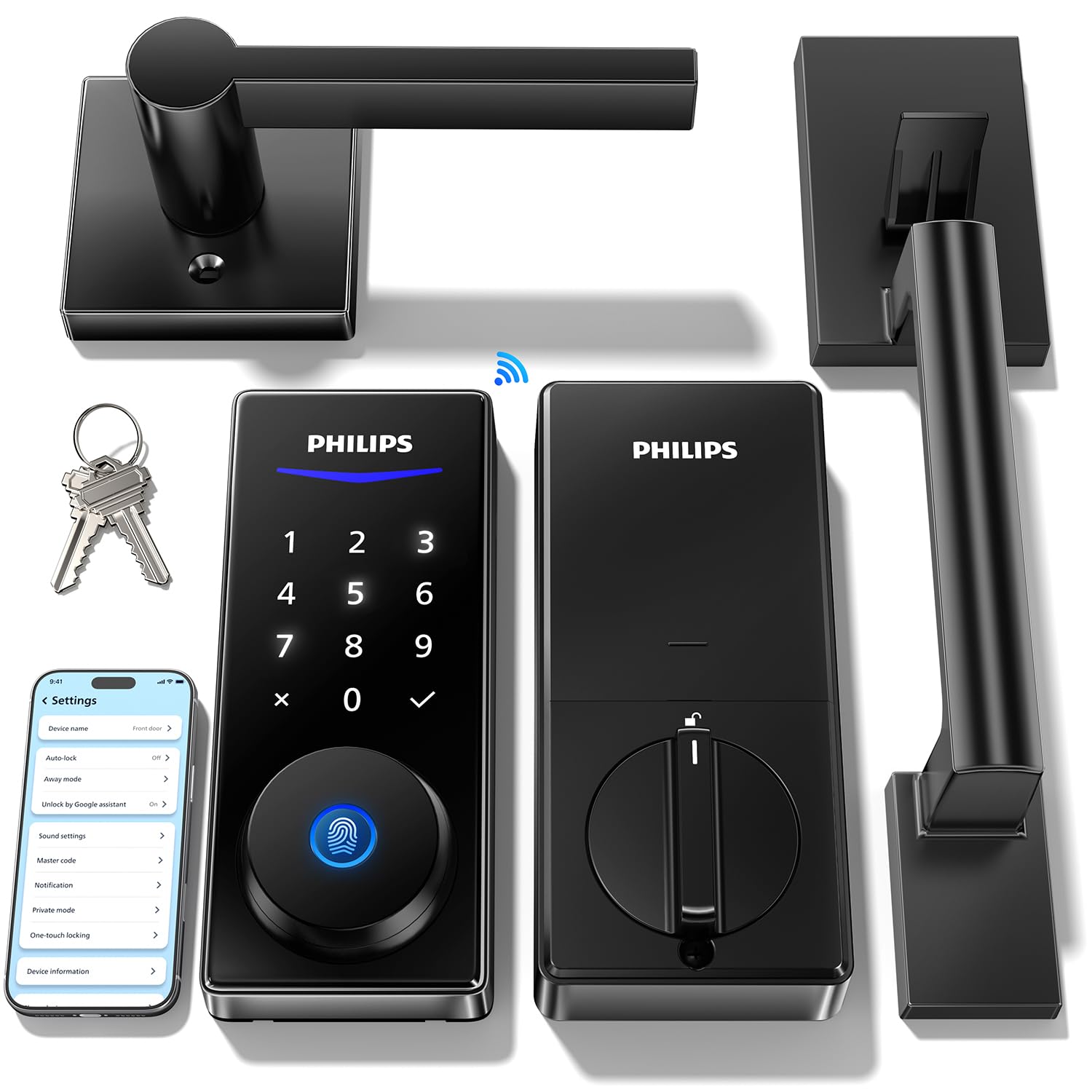
Type: Keypad deadbolt set with two handles
Unlock Methods: Fingerprint, code, app, Alexa and Google voice
Connectivity: Built-in WiFi
Convenience: Auto-lock and remote access
Keypad: Backlit touchscreen
Included: Two handles
This set steps up to a backlit touchscreen and ships with two handles, which suits a home where both the front and a side door need the same easy entry. Voice unlock through Alexa or Google adds a truly hands-free option: a spoken command opens the door when fingers are full or painful. Fingerprint and app unlock cover the rest.
The two-handle bundle is the reason it costs more than the single-handle pick, and it makes sense for anyone matching hardware across doors. Remote access lets a caregiver or family member unlock from elsewhere, useful when grip strength is not the only barrier. The trade-off is that voice unlock depends on a stable WiFi connection and a linked speaker, so it should be treated as a bonus rather than the primary way in.
Trade-off: Voice entry only works while the WiFi and the linked smart speaker are both online, so fingerprint or code remains the dependable fallback.
3. Philips Upgraded Wi-Fi Smart Lock with Handle (B0GZNFRZ6D)

Type: Keyless deadbolt with lever handle
Unlock Methods: Fingerprint, keypad code, app
Connectivity: Built-in WiFi
Convenience: Auto-lock and remote control
Intended Use: Bedrooms, office, front door
Included: Lever handle
This model is pitched at interior doors as much as front doors, and the lever handle is the key detail for limited grip: a light push down opens the latch where a round knob would demand a pinch and twist. Fingerprint unlock and app remote control handle the deadbolt side. Auto-lock closes the door behind the user without any manual throw.
It suits a bedroom, office, or back door where a full front-door security set is overkill but easy entry still matters. The lever design is also friendlier for elbows and closed fists than a knob. The caution here is the interior focus: buyers should confirm the door thickness and prep match before ordering, since a lever set fitted to a thin interior door may not transfer to a heavy exterior slab.
Trade-off: Its interior-door positioning means the hardware is less suited to a heavy exterior front door than a dedicated front-entry deadbolt.
4. Schlage Encode Smart WiFi Deadbolt Lock with Century Trim (B07HXMLCBT)

Type: Keyless touchscreen deadbolt
Unlock Methods: Touchscreen keypad code, app control
Connectivity: Built-in WiFi
Compatibility: Alexa, Google Home, Ring, Airbnb
Security: Certified security rating
Finish: Matte Black with Century Trim
This is the premium pick and the one built around a certified security deadbolt rather than a full handle set. The touchscreen keypad needs only a light tap per digit, which is easier on stiff fingers than pressing physical buttons. Built-in WiFi supports app control plus Alexa, Google Home, Ring, and Airbnb integration.
It suits a homeowner who wants a recognized security name on the front door and rental-friendly remote code management. The matte black Century trim gives it a clean, modern look that fits most exteriors. The drawback is that it is a deadbolt only: there is no lever or knob included, so a door with a stiff handle still needs that handle addressed separately, and the premium price reflects the certification and brand.
Trade-off: It is a deadbolt-only unit at the highest price here, so a difficult door handle or knob must be solved separately.
5. Yamiry Fingerprint Knob (B0C66NCTXX)

Type: Fingerprint door knob with keypad
Unlock Methods: Fingerprint, keypad code, app
Convenience: Auto-lock and passage mode
Installation: DIY
Feature: Remote passcode generation
The Yamiry is the budget entry and the simplest swap: a knob-style lock with a fingerprint reader and keypad built in. DIY installation is the selling point, and passage mode lets the door stay unlocked during a party or a move without repeated unlocking. Remote passcode generation covers guests and helpers.
It suits a renter-friendly or low-cost upgrade where the existing knob simply comes off and this one goes on. Fingerprint unlock again removes the grip demand at the door. The caution is the knob format itself: a round knob still requires a grasp and turn to open the latch, so buyers with very limited grip should weigh it against the lever-handle picks above.
Trade-off: The knob format still asks for a grasp-and-turn motion, which undercuts the grip-friendly fingerprint reader for users with severe hand weakness.
Before You Buy
- Unlock method: Fingerprint and touchscreen code entry ask the least of the hands; voice unlock is the most hands-free but depends on WiFi and a speaker.
- Handle type: A lever opens with a downward push and suits limited grip far better than a round knob, which needs a grasp and twist.
- Door prep: A full handle-and-deadbolt set needs more drilling than a deadbolt-only or knob swap; measure the door and check the existing bore holes first.
- Connectivity: Built-in WiFi avoids a hub, but remote and voice features only work while the network is up, so keep a code or fingerprint as the fallback.
- Security rating: A certified deadbolt is worth the premium on an exterior front door; interior doors can trade certification for convenience.
- Battery and care: Smart locks run on batteries, so plan to check and replace them on a schedule and keep a physical key or backup code accessible.
- Included hardware: Confirm whether the box contains a handle, two handles, or a deadbolt alone, since a missing lever leaves the grip problem half-solved.
Frequently Asked Questions
-
What is the best smart lock for someone with limited grip?
A fingerprint lock with a lever handle is the easiest combination, since a finger rest unlocks the deadbolt and a light push opens the door. The Philips WiFi Keypad Deadbolt with Handle covers both in one box. -
Is a fingerprint lock easier than a keypad for weak hands?
Generally yes. A fingerprint reader needs only a still finger, while a keypad requires repeated precise presses. A touchscreen keypad is gentler than physical buttons but still asks for aimed taps. -
Do smart locks work without WiFi?
The lock itself still opens by fingerprint, code, or key without WiFi. App control, remote access, and voice unlock are the features that stop working when the network drops. -
Can a smart lock replace a stiff door handle?
Only if the model includes a handle. Deadbolt-only locks leave the existing knob or lever in place, so a separate handle swap may be needed for a full grip-friendly setup. -
Are smart locks hard to install?
A knob or deadbolt-only swap is a straightforward DIY job for most homeowners. A full handle-and-deadbolt set involves more door prep and alignment, so it may warrant professional installation. -
What happens when the batteries die?
Most smart locks give a low-battery warning and retain a physical key or backup entry method. Keeping a key stored away from the door and a spare code ready avoids a lockout.
Bottom Line
For most buyers with limited grip, the Philips WiFi Keypad Deadbolt with Handle (B0F61WG9F2) is the best smart lock for the money: fingerprint unlock, a lever handle, and built-in WiFi in a single box at a mid-budget price. Those who want a certified name on a front door should step up to the Schlage Encode, and anyone on a tight budget can start with the Yamiry knob, provided a round knob is still workable.
