Why there are Amazon links here: Brave Review is paid a commission for qualifying Amazon purchases made through the links below. Your price does not change, and using our links is entirely optional. How this works
GHome Smart Switch: A Four-Pack for Alexa Households
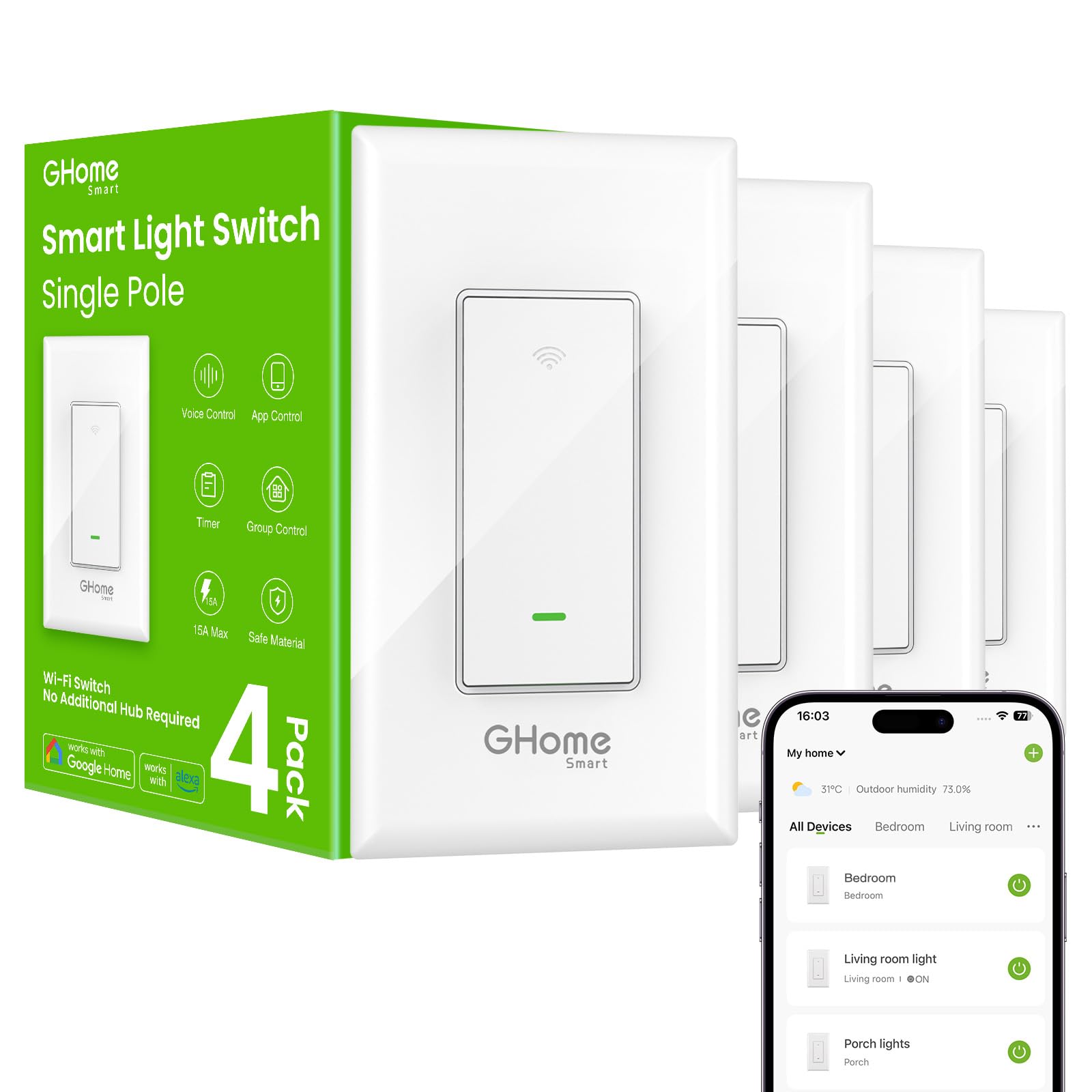
The GHome smart switch is a four-pack of single-pole WiFi wall switches built for households that already lean on Alexa or Google Assistant and want voice and app control without a hub. This review covers what the switches do, what the neutral wire requirement means before purchase, and where a budget four-pack like this one asks for patience. Buyers with an older switch box should read the wiring section before ordering.
Features and Specifications
Type: Single-pole WiFi wall switch
Quantity: 4 pack
Compatibility: Amazon Alexa, Google Home
Connectivity: 2.4GHz WiFi
Wiring Requirement: Neutral wire required
Control: Voice control, app control, schedule, timer
Listings: UL and FCC listed
Intended Use: Lights
The specification list is short, and that is the point of a switch like this. The GHome smart switch covers the essentials: voice control through Alexa or Google, app control from a phone, and scheduling and timers for lights. Nothing in the listing points to a hub, a bridge, or a proprietary controller.
The neutral wire line matters more than any other spec here. Most homes built or rewired in recent decades have a neutral conductor in the switch box, but plenty of older homes do not, and a switch that needs one will not power up without it. Buyers should check the box before ordering rather than after.
The 4-pack sizing suits a whole room, a hallway run, or a starter set for a house. The UL and FCC listings are the safety and interference marks buyers should expect on anything wired into a wall, and their presence on a budget pack is a reasonable baseline.
Build and Wiring Requirements
The GHome smart switch is a single-pole device, which means it replaces one switch controlling one light or one circuit, not a three-way setup where two switches control the same fixture. Buyers replacing a three-way switch need a different product, and this is the most common mismatch in the category.
Neutral wire is the second gate. The switch needs a live, a load, and a neutral to stay powered while the light is off. In a box with only two wires, the switch has nothing to draw standby power from, and no amount of app setup fixes that.
The 4-pack is the practical part of the spec. Four switches cover a room, a floor, or a handful of circuits, and buying them together saves the hassle of matching models later. It also means a buyer who discovers a missing neutral in one box still has three switches to place.
Connectivity and App Control
The 2.4GHz WiFi requirement is a real constraint, not a footnote. Many modern routers broadcast one network name for both bands, and a phone on the 5GHz side can fail to hand the switch its credentials during setup. Buyers with a split network, or a 2.4GHz guest band, tend to have an easier first install.
Once connected, the switch pairs with Alexa and Google Home for voice control. Schedules and timers live in the app, which is where most buyers will set lights to come on at dusk or turn off after a set period.
Control stays local to the home network plus the cloud account, so a dropped internet connection can take voice and app control with it. That is a category-wide trade-off at this price, not a flaw unique to GHome.
Scheduling and Everyday Use
Schedules and timers are the features that earn a smart switch its place. A porch light on a dusk schedule, a hallway light on a timer, or a lamp that turns off after the kids go to bed are the everyday jobs this four-pack handles well.
Voice control adds a second layer. Hands-full moments in a kitchen or a dark entryway are where an Alexa or Google command beats reaching for a wall plate.
The switches are designed for lights, which keeps the load straightforward. Buyers planning to control a ceiling fan, a motor, or a heavy appliance should look for a switch rated for that job instead.
Maintenance and Long-Term Expectations
Maintenance on a wired smart switch is close to zero once installed. The realistic long-term concerns are firmware updates through the app and the usual WiFi reliability questions that come with any cloud-connected device.
The budget price tier suggests plastic wall plates and a lightweight feel rather than premium metal faceplates. Buyers who want a switch that matches high-end decor should expect to supply their own plates or look at a pricier line.
Trade-off: The neutral wire requirement and single-pole design rule out a meaningful share of older homes and multi-switch circuits, so buyers need to confirm their wiring before ordering a four-pack.
Who Should Buy the GHome Smart Switch
The GHome smart switch suits renters-to-owners in newer or updated homes who want four circuits under voice and app control without spending premium money. It fits Alexa and Google households, anyone who wants schedules for porch or hallway lights, and buyers replacing a set of standard single-pole switches in one go.
It is not for homes without a neutral wire in the switch box, not for three-way circuits, and not for buyers who want local-only control with no cloud account. Anyone wiring a fan or a heavy load should skip it.
Check the current price on Amazon
FAQ
-
Does the GHome smart switch need a neutral wire?
Yes. The product name states neutral wire required, and the switch needs that conductor to stay powered. Buyers should check the switch box before ordering. -
Will the GHome smart switch work with Alexa and Google Home?
Yes. The switch is listed as compatible with both, and voice control is one of its main features. -
Does the GHome smart switch need a hub?
No. It connects over 2.4GHz WiFi directly, so no separate bridge or hub is part of the setup. -
Can the GHome smart switch replace a three-way switch?
No. It is a single-pole switch, so it controls one circuit from one location. Three-way setups need a different product. -
Why does the switch need 2.4GHz WiFi?
2.4GHz is the band the switch is built for. Buyers whose router combines both bands may need to separate them or use a 2.4GHz guest network during setup. -
Can the GHome smart switch be scheduled and put on a timer?
Yes. Schedule and timer functions are part of the app control, which is where most buyers set lights to turn on and off automatically. -
Is the GHome smart switch UL listed?
Yes. The product name lists UL and FCC certification, the safety and interference marks buyers should look for on wired devices. -
How many switches come in the pack?
Four. The 4-pack covers a room, a floor, or a starter set of circuits. -
Can the GHome smart switch control a ceiling fan?
The switch is intended for lights. Buyers controlling a fan or motor should choose a switch rated for that load. -
What happens to the GHome smart switch if the WiFi goes down?
Voice and app control depend on the connection, so an outage can take those with it. The wall switch itself remains the physical control.
Bottom Line
The GHome smart switch is a sensible four-pack for buyers in homes with neutral wiring who want Alexa and Google control, schedules, and timers without paying premium prices. Confirm the wiring and the single-pole setup first; if both fit, this pack covers four circuits at a budget tier.