Why there are Amazon links here: Brave Review is paid a commission for qualifying Amazon purchases made through the links below. Your price does not change, and using our links is entirely optional. How this works
Aqara UWB Smart Lock U400: Apple Home Key Without the Keypad
The Aqara UWB Smart Lock U400 is a keyless deadbolt built for households that want to walk up and unlock with a phone or a fingerprint rather than dig for keys. It sits at the premium end of the retrofit lock market and leans hard into Apple’s ecosystem, with Matter over Thread and Home Key support doing the heavy lifting. This review covers what the lock is built to do, where it fits in a smart home, and who should skip it. Readers ready to buy can jump straight to the current price on Amazon.
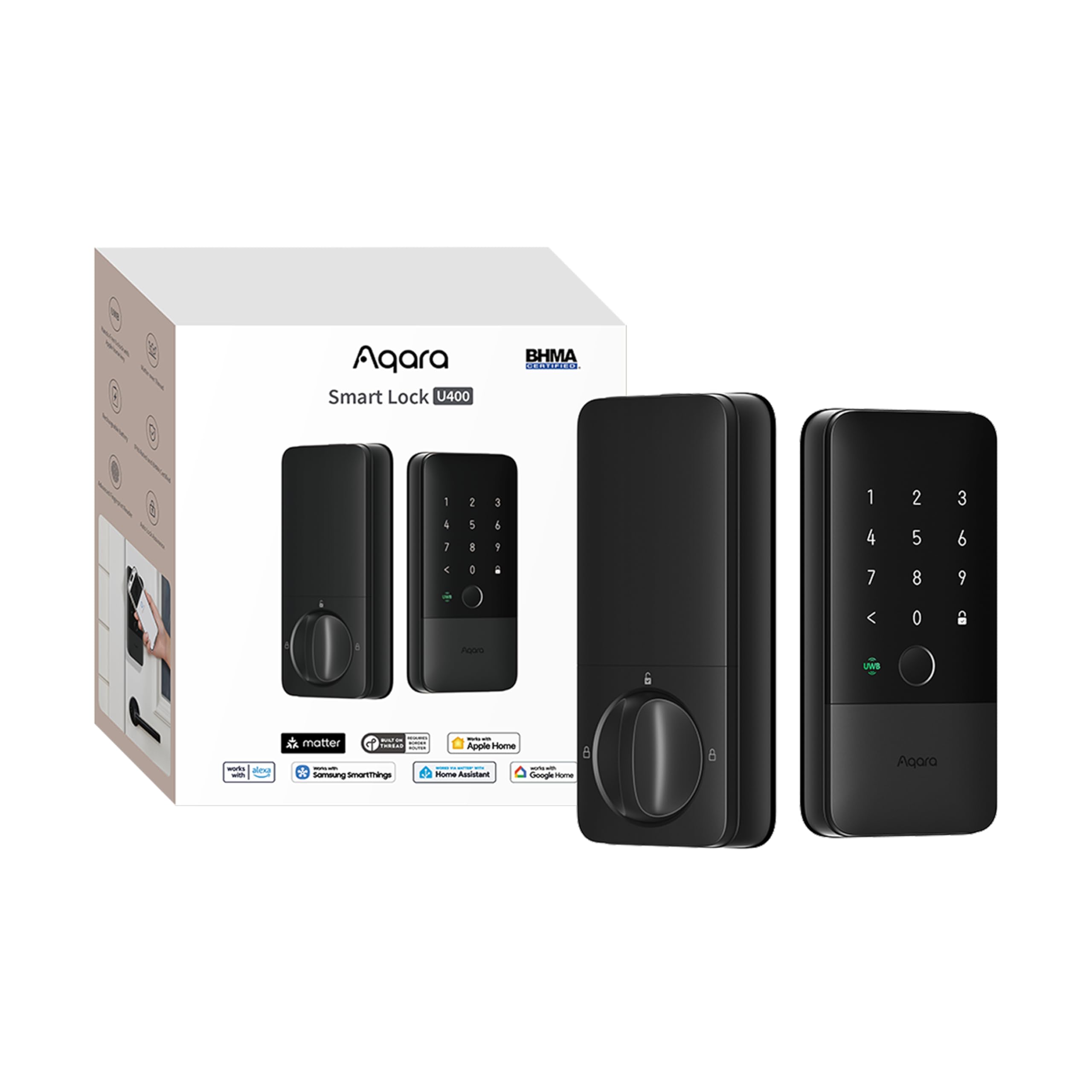
Features and Specifications
Type: Keyless entry deadbolt with fingerprint reader
Connectivity: Matter over Thread
Power Source: Rechargeable battery
Ecosystem Support: HomeKit, Alexa, Google Home, Home Assistant
Access Methods: Apple Home Key, fingerprint, keyless entry
Finish: Black
ASIN: B0FRS6T6HL
The headline here is the combination of Matter over Thread and Apple Home Key in a single deadbolt. Matter is the cross-platform standard that lets one lock talk to Apple, Google and Amazon ecosystems without a brand-specific bridge, while Thread is the low-power mesh radio it runs on. Together they mean the lock should stay responsive and battery-friendly rather than relying on Wi-Fi, which is the usual culprit behind sluggish smart locks.
The rechargeable battery is the other spec that matters day to day. Instead of swapping disposable cells on a schedule, owners plug the pack in to top it up. The fingerprint reader rounds out the package as a backup for anyone who leaves the phone inside or hands the house to a guest without a key.
Build and Design
A deadbolt in a black finish is a statement piece on the door, and the U400 is aimed at front doors where the hardware is visible from the street. The keyless design removes the cylinder entirely, which means no keyway to pick and no key to carry. That is a genuine convenience for a household that has committed to phones and fingers as the primary way in.
The trade-off is that a keyless deadbolt has no mechanical fallback in the traditional sense. Buyers who want a physical key as a last resort should look elsewhere, because the U400’s backup is the fingerprint reader and the rechargeable battery, not a brass key. For a rental property or a home where a locksmith visit is expensive, that is worth weighing carefully.
Power and Connectivity
Thread is the right radio for a door lock. It sips power compared with Wi-Fi, and because it forms a mesh with other Thread devices, the lock can stay reachable even at the far end of a house. The catch is that Thread needs a border router in the home — typically a HomePod, an Apple TV, or a compatible hub — to bridge the lock to the wider network. Buyers without one should budget for it.
The rechargeable battery fits that low-power design, but it also means the lock is only as smart as the network around it. Matter over Thread is maturing quickly, and the platform support listed for the U400 is broad, though the depth of features can vary by ecosystem. Apple Home users get the richest experience here, because Home Key is an Apple feature first.
Access and Everyday Use
Apple Home Key is the reason many buyers will choose this lock. It lets an iPhone or Apple Watch unlock the door with a tap, using the same secure element that powers Apple Pay, so there is no app to open and no code to type. For someone arriving with groceries in both hands, that is a meaningful upgrade over a keypad.
The fingerprint reader covers everyone else in the household, including guests and family members who do not carry an Apple device. Keyless entry is the through-line: there is no keypad to smudge and no code to share and forget to change. The trade-off is that a fingerprint lock depends on clean, dry fingers, and cold or wet hands can slow the reader down.
Ecosystem and Smart Home Fit
Home Assistant support is the detail that separates the U400 from most mainstream smart locks. Buyers who run a local smart home server can integrate the lock without routing everything through a cloud, which is a real draw for privacy-minded households. Alexa and Google support broaden the audience, and HomeKit ties it back to Apple.
The trade-off is complexity. A lock that speaks Matter, Thread, HomeKit, Alexa, Google and Home Assistant asks the buyer to understand which hub does what and which app controls which feature. Households that want a single app and nothing else may find the U400 overqualified for the job.
Trade-off: The U400 is a premium, Apple-leaning lock with no mechanical key backup, so buyers who want a traditional key or a simpler setup should look at a keypad deadbolt instead.
Check the current price of the Aqara UWB Smart Lock U400 on Amazon
FAQ
-
Does the Aqara UWB Smart Lock U400 work with Apple Home Key?
Yes. Home Key support is one of the lock’s headline features, letting an iPhone or Apple Watch unlock the door with a tap. -
Does the U400 need a hub to work?
It uses Matter over Thread, which requires a Thread border router in the home — commonly an Apple HomePod, Apple TV, or a compatible smart home hub — to connect the lock to the network. -
Is the Aqara U400 battery-powered or hardwired?
It runs on a rechargeable battery, so there is no wiring to run to the door and no disposable batteries to keep buying. -
Can the U400 be used without a phone?
Yes. The fingerprint reader provides keyless entry for anyone whose finger is enrolled, so a phone is not required for everyday use. -
Does the U400 work with Google Home and Alexa?
Yes. The lock lists support for HomeKit, Alexa, Google Home and Home Assistant alongside Matter over Thread. -
Is there a physical key backup on the U400?
No. The lock is keyless, so entry relies on Home Key, the fingerprint reader and the rechargeable battery rather than a traditional key. -
Can the Aqara U400 be integrated with Home Assistant?
Yes. Home Assistant support is listed, which suits buyers who prefer a local smart home setup over a cloud-only one. -
Who should not buy the Aqara UWB Smart Lock U400?
Buyers who want a mechanical key backup, a simple single-app setup, or who do not own a Thread border router should consider a different deadbolt. -
What color is the Aqara UWB Smart Lock U400?
The lock is offered in a black finish, which suits front doors where the hardware is on display.
Bottom Line
The Aqara UWB Smart Lock U400 is the pick for Apple households that want to walk up and unlock with a phone or a finger, and for Home Assistant users who value a local, Matter-based lock. It is a premium deadbolt, and the lack of a mechanical key plus the need for a Thread border router are real hurdles. Buyers who clear those two conditions get one of the more capable keyless locks on the market.