Why there are Amazon links here: Brave Review is paid a commission for qualifying Amazon purchases made through the links below. Your price does not change, and using our links is entirely optional. How this works
Best Time of Use Tariff Hardware for Lower Peak-Hour Power Bills
Time of use tariffs reward households that shift heavy loads away from expensive peak windows. The catch is that without live data, no one knows which appliances are actually driving the bill. This guide ranks five pieces of time of use tariff hardware, from a cheap smart plug to whole-panel monitors, and explains which fits renters, owners and solar households. Each pick below includes its key spec, best use and trade-off, so the right choice should be obvious within a minute. The overview table comes first, then detailed reviews, a buyer’s checklist and answers to common questions.
Overview of the Picks
| Product | Key Spec | Best Use | Price Tier |
|---|---|---|---|
| Smart Home Energy Monitor with 16 50A Circuit Level Sensors | 16 circuit sensors, 50A | Rental homes and shared apartments | Mid |
| Emporia Vue 3 Home Energy Monitor | Solar and net metering, UL certified | Whole-home tracking with solar | Upper mid |
| 2.4 GHz WiFi Home Energy Monitor with 2 x 120A CTs | 2 x 120A CTs, bi-directional | Budget whole-panel monitoring | Budget |
| Tapo Smart Plug P115 (2-Pack) | 15A, 1800W max, energy monitoring | Single appliances and lamps | Entry |
| Refoss Smart Home Energy Monitor EM16P | 16 circuit sensors, 60A, open API | Local-only smart home setups | Mid |
Smart Home Energy Monitor with 16 50A Circuit Level Sensors

Circuit Sensors: 16
Sensor Rating: 50A
Tracking: Real-time power usage and electricity cost
App History: Included
Compatibility: Home Assistant
Intended Use: Rental homes and shared apartments
Smart Home Energy Monitor with 16 50A Circuit Level Sensors
This monitor clamps onto individual branch circuits rather than the main feed, so it reports which breaker is running the water heater, the dryer or the spare-room space heater. Sixteen 50A sensors cover a typical apartment panel with room to spare, and the app keeps a history of power use and cost so peak-hour spikes can be traced back to a specific circuit. Home Assistant compatibility means the data can feed automations, such as an alert when consumption crosses a threshold during an expensive window. It suits renters and shared households because the sensors are non-invasive and nothing needs rewiring.
The pick earns its place for anyone who needs circuit-level detail without a full panel upgrade. The trade-off is that sixteen clamps take real time to install neatly inside a crowded panel, and the app is the only way to read the data.
Emporia Vue 3 Home Energy Monitor

Type: Smart home automation module and real-time monitor
Tracking: Power consumption
Solar Support: Solar and net metering
Certification: UL certified
Safety: Safe energy monitoring
Emporia Vue 3 Home Energy Monitor
The Vue 3 is the most complete whole-home option here, combining real-time consumption tracking with solar and net metering support. That matters on a time of use tariff because export credits and import costs can differ by hour, and net metering data shows whether the panels are paying off during peak windows. UL certification adds a layer of confidence for a device that lives inside the electrical panel, and the automation module lets the data drive smart-home routines. It is aimed at owners with a solar array or a serious interest in shaving peak demand.
The popularity of this unit reflects how many households are pairing solar with time of use rates. The trade-off is the price: it costs more than the budget monitors, and the solar features only pay for themselves in a home that actually exports power.
2.4 GHz WiFi Home Energy Monitor with 2 x 120A CTs

Connectivity: 2.4 GHz WiFi
Current Transformers: 2 x 120A CTs
Tracking: Live energy use, bi-directional
Wiring: Single-phase 3-wire
Intended Use: Whole-panel power tracking
2.4 GHz WiFi Home Energy Monitor with 2 x 120A CTs
This is the entry point into whole-panel monitoring. Two 120A current transformers clamp over the main feeds and report live energy use, with bi-directional tracking that also captures power flowing back out, which is useful for small solar setups. The single-phase 3-wire design matches standard North American residential service, and 2.4 GHz WiFi keeps the hardware simple and cheap. It suits budget-conscious owners who want a live number for the whole house rather than a breakdown by circuit.
For the money, it delivers the core function of a time of use strategy: seeing consumption in real time so loads can be moved. The trade-off is granularity — two CTs show the total, not which appliance is responsible, so a smart plug is needed to drill down further.
Tapo Smart Plug Wi-Fi P115 (2-Pack)

Connectivity: 2.4 GHz Wi-Fi only
Max Load: 1800W, 15A
Certification: ETL certified
Features: Energy monitoring, timer
Ecosystems: Alexa, Google Home, Samsung SmartThings
Pack Size: 2-pack
Tapo Smart Plug Wi-Fi P115 (2-Pack)
A smart plug is the cheapest way to put a single appliance on a schedule and measure what it costs. The P115 handles up to 1800W and 15A, enough for a space heater, dehumidifier or window AC, and the built-in energy monitoring reports consumption in the companion app. Timers and ecosystem support for Alexa, Google Home and Samsung SmartThings let peak-hour routines run automatically. The two-pack suits households that want to test the time of use idea before investing in panel hardware.
It earns its place as the starter pick because it answers the question "what does this appliance cost me per hour?" with almost no setup. The trade-off is scope: each plug covers one device, so a whole-home picture needs a monitor, and the 2.4 GHz-only radio can be fussy on mesh networks.
Refoss Smart Home Energy Monitor EM16P
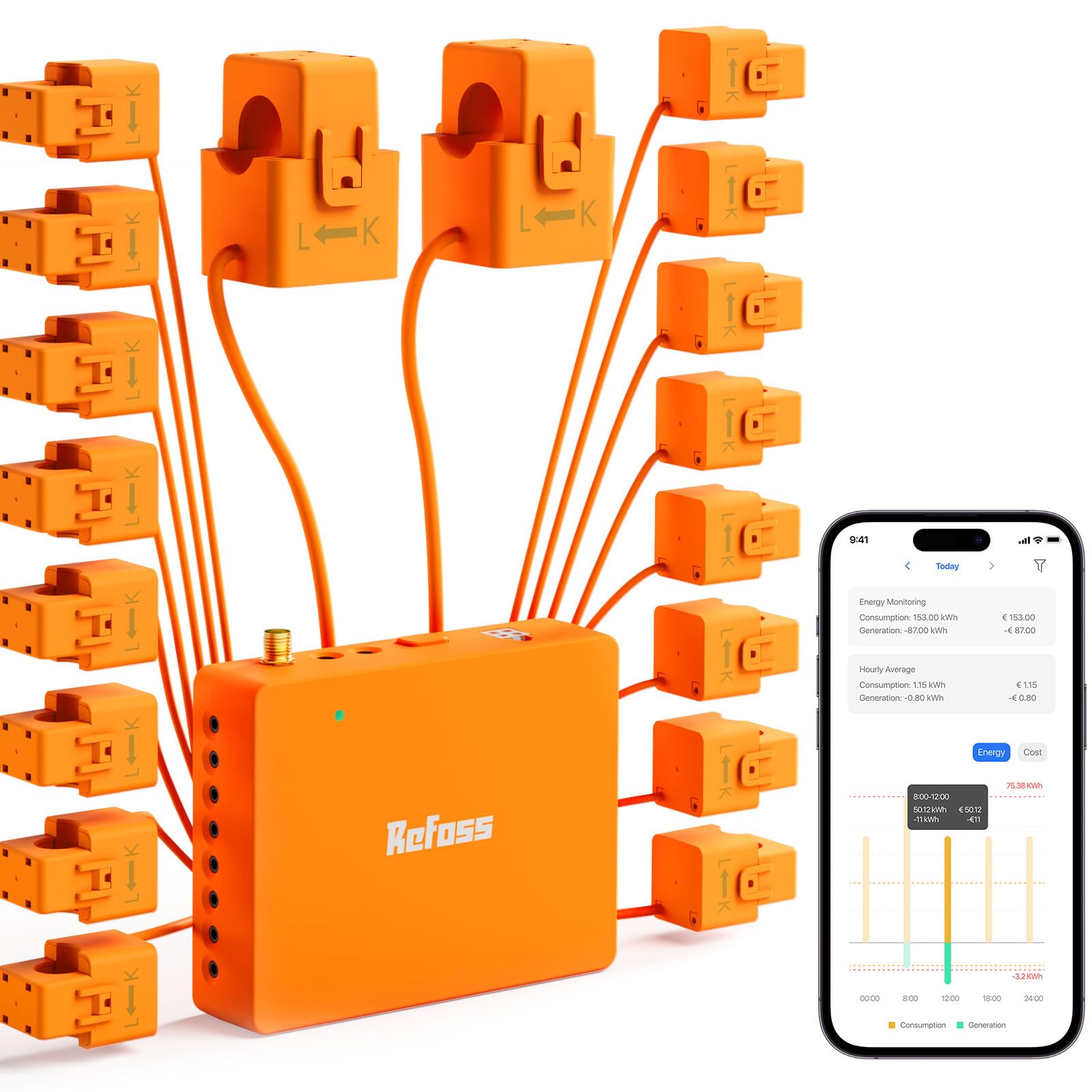
Circuit Sensors: 16
Sensor Rating: 60A
Tracking: Real-time electricity usage, solar metering
Certification: ETL certified
Integration: Open API, Home Assistant
Cloud: No cloud required
Refoss Smart Home Energy Monitor EM16P
The EM16P is the pick for privacy-minded smart home owners. Sixteen 60A sensors cover a full panel with higher headroom than the 50A alternative, and the open API plus Home Assistant support mean data stays local with no cloud dependency. Solar metering is included, and ETL certification covers the safety basics for in-panel hardware. Real-time usage tracking makes it straightforward to spot which circuits run during expensive windows and shift them.
This unit suits owners who already run a local smart home hub and want circuit-level data feeding their own dashboards. The trade-off is that a no-cloud design puts setup and maintenance on the user — there is no vendor app hand-holding, so comfort with configuration is assumed.
Before You Buy
- Panel compatibility: Whole-panel monitors here assume single-phase 3-wire service; check the panel type before ordering, and confirm whether sensors clamp the mains or individual circuits.
- Sensor count and rating: 16-sensor units give circuit-level detail, while two-CT models only report the total; match the sensor amperage to the breaker sizes in the panel.
- Solar and bi-directional needs: Households with panels should prioritize net metering and bi-directional tracking so export credits are captured alongside import costs.
- Connectivity: Most units run on 2.4 GHz Wi-Fi only; a 5 GHz-only network will need a separate band or a different approach.
- Installation comfort: In-panel hardware involves opening the electrical panel; anyone not confident doing that should use a smart plug instead or hire an electrician.
- Ecosystem fit: Home Assistant and open API support matter for local automation, while Alexa, Google Home and SmartThings support suits voice-first households.
- Budget staging: A smart plug two-pack is the low-risk first step; a whole-panel monitor is the upgrade once the expensive loads are identified.
Frequently Asked Questions
-
What is time of use tariff hardware?
It is any device that measures or schedules electricity use so consumption can be shifted into cheaper hours — energy monitors, current-transformer clamps and metering smart plugs all qualify. -
Does a whole-home monitor need an electrician?
The clamps are non-invasive, but the install happens inside the electrical panel. Owners comfortable with panel work can do it; everyone else should budget for an electrician. -
Can a smart plug really lower a time of use bill?
Yes, for the appliances it controls. Scheduling a space heater, dehumidifier or charger to run off-peak turns a guess into an automatic routine. -
Which pick works with solar?
The Emporia Vue 3 and the Refoss EM16P both support solar metering, and the budget two-CT monitor offers bi-directional tracking for smaller setups. -
Why do these devices specify 2.4 GHz Wi-Fi?
The radios are cheaper and reach further through walls than 5 GHz, but they need a 2.4 GHz network to be available at the install point. -
Is circuit-level data worth the extra cost?
For anyone serious about cutting peak demand, yes — knowing which breaker is responsible is what turns a bill into an action plan.
Bottom Line
For most households the Emporia Vue 3 Home Energy Monitor is the best time of use tariff hardware overall, pairing UL-certified whole-home tracking with solar and net metering for a complete picture. Budget buyers should start with the two-CT monitor or the Tapo plug two-pack, while local-first smart home users get the most from the Refoss EM16P.
