Why there are Amazon links here: Brave Review is paid a commission for qualifying Amazon purchases made through the links below. Your price does not change, and using our links is entirely optional. How this works
Kwikset Halo Wi-Fi Smart Lock vs Lockstar Smart Door Lock: Which Keyless Deadbolt Fits Your Door
This comparison settles one decision: whether a front door needs built-in Wi-Fi and app control, or a wider spread of entry methods at the door itself. The Kwikset Halo Wi-Fi Smart Lock is the connected, no-hub option for households that want remote access. The Lockstar Smart Door Lock is the multi-method option for households that want fingerprint and code entry without depending on a phone. The overview below gives the short answer, and the full table reads out every difference.
Quick Comparison: Kwikset Halo vs Lockstar at a Glance
| Product | Key Spec | Best Use | Price Tier |
|---|---|---|---|
| Kwikset Halo Wi-Fi Smart Lock | Wi-Fi with no hub required | Remote access and app control | Premium |
| Lockstar Smart Door Lock | Fingerprint, keypad, card FOB and key entry | Households wanting several ways in | Mid-range |
The Kwikset Halo sits a tier above on price and earns it with built-in Wi-Fi, which removes the bridge device most connected locks need. The Lockstar sits lower and spends its budget on entry methods instead of networking. Neither is the wrong lock; the split comes down to whether the phone or the door is the primary control point.
Kwikset Halo Wi-Fi Smart Lock
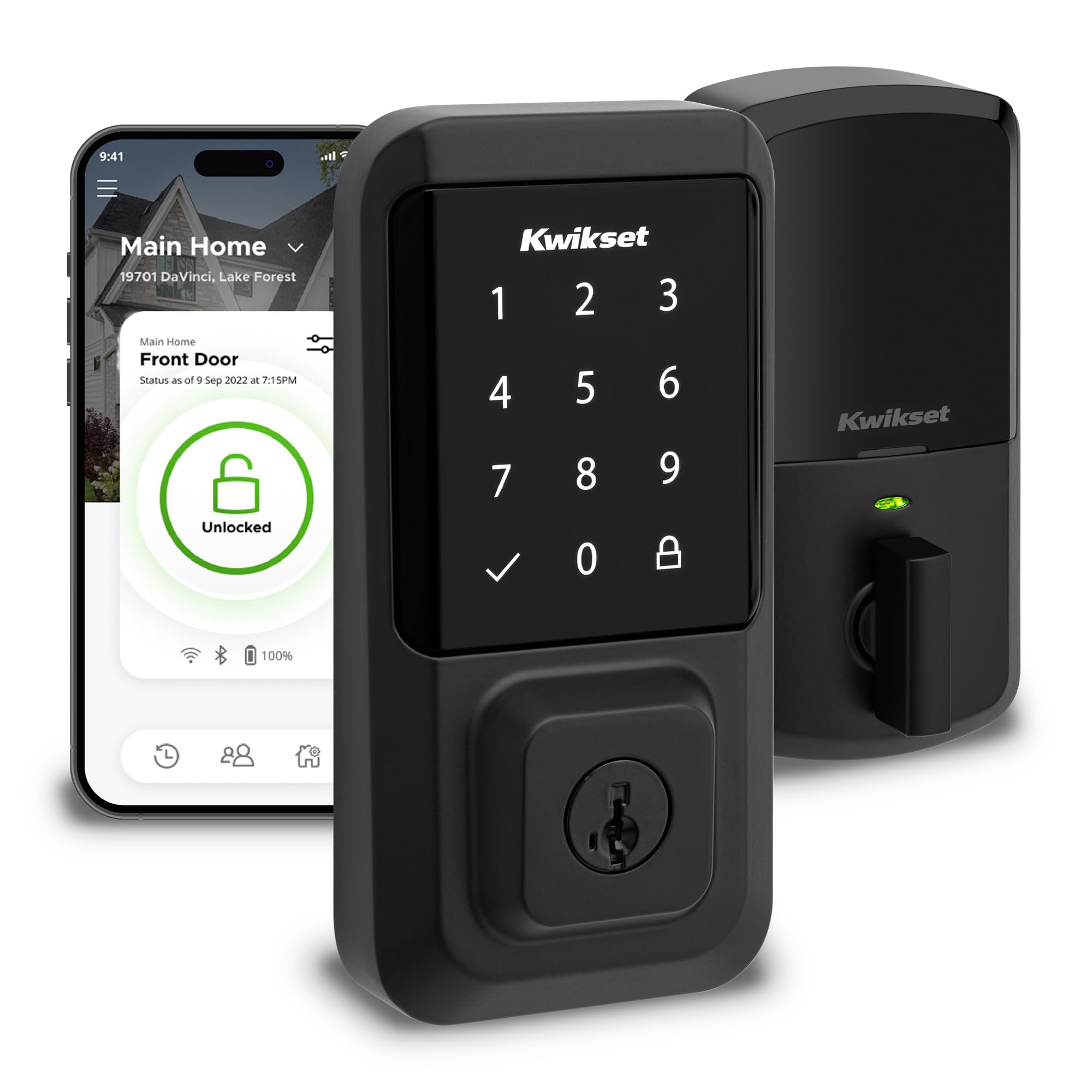
Type: Keyless entry touchscreen deadbolt
Connectivity: Wi-Fi, no hub required
Control: App control
Finish: Matte black
Certification: Grade AAA, UL Listed
Installation: Easy install, no hub
The Halo is a touchscreen deadbolt that connects straight to a home Wi-Fi network, so there is no separate bridge to buy, power or troubleshoot. The matte black finish is the more design-forward choice of the two, and it pairs with modern door hardware better than a standard satin finish. Grade AAA and UL Listing are the kind of build and safety claims that matter on an exterior door, and they are stated plainly on the product.
App control is the reason to pay the premium here. A household that wants to check lock status, let someone in remotely or manage codes from a phone gets that without extra hardware. Installation is pitched as straightforward with no hub, which keeps the job to a screwdriver and an existing deadbolt cutout.
Trade-off: A Wi-Fi lock depends on a stable router and an app that stays supported, so a household with weak signal at the front door or no interest in phone-based control pays for capability it will not use.
Check the current price on Amazon
Lockstar Smart Door Lock
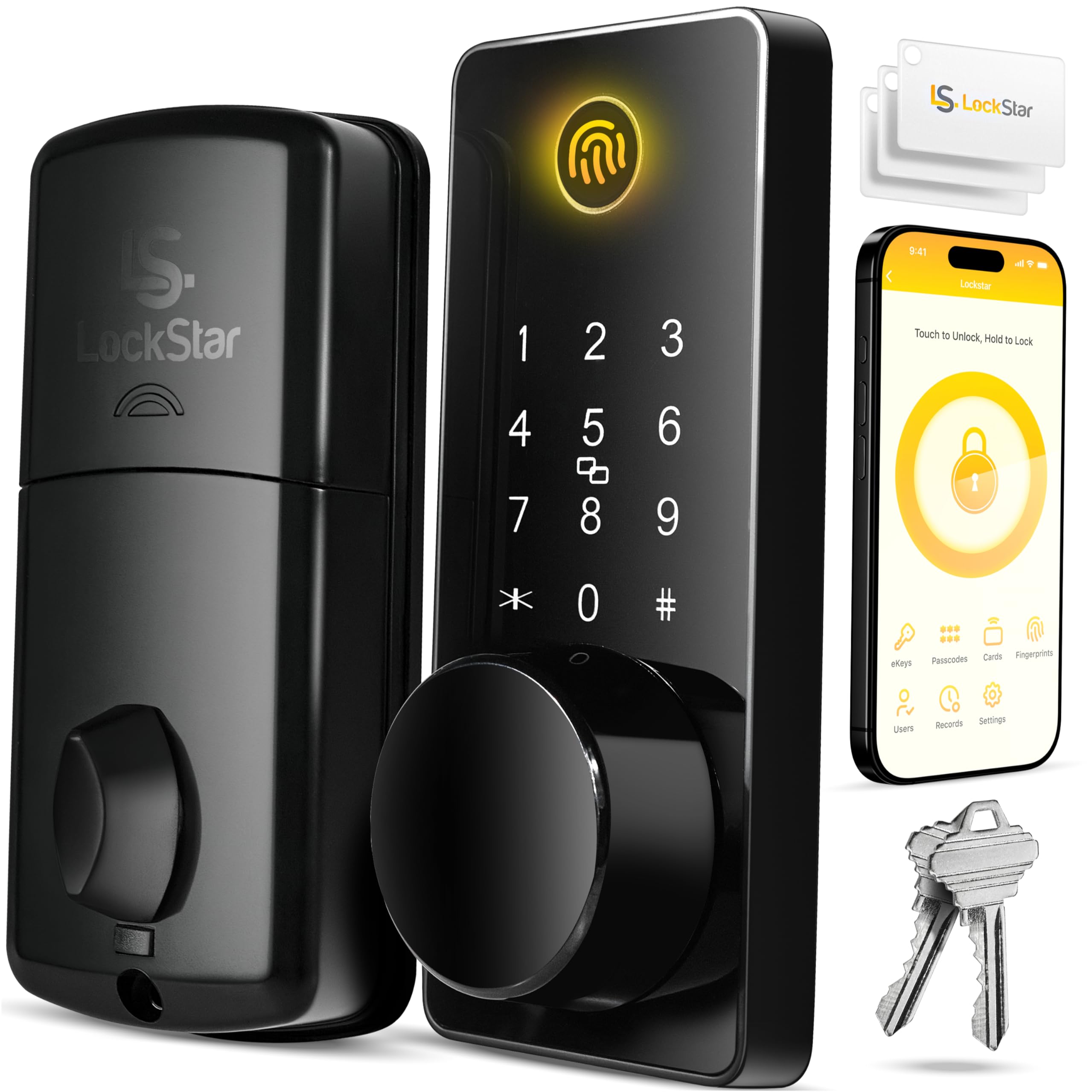
Type: Keyless entry deadbolt
Entry methods: App, fingerprint, keypad code, card FOB, traditional key
Smart home: Works with smart home devices
Price tier: Mid-range
The Lockstar is built around the idea that no single entry method suits every person who uses a door. Fingerprint Touch ID handles the household members who want the fastest entry, keypad codes cover guests and tradespeople, card FOBs suit a household that already carries a fob for a building or garage, and a traditional key remains as the fallback. App entry and smart home integration add the connected layer on top.
That spread is the argument for it over a Wi-Fi-first lock. A deadbolt that opens to a fingerprint does not care whether the router is up, and a keypad code does not require anyone to install an app. For a rental, a shared entrance or a household with mixed technical comfort, the multiple methods do more practical work than remote status ever will.
Trade-off: Five entry methods mean more setup and more parts to manage, and a lock at this price point is more likely to ask the buyer to read the manual carefully rather than assume a polished app experience.
Check the current price on Amazon
Side-by-Side: Where the Two Locks Diverge
| Feature | Kwikset Halo Wi-Fi Smart Lock | Lockstar Smart Door Lock |
|---|---|---|
| Primary control | App | Multiple methods at the door |
| Wi-Fi | Built in, no hub | Not the headline feature |
| Fingerprint entry | No | Yes, Touch ID |
| Keypad code | Touchscreen entry | Yes |
| Card FOB | No | Yes |
| Traditional key | Keyless design | Yes |
| Smart home integration | App-based | Yes |
| Finish | Matte black | Not the differentiator |
| Certification | Grade AAA, UL Listed | Not stated on the name |
| Price tier | Premium | Mid-range |
The table makes the split obvious. Kwikset puts its money into connectivity and certified build, and the entry method is a touchscreen plus the app. Lockstar puts its money into the number of ways a person can get through the door, and connectivity is one of five options rather than the point of the product.
Buyers who work from home, travel, or manage a door for family members will find the Halo’s app control genuinely useful on a weekly basis. Buyers who mostly want to stop carrying a key and let a cleaner or dog walker in without handing over a phone will find the Lockstar’s fingerprint and code options faster in daily use.
The certification row is the quieter difference. Grade AAA and UL Listing are stated on the Kwikset name, which signals a build tested to a published standard. The Lockstar name does not make that claim, and a buyer who weighs verified build ratings over feature count should notice it.
Which Should You Buy?
Choose the Kwikset Halo Wi-Fi Smart Lock if the front door needs remote management, the household is comfortable running a lock from an app, and a certified Grade AAA build is worth the premium. It is the better fit for a primary residence where the router reaches the door and the owner wants to see and control lock status from anywhere.
Choose the Lockstar Smart Door Lock if the priority is getting in without a key through whichever method suits each person, the budget is tighter, and a fingerprint reader matters more than remote access. It is the better fit for a shared entrance, a rental, or a household with several people who each want their own way in.
Skip the Kwikset Halo if the Wi-Fi signal at the door is weak or nobody in the house wants another app. Skip the Lockstar if the household wants a single, polished remote-control experience and will not use fingerprint or FOB entry.
FAQ
-
Does the Kwikset Halo need a hub?
No. The product name states Wi-Fi with no hub required, so the lock connects to the home network directly. That removes the bridge device most connected deadbolts need. -
Can the Lockstar be opened without a phone?
Yes. Fingerprint Touch ID, keypad code, card FOB and a traditional key all work at the door, so the app is one option rather than a requirement. -
Which lock is better for a rental property?
The Lockstar’s keypad codes and FOB entry make it easier to give temporary access without sharing an app account. The Kwikset Halo suits a rental where the owner wants remote oversight of the door. -
Is the Kwikset Halo more secure because of its certification?
Grade AAA and UL Listing are published standards that speak to build and safety testing. The Lockstar name does not make an equivalent claim, so a buyer weighing verified ratings should factor that in. -
Which one is easier to install?
The Kwikset Halo is marketed as an easy install with no hub, which keeps the job to standard tools. The Lockstar’s extra entry hardware means more setup steps and a closer read of the instructions. -
Do both work with smart home devices?
The Lockstar name explicitly lists smart home devices. The Kwikset Halo is controlled through its app, which is where its smart features live. -
Which lock suits a household with children or older adults?
The Lockstar’s fingerprint and code entry avoid fumbling for a key, which helps in a busy household. The Kwikset Halo suits a household where a parent manages access remotely.
Bottom Line
The Kwikset Halo Wi-Fi Smart Lock is the stronger pick for a primary front door where remote app control and a certified Grade AAA build justify the premium, and it is the one to check first for most owner-occupied homes. The Lockstar Smart Door Lock wins on entry flexibility and price, and it is the smarter buy for shared entrances, rentals and households that want fingerprint access without leaning on a phone. Compare current prices before deciding, since both sit in different tiers and the gap moves.
