Why there are Amazon links here: Brave Review is paid a commission for qualifying Amazon purchases made through the links below. Your price does not change, and using our links is entirely optional. How this works
Best Self Monitoring vs Paid Monitoring Systems for DIY Home Security
The choice between self monitoring versus paid monitoring comes down to who watches the alerts: the homeowner or a professional center. This roundup covers five systems that let buyers lean either way, from no-fee DIY kits to optional professional monitoring that can be switched on or off. Renters who want app alerts, homeowners who travel often, and families weighing a monthly bill against peace of mind will each find a fit below. The overview table ranks every pick before the detailed reviews.
Overview of the Picks
| Product | Key Spec | Best Use | Price Tier |
|---|---|---|---|
| Wireless Home Security System WiFi/4G | No subscription fees, 4G backup | Budget self monitoring | Budget |
| Cove 6 Piece DIY Home Security System | 3 months monitoring included | Test-drive paid monitoring | Mid-range |
| SimpliSafe 11 Piece Gen 3 | Indoor HD camera included | Larger homes, camera coverage | Premium |
| SimpliSafe 8 Piece | Optional 24/7 monitoring, no contract | Core sensors, flexible plan | Mid-range |
| Roku Home Monitoring System SE | Roku ecosystem integration | Streaming households | Budget |
Wireless Home Security System WiFi/4G with Phone APP Alert
Type: DIY alarm system
Connectivity: WiFi and 4G
Monitoring: Self monitoring, no subscription fees
Voice Control: Alexa compatible
Alerts: Phone app
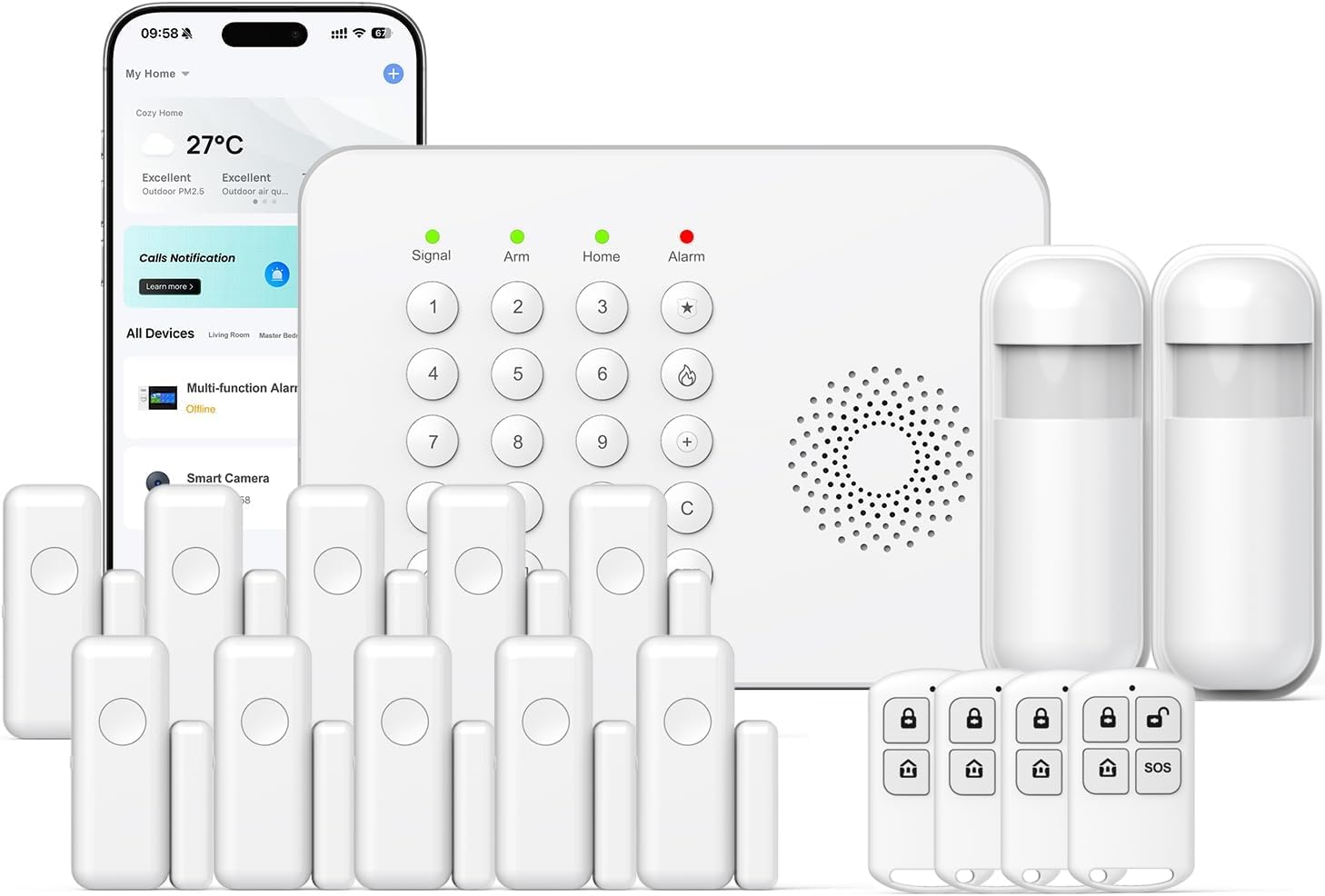
This system is built around a hub that talks to sensors over WiFi, with a 4G cellular path as a fallback if the home internet drops. The phone app pushes alerts when a sensor trips, and Alexa voice control lets the household arm or check status hands-free. The headline claim is no subscription fees, which means alerts and app control stay free for the life of the hardware. It suits buyers who want a low, one-time cost and are comfortable acting on their own alerts.
The pick earns its place as the purest expression of self monitoring: nothing is billed monthly, and the 4G radio covers the biggest weakness of WiFi-only kits. The trade-off is that nobody but the household is watching, so a missed phone notification is a missed event, and the sensor count in the box is modest. Buyers who want a professional center on the other end should look at the Cove or SimpliSafe options.
Who it suits: Budget-conscious DIYers and renters who want app alerts without a monthly bill.
Cove 6 Piece DIY Home Security System with 3-Mo Monitoring
Type: DIY security kit
Included: Motion sensors, indoor camera
Setup: DIY, expandable
App: Cove app control
Monitoring: 3 months included
Promotion: Free indoor camera after account setup

Cove’s six-piece kit pairs motion sensors with an indoor camera and runs everything through a single app. The bundle includes three months of monitoring, which makes it the natural bridge between the two camps: buyers can live with professional monitoring first and then decide whether to keep paying or drop to self monitoring. Setup is DIY and the system is expandable, so sensors can be added room by room. The free camera after account setup sweetens the entry point.
This is the pick for anyone who has not yet made up their mind on self monitoring versus paid monitoring, because the included monitoring term removes the guesswork. The trade-off is that the three months end, and the camera offer depends on completing account setup, so the real long-term cost depends on the plan chosen afterward. Buyers who refuse any account at all should skip it.
Who it suits: Households curious about professional monitoring without a long commitment.
SimpliSafe 11 Piece Wireless Home Security System Gen 3 with Indoor HD Camera
Type: Wireless security system
Pieces: 11
Camera: Wireless indoor HD camera
Monitoring: Optional 24/7 professional, no contract
Voice Assistants: Alexa and Google Assistant
Color: White

The Gen 3 SimpliSafe kit spreads eleven wireless pieces across a home, and the included indoor HD camera adds eyes on the interior rather than just entry sensors. Monitoring is optional and contract-free, so the system works as pure self monitoring or hands off to a professional center month by month. It works with Alexa and Google Assistant for voice arming and status checks. The wireless build means no drilling for sensor wiring, which keeps installation renter-friendly.
This is the largest kit here and the best fit for a house with several doors and windows plus a room worth watching on camera. The trade-off is that the camera and extra sensors push the upfront cost above the smaller kits, and full value depends on eventually adding a monitoring plan. Buyers in a studio apartment would be paying for coverage they cannot use.
Who it suits: Larger homes that want camera coverage and the freedom to toggle monitoring.
SimpliSafe 8 Piece Wireless Home Security System
Type: Wireless security system
Pieces: 8
Monitoring: Optional 24/7 professional, no contract
Voice Assistants: Alexa and Google Assistant
Color: White

This eight-piece SimpliSafe kit covers the essentials — entry points and motion — without the camera, keeping the upfront price lower than the eleven-piece version. Like its larger sibling, monitoring is optional and contract-free, and the system speaks to Alexa and Google Assistant. The wireless sensors install with adhesive mounts or screws, and the white finish blends into most trim. It is the straightforward choice for buyers who want core coverage and a plan they can start or stop.
The pick suits households that already own cameras or do not want indoor video, and it keeps the monthly decision entirely in the buyer’s hands. The trade-off is the absence of a camera in the box, so interior video means buying separate hardware. Buyers who want an all-in-one bundle should step up to the eleven-piece kit.
Who it suits: Homeowners who want sensor coverage now and monitoring flexibility later.
Roku Home Monitoring System SE
Type: Home monitoring system
Model: SS1000R
Ecosystem: Roku
Color: White

Roku Home Monitoring System SE, White, SS1000R
The Roku Home Monitoring System SE brings security into the Roku ecosystem, so alerts and controls can sit alongside streaming on the same platform. It is a compact, white system aimed at simple self monitoring rather than professional dispatch. Setup is app-driven, and the SE badge signals the streamlined entry model in the line. Households already living in Roku’s interface get the shortest learning curve of any pick here.
This is the niche pick: it earns its place for Roku loyalists who want one ecosystem for entertainment and security. The trade-off is ecosystem lock-in — the value depends on staying within Roku, and buyers outside it get less from the integration. Anyone wanting professional monitoring should choose a SimpliSafe or Cove system instead.
Who it suits: Roku households that want simple self monitoring inside an app they already use.
Before You Buy
- Monitoring model: Decide first whether alerts go to the phone only (self monitoring) or to a professional center (paid); several kits here support both.
- Contract terms: Check whether monitoring is month-to-month or bundled into a term, since no-contract systems allow switching back to self monitoring at any time.
- Connectivity: WiFi-only kits lose contact when the internet drops; a 4G backup path keeps alerts flowing.
- Coverage: Count doors and windows before choosing a piece count, and leave room for expansion.
- Camera or sensors: Cameras add interior evidence but cost more; sensor-only kits cover entries at a lower price.
- Ecosystem: Voice assistant and platform compatibility (Alexa, Google Assistant, Roku) determines how the system is armed day to day.
- Account requirements: Some promotions, like free cameras, depend on completing account setup, so read the offer terms.
Frequently Asked Questions
-
Is self monitoring as safe as paid monitoring?
Self monitoring sends alerts to the homeowner, who must act on them; paid monitoring routes alarms to a professional center that can dispatch help. The hardware is often the same, and the difference is who responds. -
Can a system switch between self and paid monitoring?
Yes — the SimpliSafe and Cove picks here support optional professional monitoring without a long contract, so a household can start with self monitoring and add a plan later. -
Do self monitoring systems have monthly fees?
Not always. The Wireless WiFi/4G pick advertises no subscription fees, while others include a monitoring term or offer plans as an option. -
What happens to alerts if the WiFi goes down?
WiFi-only systems can lose contact, which is why a 4G cellular backup matters for self monitoring setups where no professional center is watching. -
Which pick is best for a rental?
Wireless, adhesive-mounted kits like the SimpliSafe systems and the Cove kit install without drilling, making them the easiest to remove at move-out. -
Is a camera necessary?
No. The eight-piece SimpliSafe kit covers entries and motion without a camera, while the eleven-piece version and Cove bundle add interior video.
Bottom Line
For most households weighing self monitoring versus paid monitoring, the SimpliSafe 11 Piece Gen 3 kit is the top pick: it covers a full home, includes an indoor camera, and lets the buyer choose month by month whether anyone professional is watching. Budget-focused buyers who want zero fees should start with the Wireless WiFi/4G system, and the curious should test the waters with Cove’s included monitoring term.
