Why there are Amazon links here: Brave Review is paid a commission for qualifying Amazon purchases made through the links below. Your price does not change, and using our links is entirely optional. How this works
eufy Smart Display E10: The Hub That Puts Four Cameras on One Screen
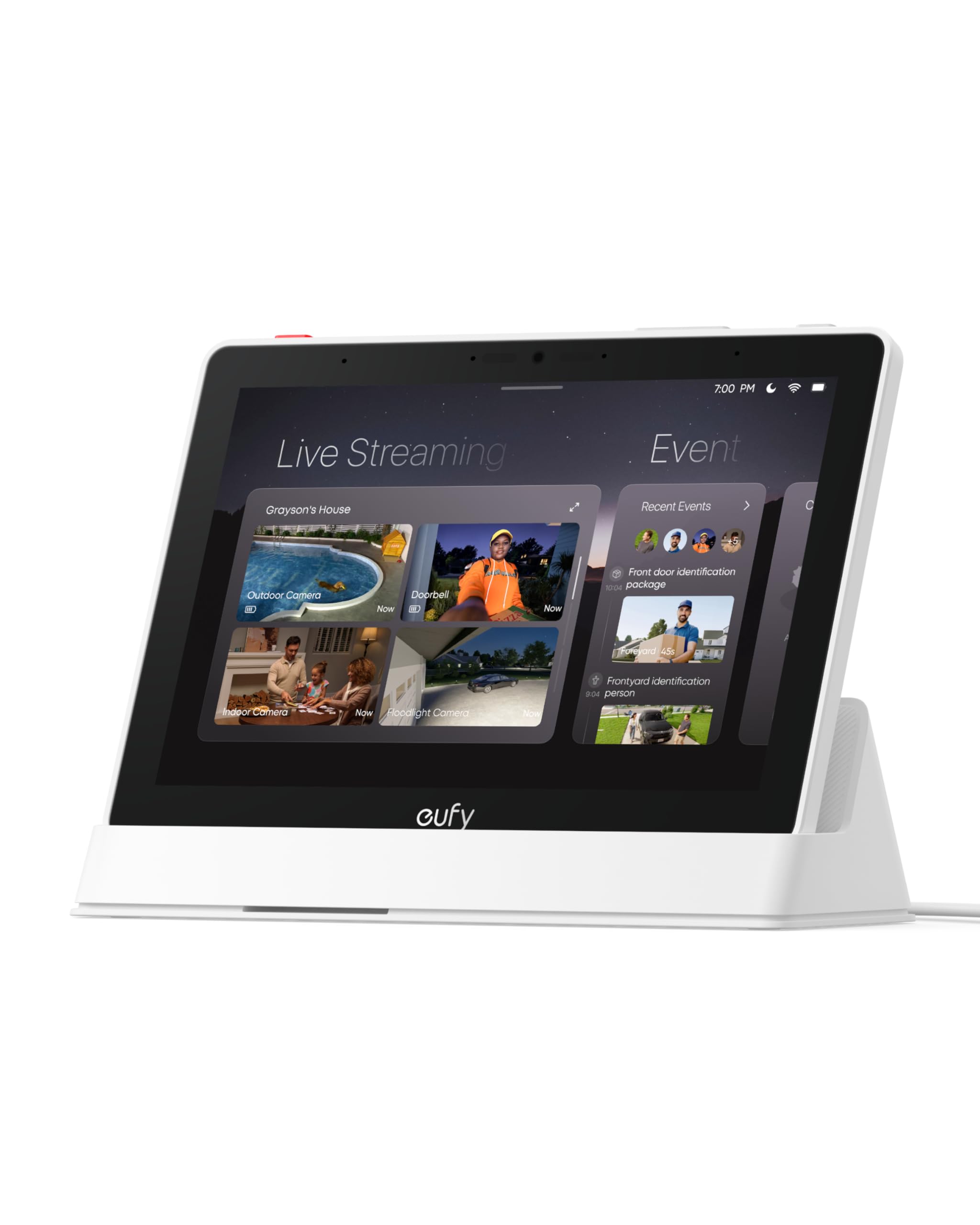
The eufy Smart Display E10 is a single-purpose control panel for households already running eufy security cameras and doorbells. It gathers up to four live feeds onto one 8-inch screen, pushes door alerts to a device that sits in the room rather than a phone in a pocket, and gives one-tap shortcuts to the devices it manages. This review covers what the panel does, how the specifications translate into daily use, and which buyers get real value from it. Anyone outside the eufy ecosystem should stop reading here and look elsewhere.
Features and Specifications
Type: Smart home hub and control panel
Screen: 8-inch display, four camera views on one screen
Compatibility: eufy Security devices
Storage: 64GB eMMC built-in
Alerts: Instant door alerts
Reporting: Daily event reports
Control: One-tap device control
The headline feature is the four-view layout. Instead of opening an app and tapping through camera tiles one at a time, the panel holds up to four feeds on a single screen at once. That is the difference between checking a phone and glancing at a device that lives on a counter or a hallway shelf. For a household with a doorbell and a few outdoor cameras, the panel turns security monitoring into something passive rather than a task.
The 64GB of eMMC storage is the second pillar. On-device memory at that capacity means the panel can hold a meaningful local record of activity without leaning on a subscription or an external drive. The daily event reports build on the same idea: the panel is designed to summarize what happened rather than force a manual scrub through footage. Buyers who want a simple daily digest of comings and goings will find that more useful than raw clip archives.
Compatibility is the constraint that shapes everything else. The E10 is built for eufy Security devices, and the name says so plainly. It is not a general-purpose smart home panel that will pull in cameras from other brands or act as a neutral hub for a mixed setup. The value proposition is vertical integration: one brand, one panel, one place to look.
Build and Screen
An 8-inch panel is a deliberate middle size. It is large enough to show four camera tiles without each one becoming an unreadable thumbnail, and small enough to sit on a side table, a kitchen counter, or a shelf near the front door without dominating the room. That is the practical case for a dedicated display over a tablet: it has one job, it stays where it is put, and nobody borrows it to browse.
The trade-off at this size is that four feeds on an 8-inch screen are still four feeds on an 8-inch screen. Each tile gets a quarter of the panel, which is fine for spotting a person at the door and less fine for reading a license plate at the end of a driveway. Buyers who need detail on a specific camera will still tap into that feed. The four-view layout is a triage tool, not a replacement for full-screen viewing.
Capacity and Storage
The 64GB of eMMC is the kind of specification that matters more than it looks. Local storage at that capacity means the panel can keep event recordings on the device itself, which suits buyers who would rather not pay a monthly fee for cloud history. It also means the panel is doing real work rather than acting as a thin remote control for footage stored elsewhere.
The caution here is that built-in eMMC is not expandable in the way a microSD slot is. Buyers who record continuously, or who keep footage for long retention windows, will eventually run into the ceiling. For event-based recording tied to door alerts and motion, the capacity is generous. For always-on archiving, it is a fixed budget that cannot be topped up.
Power and Placement
A control panel of this type needs a permanent power source and a stable network connection, which shapes where it can go. It is a countertop or shelf device, not something that gets carried around the house. That is consistent with its purpose: the panel is meant to be passed, glanced at, and left alone.
Placement decisions follow from that. The natural spots are wherever the household already passes through — a kitchen counter, an entryway table, a hallway shelf near the door the cameras watch. Buyers should plan for an outlet nearby and treat the panel as furniture rather than as a portable screen.
Alerts and Daily Reports
Instant door alerts are the feature that justifies a dedicated display over a phone app. A phone alert competes with every other notification and depends on the phone being nearby and unmuted. A panel alert comes from a device that is already sitting in the room, which makes it harder to miss and easier to act on.
Daily event reports serve a different need. Rather than a stream of individual pings, the panel summarizes activity into a digest. That suits buyers who want to know what happened while they were out without reviewing clip after clip. The limitation is that a summary is only as good as the events it captures, and buyers who want to audit every motion trigger will still need to review footage directly.
One-Tap Control
One-tap control is the quiet convenience of the whole package. Instead of unlocking a phone, opening an app, and navigating to a device, the panel puts common actions a single tap away. For a household that arms and disarms routinely, or that checks a specific camera at the same time each day, that repetition adds up.
The honest caveat is that one-tap control is only as useful as the number of devices behind it. A buyer with one doorbell gets a modest benefit. A buyer with a doorbell and three or four cameras gets a genuine command center. The panel’s value scales with the size of the eufy setup it is managing.
Trade-off: The E10 is a closed-system panel, so its cost only makes sense for households already invested in eufy Security devices — anyone with a mixed-brand setup pays for a hub that cannot manage most of their hardware.
Who Should Buy the eufy Smart Display E10
The clearest buyer is a household running several eufy cameras and a eufy doorbell that wants a fixed place to watch them. The four-view screen, the instant door alerts, and the one-tap controls all compound when there are multiple devices to manage. That buyer gets a device that turns scattered app checks into a single glance.
The second clear buyer is someone who dislikes subscription storage. The 64GB of on-device eMMC and the daily event reports point to a local-first approach, which appeals to households that would rather own their recordings than rent cloud space. The panel fits neatly into that preference.
The buyer who should not purchase is anyone outside the eufy ecosystem, or anyone with only a single camera. A one-camera household gets a small slice of the panel’s value and pays the full price for it. A mixed-brand household gets a hub that cannot see most of its hardware. In both cases the money is better spent elsewhere.
FAQ
-
What is the eufy Smart Display E10?
It is an 8-inch smart home hub and control panel built for eufy Security devices. It shows up to four camera feeds on one screen, pushes instant door alerts, produces daily event reports, and offers one-tap device control. -
Does the eufy Smart Display E10 work with non-eufy cameras?
No. The product is explicitly built for eufy Security devices. Buyers with cameras from other brands should not expect the panel to manage or display them. -
How many cameras can be shown at once?
Four. The four-view layout is the panel’s defining feature, putting up to four feeds on the 8-inch screen simultaneously. -
Does the eufy Smart Display E10 require a subscription?
The panel carries 64GB of built-in eMMC storage, which points to local recording rather than a cloud-dependent design. Buyers who want to avoid recurring storage fees should confirm the exact feature set for their cameras before purchase. -
What is the 64GB eMMC used for?
It is on-device storage for the panel’s local recording and event history. Buyers should note that built-in eMMC is fixed and cannot be expanded the way a memory card slot can. -
Can the panel be moved around the house?
It is designed as a stationary control panel for a counter, shelf, or table, with a permanent power source and network connection. It is not a portable tablet. -
What are daily event reports?
They are a summarized digest of activity captured by the connected devices, intended to give a quick overview of what happened without reviewing individual clips. -
Is the eufy Smart Display E10 a good fit for a one-camera home?
It works, but the value is thin. The panel’s strengths — four-view monitoring, multi-device one-tap control — only pay off when there are several eufy devices to manage. -
Does the panel replace a phone app?
It complements rather than replaces it. The panel is better for at-a-glance monitoring and quick actions at home, while the app remains the tool for detailed review and remote access. -
Who is the eufy Smart Display E10 not for?
Buyers with a mixed-brand smart home, buyers with only one eufy camera, and anyone who wants an open hub that works across ecosystems. The E10 is a focused, brand-locked device.
Bottom Line
The eufy Smart Display E10 is a well-targeted device for one specific household: a home already running several eufy Security cameras and a doorbell, where a fixed 8-inch panel showing four feeds at once is genuinely more convenient than a phone. The 64GB of local eMMC and the daily event reports reinforce that local-first, no-subscription positioning. Buyers outside the eufy ecosystem, or with only a single camera, should put the money toward more cameras first — the panel earns its place once there is enough hardware behind it to control.