Why there are Amazon links here: Brave Review is paid a commission for qualifying Amazon purchases made through the links below. Your price does not change, and using our links is entirely optional. How this works
NETGEAR GS105NA 5-Port Gigabit Switch: Instant Wired Ports for a Small Home Network
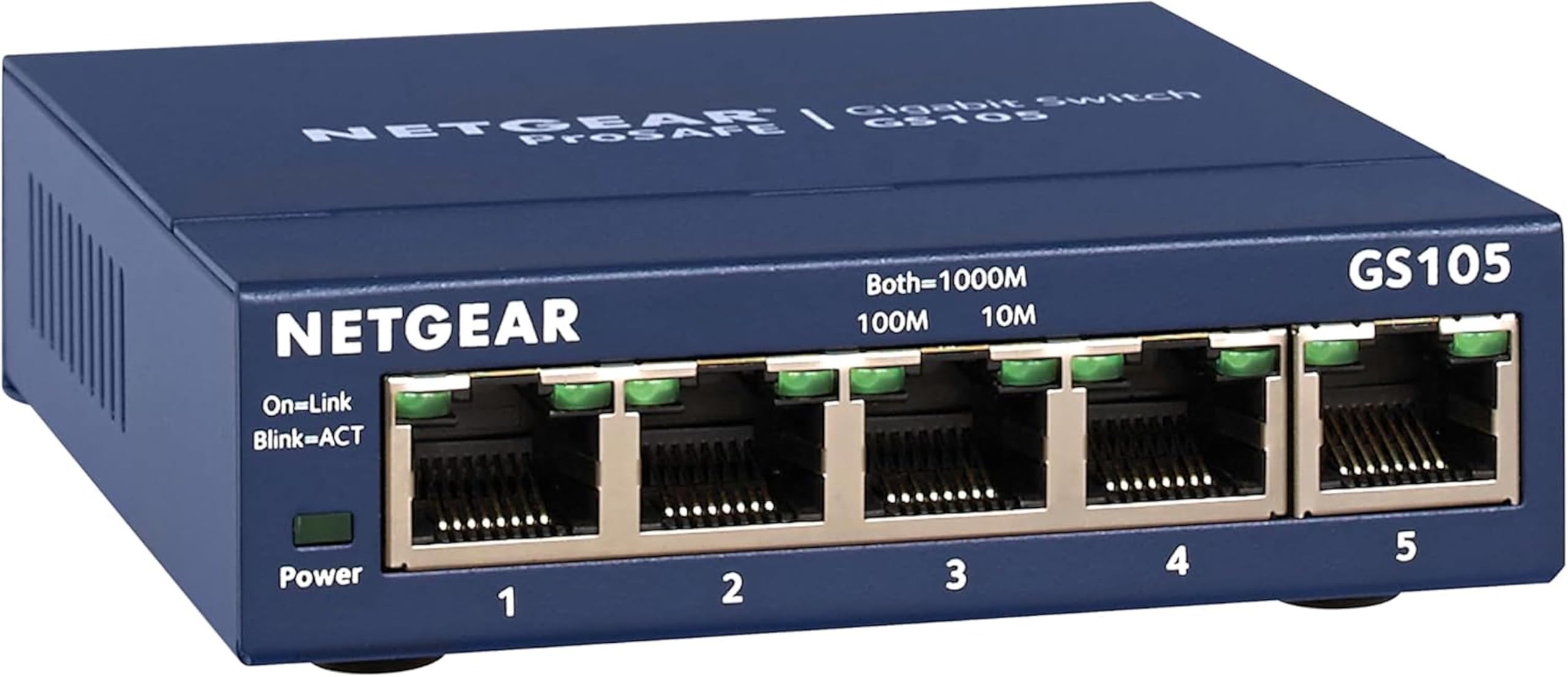
The NETGEAR GS105NA is a five-port gigabit Ethernet switch for buyers who need more wired ports than a router provides and do not want to configure anything. It suits a home office, a small apartment network, or a living room where a TV, console and desktop all want a cable. This review covers what the switch does, how it is built, where it fits in a home network, and where it falls short. Buyers who want a fast, no-setup way to split one wired connection into five should keep reading; buyers who need managed features or Wi-Fi should look elsewhere.
Features and Specifications
Type: Unmanaged Gigabit Ethernet network switch
Ports: 5 Gigabit Ethernet ports
Mounting: Desktop or wall mount
Configuration: None required — unmanaged, plug-and-play
Brand: NETGEAR
Model: GS105NA
The GS105NA is an unmanaged switch, which is the simplest kind of network hardware available. It takes one incoming Ethernet connection and shares it across five ports, forwarding traffic automatically without any settings, apps, or login screens. Buyers plug in the power adapter, connect the cable from the router to any port, and the remaining ports are live.
The "Gigabit" label matters here. Each port is rated for Gigabit Ethernet speeds, which is the same standard most home routers and modern devices use, so the switch does not become the bottleneck in a typical home network. The metal housing and the option to sit it on a desk or screw it to a wall make it easy to tuck behind furniture or mount inside a media cabinet.
Build and Mounting
The GS105NA is built as a compact metal box, which is the norm for small business and prosumer switches at this price tier. The metal chassis helps with heat dissipation and gives the unit enough weight to stay put on a shelf, and the desktop-or-wall-mount design means it does not have to live on a desk.
For buyers, the practical point is placement flexibility. A switch that can be wall-mounted can go behind a TV, inside a structured wiring panel, or on the back of a desk, which keeps cable runs short. The trade-off is that the unit is small and fanless by design, so it is meant for light-duty home use rather than a rack full of equipment.
Capacity and Port Count
Five ports is the entry point for this category, and the math is simple: one port connects back to the router, leaving four for devices. That fits a typical small setup — a desktop, a printer, a game console, and a smart TV — with one spare.
Buyers with more devices than that will run out of ports quickly, and daisy-chaining a second switch adds another power adapter and another cable run. The five-port limit is the single biggest constraint on this model, and it is the reason buyers should count their wired devices before ordering.
Power and Placement
The switch runs from a standard wall outlet through its included power adapter, and it does not need to sit near the router as long as a cable can reach. That makes it useful for extending a wired connection into another room where several devices cluster together.
The catch is that it is not a Wi-Fi device and not a router. It does not create a network, assign addresses, or provide wireless coverage — it only splits an existing wired connection. Buyers who need wireless coverage in that room need an access point or a mesh node instead.
Maintenance and Everyday Use
There is essentially no maintenance. An unmanaged switch has no firmware dashboard to log into, no settings to tune, and no account to create, so it works the moment it is powered and connected. For buyers who dislike networking setup, that is the main appeal.
The downside is the mirror image of that simplicity: there is nothing to adjust. Buyers who want VLANs, port monitoring, link aggregation, or traffic prioritization need a managed or smart switch, and this model cannot do those jobs.
Trade-off: The five-port ceiling and the total absence of management features mean this switch is a dead end for anyone planning to grow a network beyond a handful of wired devices.
Check the current price on Amazon
Who the GS105NA Suits and Who It Does Not
The GS105NA fits buyers who already have a working router and simply need more wired ports in one spot. A home office with a desktop, a network printer, and a VoIP phone is a textbook case, as is a media console holding a TV, a console, and a streaming box. In both setups the switch is invisible infrastructure that solves a port shortage in minutes.
It also suits renters and buyers on a tight budget, because it is one of the least expensive ways to add wired capacity and requires no installation work. Nothing needs to be configured, and nothing needs to be un-configured later.
It is not for buyers who need Wi-Fi extended into a room, who want to manage or monitor their network, or who have more than four wired devices to attach at one location. It is also a poor fit for anyone expecting to expand a home lab, since unmanaged switches cannot be segmented or tuned.
FAQ
-
What is the NETGEAR GS105NA used for?
It adds five Gigabit Ethernet ports to an existing network. One port connects to a router and the rest connect to wired devices such as computers, printers, consoles, and TVs. -
Does the GS105NA need to be configured?
No. It is an unmanaged switch, so it works as soon as it is powered and connected. There is no app, login, or settings page. -
Does the GS105NA provide Wi-Fi?
No. It is a wired switch only. It extends a wired connection and does not broadcast a wireless signal. -
Can the GS105NA be wall mounted?
Yes. The product is designed for desktop or wall mounting, which helps when it needs to sit behind a TV or inside a cabinet. -
How many devices can be connected to the GS105NA?
Five ports total, and one is normally used for the link back to the router, leaving four ports for devices. -
Is the GS105NA fast enough for a home network?
Its ports are Gigabit Ethernet, which matches the standard used by most home routers and modern wired devices, so it should not slow down a typical home connection. -
Does the GS105NA work without a router?
It needs an existing network source to be useful. It splits a connection rather than creating one. -
Can two GS105NA switches be connected together?
Yes, one port can link to a second switch, though each switch needs its own power adapter and the extra cable run should be planned. -
Is the GS105NA managed or unmanaged?
It is unmanaged. Buyers who need VLANs, monitoring, or traffic control should choose a managed switch instead. -
Who should skip the GS105NA?
Buyers who need wireless coverage, network management features, or more than four free ports at a single location should look at a different device.
Bottom Line
The NETGEAR GS105NA is the right answer for a buyer with a port shortage and no interest in networking setup: five Gigabit ports, a metal body, desktop or wall mounting, and nothing to configure. Its limits are just as clear — four usable device ports and no management features — so it suits small, stable home setups rather than growing networks. Buyers who match that profile can check the current price on Amazon and solve a wired-port problem in one purchase.
