Why there are Amazon links here: Brave Review is paid a commission for qualifying Amazon purchases made through the links below. Your price does not change, and using our links is entirely optional. How this works
Philips WiFi Smart Keypad Deadbolt Lock: Keyless Entry Without a Hub
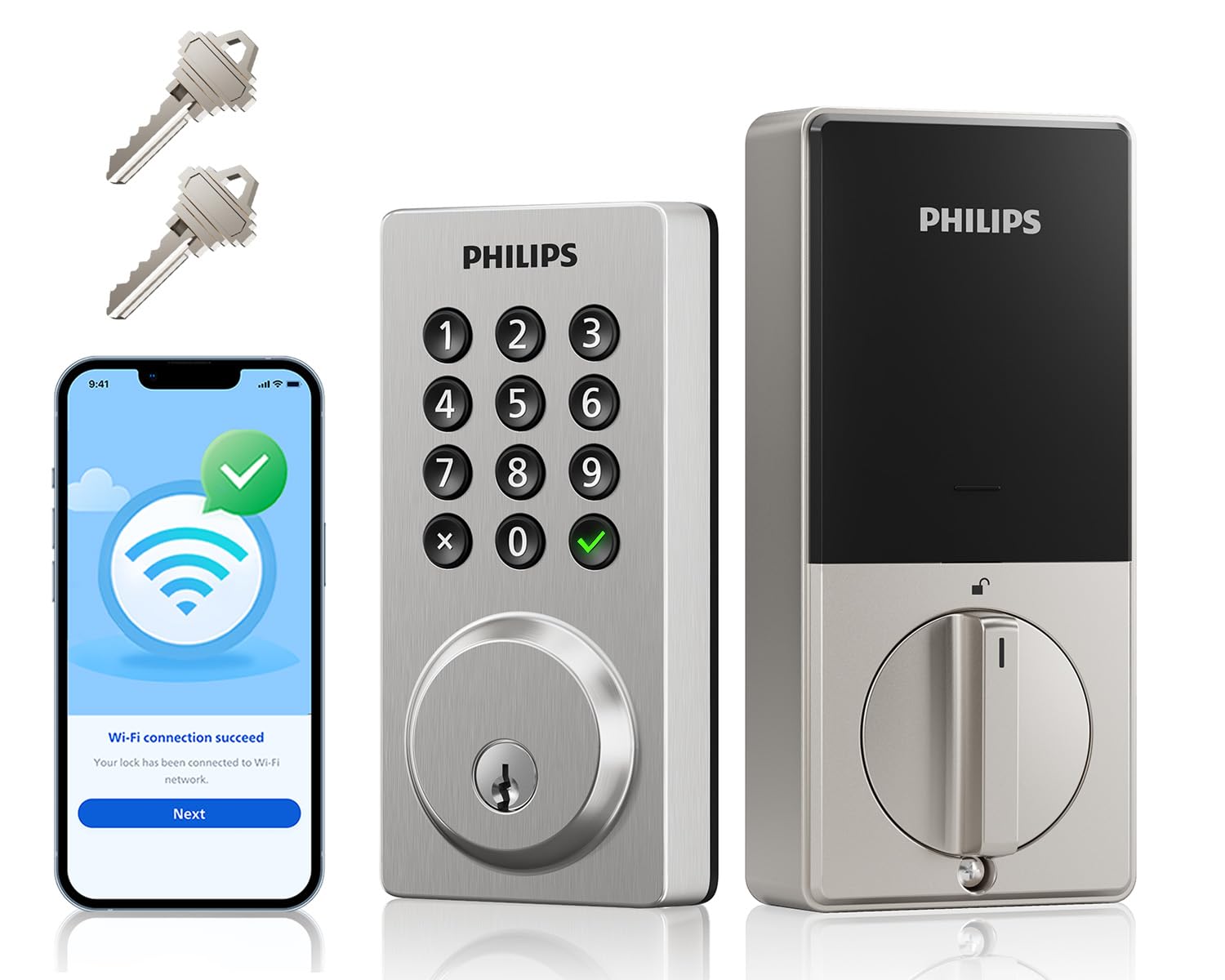
The Philips WiFi smart keypad deadbolt lock is aimed at homeowners who want app control, voice commands and keyless entry on the front door without buying a separate hub or bridge. It packs a backlit keypad, flexible access codes, an activity log and auto-lock into a single deadbolt that connects straight to the home’s WiFi network. This review covers what the lock does, how the pieces fit together, who it suits and where the compromises are. Buyers ready to move can check the current price on Amazon.
Features and Specifications
Type: WiFi smart keypad deadbolt lock
Connectivity: WiFi, no hub required
Control Methods: Backlit keypad, smartphone app, voice control, two physical keys
Access Features: Flexible codes, one-touch lock, auto-lock
Logging: Activity log in the app
Intended Use: Front door
The headline here is the "no hub needed" claim. Most smart locks at this level ask the buyer to add a bridge or a separate module before remote access works, and that extra box is both another cost and another thing to power and pair. The Philips lock skips that step by talking to the router directly, which matters most for the buyer who wants app control on day one without a shopping list of accessories.
The two physical keys are worth noting as a backup path. Keypad locks can run into a dead battery or a WiFi hiccup, and having a mechanical key as a fallback keeps the door usable when the electronics are not cooperating. The backlit keypad is the other practical detail — it is what makes the code pad usable after dark without fumbling for a phone.
Build and Design
The lock is a deadbolt, so it replaces the existing thumb-turn assembly rather than sitting on top of it. That means the exterior is a keypad face and the interior is a battery housing and motor, with the bolt itself passing through the door. Buyers installing this should expect to remove the old deadbolt and fit the new one into the same cutouts, which is a job most confident DIYers can handle with a screwdriver.
The backlit keypad suggests a design that prioritizes visibility over minimalism. The keys light up when touched, which is a small thing until the first time someone arrives home in the dark and needs to punch in a code. The trade-off is that a lit keypad and a motorized bolt both draw on the battery, so this is a lock that expects periodic battery checks rather than a set-and-forget device.
Two keys ship in the box, which is a sensible default. One for the homeowner and one for a spare, with the keypad covering everyone else. Buyers who want more physical keys will need to have them cut, which is a minor friction point but not a dealbreaker.
Power and Connectivity
The lock runs on batteries and connects over WiFi, and those two facts shape how it behaves in daily use. WiFi radios are hungry compared with Bluetooth or Z-Wave, so a WiFi lock generally asks for more frequent battery attention than a hub-based alternative. The upside is real: remote lock and unlock, activity log checks and voice commands all work without any intermediate device.
Auto-lock is the feature that earns its place here. A door that relocks itself after a set delay removes the most common smart-lock failure, which is the human one — walking away and forgetting. One-touch lock covers the opposite case, letting someone lock up on the way out without digging out a phone or entering a code.
The activity log rounds out the package. It records comings and goings in the app, which is useful for households with kids, cleaners, dog walkers or short-term guests. Flexible codes let the owner issue a code for a specific person or period and then revoke it, which is the practical version of key management.
Access and Daily Use
The lock’s core promise is that the front door opens four ways: keypad code, app, voice command or physical key. That redundancy is the point. A code for the family, a temporary code for a guest, the app for remote access and the key for the day the battery dies. Buyers who want the door to work for everyone in the household without handing out keys will find the setup covers the usual cases.
Voice control is the convenience layer. It suits a household already invested in a voice assistant and less so one without. It is a nice-to-have rather than the reason to buy, and it depends on the WiFi link staying healthy — which is the honest caveat for any hub-free lock. The router becomes the single point of failure, and a WiFi outage takes remote features with it. The keypad and the key still work, but the app does not.
Trade-off: A hub-free WiFi lock is only as reliable as the home network, and the always-on WiFi radio means more frequent battery changes than a hub-based design — buyers with weak or spotty WiFi near the front door should weigh that before committing.
Check the current price on Amazon
Who It Suits and Who It Does Not
This lock fits the homeowner who wants app and voice control on the front door without adding a hub, and who is comfortable with a battery-powered device that needs periodic attention. It also suits households that hand out codes rather than keys — renters with guests, families with a rotating cast of helpers, anyone tired of rekeying.
It is a poorer fit for the buyer who wants a lock that never needs battery service, or who has unreliable WiFi at the door and expects remote access to work anyway. Buyers who want the simplest possible install and no app at all are better served by a plain keypad deadbolt. And anyone renting a property should check with the landlord before swapping the deadbolt, since this is a permanent change to the door.
FAQ
-
Does the Philips WiFi smart keypad deadbolt lock need a hub?
No. The lock connects directly to the home’s WiFi network, so app control and voice commands work without a separate bridge or module. -
Can the door still be opened if the battery dies or the WiFi goes down?
Yes. Two physical keys ship with the lock, and the keypad continues to work on battery power. WiFi-dependent features like remote unlock and the activity log are what drop out during an outage. -
How many codes can be set up?
The lock supports flexible codes, which is the feature that lets the owner issue separate codes for family members, guests or service providers and revoke them later. The exact count is set by the app. -
Does it lock itself automatically?
Yes. Auto-lock relocks the door after a delay, and one-touch lock lets someone lock up manually on the way out. Both are configurable in the app. -
Can the lock be controlled by voice?
Yes. Voice control is one of the four access methods, alongside the keypad, the app and the physical key. It requires a compatible voice assistant and a working WiFi connection. -
Is the keypad visible at night?
Yes. The keypad is backlit, so codes can be entered in the dark without a phone or a porch light. -
Does it keep a record of who comes and goes?
Yes. The activity log in the app records lock and unlock events, which is useful for tracking guests, kids and service providers. -
Is this lock suitable for a rental property?
Only with the landlord’s permission. It replaces the existing deadbolt, which is a permanent change to the door. -
What kind of batteries does it use?
The lock is battery-powered, and the WiFi radio draws more than a hub-based design would. Buyers should plan on periodic battery checks rather than a once-a-year swap. -
Can more physical keys be made?
Yes, but only the two included keys ship in the box. Additional keys need to be cut locally.
Bottom Line
The Philips WiFi smart keypad deadbolt lock is the right pick for the homeowner who wants keyless entry, app control and voice commands on the front door without buying a hub. The backlit keypad, flexible codes, auto-lock and activity log cover the daily cases, and the two physical keys provide the fallback that matters when electronics misbehave. The trade-off is a WiFi-dependent design that asks for more battery attention and a healthy network at the door. Buyers who accept that bargain get a capable, self-contained smart lock. Check the current price on Amazon.
