Why there are Amazon links here: Brave Review is paid a commission for qualifying Amazon purchases made through the links below. Your price does not change, and using our links is entirely optional. How this works
Best Smart Lock for a Shared House: 5 Picks That Keep Every Key Accountable
The best smart lock for a shared house is one that hands out access without handing out keys. This guide covers five deadbolts and handle sets built for roommates, short-term rentals, and family homes where people come and go on different schedules. Each pick below earns its place for a different buyer: the renter who wants an easy install, the landlord juggling guest codes, or the tech-forward household that wants palm-vein entry. The overview table up next shows the differences at a glance.
Overview of the Picks
| Product | Key Spec | Best Use | Price Tier |
|---|---|---|---|
| Smart Locks for Front Door (Philips WiFi Keypad Deadbolt with Handle) | Built-in WiFi, voice and fingerprint unlock | All-in-one handle and deadbolt swap | Mid |
| Fingerprint Smart Door Lock with Handle & Keypad | Fingerprint plus keypad, Alexa and Google compatible | Budget-friendly rental and family entry | Budget |
| Wyze Palm Lock | Palm vein recognition, dual battery, BHMA, IP53 | Hands-free entry for busy shared entries | Mid |
| Veise VE06-H Smart Front Door Lock Handle Set | Remote access sharing, IP55 waterproof | Outdoor gates and shared side doors | Mid |
| ULTRALOQ Bolt SE Wifi Smart Deadbolt Lock | Matter support, Apple Home, Alexa, Google | Smart-home households with mixed ecosystems | Budget |
Five locks, five different jobs. The table above is the fastest way to narrow the field before reading the full reviews.
1. Smart Locks for Front Door — Best All-in-One Pick
Type: Keypad deadbolt with matching door lever
Connectivity: Built-in WiFi, app remote control
Entry Methods: Voice, fingerprint, flexible codes, backlit keypad
Extras: Auto-lock
Price Tier: Mid

This Philips keypad deadbolt arrives as a matched set: deadbolt plus door lever, which means one purchase replaces the whole entry point rather than half of it. Built-in WiFi skips the bridge or hub that many smart locks still require, so remote control works straight out of the box. Fingerprint, voice, and flexible codes give a shared house several ways to hand out access without cutting a single key. The backlit keypad matters for late arrivals, and auto-lock closes the door behind whoever forgets. Households that want one box to solve the entire front door are the target buyer here.
It suits the shared house that wants a coordinated look and a single app for everything. The catch is that a full handle-and-deadbolt swap is a bigger install than a deadbolt-only unit, and renters should confirm the door prep matches before ordering.
Trade-off: Replacing the lever as well as the deadbolt makes this the most involved install of the five, so a renter with a nonstandard door should measure twice.
2. Fingerprint Smart Door Lock with Handle & Keypad — Best Budget Pick
Type: Fingerprint deadbolt with handle and keypad
Connectivity: Remote access, Alexa and Google compatible
Entry Methods: Fingerprint, keypad, keyless entry
Install: DIY
Price Tier: Budget

This lock is pitched squarely at rentals and family homes, and the feature list shows it: fingerprint entry for kids who lose keys, keypad codes for guests, and remote access for the owner who is not on site. DIY install keeps the setup within reach of a handy homeowner. The handle-and-keypad combination means one unit covers the whole door, and Alexa and Google compatibility slots it into an existing smart home without extra hardware. At the budget end of this list, it is the value play for a shared house that needs function over finish.
It fits the landlord or parent who wants keyless entry without a premium price. The trade-off is typical of budget hardware: expect a plainer finish and fewer premium touches than the mid-tier picks.
Trade-off: At this price the materials and finish read as functional rather than furniture-grade, so it is a poor match for a home where the door hardware is a design feature.
3. Wyze Palm Lock — Best Hands-Free Pick
Type: Smart deadbolt with palm vein recognition
Entry Methods: Palm vein, keypad, mechanical key
Connectivity: WiFi, Alexa and Google
Ratings and Protection: BHMA, IP53
Power: Dual battery
Price Tier: Mid

Palm vein recognition is the headline here, and it solves a real shared-house problem: no key to lose, no fingerprint smudged by wet or dirty hands, and no code to share out loud. The keypad and mechanical key remain as backups, so a dead battery or a failed read never locks anyone out. Dual batteries add redundancy, and the BHMA and IP53 ratings point to hardware built for everyday exterior use. WiFi with Alexa and Google support keeps remote checks and voice control in reach. Auto-lock rounds out a package aimed at busy entries with a lot of traffic.
It suits the household where hands are full — groceries, kids, dogs — and entry needs to be instant. The caution is that palm vein is still a less common entry method, so guests may need a quick walkthrough the first time.
Trade-off: Palm enrollment is unfamiliar to most guests, and anyone expecting a simple code will need a short tutorial before the feature earns its keep.
4. Veise VE06-H Smart Front Door Lock Handle Set — Best for Outdoor and Shared Side Doors
Type: Handle set with keyless deadbolt
Entry Methods: Fob unlock, app control
Management: Remote access sharing, user management
Durability: IP55 waterproof
Extras: Auto-lock, low battery alarm
Finish: Matte black
Price Tier: Mid

The Veise VE06-H leans into management: remote access sharing and user management are the core features, which is exactly what a shared house needs when roommates change and codes have to change with them. The fob unlock gives less tech-minded residents a physical token that is not a cut key. IP55 waterproofing is the standout spec, making this the pick for a side door, gate, or covered outdoor entry that sees weather. The matte black handle set looks the part on a front door, and auto-lock plus a low battery alarm cover the two most common ways a smart lock fails.
It suits the shared house with an exterior door that gets wet and a rotating cast of users. The trade-off is that fob-based entry puts a physical object back in the equation, so lost fobs become the new lost keys.
Trade-off: The fob is convenient but reintroduces a physical token to lose, and replacing one adds a step that a code-only lock avoids.
5. ULTRALOQ Bolt SE Wifi Smart Deadbolt Lock — Best for Smart-Home Households
Type: WiFi smart deadbolt
Entry Methods: Fingerprint, app, code
Ecosystems: Apple Home, Alexa, Google, Matter
Extras: Auto-lock, remote control
Material: Solid zinc alloy
Price Tier: Budget
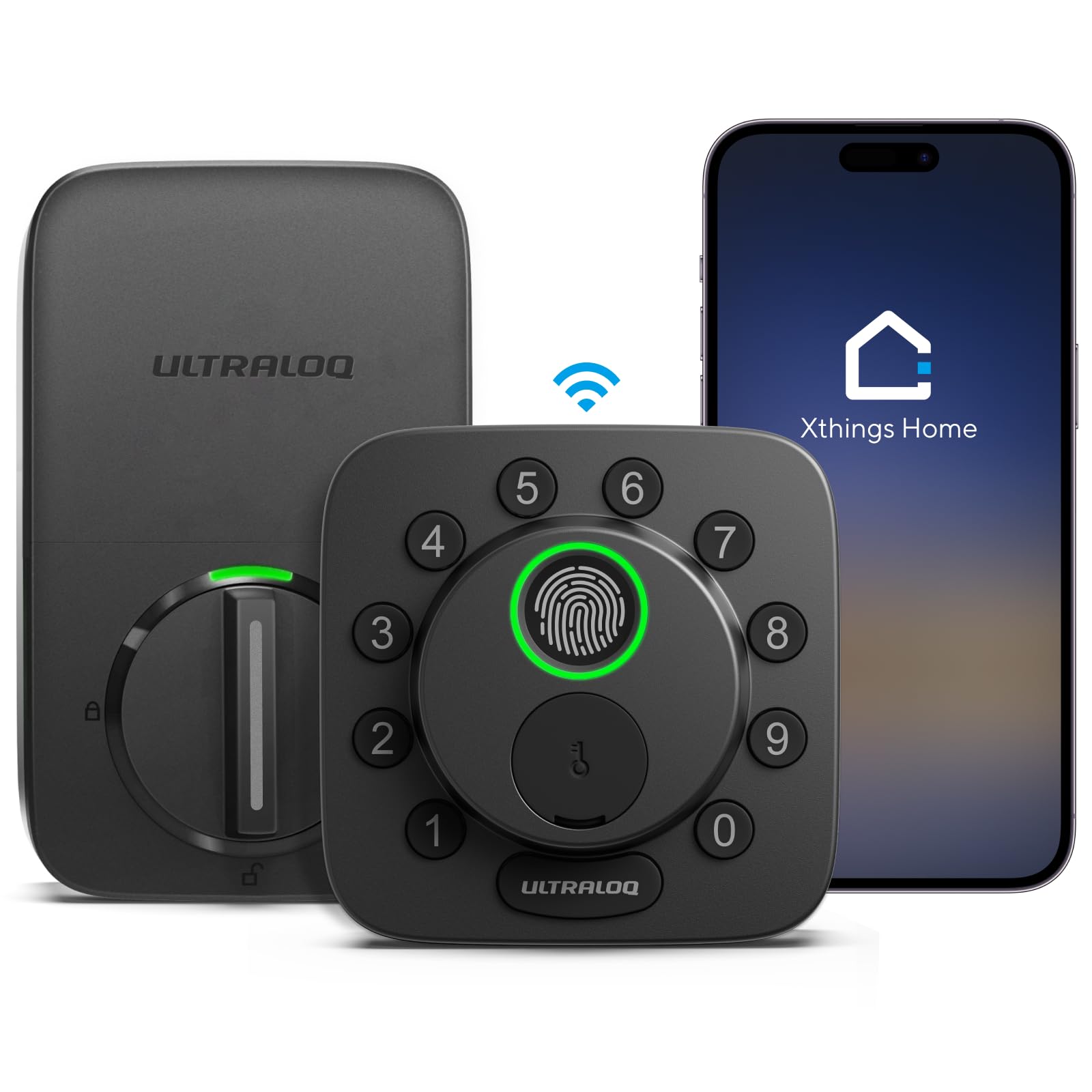
Matter support is the reason this lock stands out in a shared house full of mixed devices. Apple Home, Alexa, and Google all work here, so a household split between iPhone and Android users is not forced into one camp. Built-in WiFi handles remote control without a hub, and fingerprint, app, and code entry cover every resident and guest. Solid zinc alloy gives the deadbolt a sturdier feel than its budget position suggests. Auto-lock and remote control round out a package that is unusually complete for the price.
It suits the tech-forward shared house that already runs a smart speaker or hub and wants everything on one platform. The trade-off is that a feature-dense lock means a longer setup, and the budget price suggests the app experience will matter more than premium finishes.
Trade-off: Matter and multi-platform support make setup more involved than a single-ecosystem lock, so the least technical resident may need help with initial pairing.
Before You Buy
- Compatibility: Check the door prep and existing deadbolt backset before ordering, especially on handle-set models that replace the lever too.
- Connectivity: Built-in WiFi skips a hub; Matter and multi-platform locks need a compatible hub or app to unlock their full feature set.
- Entry methods: Match the lock to the household — fingerprint and palm for speed, codes and fobs for guests and less technical residents.
- Power: Look for dual batteries or a low battery alarm, and keep the mechanical key accessible as a backup.
- Weather rating: An IP rating matters for side doors, gates, and any entry that sees rain; interior doors need less.
- User management: Shared houses turn over residents, so remote code sharing and user management are worth more than a fancy finish.
- Install: A deadbolt-only swap is the simplest DIY job; a full handle-and-deadbolt set asks more of the door and the installer.
Frequently Asked Questions
-
What is the best smart lock for a shared house with roommates?
A lock with remote code sharing and user management, such as the Veise VE06-H or the Philips keypad set, makes it easy to add and remove access as roommates change. -
Can a renter install a smart lock?
Yes, in many cases. Deadbolt-only models are the least invasive, but renters should confirm the door prep matches and check the lease before swapping hardware. -
Do smart locks work without WiFi?
Most still open with a fingerprint, code, or key when the network is down. Built-in WiFi models add remote control, but local entry usually works regardless. -
How do guests get in without a key?
Through a temporary code, a fob, or a fingerprint enrolled by the owner. Codes are the easiest to revoke once a guest leaves. -
Which lock is best for an outdoor side door?
The Veise VE06-H carries an IP55 waterproof rating, making it the strongest fit for a door or gate exposed to weather. -
Do smart locks need a hub?
Not always. Models with built-in WiFi connect directly, while Matter and multi-platform locks may need a compatible hub to reach every ecosystem.
Bottom Line
For most shared houses, the Smart Locks for Front Door set is the top pick: built-in WiFi, fingerprint, voice, and flexible codes cover every resident and guest in one box, and the matching lever finishes the door properly. The Wyze Palm Lock is the hands-free alternative, and the ULTRALOQ Bolt SE is the value choice for a Matter household. Whichever fits, check the current price before ordering.