Why there are Amazon links here: Brave Review is paid a commission for qualifying Amazon purchases made through the links below. Your price does not change, and using our links is entirely optional. How this works
Best Smart Lock for a Door with a Thumbturn Inside: 5 Keyless Picks
A door with a thumbturn on the inside is a retrofit job, not a renovation. The best smart lock for a door with a thumbturn inside either keeps the existing deadbolt and adds a wireless keypad, or replaces the whole handle and deadbolt in one unit that mounts on the same door prep. This guide covers five models — two full handle-and-deadbolt replacements, two Philips retrofit units, and a budget biometric knob — so renters, homeowners and small-office managers can each land on a fit quickly. The overview table below is the fastest way to decide; the reviews that follow explain the trade-offs.
The 5 Picks at a Glance
| Product | Key Spec | Best Use | Price Tier |
|---|---|---|---|
| Philips Upgraded Wi-Fi Smart Lock with Handle | Built-in Wi-Fi, fingerprint, lever handle | Front doors and offices needing app control | Mid |
| Smart Locks for Front Door (Philips WiFi Keypad Deadbolt with Handle) | Built-in Wi-Fi, backlit keypad, voice unlock | High-traffic front doors | Mid |
| Yamiry Fingerprint Keyless Entry Handle Lock | Electronic knob, digital codes, passage mode | Bedrooms and interior doors | Budget |
| Philips WiFi Smart Retrofit Lock + Wireless Fingerprint Keypad | Retrofit over existing deadbolt | Renters keeping their current hardware | Mid |
| Fingerprint Door Lock with Keypad & Handle | Biometric knob, passcode entry | Home offices and bedrooms | Budget |
1. Philips Upgraded Wi-Fi Smart Lock with Handle

Type: Complete handle and deadbolt set
Connectivity: Built-in Wi-Fi
Entry Methods: Fingerprint, keypad, app, key
Auto-Lock: Yes
Mounting: Replaces the existing lever handle and deadbolt
Best For: Front doors and offices
Philips Upgraded Wi-Fi Smart Lock with Handle
This is the most complete package in the lineup: a lever handle and keypad deadbolt in one box, so the door gets a consistent look instead of a mismatched handle bolted next to a smart deadbolt. Built-in Wi-Fi means no separate hub, and the fingerprint reader plus keypad cover the two entry methods most households actually use daily. The auto-lock function is the quiet selling point for anyone who regularly forgets to lock up behind themselves. It suits a front door or a small office where several people need their own access method.
The pick earns its place because it handles the whole door in a single install, which matters on a door with a thumbturn inside — the interior side gets a proper thumbturn lever rather than a bare cylinder. Buyers who want app control without adding a bridge will find it the least fussy route. The trade-off: a full handle-and-deadbolt replacement demands the door already has the right bore spacing, so anyone with an unusual door prep should measure before ordering.
2. Smart Locks for Front Door, Voice & Fingerprint Unlock (Philips WiFi Keypad Deadbolt with Handle)

Type: Keypad deadbolt with matching door lever
Connectivity: Built-in Wi-Fi
Entry Methods: Fingerprint, backlit keypad, voice, app
Code Management: Flexible, multiple codes
Auto-Lock: Yes
Best For: Busy front doors and shared entrances
The backlit keypad is the differentiator here — a real advantage on a porch or entry that stays dark through winter, and one that separates it from cheaper keypads that go invisible after dusk. Flexible code management makes it the natural choice for a household with a cleaner, a dog walker or a rental turnover schedule, since temporary codes can be issued and retired without handing out keys. Voice unlock adds a hands-free option for anyone carrying groceries or parcels. The lever matches the deadbolt finish, so the door reads as one unit.
This pick suits high-traffic front doors and shared entrances where several people cycle through. It earns its slot because the combination of backlighting, flexible codes and voice control is unusually broad for this price band. The trade-off: voice unlock depends on a connected assistant ecosystem, so buyers outside that ecosystem pay for a feature they will not use — the keypad and fingerprint reader are the parts that matter day to day.
3. Yamiry Fingerprint Keyless Entry Handle Lock

Type: Electronic door knob
Entry Methods: Fingerprint, digital codes
Special Mode: Passage mode
Auto-Lock: Yes
Compatibility: Works alongside an existing deadbolt
Best For: Bedrooms, interior doors, back doors
Yamiry Fingerprint Keyless Entry Handle Lock
This is the pick for a door that already has a deadbolt and only needs the knob upgraded. Because it works with the existing deadbolt rather than replacing it, the thumbturn on the inside stays exactly where it is — a genuine advantage for anyone who does not want to touch the primary lock. Passage mode is the feature worth noting: it lets the latch stay open for a stretch of time, which suits a back door during a party or a bedroom door in a busy hallway. Easy installation keeps the job within reach of a basic tool kit.
It suits bedrooms, interior doors and secondary exterior doors where the deadbolt is doing the real security work. The pick earns its place on price and on the fact that it leaves existing hardware alone. The trade-off: an electronic knob is a convenience lock, not a security lock, so it should never be the only thing between a house and the street — the deadbolt behind it is what actually resists force.
4. Philips WiFi Smart Retrofit Lock + Wireless Fingerprint Keypad
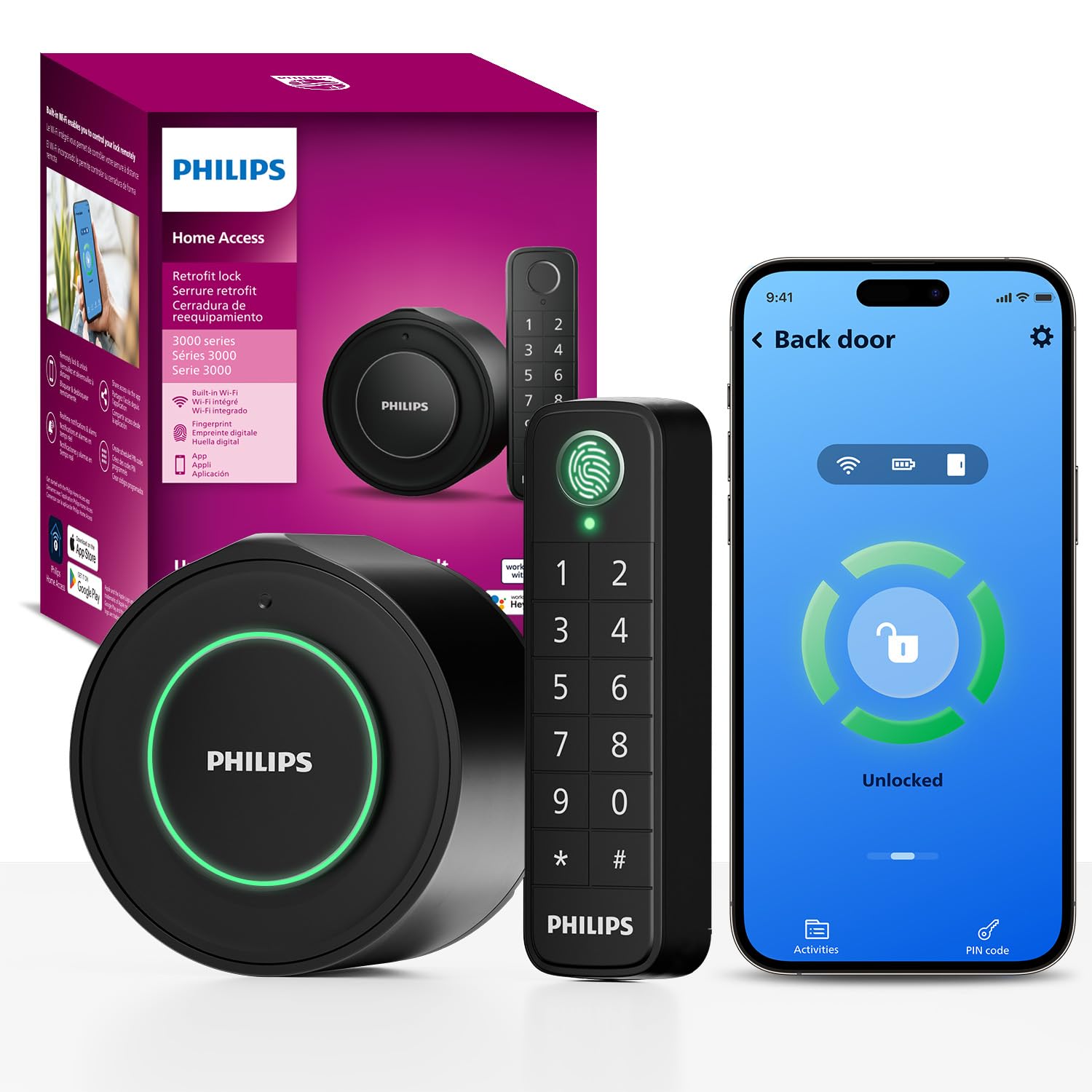
Type: Retrofit deadbolt cover with wireless keypad
Connectivity: Built-in Wi-Fi
Entry Methods: Wireless fingerprint keypad, app, voice
Installation: Updates the existing deadbolt
Auto-Lock: Yes
Interior Side: Interior knob included
Best For: Renters and anyone keeping their current deadbolt
Philips WiFi Smart Retrofit Lock + Wireless Fingerprint Keypad
This is the answer for a door with a thumbturn inside that the owner does not want to replace. The retrofit unit mounts over the existing deadbolt, and the wireless fingerprint keypad goes on the outside of the door with no wiring to run — a combination that makes it the friendliest option for renters and for anyone in a building where exterior door changes need approval. Built-in Wi-Fi and voice control are both handled without an extra hub. The interior knob is included, so the inside face of the door still looks finished.
It suits renters, apartment dwellers and homeowners who like their current deadbolt hardware. The pick earns its place because retrofit is the lowest-risk way to make a thumbturn door smart, and this one adds a fingerprint keypad rather than stopping at app control. The trade-off: a wireless keypad runs on its own power supply, so battery changes happen in two places instead of one, and the pairing between keypad and lock is one more thing that can need re-establishing after a long outage.
5. Fingerprint Door Lock with Keypad & Handle
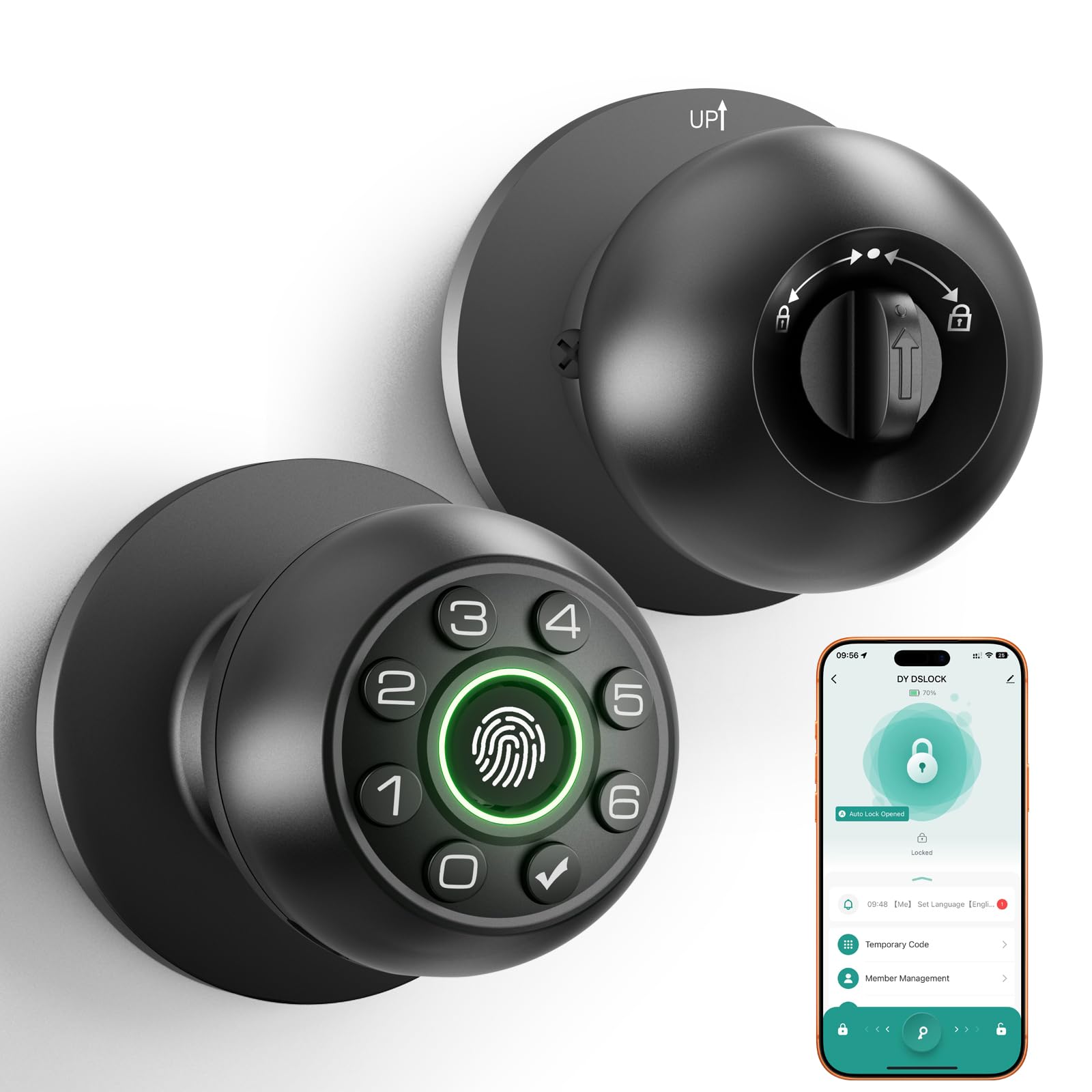
Type: Biometric door knob with keypad
Entry Methods: Fingerprint, passcode
Handle: Integrated lever
Best For: Bedrooms and home offices
Price Tier: Budget
Connectivity: Standalone, no app required
Fingerprint Door Lock with Keypad & Handle
The cheapest way into keyless entry, and a sensible one for a door that does not need remote control. Fingerprint and passcode cover the two entry methods that matter on an interior door, and the integrated lever means the whole thing installs as one piece. There is no app and no Wi-Fi, which is a feature rather than a gap for a bedroom or home office — nothing to configure, nothing to keep online, nothing that stops working when the router does.
It suits bedrooms, home offices and any interior door where the goal is keeping a roommate, a child or a visitor out rather than defending against a determined intruder. The pick earns its place on price and simplicity. The trade-off: at this price tier the build is lighter than the premium picks, and a standalone knob with no app means no remote unlocking, no access log and no way to let someone in from elsewhere — buyers who want any of that should look at the Wi-Fi models above.
Before You Buy
- Compatibility: Confirm whether the door needs a full handle-and-deadbolt replacement or accepts a retrofit over the existing deadbolt; the thumbturn inside stays only with the retrofit and knob-only options.
- Door prep: Measure the bore spacing and backset before ordering a full replacement, since a complete handle set will not fit an unusual prep.
- Connectivity: Decide whether built-in Wi-Fi is needed; a standalone keypad knob costs less and skips the app entirely.
- Power: Every electronic lock here runs on batteries — retrofit kits with a wireless keypad have two power supplies to track.
- Security layer: A smart knob or keypad is a convenience lock; the deadbolt behind it is what provides real resistance.
- Who needs access: Households with cleaners, dog walkers or short-term guests should prioritise flexible or temporary codes.
- Finish matching: On a full replacement, check that the lever and deadbolt finishes match so the door reads as one unit.
Frequently Asked Questions
-
Can a smart lock work with a thumbturn on the inside?
Yes. Retrofit models mount over the existing deadbolt and keep the interior thumbturn, while full replacements swap in their own interior knob or lever. Knob-only locks leave the deadbolt and its thumbturn untouched. -
Which pick is best for a rented apartment?
The Philips retrofit lock. It updates the existing deadbolt instead of replacing it, which is the least invasive option and the easiest to reverse at move-out. -
Do these locks need a hub or bridge?
The Philips models have Wi-Fi built in and connect directly. The budget knob is standalone with no app at all, so no hub is involved either way. -
Is a keypad knob enough security for a front door?
No. An electronic knob is a convenience layer; a front door should keep a deadbolt as the primary lock, with the smart knob or keypad as the secondary entry method. -
What happens in a power or Wi-Fi outage?
The locks run on battery power, not mains, so entry still works. Remote app access is what drops during an internet outage, which is why a keypad or fingerprint reader on the door itself matters. -
Can several people have their own codes?
The Wi-Fi keypad model supports flexible code management, which is the right choice for shared entrances. The budget knob is better suited to a single household or a private office.
Bottom Line
For most doors with a thumbturn inside, the Philips Upgraded Wi-Fi Smart Lock with Handle is the pick to beat: it replaces the handle and deadbolt as one matched set, connects over built-in Wi-Fi without a hub, and covers fingerprint, keypad and app entry in a single install. Renters and anyone unwilling to touch the existing deadbolt should take the Philips retrofit lock instead, and a bedroom or home office needs nothing more than the budget biometric knob.
