Why there are Amazon links here: Brave Review is paid a commission for qualifying Amazon purchases made through the links below. Your price does not change, and using our links is entirely optional. How this works
TEEHO TK001H vs Philips Fingerprint Smart Lock: Keypad or Biometric Entry
The TEEHO TK001H and the Philips fingerprint smart lock split the front-door market along one clean line: one opens with codes, the other opens with a finger or a phone. The TEEHO is the budget keypad deadbolt for households that want keyless entry without an app; the Philips is the connected, biometric lock for buyers who want hands-free unlocking and remote control. The comparison below weighs build, entry methods, connectivity, installation and price tier so a buyer can pick one and move on.
TEEHO TK001H Keyless Entry Door Lock
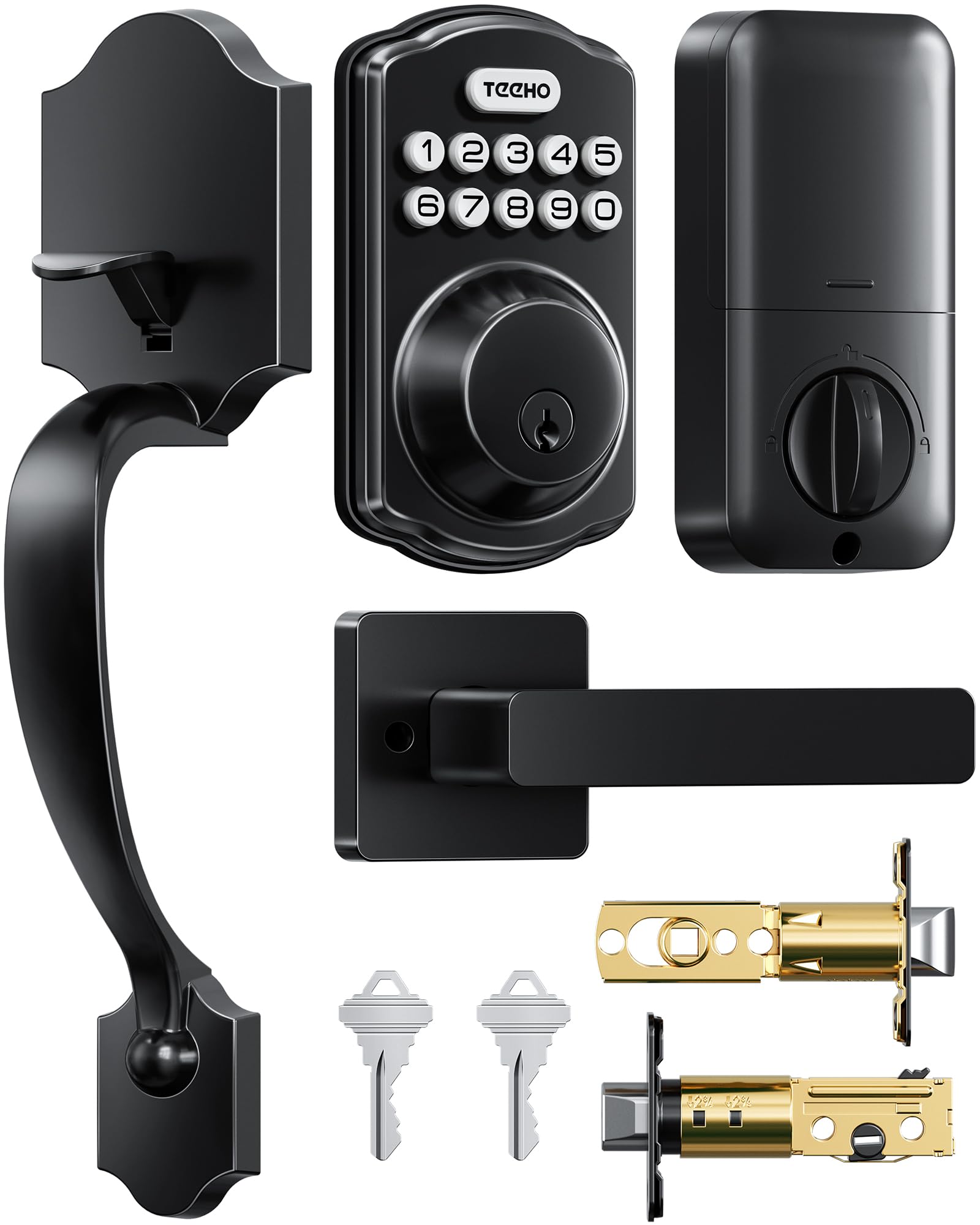
Security Rating: Grade 3
Locking: Auto-lock and one-touch lock
Code Features: Anti-peep entry and one-time codes
Special Mode: Passage mode
Installation: Easy installation
Material: Zinc alloy
Finish: Matte black
The TK001H is a code-first deadbolt. A Grade 3 rating is the residential security baseline lockmakers advertise for front doors, and the zinc alloy body with a matte black finish is built for a main entry rather than a closet or garage door. Anti-peep code entry lets a resident obscure the digits being pressed, and one-time codes give a visitor or a service worker a way in that expires after use.
Auto-lock and one-touch lock cover the two habits that matter day to day: the door relocks itself after a set delay, and a single press locks it on the way out. Passage mode disables auto-lock for a stretch of time, which suits a party, a move, or a household where the door is in constant use. The trade-off is that the TK001H has no fingerprint reader and no app, so every entry runs through the keypad or the physical key.
Philips Fingerprint Smart Lock

Unlock Methods: Voice, fingerprint, flexible codes, keypad
Connectivity: Built-in WiFi
Control: App remote control
Keypad: Backlit
Locking: Auto-lock
Hardware: Keypad deadbolt with door lever and handle
The Philips lock is the more capable of the two and prices itself accordingly. A fingerprint reader handles the everyday case — a thumb on the sensor, door open, no code to remember and no phone to pull out. Flexible codes add the household and guest layer on top, and the backlit keypad keeps code entry usable after dark, which matters on a porch with weak lighting.
Built-in WiFi is the real divider. There is no hub to buy and no bridge to install: the lock joins the home network directly and the app handles remote unlocking, code management and status checks from anywhere. Voice unlock extends that to a smart speaker, and the package includes a door lever and handle rather than a bare deadbolt, so a buyer replacing an old knob-and-deadbolt pair gets matching hardware in one box. The trade-off is the price and the setup load: built-in WiFi, biometrics and app pairing mean more configuration than a keypad-only lock, and a lock this connected is only as useful as the home network behind it.
TEEHO TK001H vs Philips: Side-by-Side Specs
| Feature | TEEHO TK001H | Philips Fingerprint Smart Lock |
|---|---|---|
| Entry method | Keypad code, physical key | Fingerprint, voice, code, keypad |
| Connectivity | None | Built-in WiFi |
| App control | No | Yes, remote control |
| Fingerprint reader | No | Yes |
| Keypad | Standard | Backlit |
| Security rating | Grade 3 | Not stated in name |
| Auto-lock | Yes | Yes |
| Special modes | Passage mode, one-time codes, anti-peep | Flexible codes |
| Material | Zinc alloy | Not stated in name |
| Hardware included | Lock set | Deadbolt plus door lever and handle |
| Price tier | Budget | Mid-range |
Where the Two Locks Diverge
Entry method is the first split. The Philips lock opens on a fingerprint, which is the fastest thing a hand can do at a door with arms full of groceries. The TEEHO opens on a code, which is slower to enter but cannot fail on a worn finger or a wet hand. Households with children, older residents or anyone who struggles with fingerprint sensors will find the TEEHO’s keypad the more reliable daily interface.
Connectivity is the second. The Philips lock has WiFi inside the housing, so remote unlock, guest codes issued from a phone and entry history all work without extra hardware. The TEEHO has no radio at all, which means no app, no remote access and nothing to reconfigure when the router changes. That is a limitation for some buyers and a feature for others.
Hardware scope is the third. The Philips package includes a lever and handle, so it is a full front-door replacement. The TEEHO is a lock set, and buyers matching it to existing hardware need to confirm the door prep lines up before ordering.
Security rating favors the TEEHO on paper. Grade 3 is a stated residential rating; the Philips name makes no equivalent claim, so buyers who weigh certification heavily have one clear answer and one open question.
Price tier settles the rest. The TEEHO sits in the budget bracket and the Philips in the mid-range. The gap buys biometrics, WiFi and a handle — nothing about the TEEHO’s core locking is deficient, it simply does less.
Which Should You Buy?
Choose the TEEHO TK001H if the priority is keyless code entry at the lowest cost, the door already has hardware worth keeping, and no one in the household needs remote or app-based control. It also suits rental properties and second doors, where simple and self-contained beats connected.
Choose the Philips fingerprint smart lock if fingerprints, voice and phone control are the point, the front door needs a full handle-and-deadbolt replacement, and the home network can support a WiFi lock. It is the better fit for a main entry used by a family with mixed schedules and guests.
FAQ
-
Does the TEEHO TK001H work with a phone app?
No. The TK001H is a standalone keypad lock with no WiFi or app layer; all management happens at the keypad. -
Does the Philips lock need a hub or bridge?
No. WiFi is built into the lock, so it connects to the home network directly and the app controls it remotely. -
Can the Philips lock be opened without a fingerprint?
Yes. Voice unlock, flexible codes and the backlit keypad all work as alternatives, which covers guests and anyone whose fingerprint will not read. -
What does Grade 3 mean on the TEEHO?
It is a residential security rating the lockmaker states for the TK001H, indicating it is built for home front-door use rather than commercial duty. -
Is the TEEHO suitable for a rental?
Yes, and its lack of app pairing makes it simpler to hand over — codes can be changed at the keypad and one-time codes cover temporary access. -
Does the Philips lock relock itself?
Yes. Auto-lock is part of the feature set, and code management through the app lets a household adjust access without touching the lock. -
Which lock is easier to install?
The TEEHO markets easy installation and involves no network setup. The Philips includes more hardware and requires WiFi pairing, so it takes longer even though the mechanical steps are similar.
Bottom Line
The Philips fingerprint smart lock is the stronger pick for a main front door where biometric entry, WiFi and app control are worth the mid-range price, while the TEEHO TK001H is the right answer for buyers who want dependable Grade 3 keypad entry, one-time codes and auto-lock without paying for connectivity they will not use. Buyers who want the full feature set should start with the Philips fingerprint smart lock; buyers who want simple and cheap should take the TEEHO TK001H.
