Why there are Amazon links here: Brave Review is paid a commission for qualifying Amazon purchases made through the links below. Your price does not change, and using our links is entirely optional. How this works
Best Keypad Lock for a Household with an Elderly Relative
Choosing a keypad lock for a home with an elderly relative comes down to three things: the code has to be easy to see and press, a physical key has to be there as a fallback, and nothing should depend on a smartphone. This guide covers five locks that meet that brief, from a simple knob to a full smart deadbolt. It suits adult children managing a parent’s entry, caregivers who need their own code, and older homeowners who want to stop fumbling with keys. The overview below compares all five before the detailed reviews.
Overview of the Picks
| Product | Key Spec | Best Use | Price Tier |
|---|---|---|---|
| Yamiry Electronic Code Knob | 20 user codes, 2 backup keys | Simplest retrofit on a standard knob | Budget |
| TEEHO TE001 Deadbolt | ANSI Grade 3, IP54 waterproof | Front door that needs real security | Budget |
| Veise KS03 Keypad Knob | One-time code, passage mode | Bedroom and interior doors | Mid-range |
| Keypad Door Lock with Handle | No app or Wi-Fi, 20 passcodes | Households that want zero connectivity | Mid-range |
| Philips WiFi Keypad Deadbolt | Fingerprint and voice unlock, built-in Wi-Fi | Remote family oversight | Premium |
Yamiry Electronic Code Knob for Front Door

Type: Keypad door knob with handle
User Codes: 20
Backup Access: 2 backup keys
Locking: Auto lock
Keypad: Backlit
Installation: Easy installation
The Yamiry is a knob replacement rather than a deadbolt, which makes it the least intimidating option here. Installation is a direct swap on a standard door prep, so no new holes and no locksmith. The backlit keypad stays readable in a dim hallway, and the twenty user codes leave room for family, a caregiver and a neighbor without sharing one number.
The auto-lock feature removes the most common senior mistake — walking away without locking up. It suits an older relative who is comfortable with a key but wants to stop carrying one, and it suits the adult child who wants a same-day install.
Trade-off: A knob-style lock offers less physical security than a deadbolt, so it belongs on a secondary entrance or an interior door rather than the only lock on a main front door.
Check the current price on Amazon
TEEHO TE001 Keyless Entry Deadbolt

Type: Keypad deadbolt
Security Rating: ANSI Grade 3
Weather Rating: IP54 waterproof
User Codes: 20
Backup Access: 2 backup keys
Key Features: Low battery alert, one-touch lock, anti-peep password
This is the pick for the main front door. ANSI Grade 3 gives it a recognized security baseline, and the IP54 rating means rain and dust are not an immediate concern on an exposed entry. The anti-peep feature lets a code be entered with extra digits around it, which matters when a relative is punching in a number at a door visible from the street.
The low battery alert is the detail that earns this lock its place in an elderly household. A warning before the battery dies is far kinder than a lockout in bad weather, and the two backup keys cover the case where it is ignored anyway.
Trade-off: A deadbolt install requires a properly sized bore hole and some comfort with a screwdriver, so it is not the drop-in swap that a knob-style lock is.
Check the current price on Amazon
Veise KS03 Keypad Door Knob
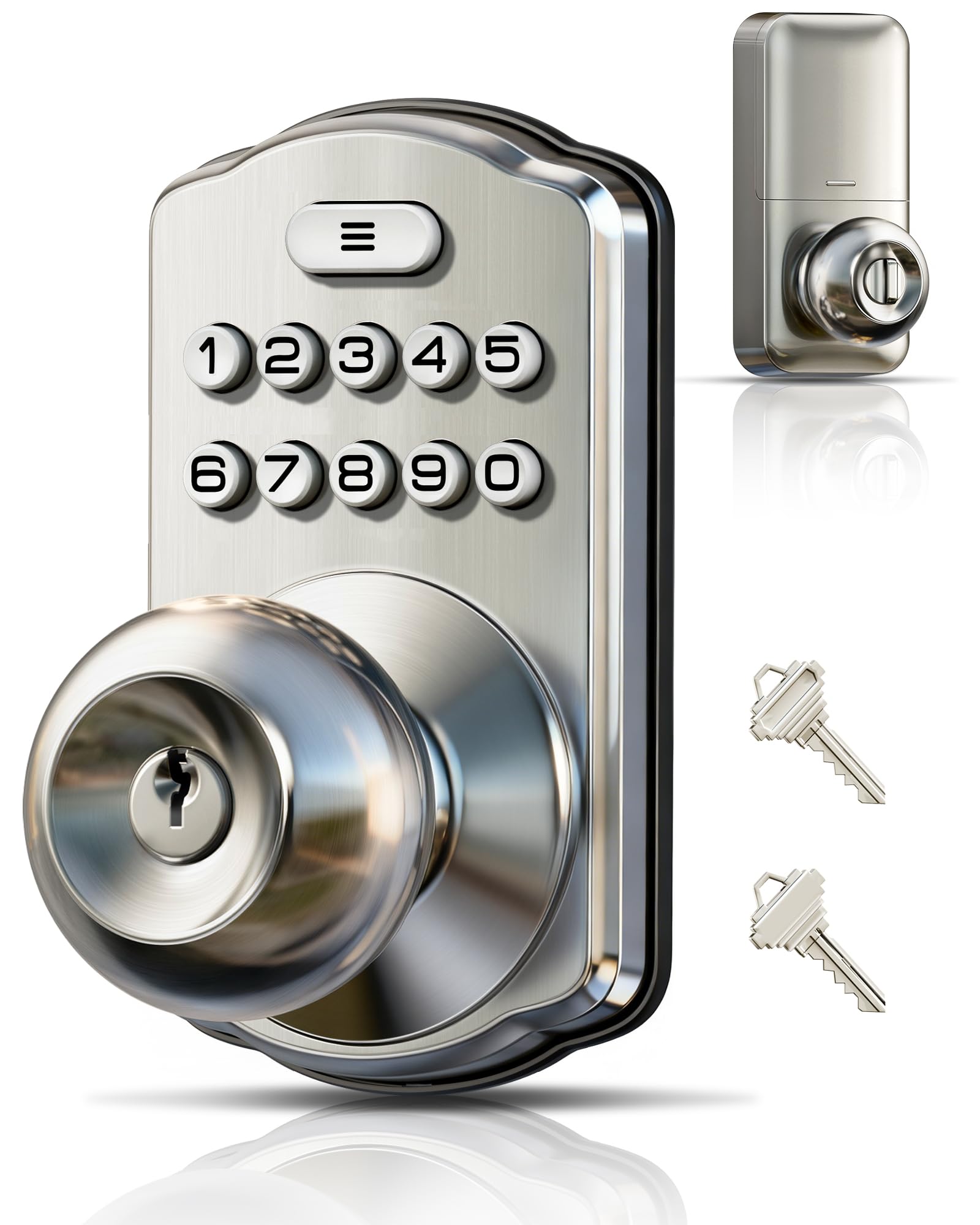
Type: Keypad door knob with handle
Finish: Satin nickel
Key Features: Auto lock, passage mode, one-time code, low battery alert
Keypad: Backlit
Installation: Easy install
Intended Use: Front door and bedroom
The Veise stands out for the one-time code, which is the feature to look for when a visiting nurse, a cleaner or a delivery helper needs entry once and never again. Passage mode disables the lock for a set period, useful on moving day or during a hospital stay when the door needs to stay open to traffic.
The satin nickel finish is a neutral match for most interior hardware, and the backlit keypad keeps it usable at night. It suits a household adding a lock to a bedroom or a secondary door where a deadbolt is overkill.
Trade-off: Passage mode is a convenience that can be left on by accident, so a household with memory concerns should confirm the lock is armed after any period of open-door use.
Check the current price on Amazon
Keypad Door Lock with Handle, No App or Wi-Fi

Type: Keypad door lock with handle
Connectivity: No app or Wi-Fi
Passcodes: 20
Backup Access: 2 keys
Key Features: Auto-lock, one-touch lock, passage mode, backlit keypad
Installation: Easy DIY install
This is the pick for the household that wants keypad convenience without any network connection at all. There is no app to install, no account to create and no router to involve, which removes an entire category of frustration for an older user and for the family member providing tech support. Everything is managed at the keypad itself.
The one-touch lock means a single press secures the door on the way out, and auto-lock backs that up. Twenty passcodes cover a large family, and the two keys remain the fallback.
Trade-off: Without Wi-Fi there is no remote unlock and no entry history, so a family that wants to check on a relative’s comings and goings from a distance should look at the smart option instead.
Check the current price on Amazon
Philips WiFi Keypad Deadbolt with Handle

Type: Smart deadbolt with lever handle
Unlock Methods: Voice, fingerprint, code, app
Connectivity: Built-in Wi-Fi
Key Features: Flexible codes, auto-lock, backlit keypad, app remote control
Backup Access: Physical lever handle with key
The Philips is the premium pick and the one that answers the question "what if a relative cannot remember a code at all?" Fingerprint unlock removes the memory step entirely, and voice unlock adds a second hands-free route. Built-in Wi-Fi means no separate hub, and the app allows remote control from another city.
For an elderly relative with arthritis or a tremor, a fingerprint read is often faster than tapping four digits. The backlit keypad and auto-lock are present here too, so the basics are not sacrificed for the smart features.
Trade-off: This is the most complex lock in the group by a wide margin. Setup, app pairing and battery management all add steps, and a relative who dislikes smartphones may never use half of what it offers.
Check the current price on Amazon
Before You Buy
- Backup key access: Any keypad lock can run out of power or fail. Confirm the model ships with physical keys and that the relative keeps one somewhere accessible.
- Keypad visibility: A backlit keypad is close to essential for an older user, especially on a porch with poor lighting or a door reached after dark.
- Code management: Twenty codes is generous but only useful if someone can actually add and delete them. Choose a lock whose programming can be done at the keypad if app use is unlikely.
- Battery warnings: A low battery alert is the difference between a planned battery swap and a lockout. Prioritize models that announce it.
- Installation type: A knob swap is a direct replacement; a deadbolt needs a compatible bore hole. Measure the door before ordering.
- Connectivity appetite: No-app locks are simpler and more private. Wi-Fi locks add remote access and entry history but also setup and maintenance.
- Physical security level: For a main front door, a deadbolt with a recognized security rating is the safer choice than a knob lock.
Frequently Asked Questions
-
Is a keypad lock easier than a key for an elderly person?
Usually yes, provided the keypad is backlit and the code is short. The main risk is forgetting the number, which is why a backup key and a fingerprint option are worth considering. -
What happens when the batteries die?
A lock with a low battery alert gives warning well before failure. Every model here includes backup keys, so a dead battery is an inconvenience rather than a lockout. -
Can a caregiver have their own code?
Yes. All five locks support multiple user codes, so a caregiver, cleaner or family member can each have a separate number that can be removed later. -
Do these locks need Wi-Fi?
Only the Philips model has built-in Wi-Fi. The other four work entirely at the door with no app, account or router involved. -
Should the lock go on the front door or a bedroom door?
A deadbolt belongs on the main entry. A knob-style lock is a better fit for a bedroom or secondary door, where the lighter build is not a security concern. -
Is a fingerprint lock a good idea for someone with arthritis?
It can be, because it removes the need to press small buttons. It is worth testing the fingerprint reader in person before committing, since grip and skin condition affect reliability.
Bottom Line
For most households with an elderly relative, the TEEHO TE001 is the safest default: a rated deadbolt, a backlit keypad, anti-peep entry and a low battery alert, all without an app. Households that want zero connectivity should take the no-app keypad lock with handle, and those wanting remote oversight should step up to the Philips Wi-Fi deadbolt.
