Why there are Amazon links here: Brave Review is paid a commission for qualifying Amazon purchases made through the links below. Your price does not change, and using our links is entirely optional. How this works
Best Smart Lock for a Household With Children and No Keys
A household with children and no keys has three problems to solve at once: small hands that lose fobs, doors that must lock themselves, and adults who want to get in without digging through a bag. The five picks below cover that ground — one cabinet lock for the cupboards that matter, and four door locks that replace the key entirely. Families who want the simplest possible front-door upgrade should start with the Tapo deadbolt, while renters and multi-user homes will find more in the fingerprint and keypad models. The overview table below puts every pick side by side; the reviews explain who each one fits.
Overview of the Picks
| Product | Key Spec | Best Use | Price Tier |
|---|---|---|---|
| Anweller Smart Cabinet Lock | Hidden adhesive RFID/Bluetooth cabinet lock | Baby-proofing cabinets and liquor storage | Budget |
| Fingerprint Smart Door Lock with Handle & Keypad | Fingerprint + keypad with handle, Alexa & Google | Rentals and Airbnb turnovers | Mid-range |
| Tapo Smart Wi-Fi Deadbolt DL100 | Tactile keypad, auto-lock, IP54, BHMA Grade 3 | Main entry on a standard door | Mid-range |
| WiFi Video Smart Lock | 5-in-1 entry with camera and 2-way talk | Front doors that need eyes on visitors | Premium |
| Philips WiFi Keypad Deadbolt with Handle | Voice + fingerprint, backlit keypad, built-in Wi-Fi | Busy family front doors | Mid-range |
Anweller Smart Cabinet Lock
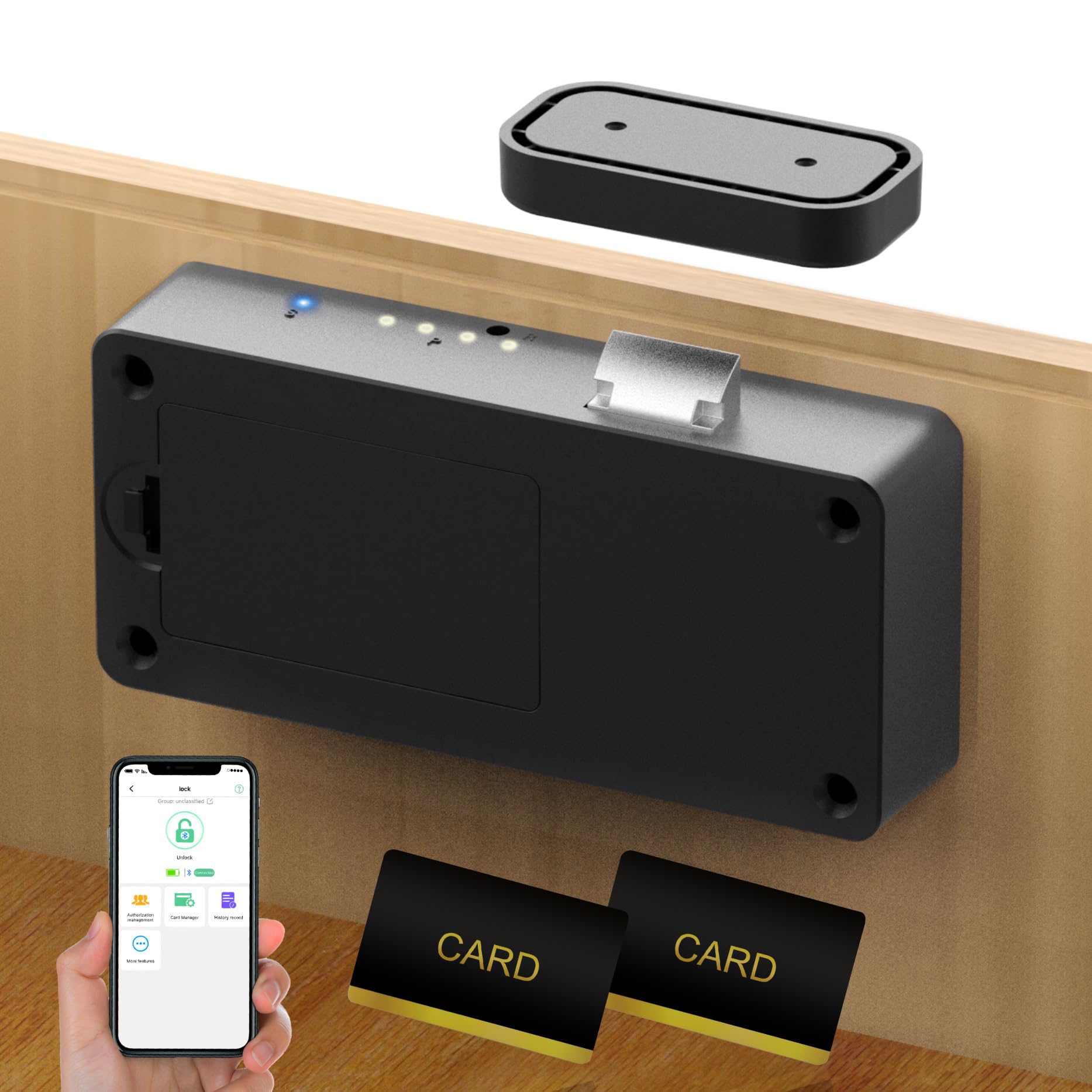
Type: Hidden cabinet and drawer lock
Entry: RFID card and Bluetooth app
Mounting: No-drill adhesive
Color: Black
Intended use: Kitchen cupboards, file drawers, liquor cabinets, closets
This is the odd pick in the group, and the one families with toddlers should read first. It is not a door lock at all — it is a concealed latch that mounts inside a cabinet with adhesive rather than screws, so a rental kitchen does not get drilled. Access runs through an RFID card or the companion app over Bluetooth, which means an adult can open a cupboard in a second while a child cannot reach or defeat the mechanism.
The hidden placement is the point. There is no visible hasp or strap on the outside of the door, so the cabinet looks untouched and there is nothing for a curious four-year-old to tug on. It suits households that need to secure cleaning supplies, medication drawers, or a liquor cabinet without turning the kitchen into a hardware project.
Trade-off: Adhesive mounting is only as strong as the surface it sits on, so a poorly cleaned or oily cabinet interior can weaken the hold over time.
Fingerprint Smart Door Lock with Handle & Keypad

Type: Door lock with integrated handle
Entry: Fingerprint, keypad, remote access
Smart home: Alexa and Google compatible
Install: DIY
Intended use: Homes, kids, Airbnb, rental property
This is the pick for a household that wants the handle and the lock to arrive as one unit. The lever is built in, so a worn-out old handle gets replaced in the same job as the lock, and the fingerprint reader means a child who cannot remember a code can still get in with a thumb. Keypad entry covers guests and babysitters, and remote access handles the doorbell-from-the-driveway problem.
The DIY install framing and the explicit Airbnb and rental mention tell the story: this is designed to be swapped in by a competent homeowner without a locksmith, and to be re-keyed by code rather than by hardware. It suits landlords and short-term hosts as much as it suits families.
Trade-off: A combined handle-and-lock unit commits the buyer to that handle style on that door, so a mismatched lever elsewhere in the house is hard to avoid.
Tapo Smart Wi-Fi Deadbolt DL100

Type: Wi-Fi deadbolt
Entry: Tactile keypad
Security rating: BHMA Grade 3
Weather rating: IP54
Features: Auto-lock, in-app monitoring, customized access
Fit: Standard door sizes
The DL100 is the straightforward answer for a family that wants the front door to lock itself. Auto-lock is the feature that matters most in a house with children — the door re-secures without anyone remembering to do it, which removes the single most common keyless-entry failure. Tactile buttons give physical feedback under a finger, which helps in the dark and helps anyone who finds flat touch panels unreliable.
The hardware claims are unusually specific for this price bracket. BHMA Grade 3 is a recognized residential security rating, IP54 means the lock is built to shrug off weather on an exposed door, and the standard-door-size compatibility note means most buyers will not be cutting new holes. In-app monitoring and customized access round out the package for households that want a log of who came and went.
Trade-off: A keypad-only deadbolt offers no fingerprint reader, so a child who forgets the code still needs an adult or a phone to get in.
WiFi Video Smart Lock
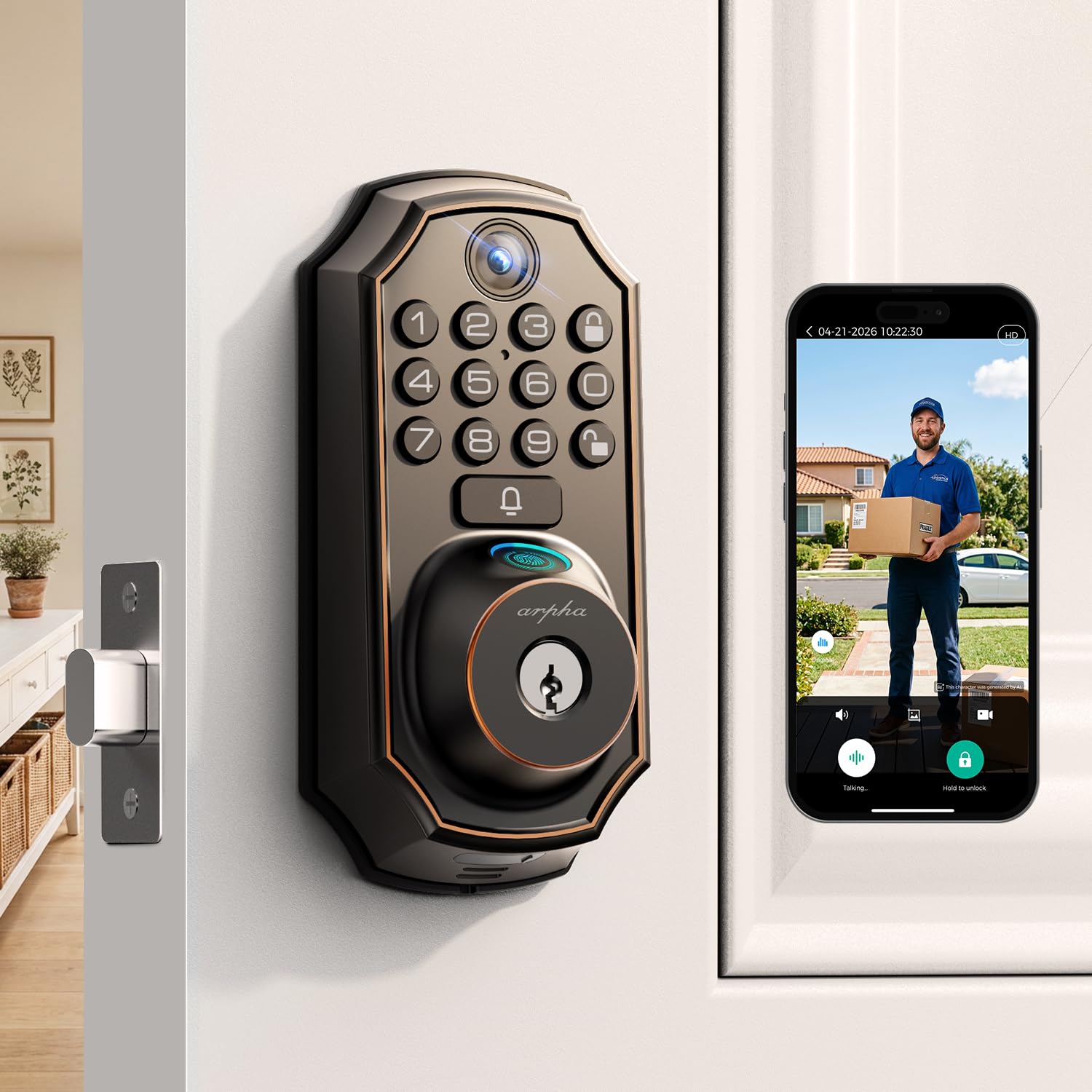
Type: Video smart lock
Entry: Fingerprint, keypad, app remote unlock
Camera: Live video with 2-way talk
Automation: Auto-lock timer
Smart home: Works with Alexa and Google
Intended use: Front door
This is the premium pick, and it earns the position by merging two devices families usually buy separately. The camera and two-way talk mean a parent can see and speak to whoever is at the door — a child arriving home from school, a delivery, a neighbor — without opening it. Remote unlock through the app covers the case where someone is expected but nobody is inside to answer.
Fingerprint and keypad entry sit alongside the video, so everyday use does not depend on pulling out a phone. The auto-lock timer is the child-safety feature in the package: the door can be set to re-secure itself after a defined interval rather than staying open because someone forgot.
Trade-off: Camera-equipped locks draw more power and demand more setup than a plain deadbolt, so buyers should expect more frequent battery attention and a longer install.
Philips WiFi Keypad Deadbolt with Handle

Type: Keypad deadbolt with door lever
Entry: Voice, fingerprint, keypad, flexible codes
Connectivity: Built-in Wi-Fi
Features: Auto-lock, backlit keypad, app remote control
Intended use: Front door
The Philips model is the busiest-selling pick in this group, and the spec sheet explains why: it throws almost every entry method into one unit. Voice unlock, fingerprint, keypad, and flexible codes cover a household where different family members prefer different things — a child uses a fingerprint, a grandparent uses a code, an adult uses voice on the way in with full hands. The backlit keypad matters on dark winter evenings.
Built-in Wi-Fi means no separate hub is needed for app remote control, which keeps the install simple and the bill lower. The included door lever again replaces the whole handle assembly, and auto-lock closes the loop so the door does not sit unlocked after a school run.
Trade-off: Packing voice, fingerprint, keypad, and Wi-Fi into one lock leaves more electronics to maintain, and the feature count makes the initial setup the longest of the five.
Before You Buy
- Entry method: Decide whether the household needs fingerprint, keypad, app, voice, or several at once — children often do better with a fingerprint than a memorized code.
- Auto-lock: Prioritize a lock that re-secures itself; it is the single most useful feature for a home with children.
- Door compatibility: Check that the door matches the lock’s stated fit — standard door sizes are covered by the Tapo, while handle-integrated models replace the existing lever.
- Power and maintenance: Video and multi-method locks draw more power, so plan on more frequent battery checks than a simple keypad deadbolt.
- Weather exposure: An exterior door benefits from a weather-rated lock such as the IP54 Tapo; interior cabinet locks do not need it.
- Installation: Adhesive cabinet locks need no tools; deadbolts and handle units are DIY jobs that reward a careful read of the instructions.
- Household size: More users means more codes and fingerprints to manage — flexible-code models handle a crowd better than single-user locks.
Frequently Asked Questions
-
What is the best smart lock for a household with children and no keys?
The Tapo DL100 is the simplest fit for most families because auto-lock secures the door without anyone remembering to, while the Philips model suits homes that want fingerprint and voice as well. -
Can children use a smart lock safely?
Yes — fingerprint entry is usually easier for small children than a memorized code, and auto-lock removes the risk of a door being left open. -
Do smart locks work without a key at all?
Every door lock in this roundup is keyless, relying on fingerprint, keypad, app, or voice rather than a physical key. -
What about cabinets and drawers?
The Anweller cabinet lock covers cupboards, drawers, and liquor storage with a hidden adhesive latch rather than a door-mounted lock. -
How often do batteries need changing?
A plain keypad deadbolt lasts longest; video and multi-method locks draw more power and need more frequent checks. -
Are these locks hard to install?
Cabinet locks are adhesive and tool-free, while deadbolts and handle-integrated locks are DIY jobs suited to a competent homeowner.
Bottom Line
For most families with children and no keys, the Tapo Smart Wi-Fi Deadbolt DL100 is the pick: auto-lock, a weather-rated build, a recognized residential security rating, and tactile buttons that work in the dark. Households that want fingerprint and voice on top should look at the Philips model, and anyone baby-proofing the kitchen should add the Anweller cabinet lock to the same order.
