Why there are Amazon links here: Brave Review is paid a commission for qualifying Amazon purchases made through the links below. Your price does not change, and using our links is entirely optional. How this works
Lockly Vision Zeno Smart Lock Review: A Video Doorbell and Deadbolt in One
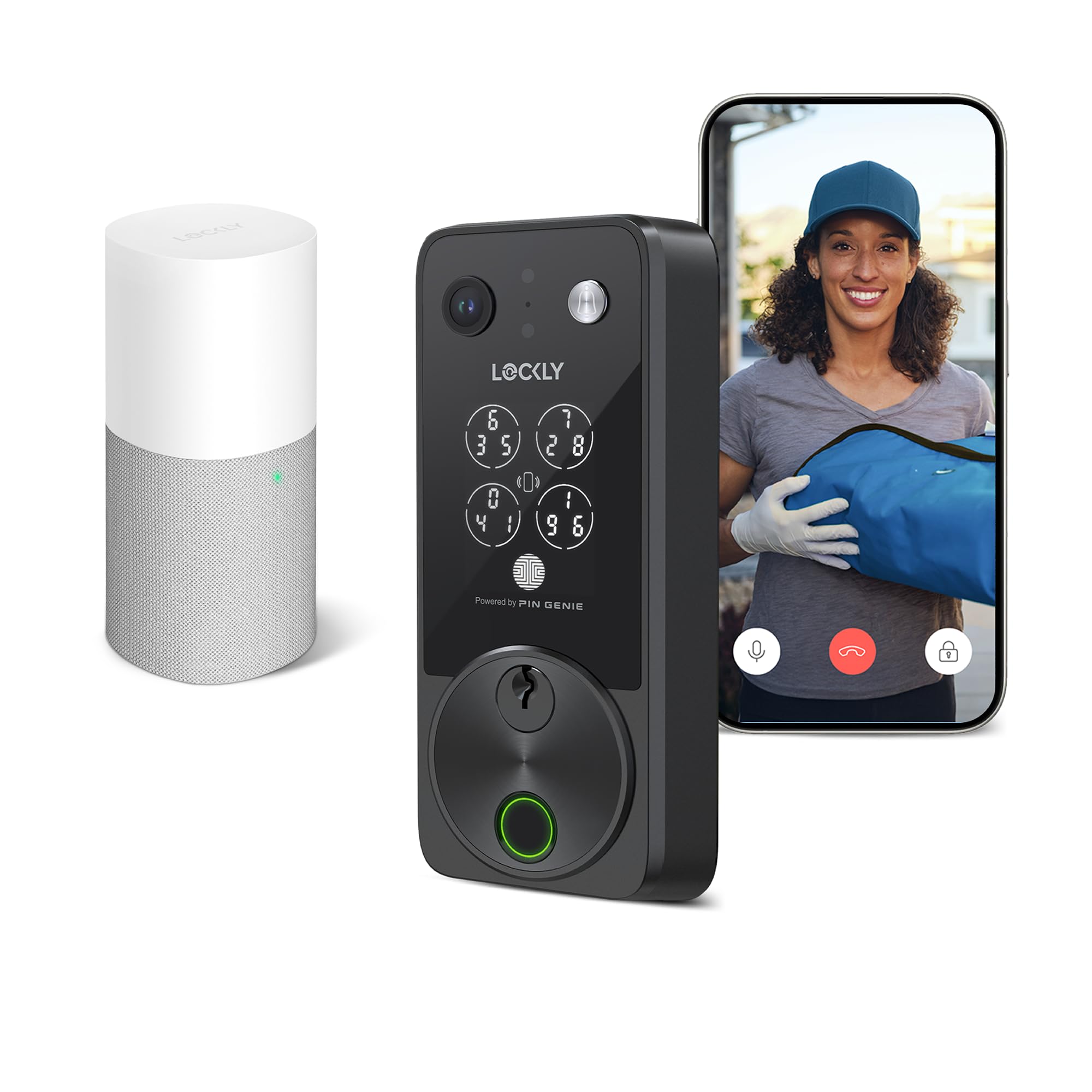
The Lockly Vision Zeno is a front-door deadbolt that folds a video doorbell camera, a fingerprint reader, and a PIN keypad into a single piece of hardware. It is built for homeowners who want to see and talk to whoever is at the door without bolting a separate camera above the handle. This review covers what the lock does, how the main features work in practice, and the trade-offs that come with combining so much into one device.
Features and Specifications
Type: Smart deadbolt with built-in video doorbell camera
Entry methods: Fingerprint, PIN Genie keypad, Apple Home Key, app, voice control
Power source: Two rechargeable batteries
Weather resistance: IP65-rated
Connectivity: App remote control, voice assistant control, Apple Home Key
Camera: Integrated video doorbell camera
Best for: Front doors that need both secure entry and a doorbell view
The core appeal is consolidation. A conventional setup means buying a smart deadbolt and a video doorbell separately, then mounting two devices, charging two batteries, and managing two apps. The Vision Zeno puts both jobs in one housing, so the door has a single camera and a single keypad instead of a camera plus a separate lock.
The $339 price sits in the premium tier for smart locks, which is expected given the camera. Buyers comparing this to a plain fingerprint deadbolt should factor in that they are effectively paying for a doorbell camera and a lock in one purchase rather than two.
Build and Design
The lock is rated IP65, which means it is sealed against dust and against water jets from any direction. For a front door that faces rain, that rating matters — a camera lens and keypad living outdoors need real weather protection, not just a splash guard. The deadbolt body is designed to replace a standard front-door deadbolt, so installation follows the usual path of swapping the existing hardware rather than cutting new holes.
The integrated camera sits on the exterior assembly, which keeps the door face cleaner than a separate doorbell mounted beside the frame. The trade-off is that the lock is a single point of failure: if the camera or keypad needs service, the whole unit is involved, whereas separate devices can be replaced independently.
Entry Methods and Access Control
Fingerprint entry is the fastest option for the people who live in the home — a registered finger opens the door without a phone or a code. The PIN Genie keypad handles guests, cleaners, and anyone who needs temporary access, and it is designed so the digits shuffle positions, which makes shoulder-surfing a PIN harder.
Apple Home Key lets an iPhone or Apple Watch act as the key, so a household already inside Apple’s ecosystem can tap to unlock without opening the Lockly app. App and voice control cover remote unlocking and checking the door from elsewhere. The practical caution here is dependence on the phone: a dead battery or a lost device should never be the only way in, so a physical key or a memorized PIN remains the sensible backup.
Camera and Doorbell Performance
The video doorbell camera is the feature that separates this lock from a standard smart deadbolt. It lets a homeowner see and speak to a visitor through the app before unlocking, which is the main reason to pay the premium over a camera-free lock.
Buyers should think about placement before buying. A camera built into the deadbolt sits at lock height, lower than a dedicated doorbell, so the viewing angle differs from a camera mounted at chest height. It works, but the framing is a consideration for anyone who wants a clear face-level view of visitors.
Power and Maintenance
Two rechargeable batteries are included, and the redundancy is the point: with two cells, one can be charging while the other keeps the lock running. That is a meaningful convenience for a device that now powers a camera as well as a motor and keypad, since camera functions draw more current than a lock alone.
The maintenance routine is charging batteries on a schedule and keeping the camera lens and fingerprint sensor clean. The trade-off is that this is a battery-dependent device with more electronics than a mechanical deadbolt, so it demands more attention over its life than a key-only lock.
Smart Home Integration
Apple Home Key is the headline integration, and it makes the lock a natural fit for homes already using Apple’s smart home setup. App control and voice commands extend access to the rest of the household and to remote management.
The limitation is ecosystem gravity. Buyers heavily invested in other smart home platforms should confirm compatibility before committing, because the deepest integration here is clearly aimed at Apple users. For everyone else, the app and keypad still cover the basics.
Trade-off
Trade-off: Combining a camera, keypad, fingerprint reader, and motor into one unit means more electronics to maintain and a higher upfront cost than a camera-free smart deadbolt, so buyers who only want keyless entry are overpaying for features they will not use.
Who It Is For and Who Should Skip It
This lock suits a homeowner who wants one device at the front door instead of two, especially one already using Apple devices and Apple Home Key. It also fits anyone who values fingerprint entry for daily use and wants to see visitors before opening the door.
Buyers who should skip it include renters who cannot swap the deadbolt, anyone on a tight budget who just wants keyless entry, and households committed to a non-Apple smart home platform that needs verified compatibility first. A plain fingerprint deadbolt at a lower price covers those cases better.
Check the current price on Amazon
FAQ
-
Does the Lockly Vision Zeno have a camera?
Yes. The lock includes an integrated video doorbell camera, so the front door gets a view of visitors without a separate doorbell device. -
Can the Lockly Vision smart lock be opened without a phone?
Yes. Fingerprint entry, the PIN Genie keypad, and Apple Home Key all work without opening the app, which makes it practical for daily use and for guests. -
What is Apple Home Key and does this lock support it?
Apple Home Key lets an iPhone or Apple Watch unlock the door with a tap. The Lockly Vision Zeno supports it, making the lock a strong fit for Apple households. -
Is the lock weatherproof?
It carries an IP65 rating, meaning it is sealed against dust and water jets. That suits a front door exposed to normal weather. -
How is the lock powered?
It runs on two rechargeable batteries. Having two means one can charge while the other keeps the lock running. -
Does the PIN Genie keypad hide the code?
The keypad shuffles the digit positions, which makes it harder for someone nearby to learn a PIN by watching. -
Can the door be controlled remotely?
Yes. App control and voice commands allow remote unlocking and management, in addition to fingerprint, keypad, and Home Key entry. -
Is this lock good for renters?
Generally no. It replaces the front-door deadbolt, so renters should check with the landlord before installing one. -
Does it replace a separate video doorbell?
For most front doors, yes. The built-in camera handles the doorbell view, though its lock-height placement frames visitors differently than a chest-height doorbell. -
Who should not buy this lock?
Buyers who only want keyless entry, renters, and households on a non-Apple smart home platform should compare simpler or differently compatible locks first.
Bottom Line
The Lockly Vision Zeno earns its premium by replacing two front-door devices with one: a fingerprint deadbolt, a scrambling keypad, Apple Home Key, and a video doorbell camera in a single IP65 housing. It is the right pick for an Apple household that wants to see visitors and skip the key, and the wrong pick for a renter or a budget buyer who just wants a keyless deadbolt. Buyers who fit the first profile should check the current price before deciding.
