Why there are Amazon links here: Brave Review is paid a commission for qualifying Amazon purchases made through the links below. Your price does not change, and using our links is entirely optional. How this works
Best Smart Lock With a Physical Key Backup for a Main Door
A smart lock only earns a place on a main door if it still opens when the electronics do not. Every pick below keeps a physical key backup, so a dead battery or a dropped phone never strands anyone outside. The five locks cover three buyer types: renters and budget installers who want a simple keypad, families who want fingerprint and app control, and premium buyers who want remote WiFi management with extended battery life. The overview table sorts them in seconds, and each review names the household the lock fits — and the one it does not.
The Picks at a Glance
| Product | Key Spec | Best Use | Price Tier |
|---|---|---|---|
| Smart Locks for Front Door (Philips WiFi Keypad Deadbolt with Handle) | Built-in WiFi, voice and fingerprint unlock, backlit keypad | Full-featured main door upgrade | Mid |
| TEEHO TE001 Keyless Entry Deadbolt | ANSI Grade 3, IP54 waterproof, 20 user codes, 2 backup keys | Budget front door with weather exposure | Budget |
| Yale Assure Lock 2 with WiFi Bridge | Extended-range WiFi bridge, remote app control, backup key | Premium remote access | Premium |
| Keyless Entry Electronic Deadbolt (Zinc Alloy, Fingerprint) | Zinc alloy body, fingerprint, keypad, Bluetooth app, auto lock | Apartments and rentals wanting fingerprint | Mid |
| Yamiry Electronic Code Knob | 20 user codes, 2 backup keys, backlit keypad, auto lock | Simple knob-style entry on a budget | Budget |
1. Smart Locks for Front Door — Best Overall Smart Lock With a Physical Key Backup

Type: WiFi keypad deadbolt with lever handle
Unlock Methods: Voice, fingerprint, flexible codes, app
Connectivity: Built-in WiFi, app remote control
Convenience: Auto-lock, backlit keypad
Backup: Physical key backup
Best For: Main doors wanting the widest unlock menu
Smart Locks for Front Door is the pick for a household that wants every unlock route in one box. The deadbolt ships with a matching lever handle, so the hardware on the door reads as a single set rather than a bolt bolted onto an old knob. Built-in WiFi means remote control works without a separate bridge, and the backlit keypad keeps codes usable after dark. Voice and fingerprint unlock sit alongside flexible codes, which suits a busy main door with family, guests and deliveries passing through.
This lock earns its place as the overall pick because it covers the most ground for a mid-tier price. Buyers who want one purchase to modernize the whole door — handle included — get the least shopping friction here. The caution is a practical one: more unlock methods and always-on WiFi mean more settings to manage and a faster battery draw than a bare keypad, so the key backup deserves a spot in a bag or a trusted neighbor’s drawer.
Check the current price on Amazon
Trade-off: The feature load and built-in WiFi make this the most setup-heavy pick and the quickest to drain batteries.
2. TEEHO TE001 — Best Budget Smart Lock With a Physical Key Backup

Type: Keyless entry deadbolt with keypad
Security: ANSI Grade 3 rated
Weather Resistance: IP54 waterproof
Codes: 20 user codes, anti-peep password
Backup: 2 physical backup keys
Alerts: Low battery alert, one-touch lock
Finish: Satin nickel
TEEHO TE001 is the value pick for a front door that takes weather and foot traffic. The IP54 waterproof rating and ANSI Grade 3 security designation put it in the range most exterior doors actually need, and the satin nickel finish stays neutral against common door hardware. Twenty user codes cover a family plus regular visitors, and the anti-peep password entry lets someone type a longer string with the real code buried inside it. Two backup keys ship in the box, so the physical fallback is built in from day one.
It earns its place by doing the core job — code entry, auto lock, key backup — without paying for app control or fingerprint reading. Buyers on a tight budget or outfitting a rental get the most lock per dollar here. The trade-off is the ceiling: no app, no remote access and no fingerprint, so anyone who wants phone-based management has to step up to another pick.
Check the current price on Amazon
Trade-off: A code-only lock with no app or fingerprint, so remote control and phone-free unlocking are off the table.
3. Yale Assure Lock 2 — Best Premium Smart Lock With a Physical Key Backup
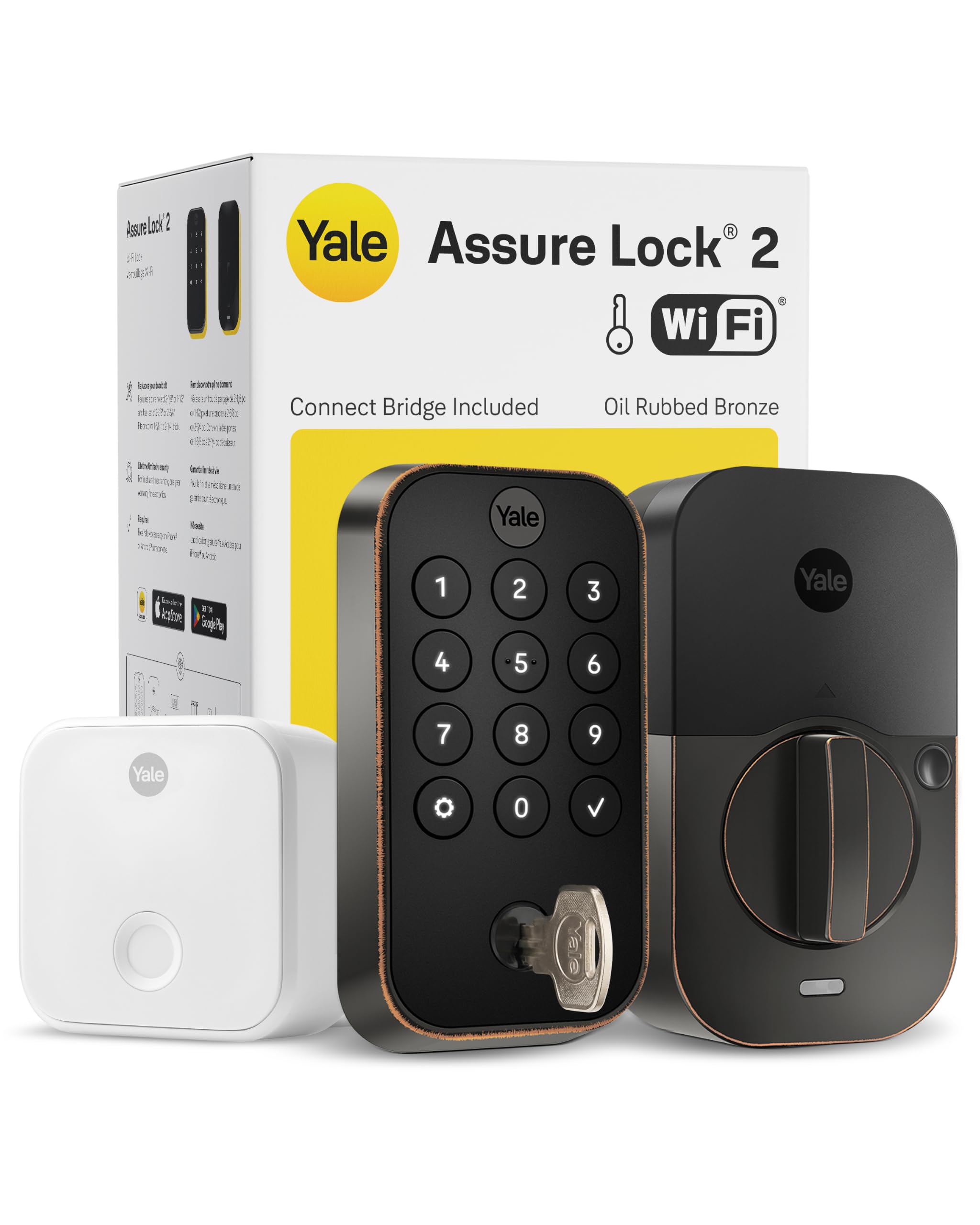
Type: Smart deadbolt with extended-range WiFi bridge
Connectivity: WiFi bridge, remote app control (US & Canada only)
Battery: Extended battery life via bridge
Backup: Physical backup key
Finish: Oil rubbed bronze
Best For: Remote management and premium hardware feel
Yale Assure Lock 2 targets the buyer who wants to check and control the door from anywhere without babysitting batteries. The WiFi bridge is a separate piece that extends range and takes the heavy radio work off the lock itself, which is the design behind the extended battery life claim. Remote app control covers locking, unlocking and code management, and the oil rubbed bronze finish gives the door a warmer, heavier look than satin hardware. A physical backup key keeps the lock usable if the app or the network goes down.
This is the premium pick because it solves the two complaints that follow smart locks around — weak WiFi at the door and constant battery swaps — with dedicated hardware instead of software tricks. Buyers who travel, rent the property out or manage a second home get the most from it. The caution is scope and cost: remote app control is listed for the US and Canada only, and the price sits well above every other pick here.
Check the current price on Amazon
Trade-off: The highest price in the group, and remote app features are limited to the US and Canada.
4. Keyless Entry Electronic Deadbolt (Zinc Alloy, Fingerprint) — Best Smart Lock With a Physical Key Backup for Apartments
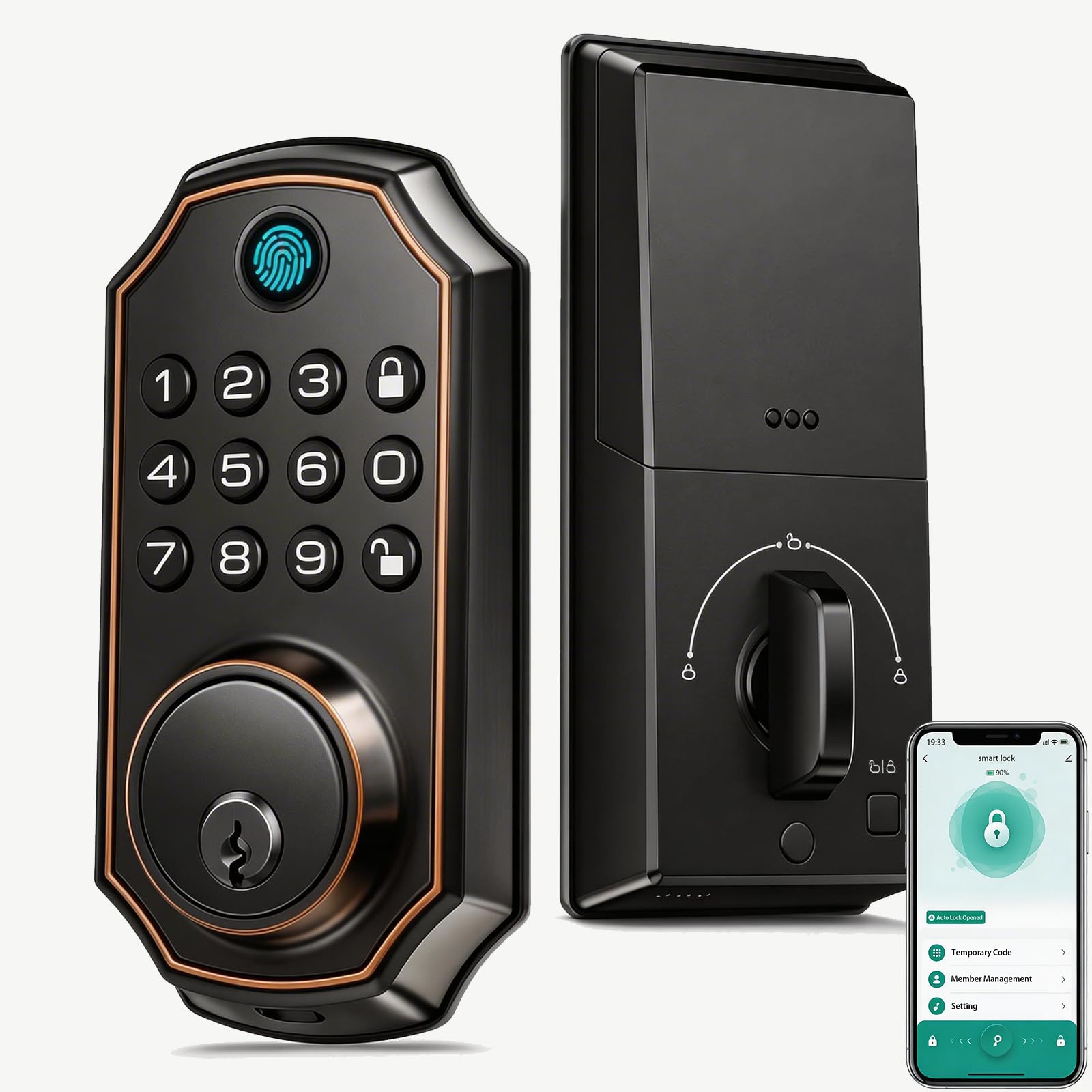
Type: Electronic deadbolt with keypad and Bluetooth app
Body Material: Zinc alloy
Unlock Methods: Fingerprint, keypad code, Bluetooth app
Convenience: Auto lock
Backup: Physical backup keys
Best For: Apartments and rentals wanting fingerprint entry
Keyless Entry Electronic Deadbolt brings fingerprint unlocking into the mid-tier without the WiFi overhead of the top pick. The zinc alloy body gives it a sturdier feel than plastic-bodied keypads, and the fingerprint reader means a resident can get in without a code or a phone in hand. Bluetooth app control handles code changes and lock status at close range, and auto lock closes the door behind the household. Backup keys cover the case where the electronics fail.
It earns its place as the apartment and rental pick: fingerprint entry is ideal for short-term guests and family members who forget codes, and Bluetooth keeps the setup local rather than cloud-dependent. The trade-off is range — Bluetooth app control only works near the door, so there is no remote check-in from work or from a trip.
Check the current price on Amazon
Trade-off: Bluetooth-only app control means no remote access once the resident is away from the door.
5. Yamiry Electronic Code Knob — Best Simple Smart Lock With a Physical Key Backup

Type: Electronic code knob with handle
Codes: 20 user codes
Backup: 2 physical backup keys
Convenience: Auto lock, backlit keypad
Installation: Easy installation
Best For: Simple knob-style entry on a budget
Yamiry Electronic Code Knob is the easiest swap in the group for a door that already uses a knob rather than a deadbolt. The knob-and-handle form factor replaces the existing hardware in one piece, and easy installation keeps the job within reach for a renter or a first-time smart lock buyer. Twenty user codes and a backlit keypad cover family and guests, auto lock handles the forgetful moments, and two backup keys ship in the box. There is no app, no WiFi and no fingerprint — this is code entry done simply.
It earns its place as the lowest-friction entry point into keyless living, and the knob style suits interior-facing or sheltered exterior doors where a full deadbolt is overkill. The trade-off is security depth: a code knob is a lighter-duty lock than a deadbolt, so it belongs on a secondary or apartment door rather than a main exterior door in a high-traffic building.
Check the current price on Amazon
Trade-off: A knob-style lock offers less physical security than a deadbolt, so it suits secondary doors better than a primary exterior entry.
Before You Buy
- Door type: A deadbolt needs a bored deadbolt hole and a compatible backset; a knob-style lock replaces the existing knob and handle instead.
- Power and backup: Every pick here uses a physical key backup, but check which key type ships and store a spare outside the home.
- Connectivity: Built-in WiFi allows remote control; Bluetooth-only locks work near the door; a bridge adds range and battery life at a premium.
- Weather exposure: For an uncovered exterior door, look for a waterproof rating such as IP54 rather than an interior-grade keypad.
- User capacity: Twenty user codes covers most families and rentals; fingerprint entry removes the code-sharing problem entirely.
- Security rating: A deadbolt with an ANSI Grade rating offers more physical resistance than a knob-style lock.
- Finish and fit: Match the finish to existing door hardware, and confirm the lock’s handle style fits the door’s prep before ordering.
Frequently Asked Questions
-
Do all smart locks still work with a physical key?
Not all — some are keyless-only. Every lock in this roundup ships with a physical key backup, which is the main reason each one made the list. -
What happens when the battery dies on a smart lock?
The physical key backup opens the door regardless of battery state. A low battery alert on models like the TEEHO TE001 gives warning before the lock stops responding. -
Is a smart lock with a key backup as secure as a standard deadbolt?
A deadbolt-based smart lock with an ANSI Grade rating matches the physical security of a conventional deadbolt. A knob-style lock is lighter duty and better suited to secondary doors. -
Can a smart lock be used on an apartment door?
Yes, provided the door’s existing prep matches the lock. The zinc alloy fingerprint deadbolt and the Yamiry code knob are the most apartment-friendly picks here. -
Does a WiFi smart lock need a bridge?
Not always. The Philips WiFi keypad deadbolt has WiFi built in, while the Yale Assure Lock 2 uses a separate bridge to extend range and battery life. -
How many user codes are enough for a family?
Twenty codes covers a family plus regular visitors, cleaners and renters. Fingerprint entry is the better option when codes get shared too widely.
Bottom Line
The Smart Locks for Front Door Philips WiFi Keypad Deadbolt is the best smart lock with a physical key backup for most main doors — fingerprint, voice, codes and built-in WiFi in one set with a matching handle. Budget buyers should take the TEEHO TE001, remote managers should take the Yale Assure Lock 2, and apartment dwellers get the most from the zinc alloy fingerprint deadbolt.
