Why there are Amazon links here: Brave Review is paid a commission for qualifying Amazon purchases made through the links below. Your price does not change, and using our links is entirely optional. How this works
Lockly Secure Plus Review: Keyless Entry Without the Key Hassle
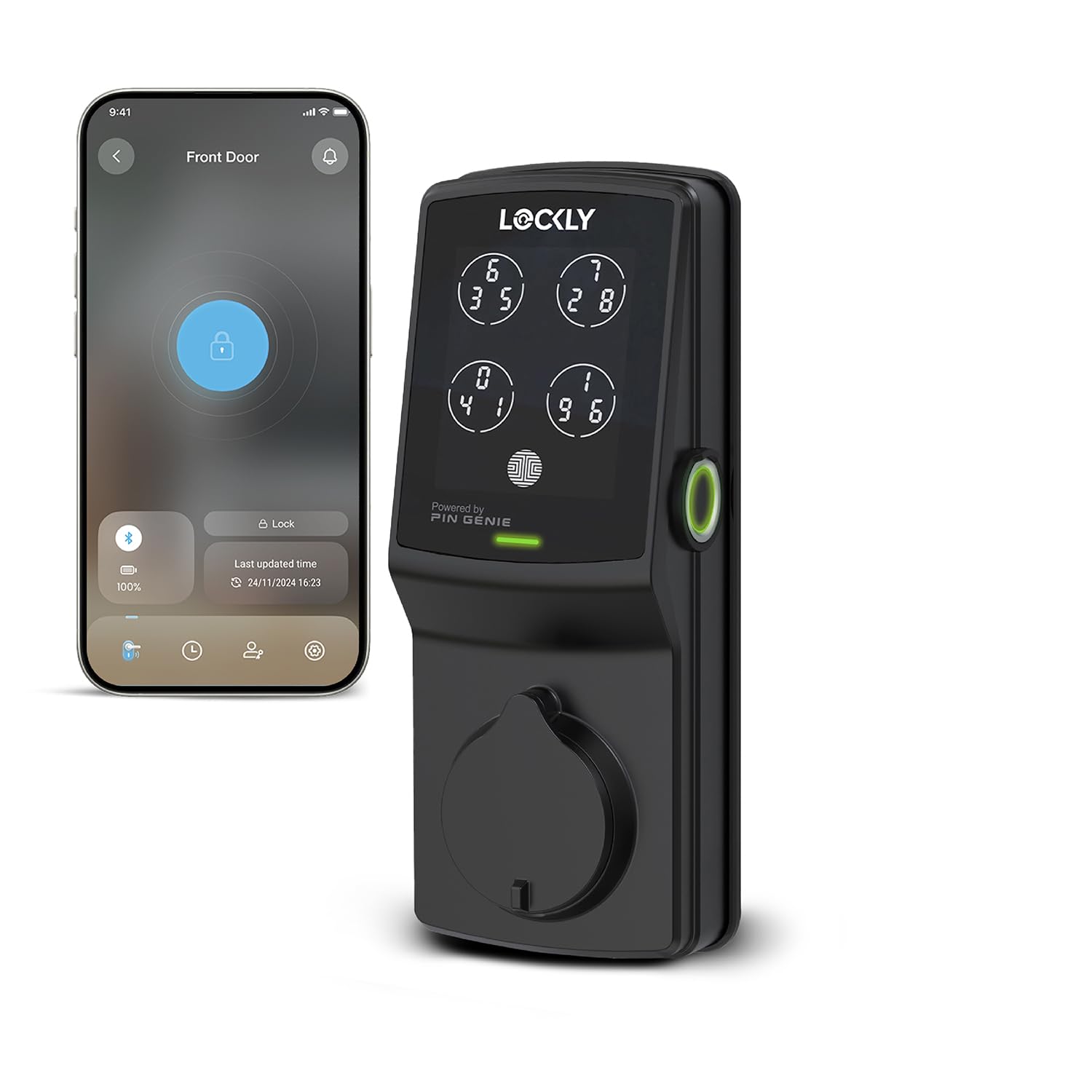
The Lockly Secure Plus is a smart deadbolt built for the homeowner who wants to stop fumbling for keys and stop hiding a spare under the mat. It combines a 3D biometric fingerprint reader, the company’s PIN Genie keypad, automatic locking and voice control in one matte black unit. This review walks through how the lock is put together, what each feature actually means day to day, where it falls short, and which households should consider it before clicking buy.
Features and Specifications
- Product Type: Smart deadbolt door lock
- Entry Methods: 3D biometric fingerprint, PIN Genie keypad, voice control
- Keypad Technology: PIN Genie peephole keypad
- Locking Mode: Auto lock
- Finish: Matte black
- Installation: Easy installation, standard deadbolt fit
- Connectivity: Voice control compatible
- ASIN: B0BXWK5YKX
The core hardware is a deadbolt, which means this lock replaces an existing deadbolt rather than adding a second lock to the door. That is the right form factor for a front door, a back door or a garage entry door where a standard deadbolt already sits. The matte black finish is a deliberate style choice — it suits modern doors, dark hardware schemes and painted exteriors better than it suits ornate brass-and-crystal traditional entryways.
The three entry methods are the headline. The fingerprint reader handles the everyday case: a finger on the sensor and the door opens, no key, no code, no phone. The PIN Genie keypad handles the case where a fingerprint will not read — wet hands, gloves, a guest who needs in once. Voice control handles the hands-full case, letting a compatible smart assistant handle the lock while the homeowner carries groceries or a toddler.
Build, Materials and Finish
The lock is a deadbolt assembly, so its build quality matters most at two points: the bolt itself and the exterior keypad housing. A deadbolt that fits a standard door prep keeps installation simple, and Lockly markets this model as an easy installation for exactly that reason — the buyer is not expected to drill new holes or hire a locksmith for a routine swap. The matte black finish is a coating over the metal housing, and matte finishes on exterior hardware tend to show fingerprints and road dust more than satin nickel or brushed steel does.
The PIN Genie keypad is the more interesting piece of engineering. Rather than a fixed keypad layout, PIN Genie shuffles the digits on the display each time the keypad is used, so someone watching from a distance cannot learn the code from finger position. That is a real improvement over a static keypad, and it costs the user almost nothing — the code stays the same, only the layout moves.
The 3D biometric fingerprint reader is the part that will decide whether the owner loves this lock or merely tolerates it. A 3D sensor reads depth as well as the surface pattern, which generally means better performance than an optical reader when fingers are dry, dirty or slightly damp. It still is not magic: a badly worn fingerprint, a bandaged finger or a very young child’s finger may not register reliably.
Trade-off: The matte black finish and the fingerprint-first design both push this lock toward a specific buyer — one with modern exterior hardware and a household where most people have consistent, readable fingerprints — and households with heavily worn or frequently bandaged fingers should expect to lean on the PIN keypad instead.
Capacity and Access Management
The capacity question for a smart deadbolt is not storage volume — it is how many people can get in and how the owner controls them. A PIN Genie keypad supports individual codes, which is the feature that makes a smart lock genuinely useful for a household with a dog walker, a cleaner, a contractor or visiting family. Each person gets a code that can be revoked without rekeying the lock or changing anyone else’s access.
Fingerprint entry serves the same role for people who live in the house. A fingerprint is faster than a code and impossible to shoulder-surf, which is why it tends to become the default entry method for the primary residents once it is enrolled. The keypad then becomes the backup and the guest channel.
Voice control adds a third layer. It is the least essential of the three for most households, but it earns its place for anyone who already runs a smart home and wants the door to participate in routines — locking down at night, for example, or responding to a spoken command when hands are full. Buyers should confirm their smart assistant ecosystem is supported before assuming this works out of the box.
The practical limit here is the number of people who need regular access. A two-person household can run almost entirely on fingerprints. A busy household with rotating help will live in the keypad and the code management, and that is where the PIN Genie design pays off most.
Trade-off: Managing multiple codes and fingerprints is more administration than a plain key lock ever required, and a household that only ever needs one or two people to get in will be paying for access features it barely uses.
Power, Auto Lock and Daily Operation
Auto lock is the feature that quietly changes behavior. A deadbolt that relocks itself after the door closes removes the single most common home security failure — the door left unlocked because someone was distracted. For a household with kids coming and going, or a door that gets used constantly for deliveries and pets, auto lock is arguably more valuable than the fingerprint reader.
That convenience has a cost in battery attention. Every smart deadbolt runs on batteries, and auto lock means the motor cycles far more often than it would if the door were locked by hand once a night. Buyers should expect to replace batteries on a schedule and to pay attention to any low-battery warning the lock provides. A lock that dies while the household is out is a lock that is not locking.
The other daily-operation consideration is the deadbolt throw itself. A deadbolt only works if the door and frame are aligned well enough for the bolt to seat. Older doors that have shifted, or doors that need a shoulder to close, will fight any motorized deadbolt, and this lock is no exception. Checking that the door latches cleanly by hand before installing is the cheapest diagnostic a buyer can run.
Trade-off: Auto lock is the best feature on the lock and the biggest ongoing maintenance obligation — the more convenient the lock becomes, the more often the batteries need attention.
Installation and Setup
Lockly positions this model as an easy installation, and for a standard deadbolt swap that is a fair description. The job involves removing the old deadbolt, fitting the new exterior and interior assemblies, and connecting them through the door. A homeowner comfortable with a screwdriver and a tape measure can typically handle it; anyone who has never touched a door’s hardware should budget for a handyman.
Setup after installation is where the real work sits. Enrolling fingerprints, setting codes, configuring auto lock timing and pairing voice control all happen after the hardware is mounted. Doing this before the lock goes on the door is not possible, so buyers should plan for a session at the door with the instructions open. Getting the primary residents’ fingerprints enrolled first, then adding guest codes, keeps the process organized.
The one installation risk worth flagging is door prep compatibility. A deadbolt that does not match the existing bore holes turns an easy job into a carpentry job. Measuring the existing deadbolt before ordering is the single step that prevents most installation frustration.
Trade-off: The hardware install is genuinely approachable, but the software setup is the part that eats an afternoon, and buyers who expect a plug-and-play experience will be surprised by how much configuration sits behind the keypad.
Strengths and Weaknesses
The strongest argument for the Lockly Secure Plus is the combination of fingerprint entry and the PIN Genie keypad in one deadbolt. Fingerprints cover the household; shuffled-digit codes cover guests and backups; auto lock covers the human error that defeats most locks. For a household that wants keyless entry without giving up a code-based fallback, that trio is well matched to the job.
The matte black finish is a genuine strength for the right door and a mismatch for the wrong one. It reads as modern and intentional on a contemporary entry, and it looks out of place against traditional hardware. Buyers should treat finish as a design decision, not an afterthought.
The weaknesses are the ones that come with the category. Battery maintenance is ongoing and auto lock accelerates it. Fingerprint readers are only as reliable as the fingers presented to them. Voice control depends on an ecosystem the buyer may or may not already run. And the price sits in the premium tier for a deadbolt, which means the buyer is paying for the access features rather than for the bolt itself.
Trade-off: This is a premium-priced deadbolt whose value lives almost entirely in its access features — a buyer who mainly wants a sturdy lock and rarely needs codes or fingerprints will find a simpler deadbolt does the core job for less.
FAQ
-
Is the Lockly Secure Plus a deadbolt or a handle lock?
It is a smart deadbolt. It replaces an existing deadbolt and works alongside the door’s existing handle or knob rather than replacing it. -
Can the Lockly Secure Plus be opened without a key?
Yes. The lock is designed around keyless entry, with a 3D biometric fingerprint reader, the PIN Genie keypad and voice control as the primary ways in. -
What is PIN Genie and why does it matter?
PIN Genie is a keypad that shuffles the position of the digits each time it is used. The code stays the same, but someone watching cannot learn it from where the fingers land. -
Does the Lockly Secure Plus lock itself automatically?
Yes. Auto lock relocks the deadbolt automatically, which removes the risk of a door being left unlocked after use. -
Does the Lockly Secure Plus work with voice assistants?
Voice control is one of the listed entry methods, so it is built to work with a compatible smart assistant. Buyers should confirm their specific ecosystem is supported before relying on it. -
Is the Lockly Secure Plus hard to install?
It is marketed as easy installation and fits a standard deadbolt prep, so a straightforward swap is within reach for a confident DIYer. Doors with non-standard bore holes may need adjustment first. -
Does the Lockly Secure Plus need batteries?
Yes, as a powered smart deadbolt it runs on batteries. Auto lock increases how often the motor cycles, so battery replacement is a routine part of ownership. -
Who is the Lockly Secure Plus not for?
It is a poor fit for renters who cannot change door hardware, for households that only ever need one key and no codes, and for anyone unwilling to manage batteries and app setup. -
Can fingerprints fail on the Lockly Secure Plus?
Any fingerprint reader can struggle with worn, damaged or bandaged fingers. The PIN Genie keypad exists as the backup for exactly those moments. -
Is the matte black finish suitable for outdoor doors?
Matte black is a popular exterior finish and suits modern doors well. It does tend to show dust and fingerprints more visibly than lighter metal finishes.
Bottom Line
The Lockly Secure Plus is the right pick for a homeowner who wants keyless entry done thoroughly — fingerprint for the household, shuffled PIN codes for guests, auto lock for peace of mind — and who is willing to accept battery maintenance and a setup afternoon in exchange. It is a premium deadbolt priced for its access features, so buyers who mainly want a solid lock and nothing more should look simpler. For everyone else, this is a well-rounded keyless entry upgrade.
