Why there are Amazon links here: Brave Review is paid a commission for qualifying Amazon purchases made through the links below. Your price does not change, and using our links is entirely optional. How this works
TP-Link Archer AXE7800: Tri-Band Wi-Fi 6E for Busy Homes
The TP-Link Archer AXE7800 is a tri-band Wi-Fi 6E router aimed at households that have outgrown an ISP-supplied box. It adds the 6 GHz band to the usual 2.4 GHz and 5 GHz channels, which means more room for devices and less interference from older gear. This review covers what the hardware offers, where the renewed listing changes the math, and which buyers should look elsewhere.
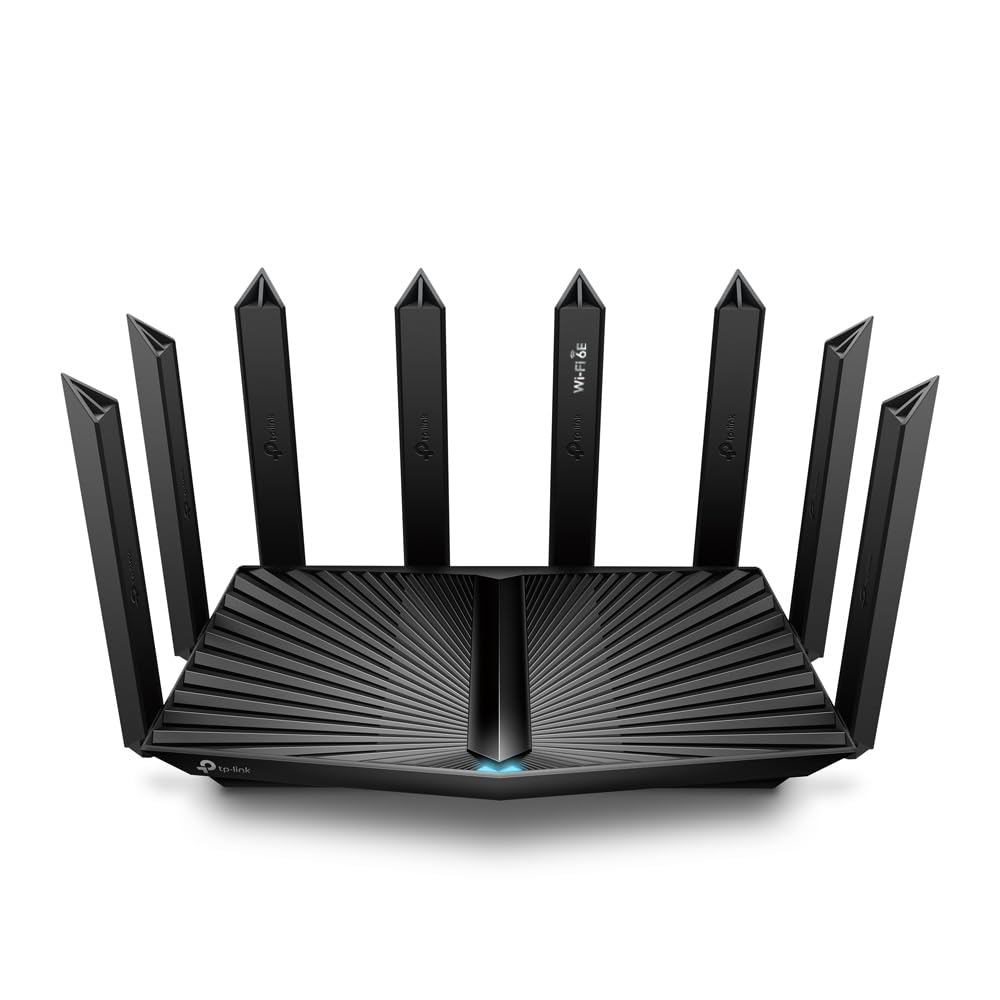
Buy on Amazon: Amazon Renewed Archer AXE7800 Tri-Band Wi-Fi 6E Router – Black (Renewed)
Features and Specifications
Product: Amazon Renewed Archer AXE7800 Tri-Band Wi-Fi 6E Router – Black (Renewed)
Wireless Standard: Wi-Fi 6E
Bands: Tri-band (2.4 GHz, 5 GHz, 6 GHz)
Color: Black
Condition: Renewed
Brand: TP-Link (Archer series)
The name tells most of the story. "Tri-band Wi-Fi 6E" is the headline capability: three separate radio bands working at once, with the 6 GHz band reserved for Wi-Fi 6E clients. That third lane matters in dense neighborhoods, where the 2.4 and 5 GHz bands are crowded with neighbors’ networks, doorbells, and older laptops.
The "Renewed" label is the other half of the story, and it changes who should buy this. A renewed unit is a previously owned or returned router that has been inspected and repackaged for resale, which is why the listing sits at a lower price tier than a new-in-box AXE7800. Buyers get the same model and the same tri-band design, but with a shorter warranty and the small chance of cosmetic wear.
Trade-off: A renewed unit saves money up front but trades away the full manufacturer warranty and the certainty of an untouched box.
What Tri-Band Wi-Fi 6E Actually Delivers
Build and Design
The Archer AXE7800 is a desktop router in black, the kind of upright or flat-standing chassis that sits on a shelf or media console rather than mounting to a wall. TP-Link’s Archer line tends toward external antennas and a vented body, and this model follows that pattern. The black finish hides dust well and blends into a dark entertainment setup.
Physically, a router in this class needs breathing room. The vents and antennas are there because tri-band radios generate heat, and stacking books or a cable box on top of the unit is the fastest way to shorten its life. Buyers should plan for open air on at least three sides.
The renewed condition is worth a close look on arrival. Cosmetic scuffs are possible on any renewed router, and the accessories in the box may be repackaged rather than factory-sealed. None of that affects performance, but buyers who want a pristine box for a gift should buy new instead.
Capacity and Coverage
Three bands mean three separate pools of capacity. The 6 GHz band is the cleanest of the three because only Wi-Fi 6E devices can use it, so a household with a mix of old and new gear gets an uncrowded lane for the newer phones and laptops. The 5 GHz band handles most streaming and gaming traffic, while 2.4 GHz stays available for smart plugs, cameras, and anything that needs range over speed.
This is a router for a busy household, not a studio apartment. A home with a dozen or more connected devices, multiple 4K streams, and someone working from home will feel the difference that a third band makes. A single person with a phone and a laptop will not.
Coverage depends on the floor plan as much as the router. The AXE7800 is a single unit, so a long house with thick interior walls may still need a mesh node or an extender at the far end. Buyers in a multi-story home with a dead zone upstairs should treat this as the centerpiece of a system, not a cure-all.
Trade-off: The 6 GHz band is fast and clean, but it has the shortest range of the three — devices far from the router may fall back to 5 GHz.
Power and Performance
Wi-Fi 6E brings the efficiency features of Wi-Fi 6 — better handling of many devices at once, lower latency under load — into the new 6 GHz spectrum. In practice, that means video calls stay stable while someone else downloads a game, and smart-home devices stop dropping off when the network gets busy.
The Archer AXE7800 is a consumer router, not an enterprise access point. Buyers should expect strong performance for typical home use: streaming, gaming, video conferencing, and large file transfers. Buyers running a home lab, a small office with heavy upload traffic, or a NAS setup should look at a router with more advanced management features.
Gaming households will care about latency more than raw throughput, and tri-band routers generally help there by keeping the gaming device on its own band. The 6 GHz band is especially useful for a console or PC that supports Wi-Fi 6E, since it avoids competing with phones and TVs on 5 GHz.
Maintenance and Setup
TP-Link routers are configured through a companion app or a browser-based admin page, and the Archer line typically supports both. Setup is a guided process: connect the modem, name the network, set a password, and let the router handle band steering. Most buyers will be online in under half an hour.
Firmware updates matter more on a renewed unit than on a new one, because the router may have sat in a warehouse for a while. Buyers should check for updates immediately after setup and enable automatic updates if the app offers them. Security patches for Wi-Fi routers are not optional.
The renewed status also shapes support. Buyers dealing with a renewed router should keep the listing and packaging until the return window closes, and should confirm the warranty terms through the seller before relying on them. That is a five-minute check that prevents a much longer headache.
Trade-off: Renewed routers can arrive with older firmware and a shorter warranty, so the first hour of ownership should include an update check and a warranty confirmation.
Strengths and Weaknesses
The case for the Archer AXE7800 starts with the third band. Wi-Fi 6E is the most meaningful upgrade a home network can get right now, because the 6 GHz spectrum is genuinely less crowded than 2.4 and 5 GHz. A tri-band router future-proofs a household for the next several years of device purchases.
The renewed listing is the second argument. Buyers who are comfortable with a repackaged unit get the same tri-band hardware at a lower price tier, which is the difference between a mid-range budget and a stretch purchase for many households. The 100+ bought in the past month suggests the renewed route is not a niche choice.
The weaknesses are equally clear. Renewed means a shorter warranty, possible cosmetic wear, and the need to verify firmware and accessories on arrival. The 6 GHz band’s shorter range is a physics problem, not a defect, but it does mean a large home may need additional hardware. And buyers who want the simplest possible ownership experience — new box, full warranty, no checks — should pay for new.
FAQ
-
Is the TP-Link Archer AXE7800 a good router?
Yes, for households with many devices and at least a few Wi-Fi 6E clients. The tri-band design adds a clean 6 GHz lane that reduces congestion, which is the main reason to upgrade from an older dual-band router. -
What does "Renewed" mean on this listing?
Renewed means the router was previously owned or returned, then inspected and repackaged for resale. It is not the same as new, and it typically comes with a shorter warranty than a factory-sealed unit. -
Do I need Wi-Fi 6E devices to benefit from this router?
The 6 GHz band only works with Wi-Fi 6E devices. Older devices will use the 2.4 and 5 GHz bands, which still benefit from the router’s Wi-Fi 6 efficiency features and from having the newer devices moved off those bands. -
Will this router cover a large house?
A single unit covers a typical home, but long or multi-story houses with thick walls may still have dead zones. Buyers in that situation should plan for a mesh node or extender rather than expecting one router to cover everything. -
Is a renewed router risky to buy?
The risk is manageable if buyers check firmware, confirm the warranty through the seller, and keep the packaging until the return window closes. Cosmetic wear is possible but does not affect performance. -
How does Wi-Fi 6E differ from Wi-Fi 6?
Wi-Fi 6E uses the same technology as Wi-Fi 6 but adds access to the 6 GHz band. That extra spectrum is the main advantage, because it is reserved for newer devices and is far less crowded. -
Who should not buy the Archer AXE7800?
Buyers in a small apartment with few devices, buyers who want a full manufacturer warranty and a factory-sealed box, and buyers who need advanced network management for a home office or lab should look at other options. -
Does the router work with a mesh system?
TP-Link’s Archer line generally supports the brand’s mesh and extender ecosystem, but buyers should confirm compatibility with their specific model before mixing hardware. A single router is the starting point, not a whole-home system. -
What should buyers check first after unboxing?
Firmware updates, the included accessories, and the warranty terms. A renewed router may have sat in storage, so updating immediately is the most important first step. -
Is the black color the only option?
This listing is for the black version. Buyers who want a different finish should check other listings for the same model rather than assuming color options exist here.
Bottom Line
The TP-Link Archer AXE7800 is the right router for a busy household that wants the 6 GHz band without paying new-in-box prices, and the renewed listing is what makes that possible. Buyers who accept a shorter warranty and a five-minute firmware check get tri-band Wi-Fi 6E hardware at a lower price tier. Buyers who want a sealed box and full warranty should buy new — everyone else can check the current price on Amazon and decide from there.
