Why there are Amazon links here: Brave Review is paid a commission for qualifying Amazon purchases made through the links below. Your price does not change, and using our links is entirely optional. How this works
TP-Link Archer BE260: The Budget Entry to WiFi 7
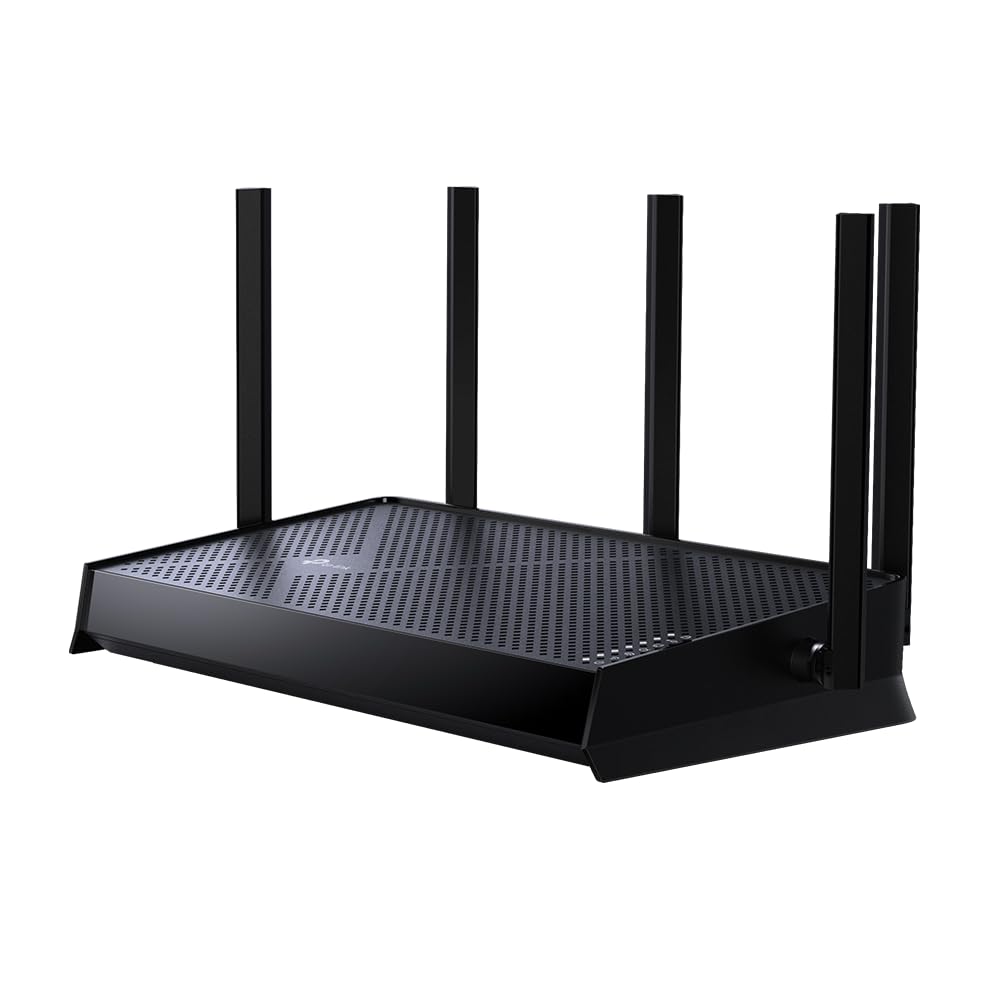
The TP-Link Archer BE260 is a dual-band WiFi 7 router aimed at households that want the new standard without paying flagship money. It pairs a 2.5G WAN port with a 2.5G LAN port, adds three gigabit LAN ports, and leans on TP-Link’s Easy-Mesh and HomeShield tools for coverage and network security. This review covers what the hardware actually does, where the spec sheet trims corners, and which buyers should pick it over a cheaper WiFi 6 box.
Features and Specifications
Type: Dual-band WiFi 7 router
Wireless class: BE5000
Wired ports: 1× 2.5G WAN, 1× 2.5G LAN, 3× 1G LAN
Antennas: 5
Key wireless feature: MLO (Multi-Link Operation)
Software: VPN clients and server, Easy-Mesh, HomeShield, Private IoT
Streams: 5-stream
The port layout is the first thing that separates this router from budget WiFi 6 hardware. A 2.5G WAN input means a fiber or cable plan above gigabit speeds can actually reach the router without being throttled at the door, and the matching 2.5G LAN port gives one wired device — a NAS, a gaming PC, a workstation — the same headroom.
The five antennas and five-stream design point to a router built for broad coverage rather than a single-room setup. TP-Link’s Easy-Mesh support means the BE260 can be paired with other compatible TP-Link mesh units later if a single unit cannot cover the whole home.
What the BE5000 Rating Means for a Buyer
The BE5000 label describes combined throughput across both bands, not a single-device speed. In practice it signals a mid-tier WiFi 7 router rather than a flagship, which is exactly where a budget WiFi 7 model should sit.
That positioning matters because WiFi 7’s headline features — MLO and the wider channels — are most useful when several devices compete for airtime. A household with phones, laptops, TVs and smart-home gear all streaming at once will feel the difference more than a single-user apartment.
Buyers should read BE5000 as "fast enough for a busy home," not "replaces a wired backbone." The dual-band design also means no 6GHz band, which is the biggest spec-sheet omission compared with pricier WiFi 7 routers.
Trade-off: The dual-band design skips the 6GHz band that premium WiFi 7 routers use to offload traffic, so dense homes with many high-bandwidth devices may still see congestion.
Ports, MLO, and Real-World Wiring
The 2.5G WAN port is the most consequential number on the box. Internet plans above 1Gbps are increasingly common, and a router with only gigabit WAN ports caps that connection at the input. The BE260 avoids that bottleneck for one wired path.
The single 2.5G LAN port is generous at this price but also a constraint: only one wired device gets the fast lane. Everything else on the wired side runs at gigabit, which is fine for most homes but worth noting for buyers with multiple high-speed wired devices.
MLO lets compatible WiFi 7 clients use both bands at once, improving stability and reducing latency spikes. The benefit depends on the client device — older phones and laptops will not use it — so buyers should treat MLO as future-proofing rather than an immediate upgrade.
VPN, HomeShield, and Private IoT
The built-in VPN client and server support is a feature usually reserved for mid-range and premium routers. A VPN client lets the router route selected traffic through a third-party VPN service; a VPN server lets a user reach the home network remotely without extra hardware.
HomeShield covers the network-security side, with TP-Link’s subscription-based tools for parental controls and threat filtering. The free tier is useful; the paid tier is optional, and buyers who dislike subscriptions should plan around the free features.
Private IoT is a separate network segment for smart-home devices, which keeps always-on gadgets off the main network. It is a sensible addition for homes with many cheap connected devices.
Setup, Mesh, and Maintenance
Easy-Mesh support means the BE260 can act as the base of a larger mesh if one unit cannot cover the home. Buyers who already own compatible TP-Link mesh hardware can add the BE260 as a node instead of replacing the whole system.
Setup runs through TP-Link’s app, which is the same workflow across the company’s current router line. Firmware updates arrive through the app, and HomeShield settings live in the same place, so ongoing maintenance stays in one interface.
The five-antenna design is best placed centrally and high. A router of this class rewards thoughtful placement more than most buyers expect, and a closet or floor-level shelf will waste much of the coverage advantage.
Who Should Buy the Archer BE260
The BE260 suits buyers with a fast internet plan, a mix of WiFi 7 and older devices, and a budget that rules out flagship routers. It also fits households planning to expand into mesh later, since Easy-Mesh support keeps that door open.
It is not the right pick for buyers who need a 6GHz band, multiple 2.5G wired devices, or top-tier throughput in a dense apartment building. Those buyers should look at tri-band WiFi 7 models instead.
Buyers who only need reliable WiFi for a small apartment and a sub-gigabit plan will get more value from a cheaper WiFi 6 router. The BE260’s advantages only pay off when the internet plan and device mix can use them.
FAQ
-
Is the TP-Link Archer BE260 a good router?
It is a solid budget entry into WiFi 7, with 2.5G ports and MLO support that cheaper WiFi 6 routers lack. Buyers should weigh the missing 6GHz band against the lower price. -
Does the Archer BE260 support WiFi 7?
Yes. The BE5000 rating and MLO support place it in the WiFi 7 class, though it is a dual-band design rather than tri-band. -
What is the difference between the 2.5G WAN and 2.5G LAN ports?
The WAN port connects to the modem and accepts internet speeds above gigabit. The LAN port delivers that speed to one wired device. -
Can the Archer BE260 be used with TP-Link mesh?
Yes. Easy-Mesh support lets it join compatible TP-Link mesh systems as a base or a node. -
Does the Archer BE260 have a VPN?
It supports both VPN client and VPN server functions, which is unusual at this price tier. -
Is the Archer BE260 good for gaming?
The 2.5G LAN port and MLO support help with latency and stability for wired and WiFi 7 clients. Buyers on older WiFi standards will see smaller gains. -
How many devices can the Archer BE260 handle?
The five-stream design suits a busy family home with phones, laptops, TVs and smart-home gear. Very dense device counts favor tri-band models. -
Does the Archer BE260 need a subscription?
HomeShield has a free tier and an optional paid tier. The router works without a subscription. -
Can the Archer BE260 replace an ISP-provided router?
Yes, provided the ISP allows a third-party router and the connection uses a standard Ethernet handoff to the WAN port. -
Is the Archer BE260 worth it over a WiFi 6 router?
It is worth it for buyers with a fast internet plan and WiFi 7 devices. Buyers on older devices and slower plans can save money with WiFi 6.
Check the current price on Amazon
Bottom Line
The TP-Link Archer BE260 is the sensible budget pick for buyers who want WiFi 7, 2.5G wired ports, and mesh-ready software without flagship pricing. Its dual-band design and single 2.5G LAN port are the compromises to accept, and buyers who need a 6GHz band should look higher up the range. For everyone else, it is a well-rounded entry point into the new standard. Check the price on Amazon.
