Why there are Amazon links here: Brave Review is paid a commission for qualifying Amazon purchases made through the links below. Your price does not change, and using our links is entirely optional. How this works
Best Standby Power Monitor for Finding Phantom Loads
Phantom loads — the electricity appliances draw while switched off or idle — are easy to ignore and hard to find without a meter. This guide covers five standby power monitors that expose those hidden watts: plug-in meters for testing one device at a time, and whole-home monitors for tracking circuits. Renters and single-appliance hunters should look at the plug-in picks, while homeowners chasing the big picture will want a circuit-level monitor. The overview table below puts all five side by side before the individual reviews.
Overview of the Picks
| Product | Key Spec | Best Use | Price Tier |
|---|---|---|---|
| Upgraded Electrical Usage Monitor (7 Modes) | 7-mode backlit display, overload protection | Budget single-outlet testing | Budget |
| Emporia Vue 3 | Smart home module, solar and net metering | Whole-home tracking with app | Premium |
| Refoss EM16P Smart Monitor | 16 60A circuit sensors, open API, no cloud | Circuit-by-circuit phantom hunting | Mid-range |
| Electricity Usage Monitor (8 Modes) | 8 display modes, backlight, overload protection | General plug-in testing | Budget |
| P3 P4400 Kill A Watt | LCD analyzer, single-appliance focus | Simple, dependable spot checks | Budget |
Upgraded Electrical Usage Monitor (7 Modes)

Type: Plug-in outlet meter
Display: Backlit, 7 modes
Functions: Energy, voltage, amps, wattage
Protection: Overload protection
Best for: Single-appliance phantom-load testing
Check the current price on Amazon
This is the classic plug-in energy meter format: the unit sits between the wall outlet and the appliance, and the backlit screen cycles through seven display modes covering consumption, voltage, amps and wattage. Overload protection adds a safety layer when testing heavier draws like space heaters or fridges. The backlight matters more than it sounds — the useful measurements are often taken in dim corners behind a TV stand or under a desk, where a dim LCD is unreadable.
For phantom-load hunting, the meter’s real job is showing the wattage an appliance pulls while it is "off," which is exactly what a plug-in unit does best. One device at a time, one outlet at a time, and the user builds a picture of which electronics are quietly draining power overnight. It suits renters and anyone who wants a cheap first step before committing to a whole-home system.
Trade-off: A single-outlet meter means testing every device individually, which is slow in a home with dozens of always-on gadgets.
Emporia Vue 3

Type: Whole-home smart energy monitor
Installation: Panel-mounted module
Features: Real-time usage, solar and net metering
Certification: UL certified
Best for: Homeowners tracking total consumption
Check the current price on Amazon
The Vue 3 moves the job from a single outlet to the electrical panel itself, reading real-time consumption for the whole home and reporting it through a smart home app. Solar and net metering support makes it useful for households with panels, where knowing what is exported versus consumed changes the math on phantom loads. UL certification is the reassurance buyers want for a device that lives inside a breaker panel.
This is the pick for homeowners who want to know where the baseload goes without walking room to room with a plug-in meter. A whole-home monitor reveals the overnight floor — the watts drawn when everything is nominally off — and that figure is the phantom-load total in one number. It suits the data-minded buyer who wants trends over weeks rather than a single snapshot.
Trade-off: Panel installation is beyond most DIY comfort levels, so professional fitting should be budgeted alongside the unit.
Refoss EM16P Smart Home Energy Monitor
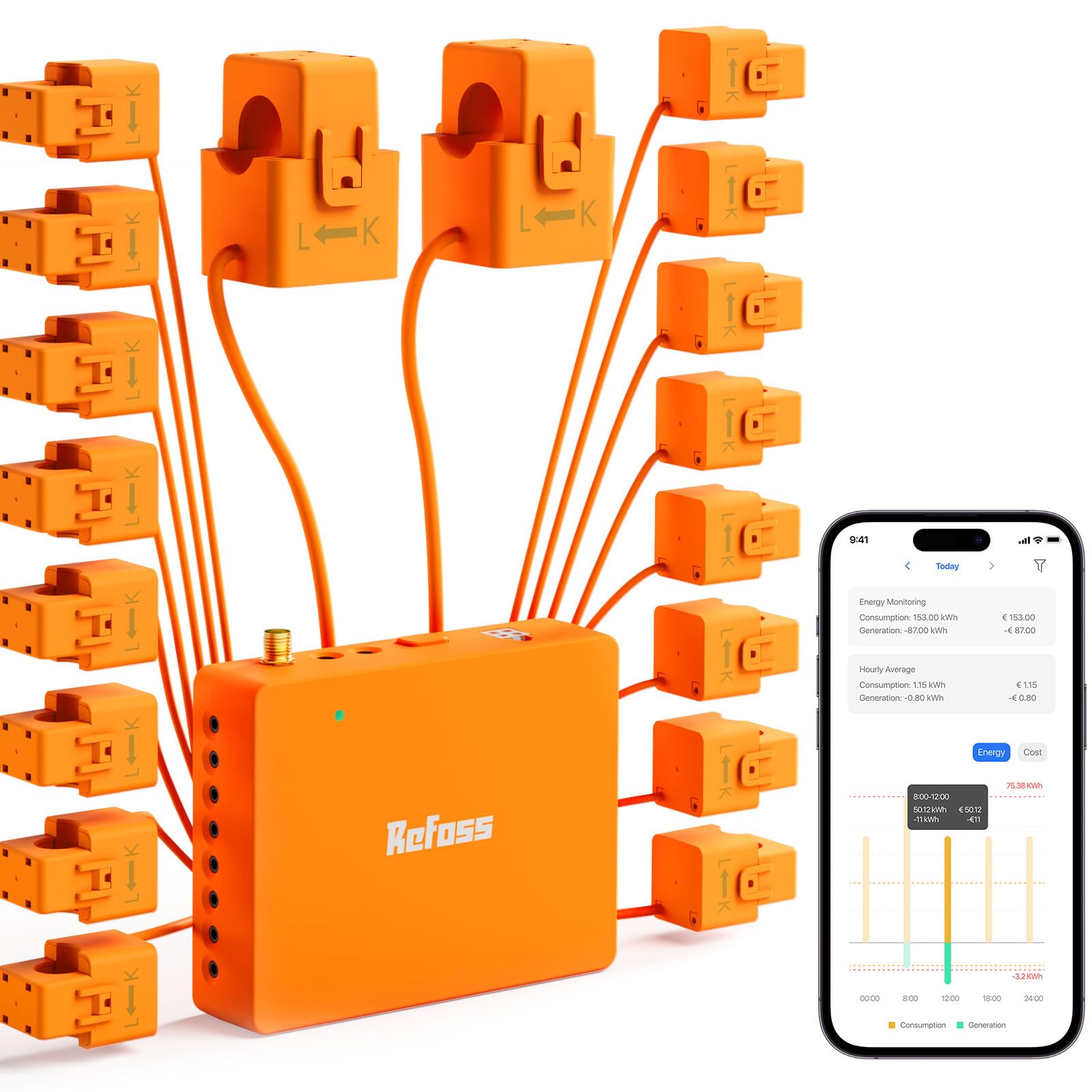
Type: Multi-circuit smart monitor
Sensors: 16 60A circuit sensors
Integration: Open API, Home Assistant, no cloud
Certification: ETL certified
Best for: Circuit-level phantom-load isolation
Check the current price on Amazon
Sixteen 60A circuit sensors are the headline here: instead of one whole-home figure, this monitor breaks consumption down per circuit, which is the fastest way to pin a phantom load to a specific breaker. An open API and Home Assistant support mean the data can flow into a home automation setup without a vendor cloud in the middle — a real draw for privacy-conscious tinkerers. ETL certification covers the safety side.
For phantom-load work, per-circuit data is genuinely more useful than a single total. The always-on draw on the entertainment circuit can be compared directly against the kitchen or garage circuits, and the offender gets isolated without unplugging a thing. It suits smart-home users who already run Home Assistant and want energy data as another sensor feed.
Trade-off: The open-API, no-cloud design rewards buyers with automation skills and offers little to someone who just wants a plug-in readout.
Electricity Usage Monitor (8 Modes)

Type: Plug-in outlet meter
Display: Backlit, 8 modes
Functions: Energy, voltage, amps, wattage
Protection: Overload protection
Best for: Versatile single-outlet testing
Check the current price on Amazon
This is the same plug-in format as the first pick, with an eighth display mode and the same backlit screen and overload protection. The extra mode is a small edge for buyers who like cycling through more measurements without a second device. Build is the familiar in-line outlet block: it plugs into the wall, the appliance plugs into it, and the screen faces out for reading.
The practical use case is identical — unplug a device, meter it, and watch the wattage when it is switched off. It earns its place as the alternative budget pick for shoppers who prefer more display options or find this one available at a better price. Anyone testing a handful of TVs, consoles and chargers will get what they need without spending much.
Trade-off: Like all single-outlet meters, it cannot show whole-home baseload, so the phantom-load picture stays partial until every suspect device is tested.
P3 P4400 Kill A Watt

Type: Plug-in power analyzer
Display: LCD
Origin: Made in Taiwan
Power: Batteries not included
Best for: Straightforward appliance spot checks
Check the current price on Amazon
The Kill A Watt is the name most people associate with household energy testing, and the P4400 keeps it simple: an LCD analyzer that sits between outlet and appliance and reports energy use. It is made in Taiwan and runs without included batteries, so buyers should plan for that small extra. There is no backlight and no mode count to speak of — this is the no-frills instrument of the group.
Its strength is familiarity and simplicity. Plug in a fridge, a games console or a charger, leave it for a day, and read the consumption. For phantom loads specifically, it does the essential job of showing standby draw on any single device. It suits buyers who want a dependable, plain meter and do not care about backlighting or app integration.
Trade-off: The plain LCD and single-outlet design feel dated next to backlit budget meters, and there is no smart or whole-home option.
Before You Buy
- Measurement scope: A plug-in meter tests one appliance at a time; a panel or circuit monitor covers the whole home or individual breakers.
- Installation: Plug-in units need no tools; panel-mounted monitors generally call for an electrician.
- Display: Backlighting helps in dim spots behind furniture, while plain LCDs are fine for well-lit kitchens.
- Smart features: App control, open APIs and Home Assistant support add long-term value only for buyers who will use them.
- Certification: UL or ETL marks matter most on monitors that live inside the electrical panel.
- Safety limits: Overload protection is worth having when testing heaters, fridges and other heavy draws.
- Extras: Check whether batteries are included and whether the unit needs a hub or subscription.
Frequently Asked Questions
-
What is a phantom load, and why measure it?
A phantom load is the power an appliance draws while switched off or idle. Measuring it shows which devices are worth unplugging or putting on a smart strip. -
Is a plug-in meter or a whole-home monitor better for finding phantom loads?
Plug-in meters pinpoint individual devices cheaply; whole-home and circuit monitors reveal the total baseload and which circuit carries it. -
Can a plug-in meter be left connected permanently?
It can, but the better routine is short testing periods per device, then removing the meter so the outlet stays free. -
Do these monitors need an app or subscription?
The plug-in models work standalone. The smart monitors rely on an app, and the Refoss model is built around local control with no cloud requirement. -
Is professional installation required for panel monitors?
Panel-mounted units are best fitted by a qualified electrician, since the work happens inside the breaker box. -
What should be tested first?
Entertainment setups, chargers, game consoles and kitchen appliances with clocks or standby lights are the usual suspects.
Bottom Line
For most households, the fastest route to phantom-load answers is the Upgraded Electrical Usage Monitor (7 Modes) — cheap, backlit, and simple enough to test every suspect device in an afternoon. Homeowners who want the whole picture in one number should step up to the Emporia Vue 3, while Home Assistant users will get the most from the circuit-level Refoss EM16P.
