Why there are Amazon links here: Brave Review is paid a commission for qualifying Amazon purchases made through the links below. Your price does not change, and using our links is entirely optional. How this works
SwitchBot Hub 2 vs SwitchBot Hub 3: Which Smart Hub Fits Your Setup
The SwitchBot Hub 2 vs SwitchBot Hub 3 decision comes down to one question: does the household need a screen-and-dial command center with a Matter bridge, or is a straightforward Wi-Fi bridge for IR appliances and sensors enough? The Hub 2 is the budget-friendly entry point and the Hub 3 is the premium pick with local control and Matter built in. The overview table below settles the choice in under a minute, and the full comparison explains each difference.
The Picks at a Glance
| Product | Key Spec | Best Use | Price Tier |
|---|---|---|---|
| SwitchBot Hub 2 (2nd Gen) | Wi-Fi bridge with IR remote, thermometer/hygrometer and light sensor | Linking existing SwitchBot gear to Wi-Fi and controlling IR appliances | Budget |
| SwitchBot Hub 3 (3rd Gen) | Screen and physical dial, Matter bridge, IR hub, temp/humidity sensor | A central command center for a mixed smart home | Premium |
SwitchBot Hub 2 (2nd Gen)

Type: Wi-Fi smart hub and IR remote bridge
Sensors: Temperature, humidity and light
IR control: TVs, air conditioners and other remote-controlled appliances
Connectivity: 2.4GHz Wi-Fi
Voice platforms: Alexa, Google Home and Apple Home
Role: Links SwitchBot devices to Wi-Fi
Check the current price on Amazon
The Hub 2 is the connective tissue of a SwitchBot household. It puts Bluetooth-only SwitchBot devices such as buttons, curtain motors and contact sensors onto Wi-Fi so they can be controlled remotely and triggered by schedules. The built-in temperature, humidity and light sensors make it a room monitor in its own right rather than a pure bridge.
Its IR blaster is the other half of the job. Older televisions, air conditioners and fans that answer to a handheld remote can be folded into the same app and the same voice commands. The 2.4GHz-only Wi-Fi is the practical limit worth knowing about: networks that broadcast solely on 5GHz will need a compatible band enabled before setup.
Trade-off: The Hub 2 has no display and no Matter bridge, so a household that wants a physical control panel or cross-platform local control will outgrow it.
SwitchBot Hub 3 (3rd Gen)
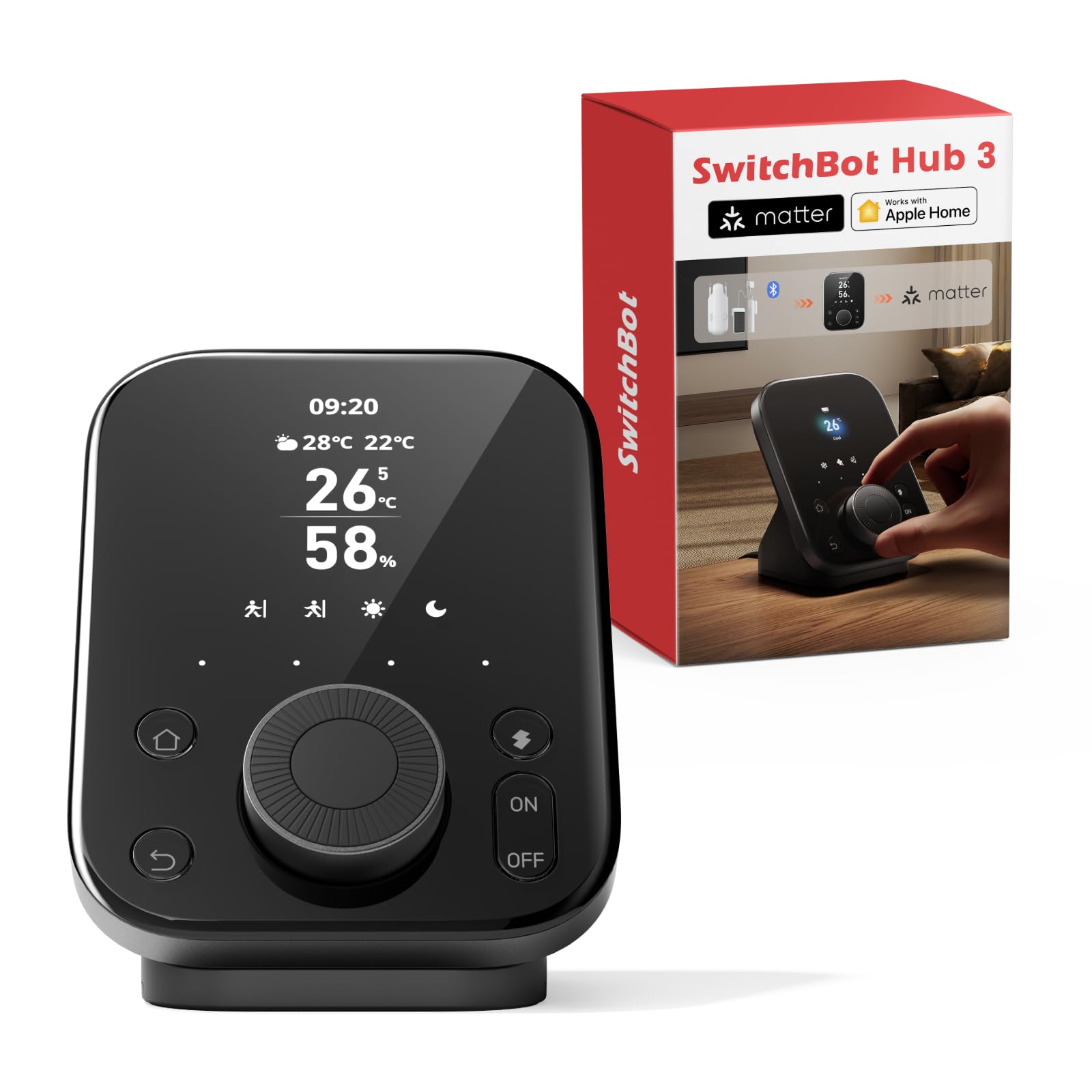
Type: Smart home command center with screen and dial
Controls: Physical dial plus on-device screen
Sensors: Temperature and humidity, ±0.2°C
IR control: TVs and air conditioners
Matter: Built-in Matter bridge
Bluetooth range: 200m
Connectivity: 2.4GHz Wi-Fi
Check the current price on Amazon
The Hub 3 is built around the idea that a hub should be usable without a phone. The screen and physical dial put scenes, temperatures and appliance controls within arm’s reach, which suits a hallway, kitchen counter or bedside table. The temperature and humidity sensor carries a stated ±0.2°C tolerance, so the readings are tight enough to drive automations rather than just inform them.
The Matter bridge is the more consequential addition. It exposes supported SwitchBot devices to other Matter-compatible ecosystems, which reduces the number of separate apps a mixed household has to juggle. The 200m Bluetooth figure describes the radio reach for pairing and maintaining nearby SwitchBot devices, and the IR hub covers the same televisions and air conditioners as the Hub 2.
Trade-off: The screen and dial add cost and physical bulk, so a household that only needs a hidden Wi-Fi bridge pays for hardware it will never touch.
Side-by-Side: Hub 2 vs Hub 3
| Feature | SwitchBot Hub 2 (2nd Gen) | SwitchBot Hub 3 (3rd Gen) |
|---|---|---|
| On-device screen | No | Yes |
| Physical dial | No | Yes |
| IR remote hub | Yes | Yes |
| Temperature/humidity sensor | Yes | Yes, ±0.2°C |
| Light sensor | Yes | Not stated |
| Matter bridge | No | Yes |
| Bluetooth range | Not stated | 200m |
| Wi-Fi band | 2.4GHz | 2.4GHz |
| Voice platforms | Alexa, Google Home, Apple Home | Not stated |
| Price tier | Budget | Premium |
Where the Two Hubs Diverge
The screen and dial are the first visible difference and the one that decides most purchases. The Hub 3 can be operated standing in front of it, adjusting a scene or nudging the thermostat without unlocking a phone. The Hub 2 is an app-and-voice device with no interface of its own, which is fine in a cupboard and frustrating on a kitchen counter.
Matter support is the second split, and the more future-facing one. The Hub 3 acts as a bridge, so supported SwitchBot accessories can appear inside other Matter ecosystems. The Hub 2 links SwitchBot devices to Wi-Fi and to the major voice assistants but does not bridge them across platforms in the same way. A household standardizing on Matter should treat this as the deciding row.
Sensor coverage leans slightly toward the Hub 2 on paper, because its name explicitly lists a light sensor. The Hub 3 states a tighter temperature and humidity tolerance but does not advertise a light sensor in the same breath. Buyers who want automations triggered by room brightness should check that detail before committing.
Bluetooth reach is where the Hub 3 pulls ahead for larger homes. The stated 200m range means devices at the far end of a house or across a garage are more likely to stay connected to a single hub. The Hub 2’s reach is adequate for a typical apartment or a single floor, and a second hub is the usual fix for a spread-out property.
Finally, both hubs share the same 2.4GHz Wi-Fi requirement and the same IR role for televisions and air conditioners. Neither is a better IR blaster than the other in any way the product names establish, so the choice should not be made on appliance control.
Which Should You Buy?
Choose the SwitchBot Hub 2 (2nd Gen) if: the goal is to get existing SwitchBot buttons, curtains and sensors onto Wi-Fi and to add IR control for a TV or air conditioner, and a phone-based interface is acceptable. It is the lower-cost way into the ecosystem and covers the core job without extras.
Choose the SwitchBot Hub 3 (3rd Gen) if: the household wants a physical command center in a busy room, plans to standardize on Matter, or needs the longer Bluetooth reach for a large property. The screen, dial and Matter bridge are the reasons to pay more, and they are worth it for a mixed-ecosystem home.
FAQ
-
Is the SwitchBot Hub 3 worth it over the Hub 2?
It is worth it when the screen, dial or Matter bridge will actually be used. For a household that only needs a Wi-Fi bridge and IR control, the Hub 2 covers the same ground for less. -
Does the SwitchBot Hub 2 support Matter?
The Hub 2 is not described as a Matter bridge. Its role is linking SwitchBot devices to Wi-Fi and to Alexa, Google Home and Apple Home. Matter bridging is a Hub 3 feature. -
Can both hubs control a TV or air conditioner?
Yes. Both are IR remote hubs for televisions, air conditioners and similar appliances that use a handheld remote. Neither name suggests a difference in IR capability. -
Do both hubs need 2.4GHz Wi-Fi?
Yes. Both list 2.4GHz Wi-Fi support, so a network running only on 5GHz will need a 2.4GHz band enabled before either hub can connect. -
Which hub has the better temperature sensor?
The Hub 3 states a ±0.2°C tolerance for its temperature and humidity sensor. The Hub 2 also measures temperature and humidity but does not publish a tolerance in its name. -
Can the Hub 3 be used without a phone?
The screen and physical dial are designed for on-device control, so common actions can be handled at the hub itself. Setup and advanced configuration still go through the app. -
Does the Hub 2 have a light sensor?
Yes, a light sensor is listed among the Hub 2’s features. The Hub 3’s name does not mention one, so brightness-triggered automations favor the Hub 2.
Bottom Line
For most households the SwitchBot Hub 3 (3rd Gen) is the better long-term buy: the screen and dial make it usable without a phone, the Matter bridge future-proofs a mixed smart home, and the longer Bluetooth reach suits larger properties. The SwitchBot Hub 3 (3rd Gen) is the pick for anyone building a command center, while the SwitchBot Hub 2 (2nd Gen) remains the sensible budget choice for a simple Wi-Fi and IR bridge.
