Why there are Amazon links here: Brave Review is paid a commission for qualifying Amazon purchases made through the links below. Your price does not change, and using our links is entirely optional. How this works
APC BE600M1 Back-UPS Review: Battery Backup With USB Charging
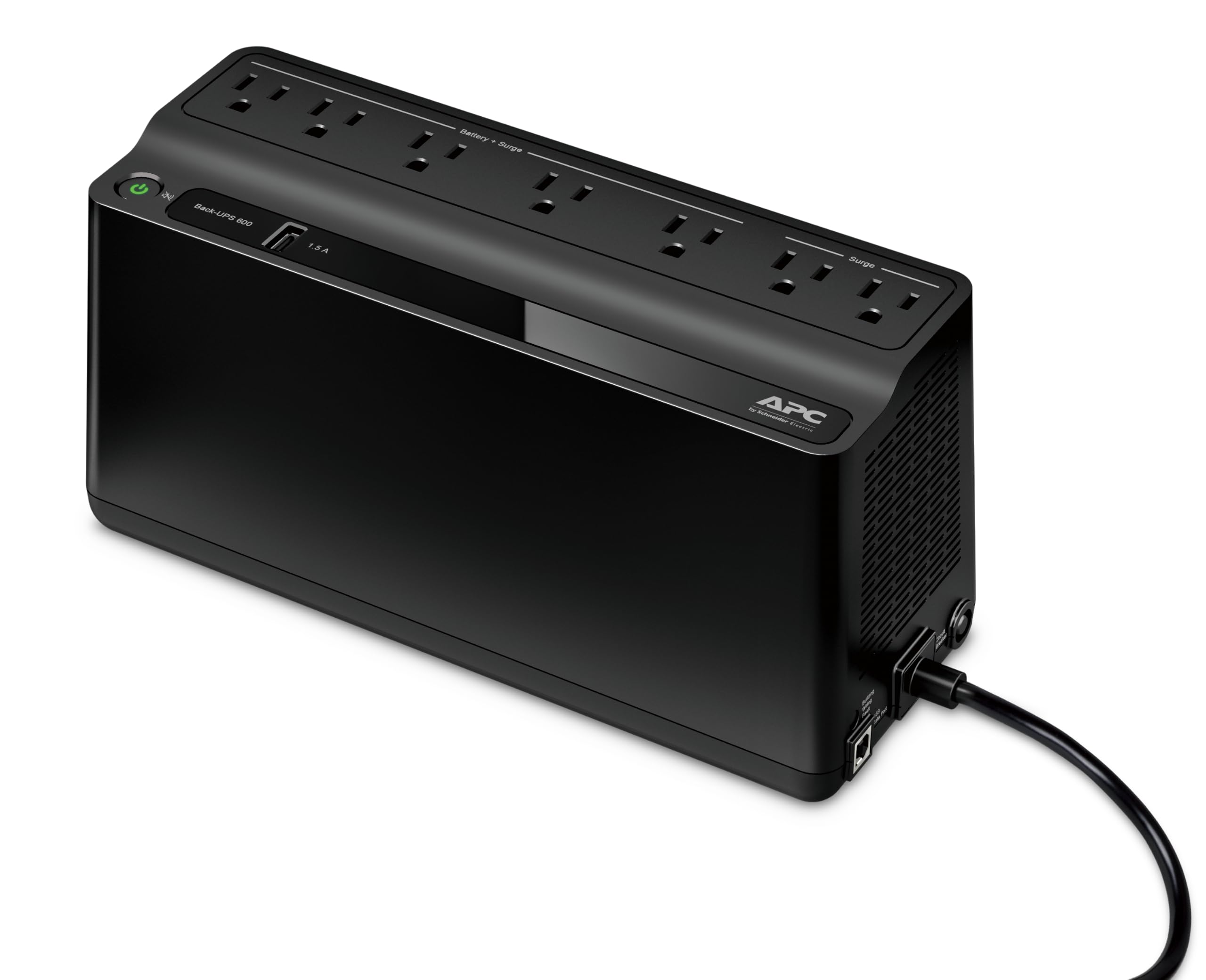
The APC BE600M1 is a compact uninterruptible power supply built for the desk, not the data center. It keeps a router, a modem, a monitor and a laptop charger alive through short outages, and it adds a USB charging port for a phone. This review covers what the unit is, how the 600VA rating translates into real runtime, who should buy it, and where it falls short. Buyers who want a simple, low-cost way to stop losing work to flickering power will find the answer quickly here.
Check the current price on Amazon
Features and Specifications
Type: Standby UPS with battery backup and surge protection
Capacity: 600VA
Outlets: Battery backup outlets plus surge-only outlets
USB: One USB charging port
Form factor: Compact desktop unit
Quantity: Pack of 2
Intended use: Home office, router, modem, small electronics
The 600VA figure is the headline number, and it is the one that confuses most shoppers. Volt-amperes describe how much load the unit can carry, not how long it will carry it. A 600VA standby UPS of this class is sized for a handful of low-draw devices — networking gear, a monitor, a laptop brick, a desk lamp — and it is not intended to run a desktop tower with a discrete graphics card or a space heater.
The "Pack of 2" detail matters just as much as the capacity. This listing ships two identical units, which changes the math for anyone comparing it against a single-pack competitor. Two units means one can sit under the desk by the router and the other can cover a second room, a second desk, or a family member’s setup.
Build and Design
This is a standby, or off-line, UPS. It passes utility power straight through to the connected devices during normal operation and switches to its internal battery when the incoming voltage drops out of range. That switch is fast enough that most equipment rides through without rebooting, which is the whole point of the category.
The housing is the familiar APC desktop shape: a small, upright plastic body designed to sit on a floor or a shelf rather than be rack-mounted. Buyers should plan for a little clearance around it, since the battery and the inverter inside generate heat during an outage and the unit vents that heat passively. It is not a device to bury under a pile of cables.
Outlets are split between battery-backed and surge-only. That split is a feature, not a limitation: high-draw items such as a printer or a paper shredder belong on the surge side, where they get protection from spikes without draining the battery the moment the power fails.
Capacity and Runtime
The honest way to read the 600VA rating is as a ceiling, not a promise. A router, a cable modem and a monitor together draw very little, and a unit of this size will hold them up through a brief outage — long enough to save open documents, finish a call, or ride out a trip of the breaker. A full desktop system with a gaming GPU will either overwhelm it or drain it in a couple of minutes.
Buyers should add up the wattage of everything they intend to plug into the battery side before ordering. The rule of thumb for a standby UPS is to stay comfortably under the rated capacity, because a unit run near its limit produces less runtime and more heat. Networking gear and a monitor are the sweet spot; anything with a heating element or a large motor is not.
Runtime also degrades with battery age. Sealed lead-acid cells, which is what a unit at this price point uses, lose capacity over the years and eventually need replacing. That is a normal consumable cost in this category, not a defect, but it is worth knowing before the first outage that arrives three years in.
Power and Surge Protection
Surge protection is the quieter half of what this unit does, and for many buyers it is the more valuable half. Every outlet on the unit is protected against voltage spikes, including the surge-only ones. That covers the everyday events — a compressor kicking on, a storm rolling through, the utility restoring power after an outage — that quietly shorten the life of electronics.
The USB charging port is a small convenience rather than a headline feature. It gives a phone or a pair of earbuds a place to charge without occupying one of the AC outlets, which matters on a unit with a limited outlet count. Buyers should not expect fast-charging speeds from it; it is a utility port, not a wall charger replacement.
One caution that applies to the whole category: a UPS protects what is plugged into it, and nothing else. Devices on a different circuit, or plugged directly into the wall, get no benefit. The protection only exists downstream of the unit.
Maintenance and Daily Use
Day-to-day, this is a set-and-forget device. It sits quietly, passes power through, and only makes itself known when the power drops or when the battery reaches the end of its service life. Most units in this class include an audible alarm and a status indicator, so an outage announces itself rather than passing silently.
The maintenance item that actually matters is the battery. Sealed lead-acid cells in a standby UPS typically last a few years before runtime drops noticeably, and replacements are a normal part of ownership. Buyers who plan to keep the unit for a decade should expect to swap the battery at least once.
Because this is a two-pack, buyers also inherit a small logistical question: two units means two batteries aging on their own schedule and two devices to keep an eye on. That is a fair trade for covering two locations, but it is a consideration for anyone who only needs one.
Trade-off: The 600VA ceiling and the standby topology keep the price low, but they also mean this unit is for routers, modems, monitors and similar light loads — a high-draw desktop or anything with a motor belongs elsewhere.
Who Should Buy the APC BE600M1
The strongest fit is a home office or a small apartment where the router, the modem and a monitor are the things that must not blink out. Losing a video call, a download, or an unsaved document to a two-second outage is the exact problem this unit solves, and it solves it at a price that does not require deliberation.
It also suits the buyer who wants surge protection across a desk setup without buying a separate strip. Every outlet on the unit is protected, so a printer, a lamp and a phone charger can all sit on it even if only some of them get battery backup.
Who it is not for: anyone hoping to keep a gaming PC running through a long outage, anyone with a laser printer or a space heater that needs backup power, and anyone who needs a pure sine wave output for sensitive audio or medical equipment. Those buyers need a larger, online or line-interactive unit, and this is not that product.
The two-pack angle deserves its own note. Buyers with two desks, two routers, or a home plus a small office get better value from this listing than from a single unit, because the second device is genuinely useful rather than a spare. Buyers who need exactly one should compare against single-pack listings before committing.
FAQ
-
What is the APC BE600M1 used for?
It is a standby UPS that keeps low-draw electronics — routers, modems, monitors, laptop chargers — running through short power outages and protects every connected device from voltage spikes. -
How long will the BE600M1 run a router during an outage?
Runtime depends entirely on the load. A router and modem together draw very little, so the unit holds them up through brief outages; adding a monitor shortens that window. Buyers should total the wattage of everything on the battery side before relying on a specific runtime. -
Can the APC BE600M1 run a desktop computer?
A basic desktop may run briefly, but a system with a discrete graphics card or a high-wattage power supply is beyond what a 600VA standby unit should carry. This is a light-load device. -
Does the BE600M1 have surge protection on every outlet?
Yes. All outlets on the unit are surge-protected; a subset also provides battery backup. High-draw items such as printers belong on the surge-only outlets. -
What is the USB port on the BE600M1 for?
It charges a phone or other small USB device without taking up an AC outlet. It is a convenience port rather than a fast charger. -
Is this listing really two units?
Yes. The product name specifies a pack of two, so the order ships two identical BE600M1 units. That suits buyers covering two locations or two desks. -
How often does the battery need replacing?
Sealed lead-acid batteries in this class typically last a few years before runtime drops noticeably. Replacement is a normal ownership cost rather than a fault. -
Is a 600VA UPS enough for a home office?
For networking gear, a monitor and a laptop charger, yes. For a desktop tower with a powerful GPU, a laser printer, or anything with a heating element, no — those need a larger unit. -
Who should not buy the APC BE600M1?
Buyers who need to run high-draw equipment, who need pure sine wave output for sensitive gear, or who only want a single unit rather than a two-pack. -
Does a UPS protect devices plugged into the wall instead?
No. Protection only covers what is plugged into the unit’s outlets. Devices on another circuit or directly in the wall get no benefit.
Bottom Line
The APC BE600M1 is the right answer for the buyer whose problem is a blinking router and a lost document, not a whole-home blackout. Its 600VA ceiling is honest about what it can carry, the surge protection covers every outlet, and the USB port is a small but real convenience. The two-pack structure is the detail to weigh carefully: buyers with two setups get genuine value, while buyers who need one unit should compare single-pack listings. For light-load backup at a budget-tier price, this is a straightforward pick.
