Why there are Amazon links here: Brave Review is paid a commission for qualifying Amazon purchases made through the links below. Your price does not change, and using our links is entirely optional. How this works
SwitchBot Hub 3 Review: The Budget Smart Home Brain That Talks to Everything
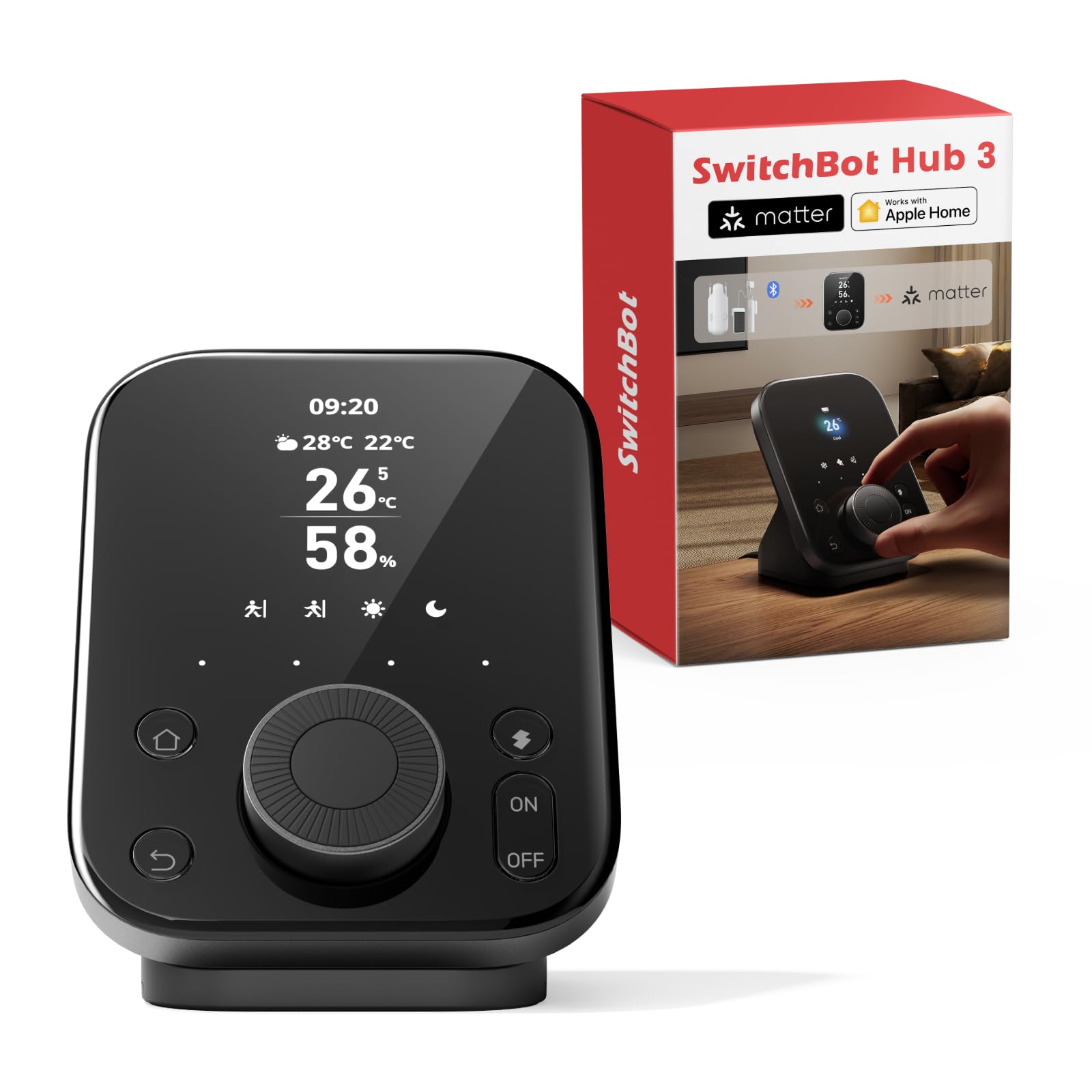
The SwitchBot Hub 3 is a small desk-top command center for households that own a mix of smart gear and old infrared appliances. It combines a display, a physical dial, an IR blaster, a temperature and humidity sensor and a Matter bridge in one unit. This review covers what the hardware is built to do, where it fits in a smart home, and the compromises that come with its price tier. Readers who want one hub to tie together a TV, an air conditioner and a handful of sensors will find the most value here.
Features and Specifications
Type: Smart home command center with integrated display and physical dial
Connectivity: 2.4GHz WiFi, Bluetooth (200m range)
IR Control: Built-in infrared remote hub for TVs and air conditioners
Sensors: Temperature and humidity sensor, accuracy rated to ±0.2°C
Protocol Role: Matter bridge
Display: Onboard screen with physical dial control
Compatibility: SwitchBot ecosystem devices plus Matter and IR-controlled appliances
The Hub 3 is a consolidation device. Rather than adding Wi-Fi to every appliance, it sits in one room and acts as a translator: infrared for legacy remotes, Bluetooth for nearby SwitchBot accessories, and Matter for bringing supported devices into a broader smart home platform. The screen and dial matter more than they sound, because a hub that can be operated without pulling out a phone is a hub that actually gets used.
Build quality follows the tier. This is a compact plastic unit meant to sit on a shelf or desk, not a rack-mounted controller, and it should be treated as a single point of failure for anything routed through it. The 200m Bluetooth figure is a line-of-sight claim from the manufacturer, not a promise about a house full of walls.
Control and Interface
The screen and dial are the headline feature and the reason to pick this over a bare bridge. A dial gives fast, tactile control over things like brightness, volume or temperature without unlocking a phone or opening an app. The screen shows status at a glance, which reduces the number of times a household member has to check a phone to confirm whether a device is on.
That convenience has a ceiling. A small screen on a hub is a status window, not a control panel, and complex automations still need the app. Buyers who want deep per-device configuration from the hardware itself will be disappointed; buyers who want a fast physical override will not.
Infrared and Appliance Control
The IR blaster is the most practical part of the package for most homes. Televisions, air conditioners and other remote-controlled appliances rarely have smart features built in, and an IR hub is the cheapest way to bring them into routines and voice commands. One hub in a living room can plausibly cover a TV and an AC unit in the same sightline.
Infrared is directional, though. It needs a clear path to the appliance’s receiver, and it will not pass through walls or closed cabinet doors. A hub placed badly controls nothing, so placement matters more than the spec sheet suggests.
Sensors, Matter and the Ecosystem
The built-in temperature and humidity sensor is a genuinely useful addition, because climate readings drive a lot of everyday automations: turning on an AC, kicking off a fan, or triggering a dehumidifier. The ±0.2°C accuracy figure is the manufacturer’s rating, and it puts the sensor in a different class from the rough readings many cheap sensors produce.
Matter bridging is the forward-looking piece. It lets supported devices appear in other smart home platforms instead of being locked to one app, which is the difference between a hub that ages well and one that becomes e-waste when a household changes platforms. The catch is that Matter support varies by device, and not every SwitchBot accessory will bridge.
Performance and Day-to-Day Use
In daily use, the Hub 3 behaves like a traffic controller. IR commands are near-instant when the line of sight is clear, and sensor readings update often enough to drive climate automations without noticeable lag. The dial is the feature that changes behavior most, because it removes the friction that stops people using smart controls at all.
The honest limitation is dependence. Every appliance routed through the hub stops responding if the hub loses power or the Wi-Fi drops, and IR control in particular has no local fallback beyond the original remote. Households that need guaranteed uptime for heating or security should keep native controls in place rather than routing everything through one box.
Strengths and Weaknesses
Strengths: The combination of screen, dial, IR, sensors and Matter bridging in a single unit is unusually complete for the price tier. Setup lives in one app, and the physical controls make the hub usable by people who never open that app. The temperature and humidity sensor adds real automation value rather than being a checkbox feature.
Weaknesses: Everything hinges on one device staying powered and connected, and IR is line-of-sight only. The 2.4GHz-only WiFi is a limitation in dense networks, and Matter bridging depends on which accessories are supported.
Trade-off: The Hub 3 buys breadth over depth — it does many jobs competently, but a dedicated IR blaster, a dedicated sensor and a dedicated bridge will each outperform it at their single task.
Who Should Buy the SwitchBot Hub 3
This hub suits renters and apartment dwellers who want to smarten up an air conditioner and a TV without rewiring anything, and it suits households already invested in SwitchBot accessories that need a central brain. It also fits buyers who want a physical control point on a desk or shelf rather than another app icon.
It is not for anyone building a large, mission-critical smart home where a single hub failure is unacceptable, and it is not for buyers who need every device bridged into Matter regardless of brand. Homes with thick walls between the hub and the appliances it needs to reach should plan placement carefully or look elsewhere.
Check the current price on Amazon
FAQ
-
What is the SwitchBot Hub 3 used for?
It acts as a central command center for a smart home: it controls infrared appliances like TVs and air conditioners, reads temperature and humidity, and bridges supported devices into other platforms via Matter. -
Does the SwitchBot Hub 3 need a subscription?
No subscription is required for the core functions described here. The hub works through the SwitchBot app and its physical controls. -
Can the SwitchBot Hub 3 control an air conditioner?
Yes, provided the air conditioner uses an infrared remote and the hub has a clear line of sight to it. -
Is the SwitchBot Hub 3 a Matter bridge?
Yes. It is built to bridge supported devices into Matter-compatible smart home platforms, though support varies by accessory. -
Does the SwitchBot Hub 3 work with 5GHz WiFi?
No. It connects over 2.4GHz WiFi, which is common for smart home hubs but worth checking against a home network setup. -
What is the Bluetooth range of the SwitchBot Hub 3?
The manufacturer rates it at 200m, which assumes favorable conditions. Real-world range through walls will be shorter. -
Does the SwitchBot Hub 3 have a temperature sensor?
Yes, it includes a temperature and humidity sensor rated to ±0.2°C accuracy. -
Can the SwitchBot Hub 3 be controlled without the app?
Yes. The onboard screen and physical dial allow basic control and status checks without opening a phone. -
What happens to connected devices if the hub goes offline?
Anything routed through the hub loses smart control until it reconnects. Native remotes and manual controls still work. -
Who should skip the SwitchBot Hub 3?
Buyers who need guaranteed uptime for critical systems, or who require every device to bridge into Matter, should consider a more specialized setup.
Bottom Line
The SwitchBot Hub 3 is the sensible pick for a household that wants one affordable box to control infrared appliances, read the room’s climate and tie SwitchBot gear together — as long as that household accepts a single point of failure and keeps the original remotes within reach.
