Why there are Amazon links here: Brave Review is paid a commission for qualifying Amazon purchases made through the links below. Your price does not change, and using our links is entirely optional. How this works
NETGEAR GS105NA vs NETGEAR XAVB5201: One Needs a Cable, One Needs an Outlet
The NETGEAR GS105NA and the NETGEAR XAVB5201 solve two different wiring problems, and picking the wrong one wastes money. The GS105NA is a five-port gigabit switch that splits one wired connection into several. The XAVB5201 is a Powerline 500 starter kit that pushes a network signal through the electrical wiring in a building.
Buyers who already have a router, a modem or a wall jack nearby and simply need more ports want the switch. Buyers who cannot run cable to a distant room want the Powerline kit. Everything below separates the two on that basis.
Quick Verdict: NETGEAR GS105NA vs NETGEAR XAVB5201 at a Glance
| Product | Key Spec | Best Use | Price Tier |
|---|---|---|---|
| NETGEAR GS105NA | 5-port Gigabit Ethernet, unmanaged, desktop or wall mount | Splitting one wired connection into several devices in the same room | Budget |
| NETGEAR XAVB5201 | Powerline 500, 1-port starter kit | Extending a wired connection to a room without cabling | Mid-range |
The switch is the cheaper, simpler, more predictable buy when a cable already reaches the spot. The Powerline kit costs more because it replaces a cable run with the building’s own electrical circuit.
NETGEAR GS105NA: The Five-Port Gigabit Switch
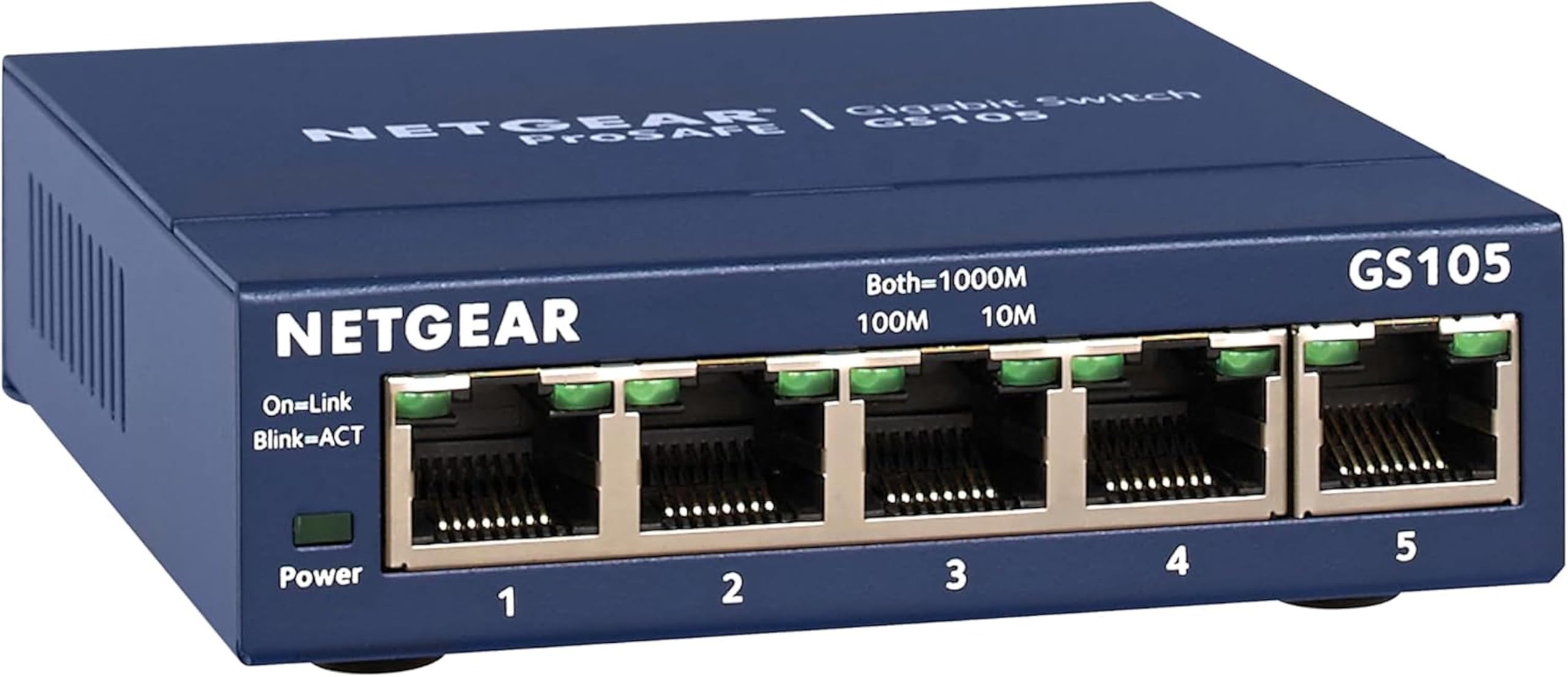
Type: Unmanaged Ethernet network switch
Ports: 5 Gigabit Ethernet ports
Speed class: Gigabit Ethernet
Mounting: Desktop or wall mount
Configuration: Unmanaged, no setup required
Best for: Splitting one wired connection across several devices
The GS105NA is a plain unmanaged switch. It takes one incoming Ethernet connection and makes it available to four more devices, all at gigabit speed, with no software, no login and no configuration screen. A buyer plugs in the uplink cable and the devices, and the switch starts passing traffic.
Gigabit matters here because it is the same speed class as most home routers and NAS boxes, so the switch itself does not become the bottleneck in a wired setup. The metal housing and the wall-mount option suit a shelf, a desk or a small structured-wiring panel where the unit will sit out of the way.
Five ports is the ceiling. A household with a router, a console, a TV, a desktop and a printer fills every port with nothing left over, and an unmanaged switch cannot prioritize traffic or separate networks. Buyers who need VLANs or port management should look at a managed model instead.
Trade-off: The five-port limit and the total absence of management features mean the GS105NA has no headroom once a household adds a sixth device.
Check the current price on Amazon
NETGEAR XAVB5201: The Powerline 500 Starter Kit

Type: Powerline Ethernet adapter kit
Class: Powerline 500
Ports: 1 Ethernet port per adapter
Kit contents: Starter kit, two adapters
Setup: Pair the adapters over the existing electrical wiring
Best for: Extending a wired connection to a room without running cable
The XAVB5201 is a starter kit, which means two adapters arrive together. One connects to the router by Ethernet, the other goes into a wall outlet in the room that needs a connection, and the pair carries the network over the electrical wiring between them. No new cable has to be pulled through walls.
Powerline 500 is a mid-tier speed class, well below what a gigabit switch passes, so the kit suits general browsing, streaming and working from a second room rather than moving large files between machines. Each adapter exposes a single Ethernet port, so a buyer with several devices in that room needs a switch on the far end as well.
Powerline performance depends on the electrical circuit it runs over. Adapters on different circuits, behind a surge protector or in an older building can deliver far less than the class suggests, and the result varies from house to house. That uncertainty is the real cost of skipping the cable.
Trade-off: The single port per adapter and the circuit-dependent speed make the XAVB5201 a one-device, one-room solution rather than a whole-network upgrade.
Check the current price on Amazon
Side-by-Side Comparison
| Feature | NETGEAR GS105NA | NETGEAR XAVB5201 |
|---|---|---|
| Product type | Unmanaged network switch | Powerline Ethernet adapter kit |
| Ports | 5 Gigabit Ethernet ports | 1 Ethernet port per adapter |
| Speed class | Gigabit Ethernet | Powerline 500 |
| Configuration needed | None | Adapter pairing |
| Mounting | Desktop or wall mount | Wall outlet |
| Cable run required | Yes, to every device | No, uses electrical wiring |
| Units in the box | One switch | Two adapters |
| Price tier | Budget | Mid-range |
How the Two Differ on Wiring
The deciding difference is what each product does with a connection that already exists. The GS105NA multiplies a nearby wired connection; the XAVB5201 transports one to a distant room. A buyer with a router in the living room and three devices beside it needs the switch. A buyer with a router in the living room and a desktop in a back bedroom needs the kit.
How the Two Differ on Speed and Predictability
Gigabit Ethernet over a cable delivers a consistent, rated speed to every port, and the GS105NA passes that through without management overhead. Powerline 500 varies with the wiring, so the XAVB5201 offers a connection where no cable exists at the cost of knowing exactly what it will deliver.
How the Two Differ on Port Count
The GS105NA gives five ports on a single device. The XAVB5201 gives one port at each end of the link, so a room with a console, a TV and a desktop needs the kit plus a switch. Buyers who want several devices in the far room should budget for both.
How the Two Differ on Setup
The switch is plug-and-play: cables in, done. The Powerline kit needs the two adapters paired and both plugged into wall outlets rather than power strips, which adds a step and a placement decision the switch never asks for.
Which Should You Buy?
Choose the NETGEAR GS105NA if a router, modem or wall jack already sits within cable reach of the devices, and the goal is simply more ports. It is the cheaper, faster and more predictable option, and it needs no pairing or placement rules.
Choose the NETGEAR XAVB5201 if the devices sit in a room with no practical cable route and the building’s wiring is the only path available. It is the right tool for a distant room, provided the buyer accepts the single port and the variable speed.
Buyers who need both — several devices in a far room — should treat the kit as the link and add a switch at the far end.
FAQ
-
Is the NETGEAR GS105NA a router?
No. It is an unmanaged switch. It splits an existing connection into more ports but does not create or manage an internet connection. -
Can the NETGEAR XAVB5201 replace a Wi-Fi extender?
It serves a different purpose. The kit delivers a wired Ethernet connection to a distant room, while a Wi-Fi extender spreads a wireless signal. Buyers who want a cable-free laptop should look elsewhere. -
Does the NETGEAR GS105NA slow down a gigabit network?
No. It is a gigabit switch, so it matches the speed class of most home routers and passes traffic at that rate across its five ports. -
Does the NETGEAR XAVB5201 work in any building?
It depends on the electrical wiring. Adapters on the same circuit and plugged directly into wall outlets generally perform best, and results vary between buildings. -
Can the two products be used together?
Yes. The Powerline kit can carry a connection to a distant room, and a switch at that end can fan it out to several devices. -
How many devices can the NETGEAR XAVB5201 support at once?
Each adapter has one Ethernet port, so a single device connects at the far end unless a switch is added. -
Does the NETGEAR GS105NA need a power adapter?
Yes. It is a powered unit that plugs into an outlet, and it also offers a wall-mount option for tidy installation.
Bottom Line
The NETGEAR GS105NA is the pick for most buyers, because it costs less, runs at gigabit speed and turns one wired connection into five without any setup. The NETGEAR XAVB5201 earns its higher price only when a cable cannot reach the room at all — and even then, it is a one-device link rather than a network in a box.
