Why there are Amazon links here: Brave Review is paid a commission for qualifying Amazon purchases made through the links below. Your price does not change, and using our links is entirely optional. How this works
Best Smart Plugs for a House with Solar Panels: Track, Shift, and Save
A house with solar panels changes what a smart plug is for. Instead of just turning a lamp on schedule, the best smart plugs for a house with solar panels help owners see where the power goes, push heavy loads into daylight hours, and confirm the panels are actually covering the bill. This roundup covers five picks: a budget outdoor plug for pool pumps and yard lighting, a mid-range dual-outlet plug with energy monitoring, and three whole-home monitors for buyers who want circuit-level data rather than one outlet at a time. The overview table below sorts all five by key spec and best use.
The Picks at a Glance
| Product | Key Spec | Best Use | Price Tier |
|---|---|---|---|
| Emporia Vue 3 Home Energy Monitor | Whole-home module, solar and net metering | Households wanting panel-level data | Premium |
| Emporia Energy Monitor 16 Sensors + 4 Smart Plugs Bundle | 16 sensors plus four smart plugs | One-box solar monitoring and control | Premium |
| Kasa Outdoor Smart Plug EP40 | IP64, two sockets, no hub | Pool pumps, patio lights, EV trickle loads | Budget |
| Wyze Plug Outdoor | Dual outlets with energy monitoring, IP64 | Outdoor loads that need usage data | Mid-range |
| Smart Home Energy Monitor with 16 Circuit Sensors | 16 circuit-level sensors, Home Assistant | Rentals, shared apartments, DIY dashboards | Mid-range |
1. Emporia Vue 3 Home Energy Monitor

Type: Whole-home energy monitor module
Solar Support: Solar and net metering
Certification: UL certified
Compatibility: Smart home automation, iOS and Android apps
Price Tier: Premium
Emporia Vue 3 Home Energy Monitor
The Vue 3 is the anchor pick for a solar household. It installs at the electrical panel and reads whole-home consumption alongside solar production and net metering, so the app shows whether the house is drawing from the array or from the grid at any moment. The module is UL certified, which matters for anything wired inside a breaker box. It suits owners who want the big picture and are comfortable having a device installed at the panel.
This is the pick for households that already have panels and want proof the system is earning its keep. It is not for renters or anyone unwilling to open the panel, and it does not switch loads on its own — it monitors, it does not control. Buyers who want plug-level switching should pair it with smart plugs rather than expect it to do both jobs.
Trade-off: Panel installation is a job for someone confident with live wiring, and the module alone will not turn anything on or off.
Check the current price on Amazon
2. Emporia Energy Monitor with 16 Sensors + 4 Smart Plugs Bundle
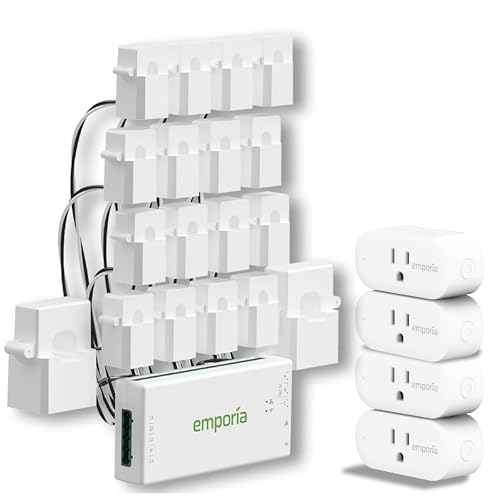
Type: Whole-home monitor bundle with smart plugs
Sensors: 16 circuit-level sensors
Included: Four smart plugs
Solar Support: Solar net metering
Compatibility: iOS, Android, Alexa
Price Tier: Premium
Emporia Energy Monitor with 16 Sensors + 4 Smart Plugs Bundle
This bundle takes the same monitoring idea and adds the control layer. Sixteen sensors clamp onto individual circuits so the app can separate the air conditioner from the water heater from the dryer, and the four included smart plugs extend that tracking down to whatever is plugged into them. Solar net metering is supported, and Alexa voice control rounds it out.
It is the strongest fit for a solar home that wants both visibility and the ability to schedule loads into peak-production hours. The extra sensors are the reason to choose it over the standalone monitor, but they also mean more wiring inside the panel. Buyers with a small or crowded breaker box may find sixteen clamps hard to place.
Trade-off: Sixteen clamps demand panel space and patience, so a compact panel can turn the install into a puzzle.
Check the current price on Amazon
3. Kasa Outdoor Smart Plug EP40

Type: Outdoor dual-socket smart plug
Weather Resistance: IP64
Hub Required: No
Certification: ETL certified
Compatibility: Alexa, Google Home
Price Tier: Budget
The EP40 is the cheap, quick win. It offers two sockets in a weather-resistant IP64 housing, connects over Wi-Fi without a hub, and works with Alexa and Google Home. For a solar home, its job is shifting outdoor loads — pool pumps, patio lighting, holiday strings — into the sunny part of the day with a schedule.
This is the pick for buyers who want to start small and spend little. It is not for anyone who needs to know how much power a device uses, because it switches without metering. It is also not a substitute for a whole-home monitor; two sockets cover two devices, not a house.
Trade-off: The low price buys scheduling and weather resistance, not energy data, so consumption stays invisible.
Check the current price on Amazon
4. Wyze Plug Outdoor
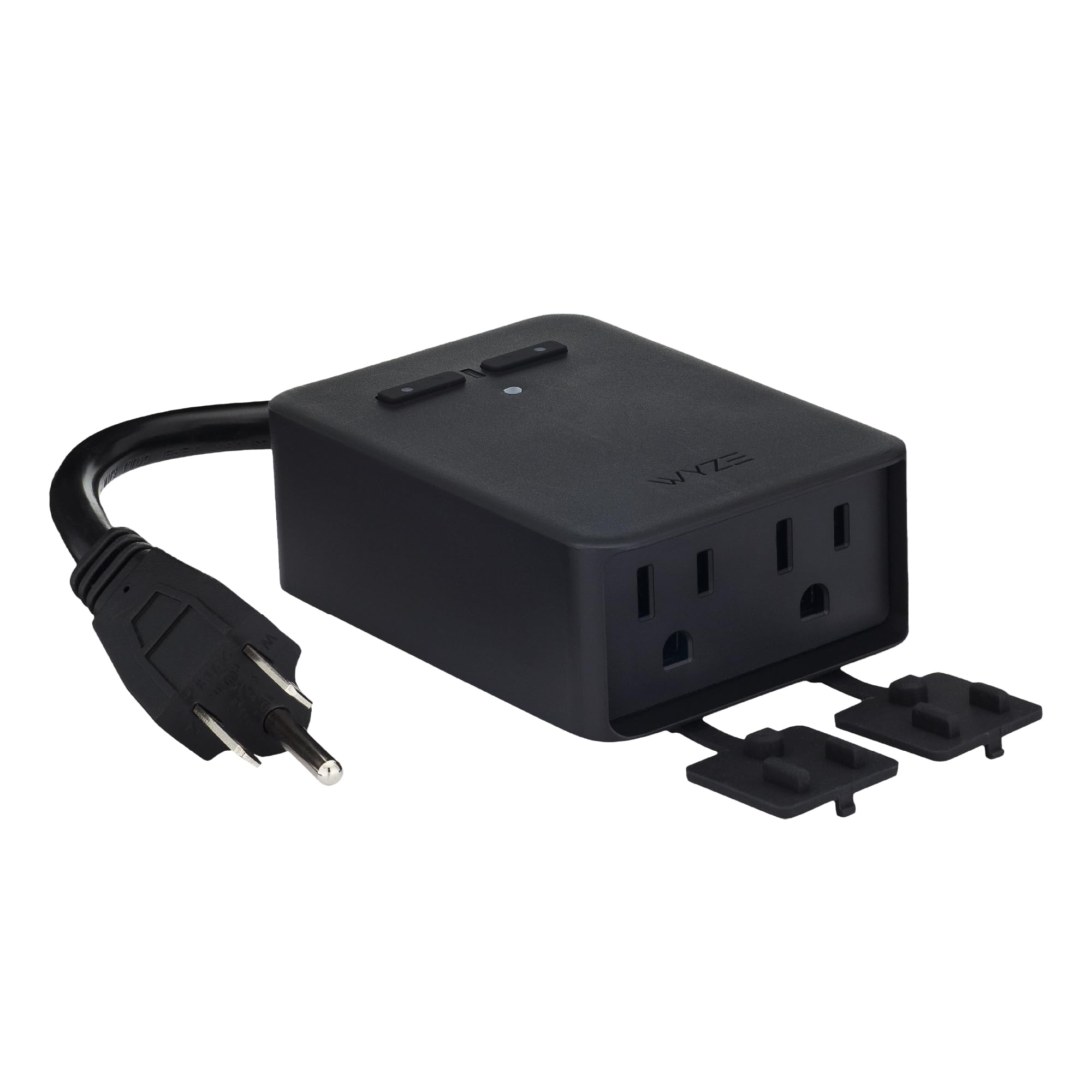
Type: Outdoor dual-outlet smart plug
Energy Monitoring: Yes
Weather Resistance: IP64
Connectivity: 2.4GHz Wi-Fi
Compatibility: Alexa, Google Assistant, IFTTT
Hub Required: No
Price Tier: Mid-range
The Wyze Plug Outdoor sits between the budget Kasa and the panel-mounted monitors. It keeps the IP64 outdoor rating and dual outlets but adds energy monitoring, so the app can show what a pool pump or space heater actually draws. IFTTT support opens up automation recipes that plain Alexa and Google setups cannot match.
It suits solar owners who want data at the outlet without paying for a panel install. The 2.4GHz-only Wi-Fi is the catch — buyers on a mesh network with a single SSID should confirm the plug will join before committing. It is not for anyone expecting circuit-level insight; two outlets is the whole story.
Trade-off: The 2.4GHz-only radio can be fussy on modern mesh networks, so pairing may take a few tries.
Check the current price on Amazon
5. Smart Home Energy Monitor with 16 Circuit Sensors

Type: Circuit-level energy monitor
Sensors: 16 x 50A circuit sensors
Tracking: Real-time power usage and electricity cost
App: Usage history
Compatibility: Home Assistant
Intended Use: Rental homes and shared apartments
Price Tier: Mid-range
Smart Home Energy Monitor with 16 Circuit Sensors
This monitor targets a different buyer: the landlord, the roommate household, the apartment dweller who wants to split costs fairly. Sixteen 50A sensors track circuits individually, the app keeps history and converts usage into cost, and Home Assistant compatibility makes it a favorite for anyone building a local dashboard. It is the most flexible pick here for DIY tinkerers.
It earns its place because it delivers circuit-level detail at a mid-range price and plays well with open-source setups. It is not for households that want a polished, hands-off app experience, and the sensor count again means a crowded panel. Buyers who need solar net metering specifically should check that the app handles bidirectional flow before relying on it.
Trade-off: Home Assistant integration is the draw, but it also signals a setup that rewards technical patience rather than plug-and-play simplicity.
Check the current price on Amazon
Before You Buy
- Solar compatibility: Confirm the monitor explicitly supports net metering or bidirectional flow; a plug that only measures consumption will misread exported power.
- Indoor vs. outdoor: IP64 ratings suit patios and pool equipment. Panel-mounted monitors belong indoors at the breaker box.
- Panel space: Sensor-based monitors need room for clamps. Count open breaker slots before ordering sixteen sensors.
- Connectivity: Most smart plugs run on 2.4GHz Wi-Fi only. Mesh-network households should verify compatibility first.
- Control vs. monitoring: Plugs switch loads; monitors report on them. A solar setup usually benefits from both, not one replacing the other.
- Installation skill: Hardwired monitors involve live panel wiring. Budget for an electrician if that is outside the comfort zone.
- Ecosystem: Alexa and Google cover basic scheduling; Home Assistant and IFTTT suit buyers who want conditional automations tied to solar production.
Frequently Asked Questions
-
Do smart plugs work with solar panels?
Yes. Smart plugs do not interact with the panels directly — they schedule and monitor the devices plugged into them, which lets owners run heavy loads during peak production. -
What is the difference between a smart plug and an energy monitor?
A smart plug controls one or two outlets and may report their usage. An energy monitor installs at the panel and tracks the whole house or individual circuits, including solar production and export. -
Can a smart plug show how much solar power is being generated?
No. Generation data comes from the inverter or a whole-home monitor with net metering support. Plugs only see what passes through them. -
Is an outdoor smart plug safe for a pool pump?
A plug rated IP64 and ETL certified is built for outdoor use, but the pump’s load must stay within the plug’s rating. Check the pump’s draw before connecting. -
Do these plugs need a hub?
The Kasa and Wyze plugs connect directly over Wi-Fi with no hub. The Emporia monitors use their own app, and the sensor-based monitor pairs with Home Assistant for advanced control. -
Which pick suits a renter?
The circuit-sensor monitor is marketed for rental homes and shared apartments, and the outdoor plugs need no panel access at all.
Bottom Line
For most solar households, the Emporia Vue 3 Home Energy Monitor is the pick that answers the real question — whether the panels are covering the load — while the Kasa EP40 handles cheap outdoor scheduling for buyers who want to start small.
