Why there are Amazon links here: Brave Review is paid a commission for qualifying Amazon purchases made through the links below. Your price does not change, and using our links is entirely optional. How this works
Best Smart Lock for an Elderly Relative with Limited Grip
This guide covers five smart locks chosen for one job: letting an elderly relative get in and out without wrestling with a stiff key or a hard-to-turn knob. The picks split into two groups — full deadbolt-and-handle sets for a main front door, and simpler knob-style keypad locks for interior or secondary doors. Fingerprint and keypad entry remove the twist-and-turn motion that a weak grip struggles with, while auto-lock and app control let family members help from a distance. The overview table below shows the key spec and best use for each pick, so a decision can be made before reading the full reviews.
Overview of the Picks
| Product | Key Spec | Best Use | Price Tier |
|---|---|---|---|
| Philips WiFi Keypad Deadbolt with Handle | Built-in WiFi, fingerprint + voice + keypad | Main front door with remote family oversight | Mid |
| Philips Upgraded Wi-Fi Smart Lock with Handle | Built-in WiFi, fingerprint + keypad, lever handle | Front door or bedroom, keyless entry | Mid |
| Philips Wi-Fi Front Lock Set with 2 Handles | Built-in WiFi, touchscreen + fingerprint, two handles | Front door where a matching handle set matters | Upper mid |
| eufy Security Smart Lock FamiLock C32 | Built-in WiFi, fingerprint, app control, 4 AA batteries | Interior doors and simple app-based access | Budget |
| Yamiry Keyless Entry Digital Lock with Handle | 20 user codes, 2 backup keys, backlit keypad | Lowest-cost keypad entry with a physical backup | Budget |
Philips WiFi Keypad Deadbolt with Handle

Unlock Methods: Voice, fingerprint, keypad code, app
Connectivity: Built-in WiFi
Keypad: Backlit
Auto-Lock: Yes
Handle: Door lever included
Best For: Front door
Philips WiFi Keypad Deadbolt with Handle
This lock pairs a deadbolt with a lever handle, which is the right combination for a relative who has trouble gripping a round knob. The backlit keypad stays readable in dim hallways and porches, and the built-in WiFi means no separate hub is needed to reach the lock from a phone. Fingerprint and voice unlock give two more ways in that ask nothing of the hands beyond a light touch or a spoken command. Auto-lock removes the worry of a forgotten lock at night.
It earns its place as the most complete option here for a main entry door, since it covers the deadbolt, the handle, and remote access in one purchase. Families who live nearby or far away can check and control the lock from the app. The trade-off is that a full deadbolt-and-handle installation takes more tools and time than a simple knob swap, and a relative living alone may need help with the first setup.
Philips Upgraded Wi-Fi Smart Lock with Handle

Unlock Methods: Fingerprint, keypad code, app
Connectivity: Built-in WiFi
Auto-Lock: Yes
Handle: Lever handle included
Best For: Front door, bedroom, office
Style: Smart door knob with deadbolt
Philips Upgraded Wi-Fi Smart Lock with Handle
This is the newer version of the same idea, with a fingerprint reader and app control built around a lever handle. The lever is the important part for limited grip — a downward push of the whole hand works better than a pinch or a twist. Keyless entry means no fumbling for a key in the dark, and auto-lock handles the locking step automatically. The app allows remote control and code management for family members.
It suits a front door or a bedroom where a relative wants one reliable keyless path with a physical handle to push. The listing also points to office use, so it works for a home office door as well. The trade-off is that the upgraded model costs more than the entry-level pick, and the fingerprint reader needs a clean, dry finger — a shaky or damp hand on a rainy day may need the keypad as backup.
Philips Wi-Fi Front Lock Set with 2 Handles
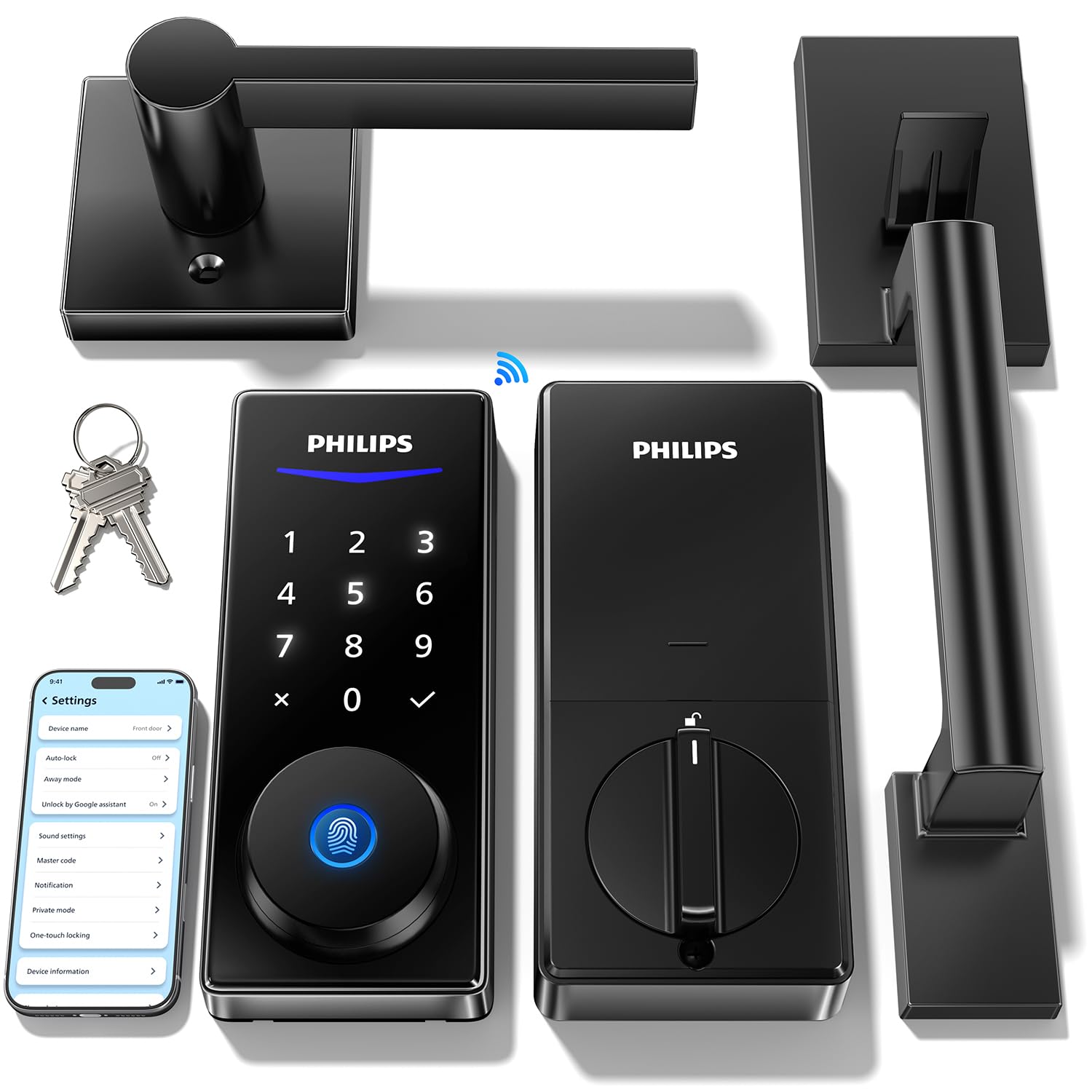
Unlock Methods: Code, fingerprint, app, Alexa and Google voice
Connectivity: Built-in WiFi
Keypad: Backlit touchscreen
Auto-Lock: Yes
Handles: Two handles included
Best For: Front door
Philips Wi-Fi Front Lock Set with 2 Handles
This set includes two handles, which makes it the pick when both sides of a door should match and look finished. The backlit touchscreen keypad is easy to read and needs only a light tap rather than a press, which helps hands with low strength. Fingerprint, code, and app unlock are all available, plus Alexa and Google voice unlock for a relative who already talks to a smart speaker. Auto-lock and built-in WiFi round out the package.
It fits a front door in a home where appearance matters and a matching handle on each side is wanted. Voice unlock is a genuine convenience for someone who finds reaching and tapping tiring. The trade-off is the highest price of the group, and a touchscreen surface can be less forgiving than physical buttons for a relative with very shaky hands or reduced skin sensation.
eufy Security Smart Lock FamiLock C32
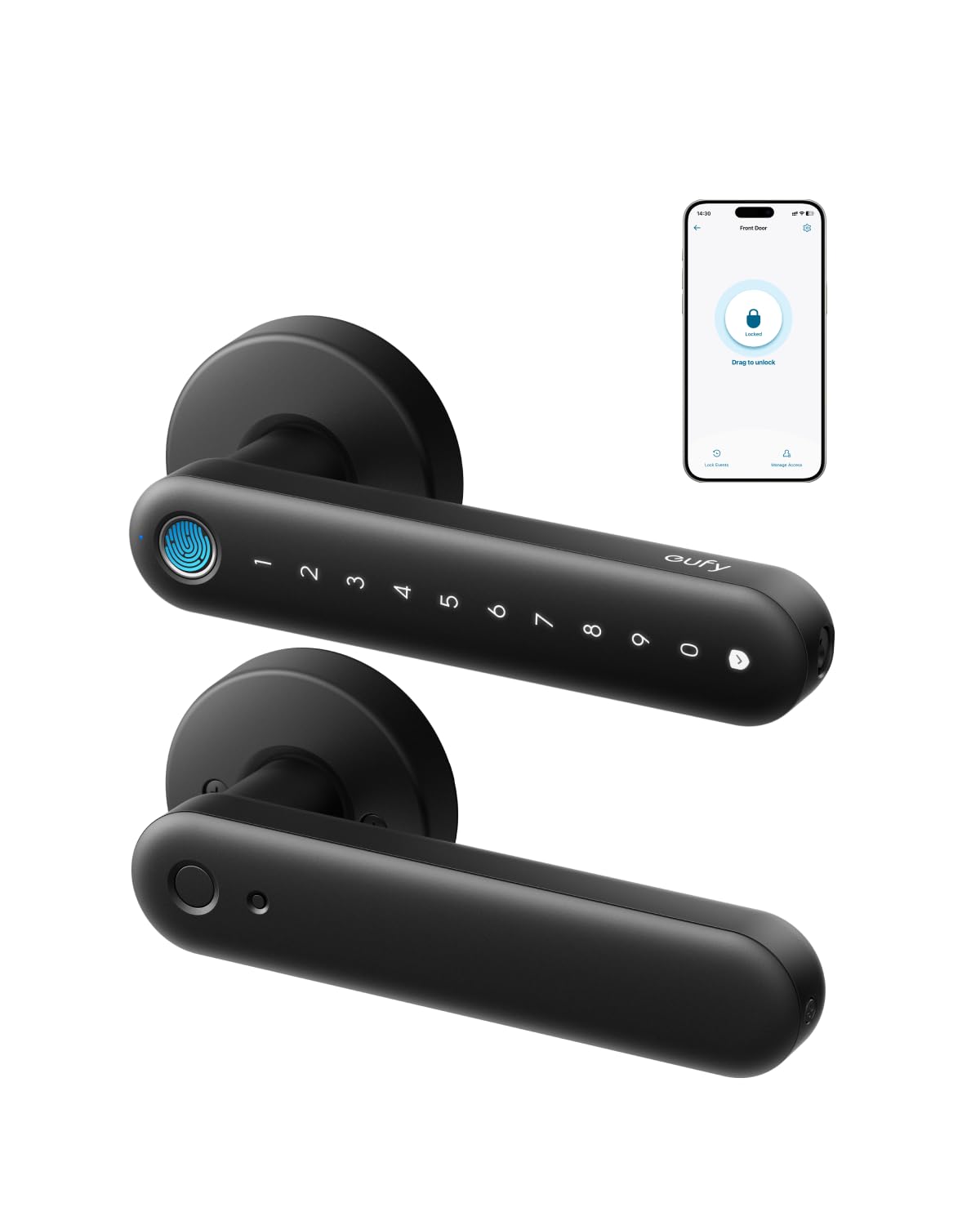
Unlock Methods: Fingerprint, app
Connectivity: Built-in WiFi
Auto-Lock: Yes
Power: 4 AA batteries
Voice Assistants: Alexa, Google
Best For: Interior doors
eufy Security Smart Lock FamiLock C32
This eufy lock is built for interior doors, with a fingerprint reader and app control as the main ways in. It runs on four AA batteries, which are easy for a family member to swap without tools. Built-in WiFi means app access works without a bridge, and Alexa and Google support let voice commands open the door. The handle design supports a push-down motion rather than a twist.
It belongs on a bedroom or interior door where the goal is keyless convenience at a low price. The AA batteries and simple app make it the easiest of the group to maintain for a household that does not want a complicated setup. The trade-off is that the listing states rekeying is not supported and it is aimed at interior doors, so it is not the right choice for an exterior front door that needs a keyed backup.
Yamiry Keyless Entry Digital Lock with Handle

Unlock Methods: Keypad code, backup keys
User Codes: 20
Backup Keys: 2 included
Keypad: Backlit
Auto-Lock: Yes
Installation: Easy installation
Best For: Front door
Yamiry Keyless Entry Digital Lock with Handle
This is the simplest and least expensive pick: a keypad knob with a handle that opens with a code, plus two physical backup keys. The backlit keypad helps in low light, and twenty user codes mean family, caregivers, and a neighbor can each have their own entry code. Auto-lock is included, and the listing emphasizes easy installation, which suits a rental or a door where drilling is not wanted.
It suits a relative who wants keyless entry without a smartphone, an app, or WiFi — just a code and a handle. The two backup keys are a real comfort for anyone nervous about being locked out. The trade-off is that this model has no fingerprint or app remote access, so a family member cannot unlock it from a distance, and the budget build is unlikely to match the finish of the pricier sets.
Before You Buy
- Unlock method: Fingerprint and keypad entry remove the grip strength a key turn demands; voice unlock helps those who find reaching difficult.
- Handle type: A lever handle that pushes down is easier on weak hands than a round knob that must be twisted.
- Power source: AA batteries are simple to replace; check who will change them and how often the lock warns of low power.
- Connectivity: Built-in WiFi allows remote app control without a hub; a code-only lock needs no network at all.
- Door type: Exterior front doors need a deadbolt-rated lock; interior doors can use a lighter knob-style model.
- Backup access: Physical backup keys or a second entry method matter for a relative who may forget a code.
- Installation: A full deadbolt-and-handle set takes more work than a knob swap; plan who will install and set it up.
Frequently Asked Questions
-
What is the easiest smart lock for someone with arthritis or a weak grip?
A lever-handle lock with fingerprint or keypad entry is the easiest, because it removes the key turn and the round-knob twist. The Philips WiFi Keypad Deadbolt with Handle is the most complete example here. -
Do these locks need WiFi to work?
No. The Yamiry model works on codes and backup keys alone, and every lock here still opens with its keypad or fingerprint if the network is down. WiFi only adds app and voice control. -
Can family members unlock the door remotely?
Yes, on the WiFi models. The Philips locks and the eufy C32 support app control, so a family member can unlock or check the lock from a phone. -
What happens if the batteries die?
The locks warn of low battery, and the Yamiry includes two physical backup keys. The eufy runs on four AA batteries that are easy to replace. -
Is a smart lock a good idea for a relative who lives alone?
It can be, because auto-lock prevents a forgotten lock and app access lets family check in. A backup key and a trusted neighbor with a code add a safety net. -
Can these locks be installed on an existing door?
Yes, they replace the existing lock hardware, though a full deadbolt-and-handle set takes more work than a knob swap. The Yamiry is marketed for easy installation.
Bottom Line
For most families, the Philips WiFi Keypad Deadbolt with Handle is the top pick: a lever handle, fingerprint and voice unlock, a backlit keypad, and built-in WiFi for remote help, all in one set for a front door. Those on a tighter budget or fitting an interior door can choose the eufy C32 or the Yamiry and still get keyless entry that spares a relative’s hands.
