Why there are Amazon links here: Brave Review is paid a commission for qualifying Amazon purchases made through the links below. Your price does not change, and using our links is entirely optional. How this works
SMONET Smart Lock: Brass Keyless Entry for the Front Door
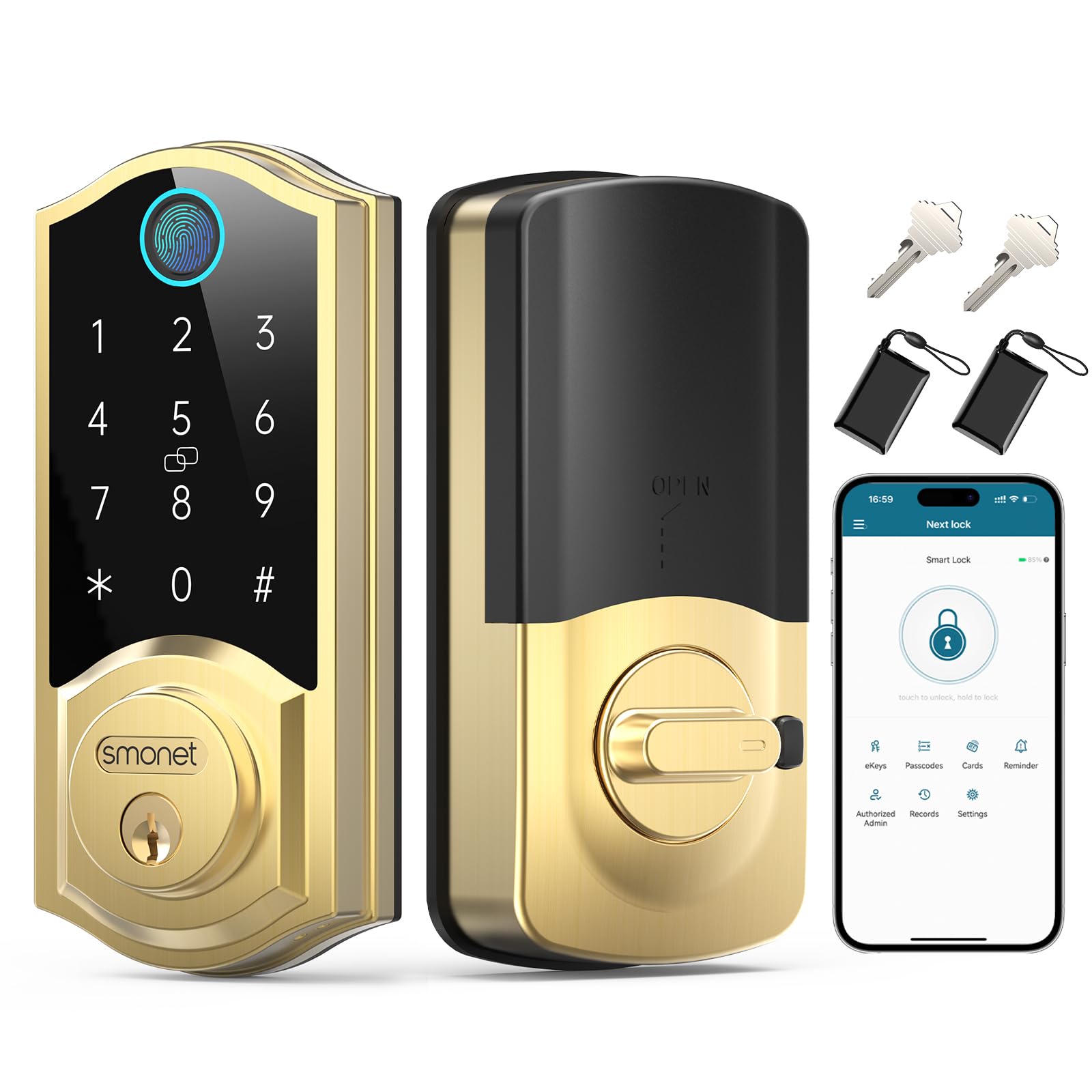
The SMONET smart lock is a brass-finished fingerprint deadbolt that replaces the front-door keys with a touchscreen keypad, a biometric reader and app control. It is aimed at homeowners who want keyless entry without moving to a full smart-home ecosystem. This review covers how the lock is built, what each entry method is good for, and where the design asks for a compromise.
Features and Specifications
Type: Electronic deadbolt with biometric fingerprint reader
Entry methods: Fingerprint, touchscreen keypad, app remote control, mechanical key
Finish: Brass / gold
Mounting: Front door deadbolt replacement
Auto lock: Built-in automatic relocking
Connectivity: App-based remote control
Power: Battery-powered electronic lock
The feature set is broad for a single deadbolt. Three electronic ways in — fingerprint, keypad and phone — plus a physical key as backup covers the common cases: a hand full of groceries, a guest who needs a one-time code, a family member arriving before the homeowner.
The brass finish is the visual signature. It reads warmer and more traditional than the satin nickel and matte black that dominate the category, which matters on a painted or wood front door where hardware is part of the curb appeal.
Build and Finish
The lock is a deadbolt replacement, so it takes the place of the existing thumb-turn assembly rather than sitting on top of it. That keeps the door looking clean and means the exterior face is a single piece of hardware.
The brass tone is a finish, not a solid brass body. On a covered porch or a sheltered entry it holds its look well; on an exposed door taking direct sun, salt air or heavy rain, plated finishes across the category dull faster than the base metal underneath. A homeowner on a fully exposed coastal entry should expect to clean and dry the exterior face more often than someone under an overhang.
Entry Methods and Daily Use
Fingerprint entry is the fastest path for the people who live there. Once a print is enrolled, a thumb on the reader opens the door without a code to remember or a phone to pull out. It suits a household where the same few people come and go several times a day.
The touchscreen keypad covers everyone else. A code can be handed to a dog walker, a cleaner or a visiting relative and changed afterwards, which is the practical advantage over a hidden key. The screen needs a clean, dry finger — wet or gloved hands push the user toward the fingerprint reader or the key.
App control is the layer that makes the lock feel modern. Remote control means a door can be checked or opened from a phone, which is useful for letting a delivery in or confirming the door is locked after leaving. It also means the lock depends on a stable wireless connection and a charged phone.
Power and Maintenance
The lock runs on batteries, as every electronic deadbolt in this class does. Battery life depends on how often the motor cycles and how much the keypad and reader are used, so a busy household with four daily users will change batteries sooner than a quiet one.
The practical routine is simple: keep a spare set of the right batteries on hand and pay attention to the low-battery warning the lock gives well before it stops working. The mechanical key remains the fallback if the batteries die at a bad moment, which is why it belongs somewhere other than inside the house.
The touchscreen and fingerprint reader are the parts that need occasional attention. A wipe with a dry cloth keeps the glass clear and the reader responsive; grime and sunscreen buildup are the usual cause of a fingerprint that suddenly stops reading cleanly.
Auto Lock and Security Habits
Auto lock is the feature that changes behavior. The deadbolt re-engages on its own after the door closes, which removes the most common home-security failure: the door that was pulled shut but never actually locked.
The trade-off is that auto lock does not know who is on the other side. A door that relocks itself is a door that can lock someone out, so the keypad code and the mechanical key both need to be genuinely available, not buried in a drawer.
Trade-off: The brass finish and the electronic entry stack are the selling points, but the lock still depends on batteries, a wireless connection for app features and a clean, dry finger on the reader — an entry that asks the household to keep spares and backups in order rather than set-and-forget.
Who the SMONET Smart Lock Suits
The strongest fit is a homeowner with a single front door who wants keyless entry and is willing to keep the lock’s backups organized. Fingerprint-first entry plus a keypad code covers a family, a rental with turnover, or a household with regular visitors who need temporary access.
It also suits a buyer who cares about how the door looks. The brass tone is a deliberate style choice, and a homeowner matching warm hardware to a wood or painted door gets more out of it than someone chasing a minimalist matte-black look.
It is not for the buyer who wants a fully integrated smart-home lock tied into a broader ecosystem, and it is not for a door that sits fully exposed to weather with no shelter. A homeowner who wants zero maintenance, zero batteries and zero app setup is better served by a mechanical deadbolt.
FAQ
-
Is the SMONET smart lock keyless, or does it still use a key?
It is keyless in daily use — fingerprint, keypad and app all open the door — but it keeps a mechanical key as a backup for dead batteries or a forgotten code. -
Does the SMONET smart lock work with a phone app?
Yes. The lock supports app remote control, so the door can be checked or opened from a phone, which is the feature that separates it from a plain keypad deadbolt. -
What happens when the batteries run out?
The lock warns before the batteries die. If they do run flat, the mechanical key opens the door, so the key needs to be stored outside the house. -
Can the SMONET smart lock be used on a rental property?
It can, and the keypad is the reason. Temporary codes can be issued to guests or cleaners and changed afterwards, which is simpler than collecting and copying keys. -
Does the lock relock itself automatically?
Yes. Auto lock re-engages the deadbolt after the door closes, which is the feature most likely to change a household’s locking habits for the better. -
Will the brass finish match existing door hardware?
The brass tone is warmer and more traditional than satin nickel or matte black. It pairs best with brass, bronze or warm-toned handles and hinges on the same door. -
Is the fingerprint reader reliable for everyone in the house?
It works best with a clean, dry finger placed consistently. Very worn prints, wet hands or heavy sunscreen can slow it down, and the keypad covers those moments. -
Does the SMONET smart lock need a hub or subscription?
The lock’s core entry methods — fingerprint, keypad and key — work on their own. App remote control depends on the lock’s wireless connection rather than a separate hub. -
Can the lock be fitted to an existing deadbolt door?
It is designed as a deadbolt replacement for a front door, so it takes the place of the existing deadbolt assembly rather than adding a second lock. -
Is a smart lock like this more secure than a standard deadbolt?
The deadbolt mechanism is the security; the electronics are convenience. Auto lock and code management reduce the human errors — unlocked doors, lost keys — that cause most break-ins.
Bottom Line
The SMONET smart lock is the right pick for a homeowner who wants a brass-finished front door with fingerprint, keypad and app entry, and who is happy to keep spare batteries and a backup key where they can be reached. The brass look and the three electronic ways in carry the purchase; the battery and weather caveats are the price of the electronics. Buyers who want a set-and-forget mechanical deadbolt, or a lock tied into a full smart-home system, should look elsewhere.
