Why there are Amazon links here: Brave Review is paid a commission for qualifying Amazon purchases made through the links below. Your price does not change, and using our links is entirely optional. How this works
ApoloSign 21.5-Inch Digital Calendar: A Family Command Center Without the Subscription
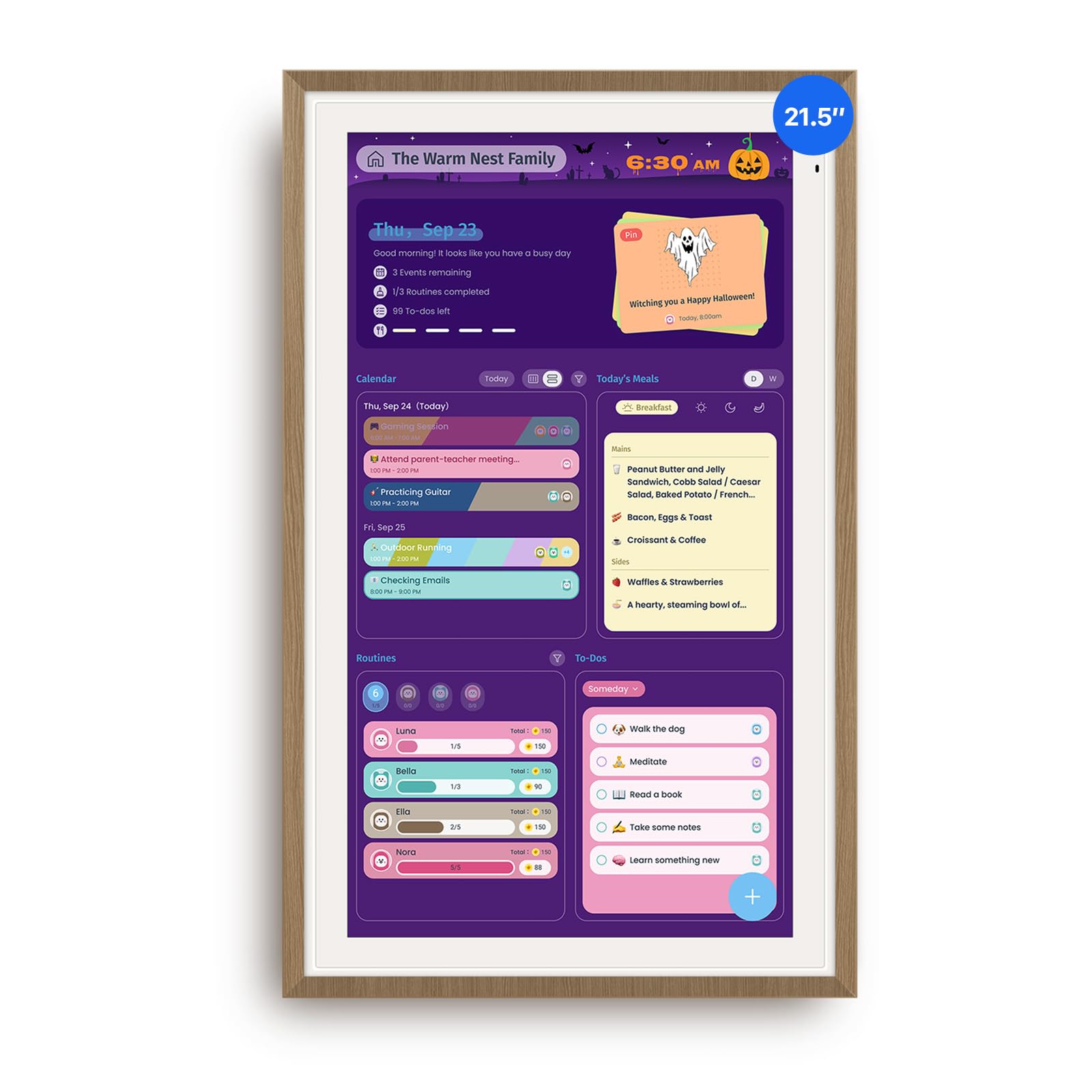
The ApoloSign 21.5-inch digital calendar is a wall-mounted touchscreen that puts the family schedule, chore chart, meal plan and shared dashboard in one always-visible place — and it does so without a monthly subscription. It suits households that are tired of paper planners, whiteboards and phone screens that only one person can see at a time. This review covers what the display actually does, how it is built, what the ownership experience is likely to demand, and where the trade-offs sit at this price. Readers who want the short answer can jump to the verdict below.
Check the current price on Amazon
Features and Specifications
Product Type: Wall-mounted digital calendar and family planner
Screen Size: 21.5-inch touchscreen display
Mounting: Smart wall planner format with dual-mode orientation
Finish: Teak frame
Core Functions: Calendar sync, chore chart, meal planning, apps and dashboard
Subscription: None required
Connectivity: Calendar synchronization with external accounts
The specification sheet reads like a short list, and that is the point. The 21.5-inch panel is the headline number: it is large enough to be read from across a kitchen or hallway, which is the whole reason a device like this exists. A phone calendar is more portable, but it is also private to one person, and a wall planner only works when every member of the household can glance at it on the way past.
The teak finish and dual-mode design place this firmly in the home-decor category rather than the office-gadget category. Buyers are not hiding this in a drawer between uses; it is meant to hang in a shared space and look deliberate. That framing matters, because it sets expectations about where the unit belongs and how it should be treated.
Build, Mounting and Installation
The ApoloSign is a wall-mounted unit, not a tablet that gets carried from room to room. That distinction shapes the entire ownership experience: installation is a one-time job that determines how useful the display becomes. A planner that hangs at eye level in a high-traffic spot gets used; one mounted in a spare room does not, regardless of how good the software is.
Dual-mode support means the screen can be set up in more than one orientation, which gives buyers some flexibility in choosing a wall location based on available space rather than forcing the layout to match a fixed panel shape. The teak frame is a decorative choice that reads warmer than the black plastic typical of commercial digital signage, and it should blend with wood tones and neutral kitchen palettes.
The trade-off here is commitment. A wall-mounted device requires drilling, a stable mounting point and a nearby power source, and once it is up, moving it is a project rather than a five-second adjustment. Buyers who rent, who rearrange furniture often, or who are unsure where the family actually congregates should think carefully before committing to a fixed location.
Calendar Sync and the No-Subscription Model
Calendar sync is the feature that separates a smart planner from a very expensive whiteboard. Syncing external calendars means existing appointments flow onto the big screen without anyone retyping them, and multiple household members can each keep their own digital calendar while the wall display shows the combined picture.
The no-subscription positioning is the most consequential detail in the product name. Many smart displays in this category bundle their best features behind a recurring fee, which turns a one-time purchase into an ongoing bill. ApoloSign’s pitch is that the calendar, chore chart, meal planner, apps and dashboard are available without that recurring cost. For a family already paying for streaming services, cloud storage and phone plans, avoiding one more monthly line item is a genuine selling point.
The caution is that subscription-free hardware tends to age differently than subscription-backed platforms. Buyers should expect the feature set to be shaped largely by what ships with the device and by whatever software updates the manufacturer provides, rather than by a paid service that is continuously funded. That is a fair trade for many households, but it is a trade, and it should be made with eyes open.
Chore Charts, Meal Planning and the Family Dashboard
The chore chart is where a shared wall display earns its place in a household with children. Assigning tasks on a visible board removes the daily negotiation about who was supposed to do what, and it puts the information where everyone can see it rather than in one parent’s app. The same logic applies to meal planning: a week of dinners posted on the kitchen wall answers the question before it is asked.
The dashboard and app support extend the device beyond scheduling. A shared dashboard can surface the information a household checks repeatedly — the day’s agenda, reminders, tasks — without anyone unlocking a phone. App support means the display can grow into other roles over time rather than being locked to a single function.
The limitation is depth. A wall planner is a coordination tool, not a productivity workstation. Buyers who want to edit documents, run heavy applications or use the panel as a general-purpose computer will find a dedicated tablet or laptop more capable for the money. This device is at its best when the job is making shared information visible and keeping it current.
Touchscreen Use and Daily Maintenance
A 21.5-inch touchscreen is comfortable to interact with at arm’s length, and the size makes tapping the right item easier than on a small tablet mounted to a wall. Updates — moving a chore, shifting a meal, adding an appointment — happen directly on the glass, so the display stays useful even for household members who never touch the companion app.
Maintenance is the unglamorous part of any always-on wall device. A touchscreen in a kitchen or hallway collects fingerprints and cooking residue, and it needs a periodic wipe with a soft cloth to stay readable. Buyers should also plan for the practical realities of a permanently powered display: a cable run to the mounting location, and a screen that is lit whenever the household is awake.
The trade-off is that this is a fixed, powered appliance in a shared room. Households that dislike visible cables, or that want a screen-free common area, will find the form factor itself to be the obstacle — no feature list overcomes that.
Who the ApoloSign Digital Calendar Is For
This planner fits busy families with school-age children, blended households coordinating two sets of schedules, and anyone who has tried a paper wall calendar and found it goes stale within a week. It also suits buyers who specifically want to avoid another subscription and are willing to accept a more static feature set in exchange.
It is not for solo users who already live in their phone calendar, for renters who cannot mount hardware, or for buyers who need a general-purpose computing device. Those shoppers will get more value from a tablet or a simple printed planner. The ApoloSign is a coordination hub, and it only pays off when more than one person actually looks at it.
Trade-off: The fixed wall-mounted format and subscription-free software mean buyers commit to one location and to the feature set the device ships with, which is a poor fit for renters or anyone who expects a continuously expanding platform.
FAQ
-
Does the ApoloSign digital calendar require a subscription?
No. The product is marketed as no-subscription, so the calendar sync, chore chart, meal planning, apps and dashboard are not gated behind a recurring fee. Buyers should still confirm the current terms on the product page before ordering, since software policies can change over time. -
What size is the ApoloSign digital calendar screen?
The display measures 21.5 inches diagonally. That is large enough to read from across a kitchen or hallway, which is the main reason a wall planner works better than a phone for shared household scheduling. -
Can it sync with an existing digital calendar?
Yes. Calendar sync is a named feature, so appointments from existing accounts can flow onto the wall display instead of being re-entered by hand. The exact list of supported calendar services is worth checking on the product page. -
Where should the display be mounted?
A high-traffic shared space such as a kitchen, hallway or mudroom works best, at roughly eye level for the adults in the household. The dual-mode design gives some flexibility on orientation, but the unit still needs a stable mounting point and access to power. -
Is the ApoloSign digital calendar good for kids and chores?
The chore chart is one of its core functions, and a large visible board removes much of the daily back-and-forth about assigned tasks. It suits households with school-age children who can read the board themselves. -
Does it work as a tablet or computer?
No. It is a wall-mounted planner with app and dashboard support, not a general-purpose device. Buyers who need to browse, type documents or run full applications should look at a tablet or laptop instead. -
What does the teak finish look like in a room?
Teak is a warm wood tone, so the frame reads more like furniture than like commercial signage. It tends to sit comfortably in kitchens and living spaces with wood or neutral palettes. -
How is the screen cleaned?
A soft, slightly damp microfiber cloth is the safe routine for a touchscreen in a kitchen. Avoid abrasive cleaners and heavy spraying directly on the glass, and wipe fingerprints regularly so the board stays legible from a distance. -
Does it need to stay plugged in?
Yes. A 21.5-inch always-on display draws power continuously, so the mounting location needs a nearby outlet or a managed cable run. Buyers should plan the cable route before drilling. -
Who should skip this product?
Solo users who already manage everything in a phone calendar, renters who cannot mount hardware, and buyers who want a subscription-funded platform with continuous feature expansion. The value depends on multiple people actually using the shared board.
Bottom Line
The ApoloSign 21.5-inch digital calendar makes sense for one specific buyer: a household with several schedules to reconcile that wants a single, always-visible board and refuses to add another monthly subscription. The large touchscreen, calendar sync and chore chart cover the coordination jobs that paper planners fail at, and the teak frame means it does not have to be hidden. The trade-off is real — a fixed wall location and a feature set that is not funded by recurring revenue — so renters and solo users should look elsewhere. Everyone else can check the current price on Amazon and decide whether the wall space is worth it.
