Why there are Amazon links here: Brave Review is paid a commission for qualifying Amazon purchases made through the links below. Your price does not change, and using our links is entirely optional. How this works
Best Smart Lock for a Household with a Dog Walker
A dog walker needs a way in that does not involve a hidden key under the mat. The best smart lock for a household with a dog walker gives that person a working code or app entry, then takes it away when the arrangement ends — without rekeying the house. This roundup covers five deadbolts and handle sets at three price tiers, from a budget keypad to a two-handle set for a full door refresh. The overview table below shows which pick suits which household before the detailed reviews.
Overview of the Picks
| Product | Key Spec | Best Use | Price Tier |
|---|---|---|---|
| Smart Locks for Front Door, Voice & Fingerprint Unlock, Flexible Codes, Auto-Lock, Backlit Keypad, Come with Door Lever Philips WiFi Keypad Deadbolt with Handle | Fingerprint plus built-in WiFi, lever included | Households that want the walker’s entry on a fingerprint and a code | Mid |
| Code / Fingerprint / APP Unlock, Remote Access, Alexa Google Voice Unlock, Auto Lock, Built in WiF, Backlit Touchscreen Philips Wi-Fi Smart Deadbolt Lock | Touchscreen keypad, built-in WiFi | Budget-first buyers who still want app and voice control | Budget |
| Code / Fingerprint / APP Unlock, Remote Access, Alexa Google Voice Unlock, Auto Lock, Built in WiF, Backlit Touchscreen Philips Wi-Fi Front Lock Set, Smart Keypad Deadbolt Lock with 2 Handles | Two handles in the box | A front door that needs the whole hardware set replaced | Premium |
| Remote Access Sharing, Fob Unlock Keyless Entry Deadbolt, Auto Lock, User Management, IP55 Waterproof, Low Battery Alarm Veise VE06-H Smart Front Door Lock Handle Set, App Control, Matte Black | Fob unlock, IP55 rating | Walkers who prefer a key fob to a code, wet climates | Mid |
| Philips Upgraded Wi-Fi Smart Lock with Handle, Keyless Entry Door Lock, Smart Door Knob, Fingerprint Unlock, App Remote Control, Auto-Lock, Keypad Deadbolt with Lever for Bedrooms, Office, Front Door | Fingerprint plus lever, lighter-duty build | Side doors and secondary entries | Mid |
1. Smart Locks for Front Door, Voice & Fingerprint Unlock, Flexible Codes, Auto-Lock, Backlit Keypad, Come with Door Lever Philips WiFi Keypad Deadbolt with Handle

Unlock Methods: Fingerprint, code, app, voice
Connectivity: Built-in WiFi
Extras: Backlit keypad, auto-lock, door lever included
Best For: Daily walker access with a fingerprint on file
Check the current price on Amazon
This is the most complete single-lock package in the group. It ships as a deadbolt and lever set, so the exterior hardware matches, and it carries built-in WiFi so the lock talks to the network without a separate bridge. Fingerprint entry is the standout for a dog walker: the walker’s finger is the key, and removing that finger from the app ends access. Flexible codes cover the backup case when a fingerprint will not read on a wet or cold day.
Households that want the walker to come and go without carrying anything earn the most from this pick. The auto-lock handles the common failure — a walker shuts the door and forgets to secure it. The lever in the box also means one purchase instead of two.
Trade-off: A fingerprint reader depends on dry, clean fingers, so a walker arriving in the rain may fall back to the keypad more often than expected.
2. Code / Fingerprint / APP Unlock, Remote Access, Alexa Google Voice Unlock, Auto Lock, Built in WiF, Backlit Touchscreen Philips Wi-Fi Smart Deadbolt Lock

Unlock Methods: Code, fingerprint, app, voice
Connectivity: Built-in WiFi
Keypad: Backlit touchscreen
Best For: Budget-first households that still want app control
Check the current price on Amazon
The lowest-cost route into app-managed walker access. It is a deadbolt only, so an existing handle and lever stay on the door, and the touchscreen replaces the mechanical key cylinder as the main way in. Built-in WiFi keeps remote access on the table without extra hardware, and Alexa and Google voice unlock add a hands-free option for someone carrying a leash and a bag of treats.
Buyers replacing just the lock body, not the whole door set, get the best value here. The touchscreen also wipes clean, which matters on a door that gets a lot of dirty-paw traffic.
Trade-off: Touchscreens can be sluggish in deep cold, and this tier generally uses lighter interior plastics than the pricier sets.
3. Code / Fingerprint / APP Unlock, Remote Access, Alexa Google Voice Unlock, Auto Lock, Built in WiF, Backlit Touchscreen Philips Wi-Fi Front Lock Set, Smart Keypad Deadbolt Lock with 2 Handles
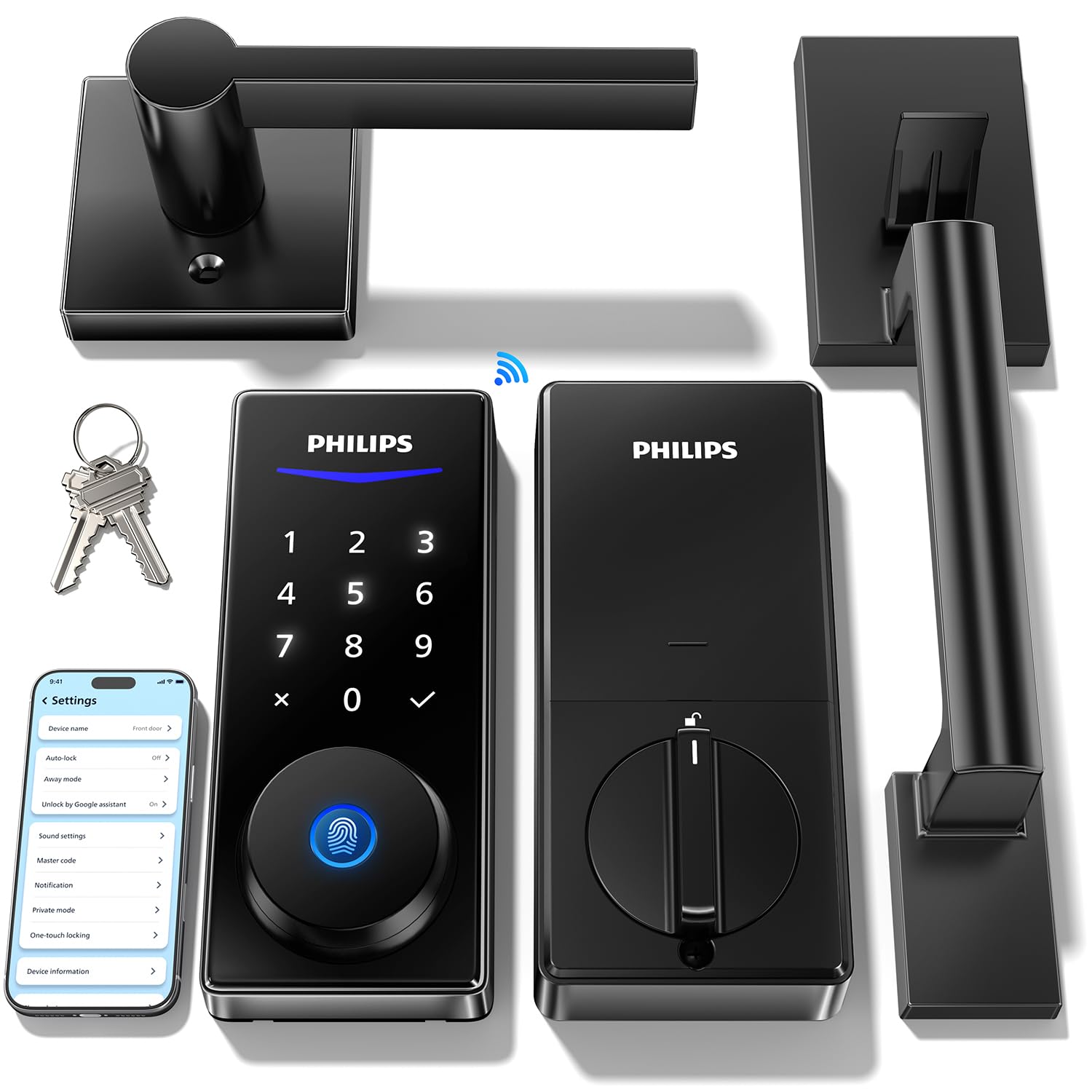
Unlock Methods: Code, fingerprint, app, voice
Connectivity: Built-in WiFi
Included: Two handles plus deadbolt
Best For: A full front-door hardware replacement
Check the current price on Amazon
The premium pick, and the only one in this group that supplies two handles alongside the deadbolt. That matters when the interior and exterior levers are mismatched or worn, because the whole door gets refreshed in one order. The feature list matches the other Philips models — fingerprint, code, app, voice, auto-lock — with built-in WiFi for remote management.
Households doing a renovation, or moving into a home with tired hardware, get the most from this set. The finish consistency across both sides of the door is the selling point as much as the electronics.
Trade-off: Two handles mean a longer install and a higher price, so a household that only needs the lock body pays for hardware it will not use.
4. Remote Access Sharing, Fob Unlock Keyless Entry Deadbolt, Auto Lock, User Management, IP55 Waterproof, Low Battery Alarm Veise VE06-H Smart Front Door Lock Handle Set, App Control, Matte Black

Unlock Methods: Fob, app, keypad
Weather Rating: IP55 waterproof
Extras: Auto-lock, low battery alarm, user management
Finish: Matte black
Best For: Walkers who prefer a fob, and wet climates
Check the current price on Amazon
This handle set stands apart because of the fob. A dog walker can clip it to a leash bag or keys and tap in without touching a keypad, which is the fastest entry for someone arriving with two dogs and a handful of gear. User management in the app handles adding and revoking that fob, and the IP55 rating means the exterior assembly is built for rain and splashes.
The matte black finish suits darker doors and trim, and the low battery alarm removes the worst failure mode — a lock that dies while the walker is mid-route. Households in wet regions should weight the weather rating heavily.
Trade-off: Fobs get lost, and a replacement is an extra purchase, so a code backup should always be set up alongside it.
5. Philips Upgraded Wi-Fi Smart Lock with Handle, Keyless Entry Door Lock, Smart Door Knob, Fingerprint Unlock, App Remote Control, Auto-Lock, Keypad Deadbolt with Lever for Bedrooms, Office, Front Door

Unlock Methods: Fingerprint, keypad, app
Connectivity: WiFi
Included: Handle and lever
Best For: Side doors, back entries and secondary access points
Intended Use: Bedrooms, offices, front doors
Check the current price on Amazon
A lighter-duty option that covers the side door or back entry a walker might use instead of the front. It bundles a handle with the deadbolt and includes fingerprint unlock, app remote control and auto-lock, so the essential walker workflow is intact. The naming points at bedrooms and offices as well as front doors, which reflects a compact build rather than a heavy commercial one.
Households with a second entrance — a mudroom, a side gate door, a back porch — get a sensible match here. Putting the walker’s code on the door closest to the leash hook is often the practical choice.
Trade-off: The compact build and lighter-duty positioning make it a weaker fit for a main front door that takes constant traffic.
Before You Buy
- Access method: Decide whether the walker gets a code, a fingerprint or a fob. Fingerprints are fastest but fail on wet hands; fobs are quick but get lost; codes are the reliable fallback in every case.
- Revocation: Confirm the app supports adding and removing individual users, so ending the arrangement does not mean rekeying the house.
- Auto-lock: Set the delay short enough that the door is secured after a walk. A walker juggling two dogs will not always remember to lock up.
- Connectivity: Built-in WiFi avoids a bridge, but the lock still needs a strong signal at the door for remote access and code changes.
- Door prep: Measure the existing bore holes and backset before ordering. Handle sets add more fitting work than a deadbolt-only swap.
- Weather exposure: An exposed door in a wet climate benefits from a rated exterior assembly and a keypad that tolerates rain.
- Battery routine: Pick a model with a low battery alarm and keep spare batteries on hand. A dead lock strands the walker and the dogs.
Frequently Asked Questions
-
Can a dog walker get in without a physical key?
Yes. Every lock here supports a code, a fingerprint, an app unlock or a fob, and access can be revoked from the app when the arrangement ends. -
What is the best smart lock for a household with a dog walker if the walker arrives in the rain?
A keypad or fob model is more dependable in wet weather than a fingerprint reader, which needs a dry finger to read cleanly. -
Does auto-lock risk locking the walker out?
Auto-lock secures the door after it closes. The walker needs a working code or fob to re-enter, so set that up before the first visit. -
How many people can be given access?
Capacity varies by model, but all five support multiple users through the app, which covers a household plus a walker and a backup sitter. -
What happens when the batteries run out?
Models with a low battery alarm warn ahead of time. A backup key cylinder or an external power point on the lock provides emergency entry on most designs. -
Is a handle set harder to install than a deadbolt?
Yes. A handle set replaces more of the door hardware, so expect more fitting work than a straight deadbolt swap.
Bottom Line
The best smart lock for a household with a dog walker is the first pick: it bundles the deadbolt and lever, runs on built-in WiFi, and puts the walker’s entry on a fingerprint with flexible codes as backup. Households on a tighter budget can drop to the touchscreen deadbolt, and anyone replacing the whole door set should go straight to the two-handle option.
