Why there are Amazon links here: Brave Review is paid a commission for qualifying Amazon purchases made through the links below. Your price does not change, and using our links is entirely optional. How this works
Anker Nano Dock: The 13-in-1 Laptop Dock That Travels Light
The Anker Nano Dock is a 13-in-1 USB-C docking station aimed at home-office and hybrid workers who run a Dell, Lenovo or HP laptop and want one cable to handle displays, peripherals, wired networking and charging. It combines a fixed dock body with a detachable 6-in-1 USB-C hub, so the same kit covers a full desk setup and a bag for the road. This review breaks down the ports, the power delivery, the display options and the practical limits, then flags who should skip it. The short version: it suits buyers who want a lot of connectivity without a desktop-sized brick.
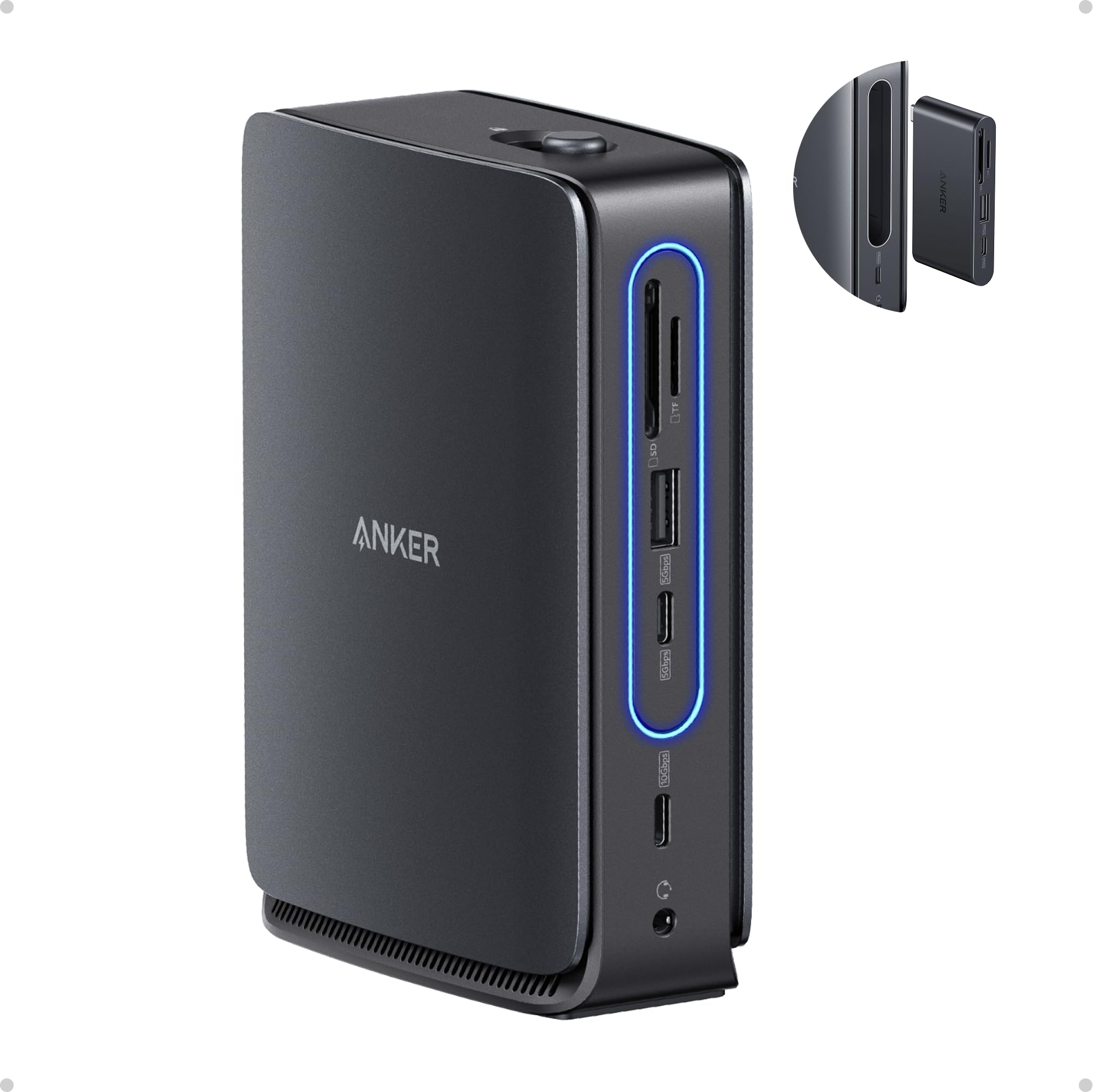
Features and Specifications
Type: USB-C laptop docking station with detachable hub
Ports: 2x HDMI, 1x DisplayPort, 3x USB-A, 1x 10 Gbps USB-C, audio, SD/TF card readers, Ethernet
Total Port Count: 13-in-1
Power Delivery: 100W max pass-through charging
Laptop Compatibility: Dell, Lenovo, HP
Form Factor: Nano compact body with detachable 6-in-1 USB-C hub
The headline here is port variety at a compact size. Two HDMI outputs plus a DisplayPort give the dock three video paths, which is unusual in a body this small and is the main reason buyers compare it against larger, mains-powered docks. Three USB-A ports cover a keyboard, mouse and a flash drive at the same time, and the Ethernet jack means a wired connection is available on laptops that dropped their own port years ago.
The 100W max PD rating is the number that matters for daily use. A laptop draws power through the same USB-C cable that carries data and video, so a single connection handles the whole desk. The 10 Gbps USB-C port sits at the fast end of the USB 3.2 range, which is enough for external SSDs and card offloads without waiting around.
Build and Portability
The "Nano" in the name is the point of the product. This is a dock built to sit behind or beside a laptop rather than under a monitor, and the detachable 6-in-1 hub splits the unit into two pieces: a desk anchor and a grab-and-go hub. That two-part design is what separates it from the fixed docks that stay bolted to a desk.
The catch with any compact dock is thermal headroom. Small aluminum or plastic bodies have less surface area to shed heat, so a dock this size is likely to run warm when several ports are loaded at once — displays, Ethernet and a charging laptop together. That is normal for the category, not a defect, but buyers who plan to run everything continuously should expect a warm chassis.
Display and Power
Three video outputs is the feature that sells this dock. Buyers running two external monitors from a laptop often find that a single HDMI port forces a choice, and the combination of two HDMI plus DisplayPort gives room for a multi-monitor desk without adding a separate adapter. The exact resolution and refresh rate each port supports depends on the laptop’s own graphics output, so the dock is best treated as a distribution hub rather than a way to exceed what the machine can drive.
Charging at up to 100W covers most mainstream Dell, Lenovo and HP laptops, which is the compatibility the name calls out. Very power-hungry gaming or mobile-workstation machines may want more headroom than that, and a dock cannot deliver more than the laptop asks for anyway. For a typical home-office notebook, one cable to the dock is genuinely enough.
Everyday Connectivity
The peripheral set is where the 13-in-1 count comes from. Three USB-A ports absorb the legacy gear most people still own, the audio jack handles a headset for calls, and the SD and TF slots mean photos and footage come off a camera without a dongle hunt. Ethernet is the quiet win for anyone whose Wi-Fi drops during video calls.
The detachable 6-in-1 hub is the practical flourish. It means a buyer can leave the full dock wired to the monitor and peripherals at the desk and still take a smaller hub to a meeting or on a trip. The trade-off is one more connection point to keep track of, and a hub that necessarily offers fewer ports than the dock it detaches from.
Trade-off: The compact body and two-piece design buy portability, but the small chassis is likely to run warm under a full load, and buyers who need maximum sustained power or a large fixed desktop dock may find the Nano’s size works against them.
Check the current price of the Anker Nano Dock on Amazon
Who Should Buy the Anker Nano Dock
This dock fits the hybrid worker who keeps a monitor, keyboard and wired network at a desk and wants the same kit to break down into something bag-sized. It also suits buyers with two or three external displays who need HDMI and DisplayPort in one unit rather than a chain of adapters.
It is not the right pick for someone running a single monitor and a mouse — that buyer can spend far less on a basic hub. Nor is it aimed at workstation-class laptops that draw more power than the 100W ceiling allows, or at users who want a permanently installed dock with no detachable parts to lose.
FAQ
-
What is the Anker Nano Dock?
A 13-in-1 USB-C docking station with two HDMI ports, one DisplayPort, three USB-A ports, a 10 Gbps USB-C port, audio, SD/TF readers and Ethernet, plus up to 100W pass-through charging and a detachable 6-in-1 hub. -
Does the Anker Nano Dock charge a laptop?
Yes. It supports up to 100W max power delivery over USB-C, which covers most mainstream Dell, Lenovo and HP laptops with a single cable. -
How many monitors can the Anker Nano Dock run?
It offers three video outputs — two HDMI and one DisplayPort. How many displays can actually run at once depends on the laptop’s graphics capability. -
Is the Anker Nano Dock compatible with Dell, Lenovo and HP laptops?
Those are the brands named in the product listing. Any modern USB-C laptop with display and power-delivery support is the general target, but buyers should confirm their model’s USB-C capabilities first. -
What makes this dock different from a standard USB-C hub?
The combination of a 13-in-1 dock body with a detachable 6-in-1 hub. The full dock stays at the desk while the smaller hub travels. -
Does the Anker Nano Dock have Ethernet?
Yes. A wired network port is included, which is useful for laptops that no longer ship with one. -
Can the Anker Nano Dock read camera memory cards?
Yes. It includes both SD and TF card slots, so photos and video can be offloaded without a separate reader. -
Is the Anker Nano Dock good for travel?
The detachable hub makes it more travel-friendly than a fixed desktop dock, though the full 13-in-1 body is still a desk-first piece of kit. -
Will the dock get warm during use?
A compact dock running displays, Ethernet and laptop charging at once will likely feel warm. That is expected for the size, but buyers should leave it ventilated. -
Who should not buy the Anker Nano Dock?
Buyers with a single monitor and a couple of accessories, workstation laptops that need more than 100W, and anyone who wants a permanently wired dock with no detachable parts.
Bottom Line
The Anker Nano Dock is the right choice for a hybrid worker who wants a full desk’s worth of ports in a body that splits into a travel hub. Two HDMI outputs plus DisplayPort, wired Ethernet, card readers and 100W charging cover the home-office checklist, and the detachable hub adds a flexibility most docks at this size do not offer. Buyers with one monitor or a power-hungry workstation should look elsewhere, but for a mainstream Dell, Lenovo or HP laptop, this is a compact dock that earns its desk space.
