Why there are Amazon links here: Brave Review is paid a commission for qualifying Amazon purchases made through the links below. Your price does not change, and using our links is entirely optional. How this works
Best Antenna Extension for a Zigbee Stick: 5 Picks for a Stronger Mesh
A weak Zigbee signal shows up as dropped sensors, laggy bulbs and a coordinator that sits at the far end of the house. The fix is usually physical: move the antenna away from the PC, the metal case and the USB port noise. The five picks below cover three buyer profiles — the smart-home tinkerer running Home Assistant, the budget builder who already owns a stick, and the network hobbyist extending a router or camera antenna. The overview table shows the shortlist at a glance.
Overview of the Picks
| Product | Key Spec | Best Use | Price Tier |
|---|---|---|---|
| HAUTECH Zigbee Coordinator | 5dBi antenna, 5 ft shielded cable, mounting base | All-in-one Zigbee upgrade | Mid |
| SUPERBAT Magnetic Base | 10 ft SMA extension, magnetic mount | Moving an antenna off a metal case | Budget |
| Bingfu RP-SMA Extension 2-Pack | RP-SMA male to female, 10 ft, 2-pack | Camera and router runs | Budget |
| Omni Directional 12dBi 2-Pack | 12dBi, 6GHz/5GHz/2.4GHz, RP-SMA male | Long-range Wi-Fi and BT | Mid |
| Bingfu Dual Band MIMO 2-Pack | 3dBi, 2.4/5/5.8GHz, RP-SMA male | Replacing stock antennas | Budget |
1. HAUTECH Zigbee Coordinator for Home Assistant
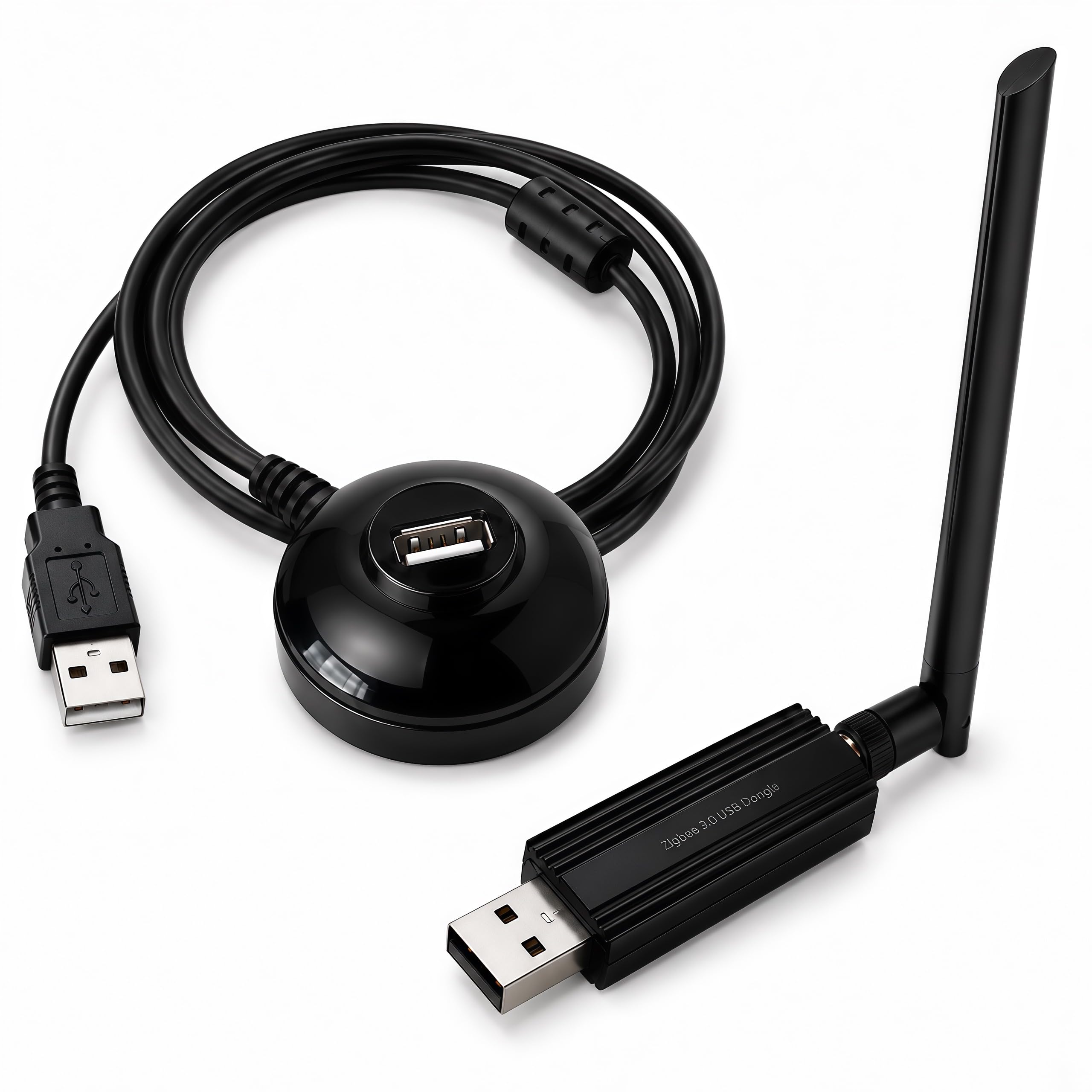
Radio: Zigbee 3.0, MG24 chipset
Output: +20dBm
Antenna: 5dBi
Cable: 5 ft shielded extension
Mounting: Base included
Software: ZHA, Zigbee2MQTT, OpenHAB
HAUTECH Zigbee Coordinator for Home Assistant is the pick for anyone who has not bought a stick yet. Instead of a bare dongle, the box includes the coordinator, a 5dBi antenna, a shielded extension cable and a mounting base — the whole relocation problem is solved in one order.
The shielded cable matters more than the length suggests: USB 3.0 ports are a known source of interference, and moving the radio a few feet away on a shielded run is the single most effective fix. The +20dBm output and 5dBi antenna give it headroom for a whole house rather than a single room.
This is the pick for Home Assistant users who want ZHA or Zigbee2MQTT working without a stack of adapters. It is not for someone who already owns a working stick and only needs a longer cable — that buyer pays for a radio they will not use.
Trade-off: The all-in-one price is higher than a cable alone, and the fixed 5 ft run limits how far the antenna can be placed from the host.
2. SUPERBAT WiFi Antenna Magnetic Base
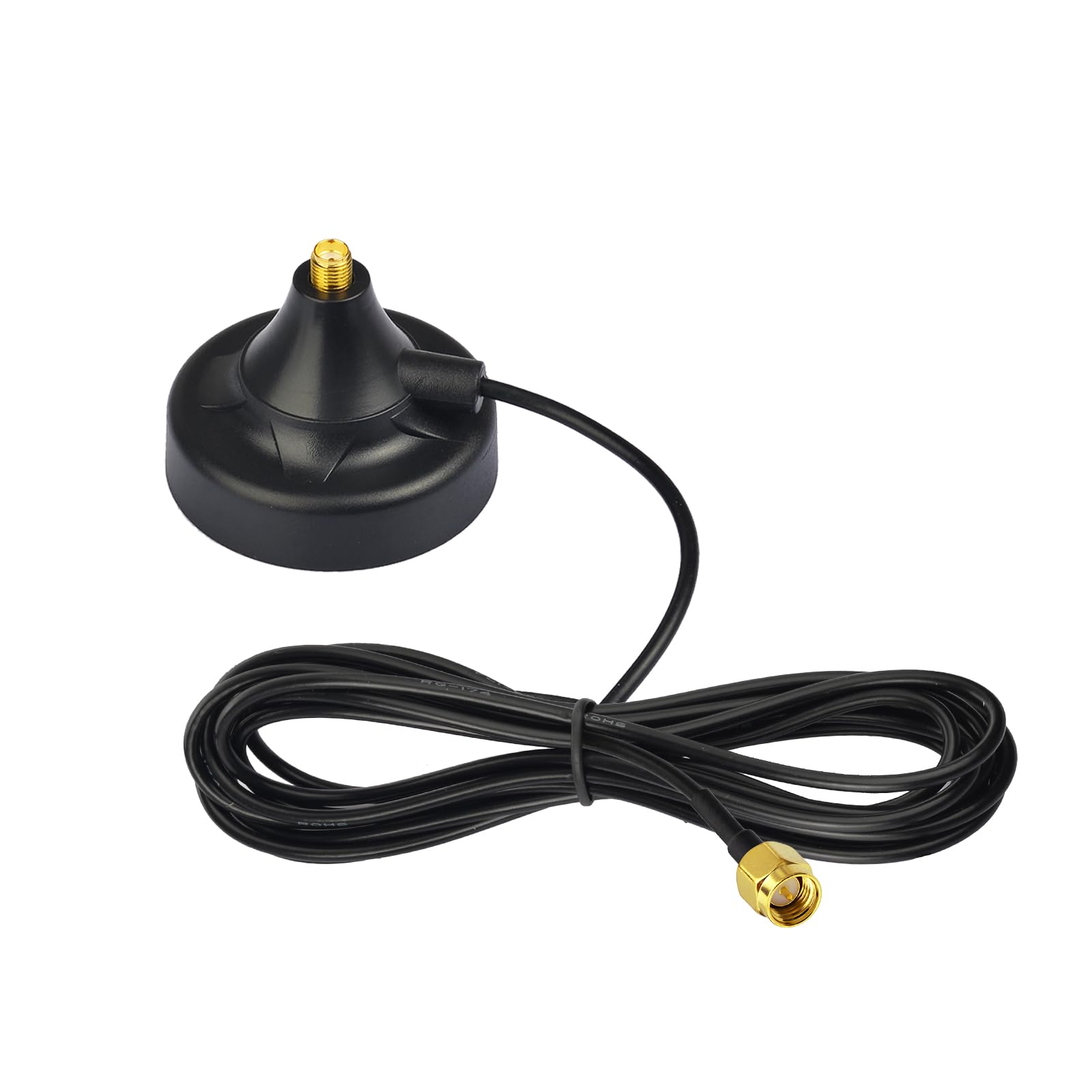
Connector: SMA male
Cable length: 10 ft
Mounting: Magnetic base
Intended use: Wi-Fi, 4G LTE, router antennas
SUPERBAT WiFi Antenna Magnetic Base is the relocation tool rather than the radio. The magnetic base sticks to a PC case, a shelf or a metal cabinet, and the 10 ft cable lets the antenna sit where the signal actually is instead of behind a desk.
The SMA male end suits routers and antennas that use a standard SMA thread. The magnetic foot is the practical part: it holds position without drilling or double-sided tape, and it can be moved again in seconds when the mesh layout changes.
This suits the buyer who already has a stick or router antenna and only needs distance and a stable mount. It is not for RP-SMA hardware — the thread gender differs and the connector will not mate.
Trade-off: The magnetic base is convenient but adds a joint in the signal path, and the cable is thin enough that very long runs are better served by a shielded option.
3. Bingfu WiFi Antenna Extension Cable 2-Pack

Connector: RP-SMA male to RP-SMA female
Cable type: RG174
Length: 3 m / 10 ft
Mounting: Bulkhead
Pack size: 2
Bingfu WiFi Antenna Extension Cable 2-Pack is the pure extension pick. Two 10 ft RG174 runs with RP-SMA male on one end and an RP-SMA female bulkhead on the other let a stick or router antenna be moved through a panel or enclosure and mounted properly.
The bulkhead end is the standout feature: it gives a fixed, screw-in mounting point on a case or box, which is cleaner than a cable dangling loose. The 2-pack means a matched pair for a router with two antennas or a spare for the next project.
This suits builders who want a permanent, tidy installation and already have the radio. It is not for anyone who needs SMA rather than RP-SMA, or who expects a thick low-loss cable — RG174 is thin and flexible, which is the trade for its size.
Trade-off: RG174 is a slim cable, so signal loss rises on long runs; the 10 ft length is best treated as a maximum rather than a starting point.
4. Omni Directional Antenna Long Range 2-Pack

Gain: 12dBi
Bands: 6GHz / 5GHz / 2.4GHz
Connector: RP-SMA male
Length: 39.5 cm
Pack size: 2
Omni Directional Antenna Long Range 2-Pack is the high-gain option. The 12dBi rating and 39.5 cm body are aimed at buyers replacing short stock antennas on a router, PC adapter or camera to push range across a larger space.
The band coverage includes 6GHz alongside 5GHz and 2.4GHz, so it suits Wi-Fi 6E hardware as well as older gear. The RP-SMA male thread is the common standard on consumer network devices, which keeps compatibility broad.
This suits the buyer chasing range on a router or adapter and willing to accept a longer antenna. It is not for a compact build or a Zigbee stick with a different connector — the physical size alone rules out tight enclosures.
Trade-off: High gain flattens the radiation pattern, so coverage improves along the horizontal plane while the vertical reach narrows; placement matters more than the number suggests.
5. Bingfu Dual Band WiFi MIMO Antenna 2-Pack

Gain: 3dBi
Bands: 2.4GHz / 5GHz / 5.8GHz
Connector: RP-SMA male
Type: MIMO
Pack size: 2
Bingfu Dual Band WiFi MIMO Antenna 2-Pack is the value replacement pick. Two 3dBi MIMO antennas with RP-SMA male connectors cover 2.4GHz, 5GHz and 5.8GHz, which makes them a straight swap for tired or missing stock antennas on a router, card or camera.
The low 3dBi gain keeps the pattern round and forgiving, so the antennas work well close to the device rather than demanding careful aiming. MIMO pairing suits routers and cards that expect two matched antennas.
This suits the buyer replacing broken or lost antennas on existing hardware without spending much. It is not for long-range work — the modest gain will not transform a weak link, and it will not fit SMA-threaded devices.
Trade-off: The low gain is the point, but it also means these are a repair-and-restore part rather than a range upgrade; buyers chasing distance need the 12dBi option instead.
Before You Buy
- Connector gender: SMA and RP-SMA are not interchangeable. Check whether the stick or router uses a male pin or a female socket before ordering.
- Cable length and loss: Longer cables lose more signal. A 5–10 ft shielded run is the practical sweet spot for moving an antenna clear of interference.
- Shielding: For USB 3.0 interference, a shielded extension does more for stability than a higher-gain antenna on a short cable.
- Gain versus pattern: High dBi flattens coverage; low dBi stays round. Match the antenna to the room shape, not to the biggest number.
- Mounting: A magnetic base or bulkhead mount keeps the antenna where it was placed; loose cables drift and undo the fix.
- Included accessories: An all-in-one kit saves buying cable and mount separately, but only pays off if a new radio is also needed.
- Band support: Confirm the antenna covers the bands in use — 2.4GHz for Zigbee, plus 5GHz or 6GHz if the same part will serve Wi-Fi.
Frequently Asked Questions
-
Will an antenna extension actually fix Zigbee dropouts?
Often, yes. Moving the antenna away from a PC case and USB 3.0 ports with a shielded cable removes a common interference source, which stabilizes the mesh. -
Can any of these be used with a Zigbee stick?
Only if the connector matches. Zigbee sticks vary between SMA and RP-SMA, so the connector on the stick decides which extension will fit. -
Is higher dBi always better?
No. Higher gain stretches range along one plane and narrows it in others. A low-gain antenna is often better for a single room or an irregular layout. -
How long a cable is too long?
Loss rises with length, and thin cable types lose more. Runs beyond roughly 10 ft generally need a lower-loss cable or a repositioned host. -
Do these antennas need power?
No. They are passive parts — no power supply, driver or configuration is involved. -
Can a Wi-Fi antenna be used for Zigbee?
Only if the connector and band match. Zigbee runs at 2.4GHz, so a 2.4GHz-capable antenna with the right thread can work, but the connector is the deciding factor.
Bottom Line
The fastest route to a stable Zigbee mesh is the HAUTECH Zigbee Coordinator: radio, shielded cable, antenna and mount arrive together, and the relocation problem is solved in one purchase. Buyers who already own a working stick should take the Bingfu RP-SMA Extension 2-Pack for a tidy bulkhead install, or the SUPERBAT Magnetic Base when the antenna needs to move and stay put.