Why there are Amazon links here: Brave Review is paid a commission for qualifying Amazon purchases made through the links below. Your price does not change, and using our links is entirely optional. How this works
Best Backup Plan for a Smart Lock Failure for Every Door
A smart lock is only as good as its fallback. The best backup plan for a smart lock failure is a second way in that does not depend on the phone, the app or a live battery. The five picks below cover the realistic scenarios: a mechanical key override, a keypad with its own power, a keycard entry, a full access-control kit and a battery-backed commercial setup.
This roundup suits three kinds of buyer. Homeowners who want a deadbolt that still opens with a key when the electronics quit. Renters and small landlords who need a simple interior lock with a physical key. And small-business owners who run a door that must unlock during a power cut. The overview table below lines up all five so a decision can be made in under a minute.
Overview of the Picks
| Product | Key Spec | Best Use | Price Tier |
|---|---|---|---|
| Easy install Fingerprint Door Knob | Backup key, rechargeable | Bedroom, office, pantry doors | Budget |
| Feit Electric Smart Touch Keycard Lock | NFC keycard, USB-C backup | Front door, weather exposure | Mid-range |
| MENGQI-CONTROL Access Control Solution | Backup battery, magnetic lock | Commercial single door | Premium |
| SoHo Mill Electronic Keypad Door Knob | Backup mechanical key | Simple keypad entry, no app | Budget |
| TEEHO TE001 Keyless Entry Deadbolt | 2 backup keys, IP54 | Front door deadbolt | Budget |
The two budget knob-style locks and the TEEHO deadbolt all rely on a cut metal key as the last line of defense, which is the simplest backup plan available. The Feit adds a keycard and USB-C power so a dead battery is not a lockout. The MENGQI kit is the only pick built around a battery-backed access controller for a door that has to open on schedule.
Easy install Fingerprint Door Knob with Backup Key
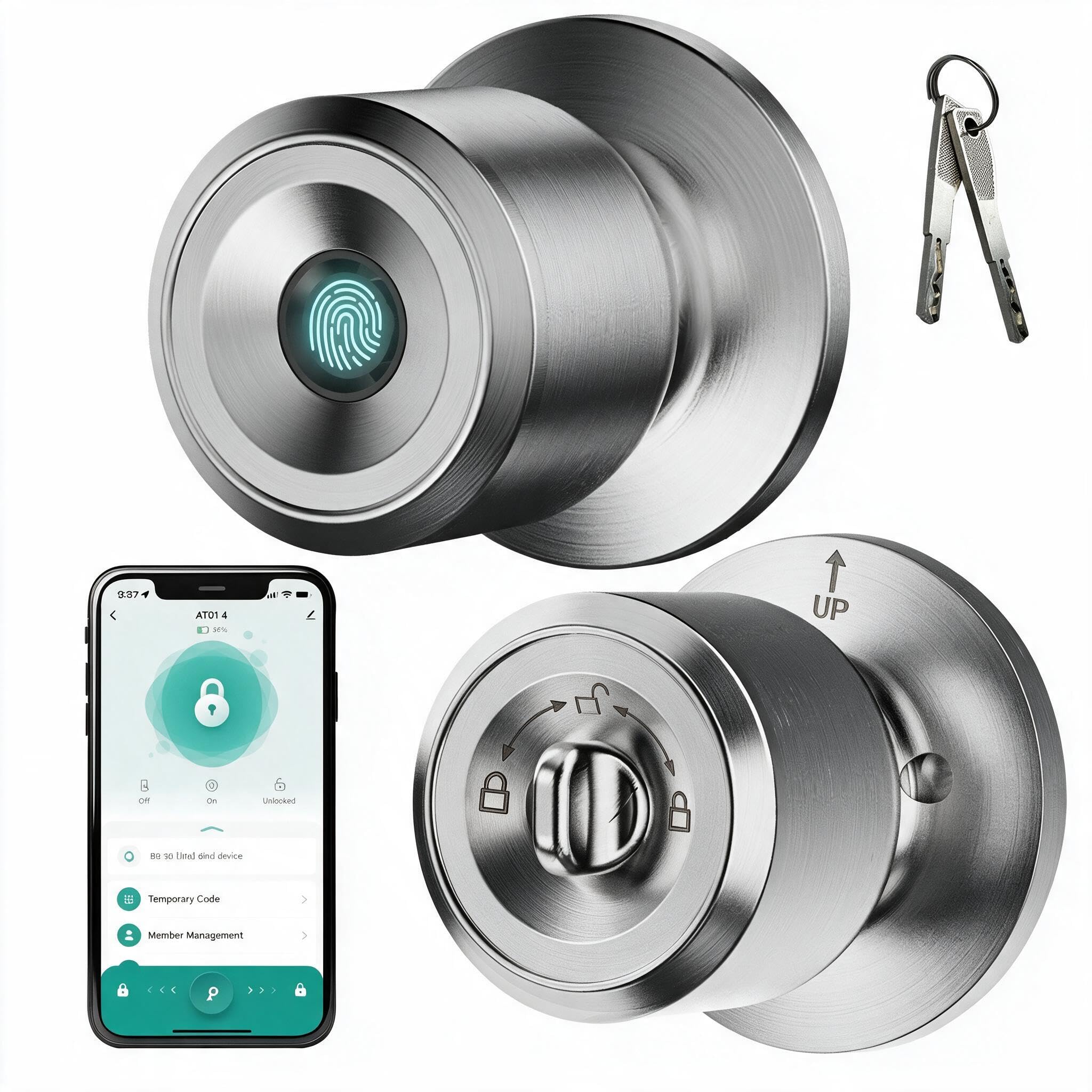
Type: Fingerprint door knob
Backup method: Physical backup key
Power source: Rechargeable battery
Auto-lock: Yes
Intended use: Bedroom, garage, office, pantry, interior doors
Installation: Easy install
Easy install Fingerprint Door Knob with Backup Key
This is a knob replacement rather than a deadbolt, so it drops onto an interior door without a locksmith. The fingerprint reader handles daily entry, and auto-lock closes the latch behind the door without anyone remembering to twist it. The rechargeable battery removes the cost of disposable cells, and the included backup key is the answer when the reader or the battery gives out. It is aimed at interior doors where security is about privacy more than forced entry.
It earns its place as the cheapest way to add a keyless interior door with a real fallback. The trade-off is that a knob-style lock offers far less resistance than a deadbolt, so it belongs on a bedroom or pantry, not an exterior front door.
Trade-off: A knob latch is a privacy and convenience lock, not a security barrier, so it should not be the only lock on an outside door.
CTA: Check the current price on Amazon
Feit Electric Smart Touch Keycard Door Lock
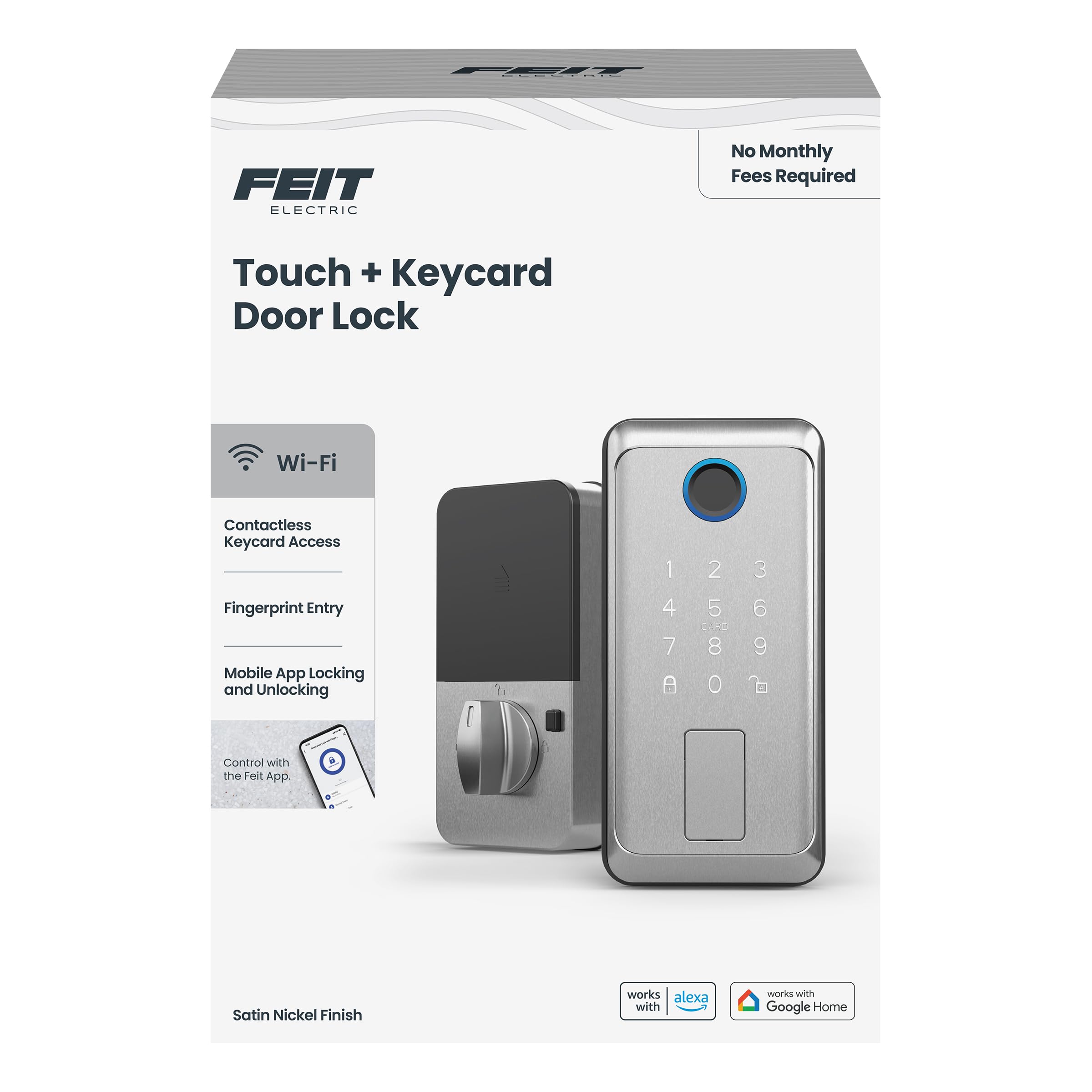
Type: Smart touch door lock
Entry methods: Fingerprint, NFC keycard, keypad, app
Backup power: USB-C
Codes: 100
Weather resistance: Weatherproof
Auto-lock: Yes
Finish: Satin nickel
Feit Electric Smart Touch Keycard Door Lock
This is the most layered backup plan in the group. A dead battery is handled by USB-C power, a forgotten PIN is handled by the keycard, and the fingerprint reader covers the everyday case. The weatherproof build and satin nickel finish point to an exterior door, and the code capacity suits a household, a rental or a small office with regular turnover. App control adds remote management on top of the physical options.
It suits buyers who want redundancy without carrying a key. The trade-off is complexity: four ways in means four things to set up and keep track of, and the keycard becomes useless if it is lost and not removed from the system.
Trade-off: More entry methods mean more administration, and a lost keycard needs to be deleted from the lock rather than simply ignored.
CTA: Check the current price on Amazon
MENGQI-CONTROL Backup Battery Access Control Solution
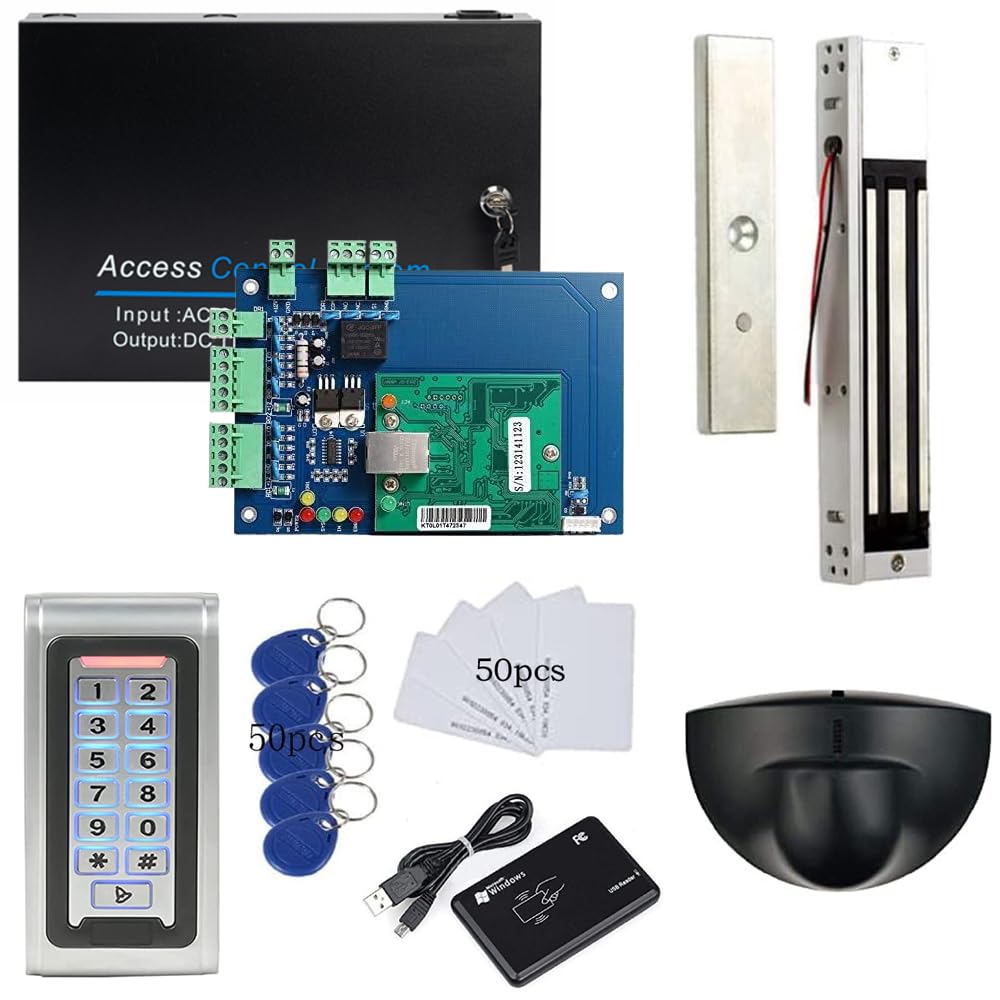
Type: Single-door access control kit
Backup power: Battery supported
Lock type: 600LBS magnetic lock
Entry: Combo reader and PIN
Exit: Overhead Rex exit sensor
Remote access: Phone app
Build: Metal reader
MENGQI-CONTROL Backup Battery Access Control Solution
This is a commercial-grade kit rather than a consumer smart lock. The 600LBS magnetic lock holds a door shut, the combo reader and PIN pad control who gets in, and the overhead Rex sensor releases the door for a normal push-to-exit. The battery support is the actual backup plan here: when mains power drops, the controller keeps working instead of failing open or locking everyone out. Phone app remote opening covers the case where someone needs entry from off site.
It suits a shop, clinic or office door where a power cut cannot mean a stuck door. The trade-off is that this is an installation project, not a swap: it needs wiring, a power supply and a mounting surface rated for a magnetic lock, so a professional installer is the realistic route.
Trade-off: Magnetic locks and controllers need proper low-voltage wiring, so the total cost includes installation labor, not just the kit.
CTA: Check the current price on Amazon
SoHo Mill Electronic Keypad Door Knob with Backup Mechanical Key

Type: Electronic keypad door knob
Backup method: Mechanical key
Latch: Spring latch
Deadbolt: No
App or phone control: No
Keypad: Single front keypad
Model: YL 99 Upgraded Model-B
SoHo Mill Electronic Keypad Door Knob with Backup Mechanical Key
The SoHo Mill keeps things deliberately simple. A keypad replaces the key for daily use, and a mechanical backup key takes over when the electronics or battery fail. There is no app, no Bluetooth pairing and no account to manage, which makes it the easiest pick to hand to a guest, a cleaner or a family member. The spring latch design fits standard knob prep rather than a deadbolt cutout.
It suits buyers who want keypad convenience with zero smart-home overhead. The trade-off is the honest one in the name: this is a spring latch, not a deadbolt, so it is a convenience lock and should be paired with a deadbolt on an exterior door.
Trade-off: With no deadbolt and no phone connection, this is a convenience upgrade rather than a security upgrade on its own.
CTA: Check the current price on Amazon
TEEHO TE001 Keyless Entry Deadbolt with Keypad

Type: Keypad deadbolt
Security rating: ANSI Grade 3
User codes: 20
Weather resistance: IP54 waterproof
Alert: Low battery alert
Backup method: 2 backup keys
Extras: One touch lock, anti-peep password
Finish: Bronze
TEEHO TE001 Keyless Entry Deadbolt with Keypad
This is the strongest exterior answer in the roundup. The low battery alert is the real backup feature: it warns before the keypad dies, and two backup keys cover the gap if it does. IP54 waterproofing and ANSI Grade 3 rating suit a front door that sees weather and daily traffic, and the anti-peep password lets someone enter a code with extra digits around it. One touch lock means the door secures with a single press on the way out.
It suits a main entry where the priority is a deadbolt first and keypad convenience second. The trade-off is that a keypad deadbolt lives or dies on battery discipline, so the alert matters more than the feature list suggests.
Trade-off: The keypad is the weak point in a power or battery failure, so the two metal keys should be stored somewhere reachable, not inside the house.
CTA: Check the current price on Amazon
Before You Buy
- Backup type: Decide whether the fallback is a mechanical key, a keycard, USB-C power or a battery-backed controller. A key is the only option that works with no power at all.
- Lock style: A knob or spring latch fits existing prep but offers less resistance than a deadbolt. Exterior doors need a deadbolt.
- Power and alerts: A low battery alert is worth more than a longer battery claim, because it turns a lockout into a routine battery swap.
- Weather rating: An exterior lock needs a stated weather resistance such as IP54. An interior lock does not.
- Installation skill: Knob swaps are a screwdriver job. Magnetic locks and access controllers need low-voltage wiring and usually an installer.
- Compatibility: Check the door prep, backset and door thickness before ordering, especially for deadbolts and commercial kits.
- Spare storage: Keep the backup key or keycard somewhere outside the door it opens. A backup key locked inside the house is not a backup.
Frequently Asked Questions
-
What is the best backup plan for a smart lock failure?
A mechanical key override is the most reliable, because it works with no battery and no network. A keypad deadbolt with two backup keys covers both the everyday and the failure case. -
What happens when a smart lock battery dies?
Most locks either warn first with a low battery alert or accept temporary power, such as the USB-C backup on the Feit lock. A key override is the fallback when neither is available. -
Is a keypad lock safer than a key lock?
Not inherently. A keypad removes the risk of a copied key but adds electronics as a failure point, so the safer setup is a keypad deadbolt that still has a physical key. -
Can a smart lock be opened without power?
Only if it has a mechanical key, a keycard with its own credential, or a battery-backed controller. A lock that depends entirely on mains power will not open during an outage. -
Do interior smart locks need a backup key?
Yes, for practicality rather than security. A rechargeable interior knob with a backup key avoids a lockout when the battery runs flat. -
How often should smart lock batteries be checked?
A routine check every few months is sensible, and any lock with a low battery alert should have that alert acted on immediately rather than deferred.
Bottom Line
The TEEHO TE001 Keyless Entry Deadbolt is the best backup plan for a smart lock failure on an exterior door, because the low battery alert, IP54 rating and two backup keys cover the warning, the weather and the worst case in one unit. For an interior door, the Easy install Fingerprint Door Knob with its rechargeable battery and backup key is the low-cost option. For a commercial door that must open during an outage, the MENGQI-CONTROL battery-backed kit is the only pick built for that job.
