Why there are Amazon links here: Brave Review is paid a commission for qualifying Amazon purchases made through the links below. Your price does not change, and using our links is entirely optional. How this works
Best Camera for a Fully Wired New Build: 5 Picks for Permanent Power
A fully wired new build rewards cameras that never need a battery swap, and this list covers five of them. The picks split into two jobs: desktop cameras for meetings and streaming in a home office, and wired security cameras for indoor and outdoor coverage. Buyers planning a dedicated office, a monitored entryway, or a full perimeter should read the overview first, then jump to the pick that matches the room. Every option here runs on a cable, so power and placement get decided once, during construction, rather than every few months.
Overview of the Picks
| Product | Key Spec | Best Use | Price Tier |
|---|---|---|---|
| Logitech Brio 101 | 1080p, privacy shutter, USB-A | Budget desk camera for calls | Budget |
| Google Nest Cam Indoor (Wired, 3rd Gen) | 2K, color night vision, Google Home | Indoor monitoring in a smart home | Mid |
| Google Nest Cam Outdoor (Wired, 2nd Gen) | 2K, weather resistant, 2-way audio | Permanent outdoor coverage | Mid |
| Tapo C120 | 2K+, person/pet/vehicle detection, local storage | Subscription-free indoor/outdoor | Budget |
| Logitech C920x | 1080p/30fps, light correction, Teams/Zoom | All-round desktop camera | Mid |
1. Logitech Brio 101 — Best Budget Desk Camera
Type: USB webcam
Resolution: Full HD 1080p
Connection: USB-A
Features: Auto-light correction, built-in mic, privacy shutter
Compatibility: Teams, Google Meet, Zoom and more
Color: Black

Logitech Brio 101 Full HD 1080p Webcam for Streaming and Meetings – Black
The Brio 101 is the simplest camera on this list, and that is its appeal. It is a plug-and-play USB-A webcam with a built-in microphone and a physical privacy shutter, so a wired desk setup needs no driver hunt and no separate mic. Auto-light correction smooths out a backlit window or a dim corner, which matters in a new office where the lighting plan may still be a work in progress. The clip mount suits a monitor or a shelf, and the cable means it draws power from the PC rather than a wall outlet.
This pick suits buyers who need a dependable camera for daily video calls without spending much, and it fits a spare-room office where the desk is the only camera location. It is not for anyone who wants 4K capture or a wide-angle lens for group streaming, and the built-in mic is a convenience rather than a studio solution. The plastic body and fixed focus reflect the price tier, so buyers wanting finer control over framing should look higher up the range.
Trade-off: The fixed lens and modest sensor mean low-light video looks soft compared with pricier webcams, so a dim office will show it.
2. Google Nest Cam Indoor (Wired, 3rd Gen) — Best for Smart-Home Monitoring
Type: Indoor security camera
Resolution: 2K video
Features: Motion detection, color night vision, 2-way audio
Ecosystem: Works with Google Home and Gemini
Power: Wired
Color: Snow

Google Nest Cam Indoor (Wired, 3rd Gen) – Security Camera – 2025 – Snow
The Nest Cam Indoor is built for a house that already speaks Google. It delivers 2K video with color night vision and two-way audio, and it ties into Google Home and Gemini for voice checks and smart alerts. The wired design means it stays powered in a fixed spot, which is exactly what a new build allows: one cable run to a shelf or ceiling corner and the camera never needs charging. Motion detection and intelligent alerts keep the feed useful rather than noisy.
This camera earns its place for buyers who want indoor coverage folded into a Google smart home, such as watching a hallway, a nursery, or a front room. It is not for households committed to Alexa or Apple Home, and it is not the pick for someone who wants local-only storage. The wired cable limits placement to somewhere a lead can reach, so the outlet or conduit needs planning before the walls close.
Trade-off: The camera leans on the Google ecosystem and cloud features, so buyers who want fully local recording will find it restrictive.
3. Google Nest Cam Outdoor (Wired, 2nd Gen) — Best for Permanent Outdoor Coverage
Type: Outdoor security camera
Resolution: 2K video
Features: Motion detection, color night vision, 2-way audio
Ecosystem: Works with Google Home and Gemini
Weather Resistance: Weather resistant
Color: Snow
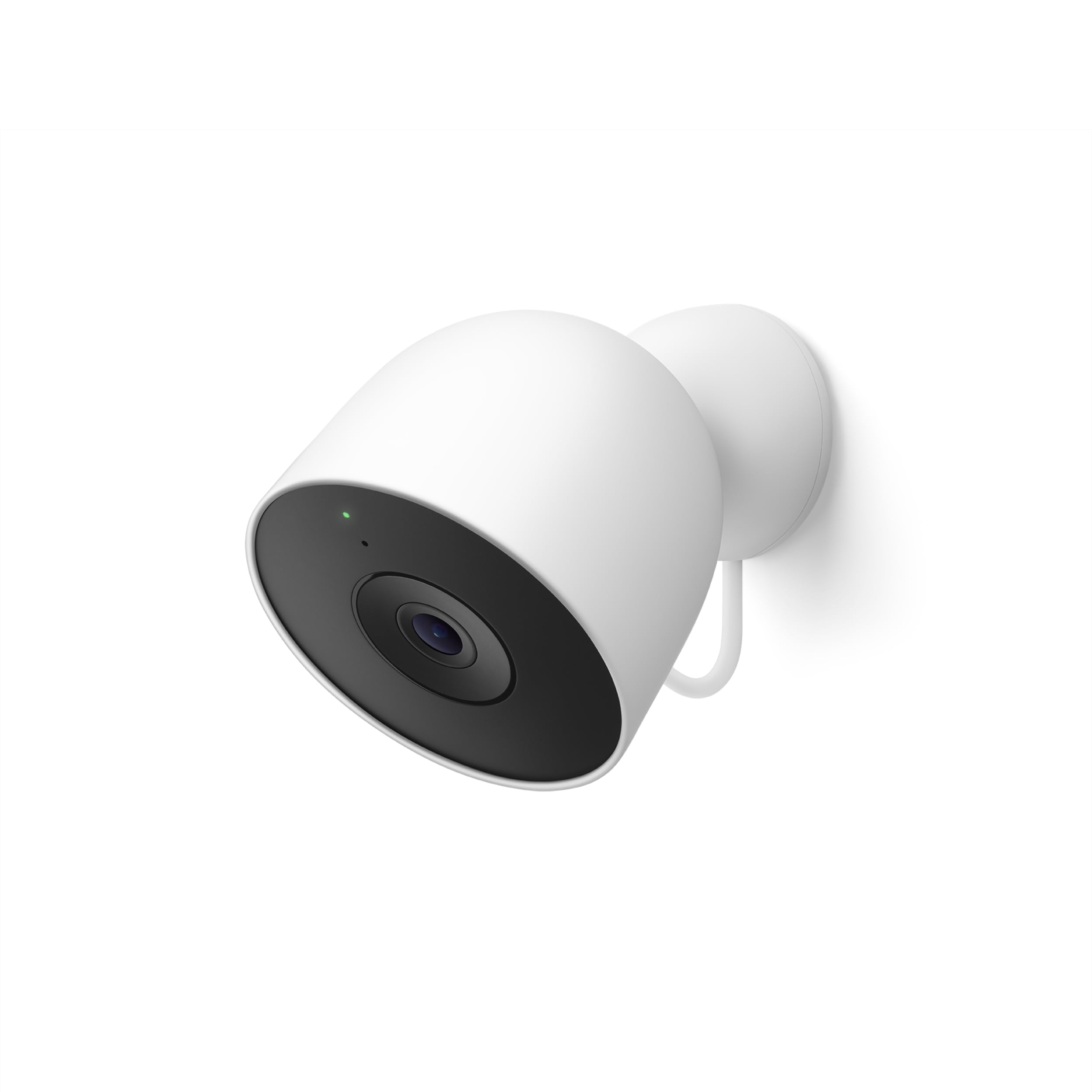
Google Nest Cam Outdoor (Wired, 2nd Gen) – Security Camera – 2025 – Snow
The outdoor Nest Cam takes the same 2K sensor, color night vision, and two-way audio as its indoor sibling and wraps it in a weather-resistant body. That makes it the natural choice for a porch, driveway, or side gate where the camera will live for years. The wired feed means no ladder trips to swap batteries, and the Google Home and Gemini integration keeps alerts and live views in one app alongside the indoor unit.
This pick suits buyers who are already running Google hardware and want a matched pair of indoor and outdoor cameras with a single app. It is not for anyone who needs a battery-backed camera for a shed or a far fence line with no power, and it is not the budget route. Planning the cable route during the build is the whole point, because retrofitting outdoor power later is the expensive part.
Trade-off: Weather resistance protects the housing, but the wired lead still needs a sheltered or sealed entry point, which adds planning work at the wall.
4. Tapo C120 — Best Subscription-Free Wired Camera
Type: Indoor/outdoor security camera
Resolution: 2K+
Features: Person/pet/vehicle detection, color night vision
Storage: Subscription-free local storage or cloud
Use Cases: Security, baby monitoring
Power: Wired

Tapo 2K+ Indoor/Outdoor Wired Security Camera, Baby Monitoring, C120
The Tapo C120 is the value play for a wired build, and its headline feature is what it does not charge for. Person, pet, and vehicle detection run on the camera, and footage can go to local storage without a subscription, with cloud as an optional extra. The 2K+ resolution and color night vision put it in the same visual class as cameras costing far more, and the indoor/outdoor body means one model can cover a nursery or a back patio.
This camera suits buyers who want strong detection and sharp video without a recurring bill, and it works well as a second or third camera where subscription costs would stack up. It is not for someone who wants deep integration with a specific smart-home assistant, and it is not the most polished app experience on this list. Local storage also means buying and managing a memory card, which is a small ongoing chore.
Trade-off: Local storage shifts the burden of card management and backup onto the buyer, and the app is less refined than the big-platform alternatives.
5. Logitech C920x — Best All-Round Desktop Camera
Type: USB webcam
Resolution: Full HD 1080p at 30fps
Features: Clear audio, light correction
Compatibility: Teams, Meet, Zoom, Nintendo Switch 2, Mac, Tablet
Color: Black

Logitech C920x HD Pro PC Webcam Full 1080p/30fps Video – Black
The C920x is the known quantity of desktop cameras, and it earns the mid-tier slot with solid 1080p video at 30fps, clear audio, and automatic light correction. It works across Teams, Meet, Zoom, Mac, tablet, and even the Nintendo Switch 2, so one camera can serve a home office and a living-room console. The wider compatibility list makes it the safer buy when the setup is not locked to a single platform.
This pick suits buyers who want a step up from a budget webcam for meetings, streaming, and occasional console use, and it fits a desk that doubles as an entertainment station. It is not for anyone who needs 4K or a built-in privacy shutter, and it is not the cheapest way to get on a video call. The clip design is desk-friendly but less flexible than a tripod mount for unusual angles.
Trade-off: There is no physical privacy shutter, so buyers who cover their lens between calls will need a separate clip or a habit of unplugging.
Before You Buy
- Power source: Every camera here is wired, so confirm an outlet, USB port, or conduit run exists at each planned location before the walls are finished.
- Indoor vs. outdoor: Choose a weather-resistant body for any exterior spot; indoor units belong under cover and away from direct rain.
- Ecosystem: Match the camera to the smart-home platform already in the house, since Google-linked models work best inside Google Home.
- Storage: Decide between subscription cloud recording and local card storage, because the ongoing cost differs sharply between the two.
- Compatibility: For desk cameras, check the meeting apps and devices in use, since the C920x covers more platforms than the Brio 101.
- Placement: Plan cable routes and mounting heights early; a wired camera is only as flexible as the lead that reaches it.
Frequently Asked Questions
-
What is the best camera for a fully wired new build overall?
The Tapo C120 offers the strongest mix of sharp video, on-camera detection, and no subscription, while the Logitech C920x is the safest desk pick for meetings. -
Do wired security cameras need a subscription?
Not always. The Tapo C120 supports local storage without a subscription, while the Nest cameras lean on cloud features for their full alert and history experience. -
Can a wired outdoor camera be added after the build is finished?
It can, but running power to an exterior wall later is far more disruptive than planning the cable route during construction. -
Which camera works with Google Home?
Both Nest Cam models are built for Google Home and Gemini, making them the natural pairing for a Google-based smart home. -
Is a webcam or a security camera better for a home office?
A webcam such as the Brio 101 or C920x is designed for calls and streaming, while a security camera is built for monitoring a room rather than framing a desk. -
What should buyers check before mounting an outdoor camera?
Confirm the cable can reach a sheltered entry point and that the housing is rated weather resistant, since the lead is the weak link in an exterior install.
Bottom Line
For most fully wired new builds, the Tapo C120 is the pick that covers the most ground for the least ongoing cost, pairing 2K+ video and on-camera detection with subscription-free local storage. Buyers who want a desk camera instead should take the Logitech C920x for its broad compatibility and reliable 1080p output. Whichever route fits the build, check the current price before ordering.
