Why there are Amazon links here: Brave Review is paid a commission for qualifying Amazon purchases made through the links below. Your price does not change, and using our links is entirely optional. How this works
Best Network Upgrade Before a Fibre Install for a Faster Home Network
A fibre line only performs as well as the hardware behind it. The best network upgrade before a fibre install replaces an ageing router or mesh kit with Wi-Fi 7 gear that can actually move multi-gigabit speeds to phones, laptops, consoles and TVs. This roundup covers five picks, from a budget tri-band mesh to a 10G desktop router, and matches each to a buyer profile. The overview table below ranks them by key spec and price tier so a decision can be made quickly, then each review explains the fit.
Overview of the Picks
| Product | Key Spec | Best Use | Price Tier |
|---|---|---|---|
| TP-Link Deco 7 Pro BE63 (2-Pack) | Tri-band BE10000, 4x 2.5G ports | Whole-home mesh on a multi-gig line | Mid |
| NETGEAR Orbi 370 Series (3-Pack) | Dual-band, 2.5G port, 6,000 sq ft | Large homes wanting simple coverage | Mid |
| ASUS RT-BE88U | 2x 10G ports, 4x 2.5G, 4x 1G | Wired-heavy homes and home labs | Upper-mid |
| NETGEAR Nighthawk RS700S | Tri-band BE19000, 10G port | Single-router speed for power users | Premium |
| TP-Link Deco BE25 (3-Pack) | Dual-band BE5000, 2x 2.5G ports | Budget whole-home upgrade | Budget |
TP-Link Deco 7 Pro BE63 Tri-Band WiFi 7 Mesh System (2-Pack)
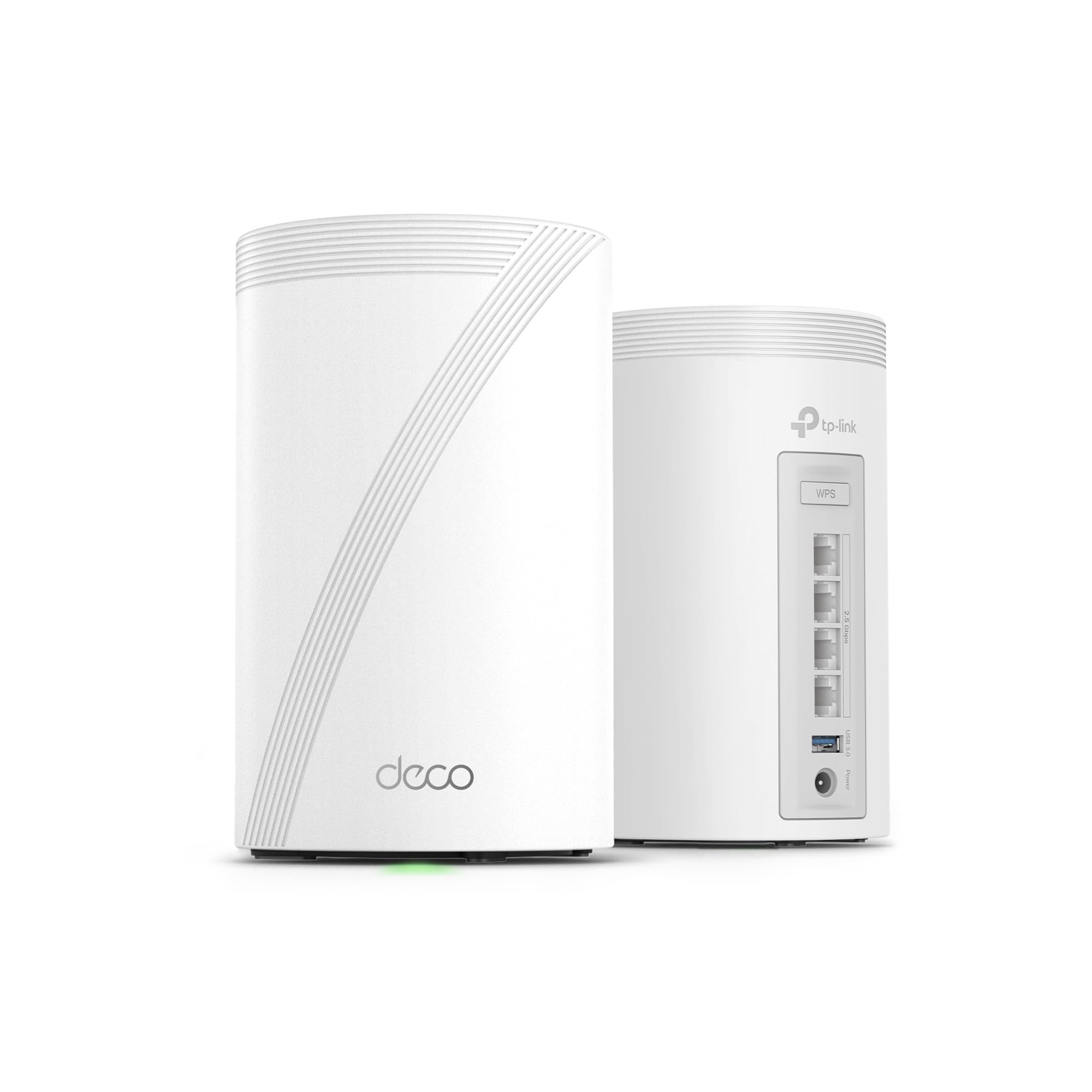
Type: Tri-band whole-home mesh system
Wireless standard: WiFi 7 (BE10000)
Streams: 6-stream
Wired ports: 4x 2.5G with wired backhaul
Antennas: 4x smart internal
Software: VPN and HomeShield
The Deco 7 Pro BE63 is the balanced pick: a two-unit mesh with tri-band radios, six streams and four 2.5G ports that support wired backhaul between nodes. That combination matters after a fibre install because the multi-gig port keeps the new line’s headroom intact while the wireless backhaul or Ethernet link carries it between rooms. Internal antennas keep the units tidy on a shelf, and HomeShield plus VPN support cover the software side.
This kit suits households with a multi-gig fibre plan and a home larger than a single router can cover, especially where walls or floors block a clean signal. It earns its place because the 2.5G ports are the practical ceiling most fibre installs deliver today, and the mesh format solves coverage without a second shopping trip.
Trade-off: Two units cover a typical home well, but a very large or multi-floor property will likely need a third node, which adds cost.
NETGEAR Orbi 370 Series WiFi 7 Mesh System (3-Pack)

Type: Router plus two satellite extenders
Wireless standard: WiFi 7, dual-band
Rated speed: Up to 5 Gbps
Capacity: 70 devices
Wired port: 2.5 Gig
Coverage: Up to 6,000 sq ft
The Orbi 370 is the coverage-first choice. A router plus two satellites spreads a dual-band WiFi 7 signal across a stated 6,000 square feet and handles up to 70 connected devices, which fits a busy family home with phones, laptops, streaming boxes and smart-home gear. The 2.5 Gig port keeps the fibre line’s speed available at the main unit, and setup is pitched as simple for buyers who do not want to configure a network.
This pick suits large single-family homes and buyers who prioritise square footage and device count over the highest possible wireless ceiling. It earns its place because the three-piece kit removes dead zones in one purchase, and the dual-band design keeps the cost below tri-band rivals.
Trade-off: The dual-band layout means less total wireless capacity than tri-band systems at the same price, so very heavy simultaneous 4K streaming and gaming may feel the limit.
ASUS RT-BE88U WiFi 7 Router

Type: Single WiFi 7 router
Wireless standard: WiFi 7, up to 7.2 Gbps
Wired ports: 2x 10G, 4x 2.5G, 4x 1G
Security: Subscription-free, parental controls included
Software: VPN support
Mesh: Compatible
The RT-BE88U is the wired-heavy pick and the most port-dense router in this group. It carries two 10G ports, four 2.5G ports and four 1G ports, which lets a fibre install feed a NAS, a desktop and a switch at full speed without adding a separate switch on day one. Subscription-free security and parental controls keep the software cost flat over time, and mesh compatibility leaves room to expand later.
This router suits home-lab users, remote workers with wired desks and buyers who want a single powerful box rather than a mesh kit. It earns its place because the port count and dual 10G links are unmatched here for the money, and the VPN support matters for anyone accessing a home network remotely.
Trade-off: A single unit cannot match a mesh for coverage in a large or awkwardly shaped home, so buyers in bigger properties may still need a node or access point.
NETGEAR Nighthawk WiFi 7 Router RS700S

Type: Single tri-band WiFi 7 router
Wireless standard: WiFi 7 (BE19000)
Rated speed: Up to 19 Gbps
Capacity: 200 devices
Wired ports: 1x 10G plus 3x Gigabit
Coverage: Up to 3,500 sq ft
The Nighthawk RS700S is the premium performance pick, with a tri-band BE19000 design rated to 19 Gbps and capacity for 200 devices. The 10G port lets a fast fibre line reach a wired desktop or NAS at full speed, and the stated 3,500 square feet suits a mid-size home from a single unit. It is built for buyers who want maximum throughput and do not want to manage multiple nodes.
This router suits power users, gamers and large-device households where one central box covers the property. It earns its place because the tri-band radios and high device ceiling handle dense traffic better than dual-band kits, and the 10G port future-proofs the wired side.
Trade-off: The premium price buys speed and capacity, not coverage, so a sprawling or thick-walled home may still need an extender despite the outlay.
TP-Link Deco BE25 WiFi 7 Mesh System (3-Pack)

Type: Tri-unit whole-home mesh system
Wireless standard: WiFi 7, dual-band (BE5000)
Rated speed: 5 Gbps
Streams: 4-stream
Wired ports: 2x 2.5G with wired backhaul
Coverage: Up to 6,600 sq ft
The Deco BE25 is the budget pick and the value leader in this roundup. Three units cover a stated 6,600 square feet, two 2.5G ports support wired backhaul, and the dual-band BE5000 design with four streams keeps the price low while still delivering WiFi 7 features like MLO, AI-roaming and HomeShield. For a household stepping up from an old Wi-Fi 5 router, this is the most coverage per dollar.
This kit suits budget-conscious buyers, renters and large homes that need broad coverage more than peak speed. It earns its place because the three-piece format and 2.5G backhaul are rare at the entry price, and the software features punch above the tier.
Trade-off: The dual-band, four-stream design caps wireless throughput well below the tri-band picks, so a very fast fibre plan will not be fully exploited over Wi-Fi.
Before You Buy
- Wired ports: Match the router’s WAN port to the fibre plan. A 2.5G port suits most multi-gig lines; a 10G port is needed to exploit the fastest tiers.
- Coverage: Measure the home and compare against the stated square footage. Mesh kits suit multi-floor or thick-walled properties; a single router suits open, mid-size homes.
- Wireless standard: WiFi 7 gear is backward compatible, so older devices still connect, but only WiFi 7 clients see the full benefit.
- Device count: Count phones, laptops, consoles, TVs and smart-home gear. Dense households need higher device ceilings and tri-band radios.
- Backhaul: Wired backhaul between mesh nodes preserves speed; wireless backhaul is easier to place but costs throughput.
- Software costs: Check whether security and parental controls are subscription-free or paid, since that changes the long-term cost.
- Future expansion: Mesh-compatible routers allow adding nodes later; closed mesh systems lock buyers into one brand.
Frequently Asked Questions
-
Does a fibre install require a new router?
Not always, but an older router with gigabit-only ports will cap a multi-gigabit fibre line. Upgrading to a router with 2.5G or 10G ports unlocks the speed already paid for. -
Is WiFi 7 worth it before a fibre install?
WiFi 7 helps most when the line is fast and devices are dense. It is backward compatible, so the upgrade is safe, but the full benefit appears only with WiFi 7 clients. -
Mesh or single router for a fibre upgrade?
Mesh suits large or multi-floor homes where one box cannot reach every room. A single router suits mid-size, open-plan homes and offers more ports per dollar. -
What port speed matches a fibre plan?
A 2.5G port suits most multi-gigabit residential plans. A 10G port is needed to exploit the fastest tiers or to feed a NAS and desktop at full speed. -
Can old devices use a WiFi 7 network?
Yes. WiFi 7 routers are backward compatible with older Wi-Fi standards, so existing phones, laptops and smart devices connect normally. -
How many mesh units are needed?
Match units to square footage and layout. Two units suit a typical home; three suit large or multi-floor properties, and extra nodes can be added later on expandable systems.
Bottom Line
The best network upgrade before a fibre install is the TP-Link Deco 7 Pro BE63 two-pack, which balances tri-band WiFi 7 speed, four 2.5G ports and mesh coverage at a mid-tier price. Buyers who need maximum wired ports should look at the ASUS RT-BE88U, while budget-focused households get the most coverage per dollar from the Deco BE25 three-pack. Match the WAN port to the fibre plan, then choose mesh or single router by home size.
