Why there are Amazon links here: Brave Review is paid a commission for qualifying Amazon purchases made through the links below. Your price does not change, and using our links is entirely optional. How this works
Best Smart Door Sensor for a Shared Entrance: 5 Picks That Alert the Right People
A shared entrance — a flat block, a rented room, a small shop front, a flat with a communal hallway — needs a door sensor that tells the right person the door moved, without wiring into someone else’s building. The five picks below cover three buyer profiles: renters who cannot drill or rewire, households that want a chime plus phone alerts, and property or shop owners who need range and battery life across a bigger doorway.
The overview table below lines the picks up side by side. A reader who wants the short version can pick a row and go straight to its review.
Overview of the Picks
| Product | Key Spec | Best Use | Price Tier |
|---|---|---|---|
| 600FT 4-in-1 Smart WiFi Door Chime | 32 chimes, 5 volumes, 3 LED modes, 2.4 GHz only, plug-in | Loud local chime for a busy shared door | Budget |
| Tapo Door Sensor Starter Kit (T31 KIT) | Matter compatible, 3 contact sensors + 1 hub with chime | Whole-flat kit with a hub and chime in one | Mid-range |
| YoLink Door and Window Sensor Kit | LoRa protocol, up to 2034 ft range, 5-year battery, 4-pack + hub | Long-range coverage across a large or thick-walled entrance | Premium |
| Smart WiFi Door and Window Sensor (2-Pack) | No hub required, Smart Life and Tuya, Alexa and SmartThings | Simple phone alerts for a renter’s shared door | Budget |
| CallToU WiFi Motion Sensor Door Chime | Motion alert system, app notifications, instant phone alerts | Motion-based entry alerts for shops and care situations | Mid-range |
The budget rows trade polish for price: the plug-in chime and the hub-free two-pack both get the job done with minimal setup, but neither offers the range or battery story of the YoLink kit. The Tapo kit sits in the middle, bundling a hub and chime so the sensors have somewhere to report to. The CallToU pick is the odd one out — it watches for motion rather than a door opening, which suits an entrance where people walk through rather than a door that swings.
600FT, 32 Chimes, 5 Volumes & 3 LED Modes, 2.4 GHz Only, Plug-in, No Wiring, Alerts via Tuya/Smart Life, Expand to 32 Sensors 4 in 1 Smart WiFi Door Chime When Door Opens Entry Alarm for Security/Kids

Type: Plug-in WiFi door chime with sensor
Chime options: 32 chimes, 5 volumes, 3 LED modes
Connectivity: 2.4 GHz WiFi only
Power source: Plug-in, no wiring
App: Tuya / Smart Life
Expansion: Up to 32 sensors
Check the current price on Amazon
This is the loudest, simplest answer to a shared door that nobody hears. The receiver plugs into a wall socket, so there is no battery to swap and no wiring to run through a communal hallway, and the sensor pairs over 2.4 GHz WiFi to the Tuya or Smart Life app. Thirty-two chime tones, five volume steps and three LED modes give a household room to make one door sound different from another. It expands to 32 sensors, which suits a building with several doors feeding one receiver.
It earned its place as the budget pick because it solves the local-alert problem first: someone in the flat hears the door, even with a phone face-down. The trade-off is that 2.4 GHz-only WiFi is fussy about distance and wall thickness, so a sensor far from the router may drop off. Buyers who need phone alerts as the primary signal, rather than a chime, should look at the hub-free two-pack instead.
Tapo Door Sensor Starter Kit, Matter Compatible, 3X Smart Door Window Contact Sensor and 1x Smart Hub with Built-in Chime, Smart Automation, Real-Time Notification, T31 KIT

Type: Starter kit — contact sensors plus hub
Included: 3 contact sensors, 1 smart hub
Hub feature: Built-in chime
Compatibility: Matter
Automation: Smart automation and real-time notification
Best for: Multi-door flats and small premises
Check the current price on Amazon
The Tapo kit is the tidy middle option: three contact sensors and one hub that also chimes, so the system has a brain and a speaker in a single box. Matter compatibility matters here because it lets the sensors talk to other smart-home platforms rather than locking the household into one app. Real-time notifications and automation mean a door opening can trigger a light, a routine or a phone alert.
Three sensors cover a front door, a back door and a window, which is more than most shared-entrance setups need — the extras are useful for a flat with a hallway window or a second entrance. The trade-off is the hub: it is one more device to power and keep in range, and a buyer who only wants one door watched is paying for capacity they will not use. It suits the household that wants a proper little system rather than a single chime.
Open/Close and Left-Open Alerts, Up to 5-Year Battery, Works with IFTTT, LoRa YoLink Protocol Up to 2034 Feet YoLink Door and Window Sensor Kit: 4-Pack + Hub

Type: Long-range sensor kit with hub
Included: 4 door and window sensors, 1 hub
Protocol: LoRa (YoLink)
Range: Up to 2034 feet
Battery: Up to 5 years
Alerts: Open/close and left-open
Integrations: Works with IFTTT
Check the current price on Amazon
This is the premium pick, and the spec sheet explains why: LoRa is a low-power, long-range radio protocol, and the stated range of up to 2034 feet is in a different class from WiFi or Bluetooth sensors. For a shared entrance in a thick-walled building, a basement flat or a shop with a door far from the office, that range is the whole point. The left-open alert is the second useful feature — a door propped open in a communal hallway gets flagged rather than silently ignored.
Four sensors and a hub in one kit make it a building-wide purchase rather than a single-door one, and the up-to-5-year battery claim means fewer ladder trips. The trade-off is cost and commitment: this is the most expensive route here, and it ties the buyer into the YoLink ecosystem and its hub rather than a plain WiFi app. Buyers who want a cheap single-door alert should not start here.
Smart WiFi Door and Window Sensor (2-Pack), Phone Notifications via Smart Life, Tuya, Alexa and SmartThings, Create Automations, No Hub Required, Easy Setup

Type: WiFi contact sensor, two-pack
Hub required: No
Apps: Smart Life, Tuya
Voice platforms: Alexa, SmartThings
Alerts: Phone notifications
Setup: Easy setup, automation-ready
Check the current price on Amazon
The hub-free two-pack is the renter’s answer to a shared door. Each sensor joins the home WiFi directly and reports through Smart Life or Tuya, so there is no extra box to buy, power or lose in a move. Phone notifications and automations cover the basics — a door opening after hours, a window left ajar — and Alexa and SmartThings support lets the alert join a wider routine.
Two sensors suit a front door plus one more opening, and the no-hub design keeps the whole thing portable when the lease ends. The trade-off is that WiFi-only sensors lean on a solid 2.4 GHz signal and a phone that is actually to hand; there is no local chime in the box, so a household that needs an audible alert in the hallway must add one. It is the lowest-friction pick for a single shared door.
CallToU WiFi Motion Sensor Door Chime, Smart Motion Alert System with App Notifications & Instant Phone Alerts, Entry Sensor for Home, Pet Monitoring, Elderly Care and Store Entrance
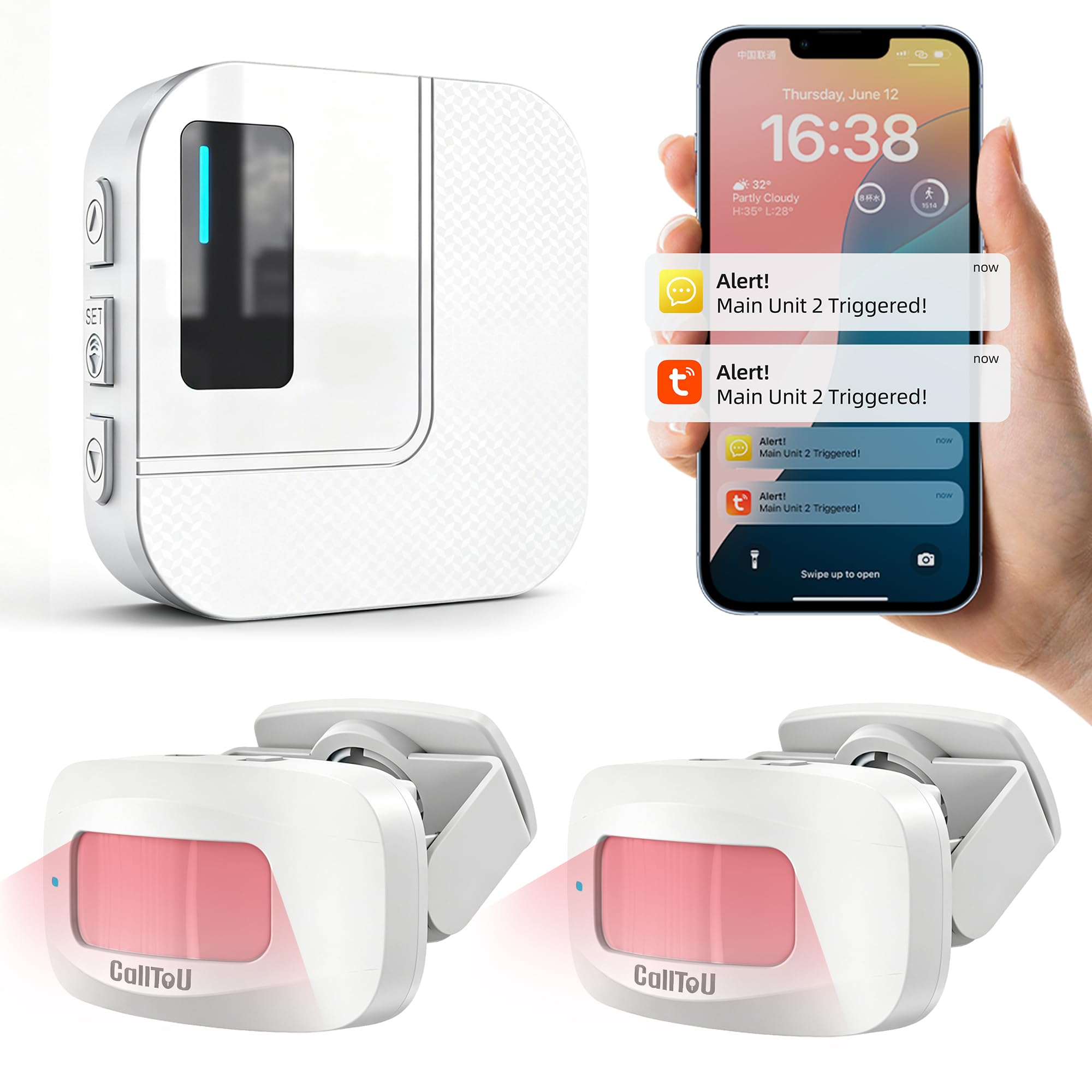
Type: WiFi motion sensor door chime
Detection: Motion, not contact
Alerts: App notifications, instant phone alerts
Intended use: Home entry, pet monitoring, elderly care, store entrance
Best for: Entrances people walk through
Check the current price on Amazon
The CallToU unit watches for movement rather than a door swinging open, which makes it the right shape for a shared entrance that people pass through — a shop doorway, a care situation where a resident should not wander out, a hallway where the door is often left ajar. App notifications and instant phone alerts put the signal on a phone, and the motion approach catches a person entering even when the door itself was already open.
It earned its place because motion covers a gap the contact sensors cannot: an entrance used by several people, where the door state is not the useful signal. The trade-off is false alarms — motion sensors react to pets and passing traffic in a way a contact sensor does not, so placement matters more than with the other picks. It suits a shop or care setting better than a quiet flat.
Before You Buy
- Detection type: A contact sensor reports the door opening; a motion sensor reports a person passing. Shared entrances with a propped-open door often suit motion better.
- Hub or no hub: Hub-free WiFi sensors are simplest to move, but a hub-based kit adds range, a local chime and more reliable reporting.
- Range and walls: WiFi sensors struggle through thick communal walls. LoRa kits exist for exactly that problem.
- Power source: Plug-in receivers never need a battery; sensor batteries range from a year or two up to the long-life cells in the YoLink kit.
- Local vs phone alerts: A chime in the hallway and a phone notification solve different problems — decide which one the household actually needs.
- Expansion: A building with several doors needs a receiver or hub that accepts multiple sensors; check the stated sensor limit before buying.
- Mounting and tenancy: Adhesive mounting suits renters; check what the sensor attaches with before fixing anything to a shared door.
Frequently Asked Questions
-
Can a smart door sensor work in a shared hallway without WiFi?
A contact sensor needs a network to send phone alerts, but a plug-in chime can still sound locally if it pairs directly with its sensor. Check the pairing method before assuming a hallway with no signal will work. -
What is the difference between a door sensor and a door chime?
A sensor detects the door opening and reports it; a chime is the speaker that makes the noise. Many kits bundle both, and some sensors rely on a phone alert instead of a chime. -
Will a WiFi door sensor reach through a thick communal wall?
Often not reliably. WiFi is the weakest option for range, which is why long-range LoRa kits exist for large or solid-walled buildings. -
Is a motion sensor better than a contact sensor for a shop entrance?
For a doorway people walk through, motion usually catches more of what matters. For a door that should stay shut, a contact sensor with a left-open alert is the better fit. -
How long do the batteries last?
It varies widely by protocol. Low-power designs such as the YoLink kit claim up to five years, while standard WiFi sensors typically need cells changed far more often. -
Can one receiver handle several doors?
Some can. The plug-in chime here expands to 32 sensors, and the Tapo and YoLink kits ship with multiple sensors, so a building with several entrances can be covered from one hub or receiver.
Bottom Line
For most shared entrances, the Tapo Door Sensor Starter Kit is the best balance: three sensors, a hub with a built-in chime, Matter compatibility and real-time notifications, all without committing to a long-range ecosystem. A renter watching one door should take the hub-free two-pack; a thick-walled building or a shop with a distant door should pay for the YoLink kit’s range.
