Why there are Amazon links here: Brave Review is paid a commission for qualifying Amazon purchases made through the links below. Your price does not change, and using our links is entirely optional. How this works
Best Smart Lock for a Door With No Deadbolt: 5 Keypad Levers That Fit
A door without a deadbolt borehole cannot take a standard smart deadbolt, so the practical answer is a keypad lever or knob that replaces the whole handle. This guide covers five locks built for exactly that job, sorted by budget, by brand trust, and by how much control the homeowner wants from a phone. It suits renters who cannot drill new holes, owners of older homes with a single bored handle, and anyone converting a garage or side entry to keyless entry. The overview table below lists every pick in one place before the individual reviews.
The Picks at a Glance
| Product | Key Spec | Best Use | Price Tier |
|---|---|---|---|
| Philips WiFi Keypad Deadbolt with Handle | Built-in WiFi, voice and fingerprint unlock | Whole-home remote control | Mid |
| Kucacci Keypad Smart Door Lock with Handle | Fingerprint plus app, deadbolt alternative | First smart lock on a budget | Budget |
| Yale Assure Lever | Brand-name keypad lever, one-touch and auto-lock | Buyers who want a proven name | Premium |
| Nyboer Electronic Code Knob | Keypad knob, matte black finish | Modern-looking front doors | Budget |
| Wyze Auto-Lock Bolt v2 | Fingerprint plus Wi-Fi deadbolt, long battery | High-traffic entries | Value |
1. Philips WiFi Keypad Deadbolt with Handle

Type: Keypad deadbolt with lever handle
Connectivity: Built-in WiFi
Unlock methods: Voice, fingerprint, code, app
Extras: Auto-lock, backlit keypad, remote app control
Price tier: Mid
This is the most feature-dense lock in the group. It ships as a matched lever-and-deadbolt set, so a door that already has a deadbolt borehole gets a full handle upgrade rather than a bolt-only swap. Built-in WiFi means no separate hub, and the voice and fingerprint options cover the two fastest ways to get inside with an armful of groceries. The backlit keypad matters more than it sounds on a dark porch.
The remote app control makes it the pick for a household that wants to unlock for a dog walker or check whether the door is locked from the office. Auto-lock closes the loop so a forgotten lock is not a nightly worry. The trade-off is that all that hardware and radios cost more than a bare keypad knob, and a WiFi lock draws more battery than a Bluetooth-only one.
Trade-off: The feature set pushes the price up and a WiFi radio drains batteries faster than a simple keypad, so it is not the right pick for a homeowner who only wants a code entry.
2. Kucacci Keypad Smart Door Lock with Handle

Type: Keypad handle lock, deadbolt alternative
Unlock methods: Fingerprint, keypad code, app
Mounting: Handle replacement, easy installation
Price tier: Budget
The Kucacci is aimed squarely at the reader who searched for a deadbolt alternative and does not want to spend much. It replaces the existing handle and adds fingerprint and code entry plus app access, which is the core of what most people actually use a smart lock for. Easy installation is the headline claim, and on a standard bored door a handle swap is a screwdriver job rather than a locksmith visit.
It suits a first smart lock, a rental where the original handle goes back in a box at move-out, or a secondary door that does not justify a premium spend. The fingerprint reader is the standout at this price, since it removes the fumbling-for-keys ritual entirely. The trade-off is that budget electronics and a plastic-heavy build will not feel as solid as a brand-name lever.
Trade-off: At this price the housing and internal components are built to a budget, so the lock will not feel as substantial as a premium lever and may not suit a door that takes heavy daily abuse.
3. Yale Assure Lever

Type: Keypad lever lock for doors with no deadbolt
Unlock method: PIN code
Locking: One-touch or auto-lock
Finish: Black suede
Price tier: Premium
Yale names the no-deadbolt use case directly in the product title, which makes this the safest fit for a door that was never bored for a bolt. It is a code-only lever: no fingerprint, no WiFi, no app in the box. What it offers instead is a proven lock brand, a keypad that handles PIN entry, and both one-touch locking and auto-lock for hands-free exits.
This is the pick for a buyer who wants a name they recognize on the front door and does not care about phone control. It also suits a household where older relatives need a code rather than a fingerprint, since a PIN is easier to share and change. The trade-off is real: the price is the highest here and the feature list is the shortest, so anyone expecting app control will be disappointed.
Trade-off: The premium price buys brand confidence and a solid lever, not features — there is no fingerprint reader and no app control, so tech-focused buyers will find it limited.
4. Nyboer Electronic Code Knob
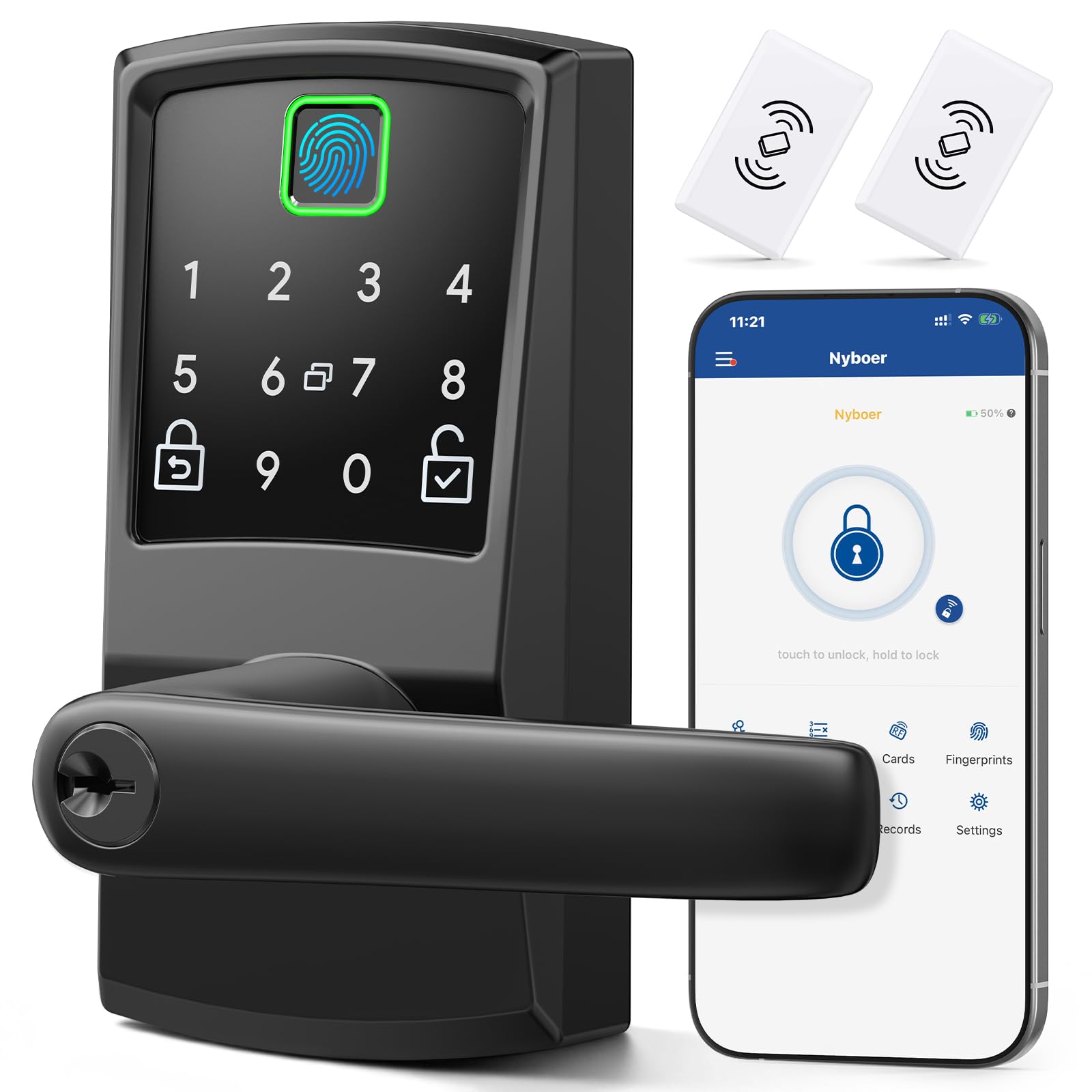
Type: Electronic keypad knob, deadbolt alternative
Unlock methods: Fingerprint, keypad code
Finish: Matte black
Style: Modern
Price tier: Budget
The Nyboer is the style pick of the budget pair. The matte black knob finish suits a modern front door far better than a shiny chrome lever, and the fingerprint plus keypad combination covers the two fastest ways in. Easy installation and the deadbolt-alternative framing put it in the same screwdriver-swap category as the Kucacci.
It suits a homeowner refreshing a front entry who wants the hardware to look intentional rather than like an add-on. The knob format also works on doors where a lever would clash with the existing trim. The trade-off is that a knob is harder to turn for anyone with limited grip strength, and a budget electronic knob is the least durable format in this group.
Trade-off: A knob is more awkward to operate than a lever for children and anyone with hand strength issues, and the budget build will not match the feel of a premium lever.
5. Wyze Auto-Lock Bolt v2

Type: Fingerprint keyless entry smart lock, deadbolt with Wi-Fi
Battery: 8 months
Ratings: BHMA2, IP53
Extras: Auto-lock, anti-peep keypad, backup keys
Price tier: Value
The Wyze is the value champion of the group and the most popular pick by purchase volume. It pairs a fingerprint scanner that learns over time with Wi-Fi connectivity, auto-lock, and a battery rated for eight months. The BHMA2 and IP53 ratings speak to durability and weather resistance, and backup keys mean a dead battery is not a lockout.
It suits a high-traffic front door where the lock is used many times a day and where weather exposure is a concern. The anti-peep keypad is a small but useful touch for anyone worried about shoulder surfing at the door. The catch is that this is a deadbolt, so it only fits a door that already has a deadbolt borehole — the opposite of the no-deadbolt problem this article is about.
Trade-off: This is a deadbolt, so it does not solve the no-deadbolt door at all — it belongs on this list only as the upgrade path for a second door that already has the borehole.
Before You Buy
- Compatibility: Confirm whether the door has a deadbolt borehole or only a handle bore. A no-deadbolt door needs a lever or knob replacement, not a bolt.
- Door thickness and backset: Measure the door and the distance from the edge to the handle hole before ordering, since handle locks are less forgiving than bolts.
- Unlock method: Decide between code-only, fingerprint, and app control. Adding radios raises cost and battery drain.
- Power source: Check whether the lock runs on standard batteries and how often they need changing. WiFi locks drain faster than Bluetooth or code-only models.
- Finish and format: Match the lever or knob to the door style, and pick a lever over a knob if children or older adults use the door.
- Backup access: Keep a physical key or a backup code path in case the battery dies or the electronics fail.
Frequently Asked Questions
-
Can a smart lock work on a door with no deadbolt?
Yes. A keypad lever or knob lock replaces the existing handle and provides keyless entry without needing a deadbolt borehole. -
Is a lever or a knob better for a no-deadbolt door?
A lever is easier to operate for children and anyone with limited grip strength. A knob suits a more traditional or modern-minimal look. -
Do these locks need a hub or WiFi?
Not all of them. Code-only and Bluetooth models work standalone, while WiFi models like the Philips and Wyze connect directly without a separate hub. -
What happens if the battery dies?
Most models include backup keys or a backup code path. Check the product details before buying and keep a key accessible. -
Can a renter install one of these?
Yes, since a handle swap is reversible. Keep the original handle and reinstall it at move-out. -
How long does installation take?
A handle or knob replacement on a standard bored door is typically a screwdriver job and takes far less time than installing a new deadbolt.
Bottom Line
For a door with no deadbolt, the Philips WiFi Keypad Deadbolt with Handle is the most complete pick: it combines a lever, fingerprint and voice unlock, built-in WiFi, and auto-lock in one box. Buyers who want a proven name and nothing more should look at the Yale Assure Lever, while the Kucacci and Nyboer cover the budget end. The Wyze is the best value overall but only for a door that already has a deadbolt borehole.
