Why there are Amazon links here: Brave Review is paid a commission for qualifying Amazon purchases made through the links below. Your price does not change, and using our links is entirely optional. How this works
Best Smart Lock for a Flat with a Communal Front Door
Choosing the best smart lock for a flat with a communal front door comes down to one question: does the lock need to open the flat itself, or the shared entrance? Almost every pick here replaces the deadbolt and handle on the apartment door, so residents still use a key or fob for the building’s communal door and a code, fingerprint or app for their own. The picks suit three buyers: renters who want keyless entry without a locksmith, households with guests or carers who need temporary codes, and anyone tired of carrying a keyring. The overview below lines up all five so a decision can be made in under a minute.
Overview of the Picks
| Product | Key Spec | Best Use | Price Tier |
|---|---|---|---|
| Philips WiFi Keypad Deadbolt with Handle (B0F61WG9F2) | Voice, fingerprint and code unlock; built-in WiFi | All-rounder for a busy flat | Mid |
| Schlage Encode Smart WiFi Deadbolt with Century Trim (B07HXMLCBT) | Touchscreen keypad, app control, Alexa and Google | Buyers who want a proven brand name | Premium |
| Philips Wi-Fi Front Lock Set with 2 Handles (B0GK1399SV) | Code, fingerprint and app unlock; two handles included | Flats where the old handle is worn out | Mid |
| Veise VE06-H Smart Front Door Lock Handle Set (B0CNRLZWSG) | Fob unlock, IP55 waterproof, low battery alarm | Fob-carrying households and sheltered entrances | Budget |
| U68 Fingerprint Keypad Deadbolt with Knob Set (B0D6B4JZCT) | Anti-peep codes, one-touch lock, five keys included | Simple keyless entry on a budget | Budget |
1. Philips WiFi Keypad Deadbolt with Handle — Best Overall

Unlock Methods: Voice, fingerprint, code, app
Connectivity: Built-in WiFi
Keypad: Backlit
Auto-Lock: Yes
Hardware: Deadbolt with door lever
Power: Battery (built-in WiFi)
This is the pick that covers the most ground for a flat. It combines a deadbolt and a lever handle in one box, so a tired old handle gets replaced at the same time as the lock, and the built-in WiFi means remote control works without a separate hub. Fingerprint and voice unlock suit residents coming in with shopping, while flexible codes cover a cleaner, a dog walker or a visiting relative. The backlit keypad helps on a dim communal landing.
It earned its place as the top pick because it needs the least extra hardware and the fewest workarounds. Buyers who rent should check the door’s existing cutouts before ordering, since combining a handle and deadbolt rarely drops straight into an old fitting. The built-in WiFi also draws on the batteries faster than a Bluetooth-only lock, so a spare set of cells is worth keeping.
Trade-off: The all-in-one handle and deadbolt format can mean adjusting or enlarging the door’s existing holes, which is a bigger job than swapping a deadbolt alone.
2. Schlage Encode Smart WiFi Deadbolt with Century Trim — Best Premium

Unlock Methods: Touchscreen keypad, app
Connectivity: Built-in WiFi
Voice Assistants: Alexa, Google Home
Compatibility: Ring, Airbnb
Trim: Century, matte black
Type: Deadbolt only
Schlage is the name most buyers recognise from the lock aisle, and the Encode brings that hardware pedigree to a WiFi deadbolt. The touchscreen keypad keeps the door face clean with no protruding buttons, and the matte black Century trim suits period and modern doors alike. Airbnb compatibility is the standout: hosts letting a flat short-term can issue and revoke codes remotely without meeting anyone at the door.
It is the premium pick, and the price reflects the brand and the certification claim in the name. Buyers wanting a fingerprint reader will not find one here — this lock is keypad and app only. It is also a deadbolt on its own, so the existing handle stays put, which actually makes it the easier fit on many flat doors.
Trade-off: The premium price buys brand assurance and hosting features rather than extra unlock methods, and there is no fingerprint option.
3. Philips Wi-Fi Front Lock Set with 2 Handles — Best for Replacing Worn Hardware
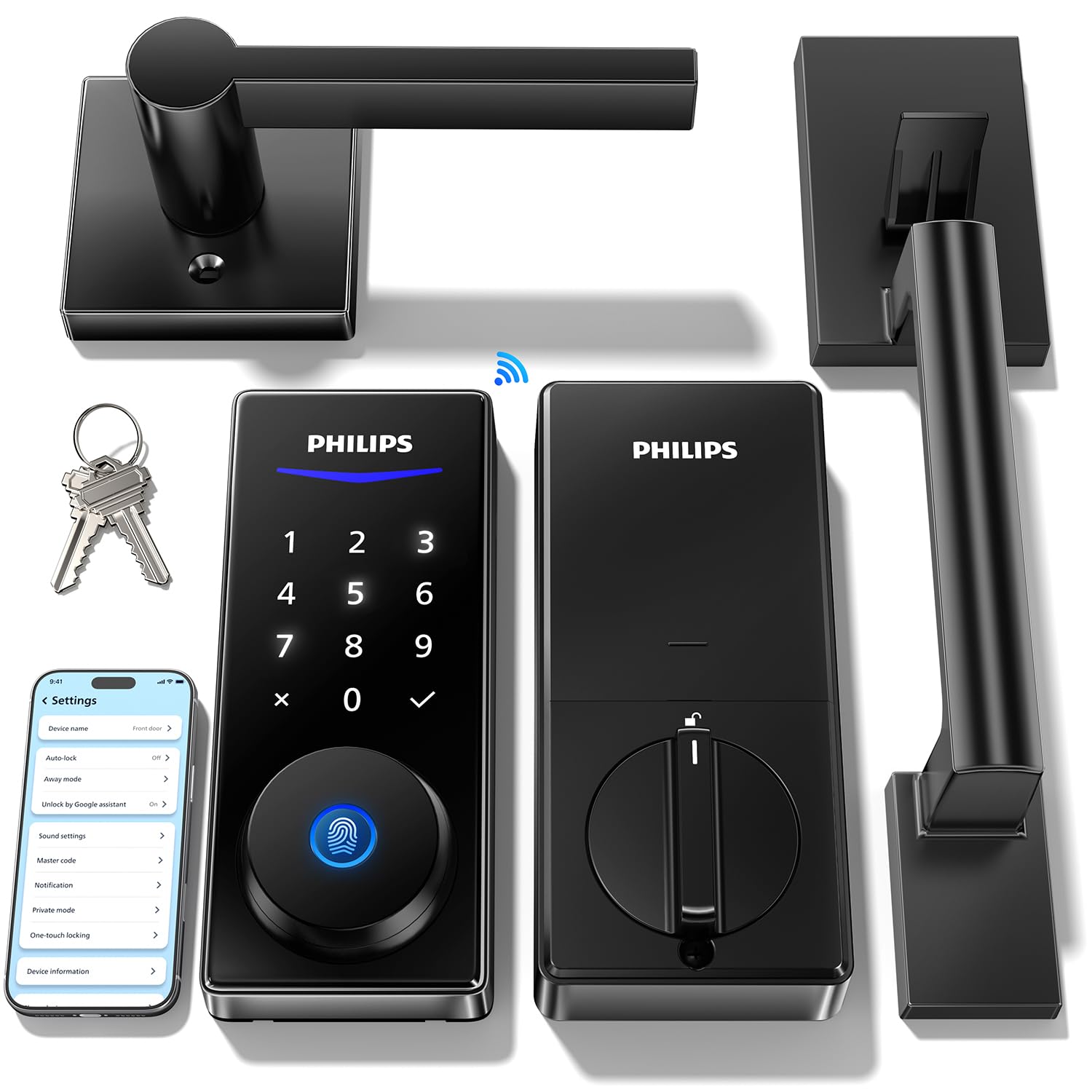
Unlock Methods: Code, fingerprint, app
Connectivity: Built-in WiFi
Voice Assistants: Alexa, Google
Keypad: Backlit touchscreen
Auto-Lock: Yes
Hardware: Deadbolt with two handles
Two handles in the box is the detail that separates this set from the rest. One handle fits each side of the door, so a flat with a mismatched or failing lever on the inside can be brought back to a matching pair in a single job. The backlit touchscreen handles codes and fingerprints, and built-in WiFi covers remote access and voice control through Alexa or Google.
It suits buyers doing a fuller refresh of the entrance rather than a straight deadbolt swap. The touchscreen is a fingerprint magnet compared with a physical keypad, and glossy black surfaces show smudges on a hallway door. Fitting two handles means more measuring and more drilling than a deadbolt-only install.
Trade-off: The two-handle set demands more installation work and careful measuring, and the touchscreen surface shows fingerprints quickly.
4. Veise VE06-H Smart Front Door Lock Handle Set — Best for Fobs and Damp Entrances

Unlock Methods: Fob, app, keypad
Weather Rating: IP55 waterproof
Auto-Lock: Yes
Management: User management, remote access sharing
Alarm: Low battery
Finish: Matte black
The fob unlock is the reason this lock stands out for flats. Residents already carrying a fob for the communal door can add a second one for the flat and leave the keys behind entirely, which suits older family members better than an app. IP55 waterproofing means the lock copes with a sheltered but draughty communal close, and the low battery alarm takes the guesswork out of replacement. User management and remote sharing let the household add and remove access without rekeying.
It is the budget route into fob-based entry, and the matte black finish hides marks well. Buyers wanting fingerprint unlock will need to look elsewhere — this one is fob, app and keypad. The app experience on budget locks tends to be plainer than on premium brands, so anyone who wants deep smart-home automation should weigh that.
Trade-off: No fingerprint reader, and the app and automation features are simpler than those on the premium pick.
5. U68 Fingerprint Keypad Deadbolt with Knob Set — Best Budget Keyless Entry
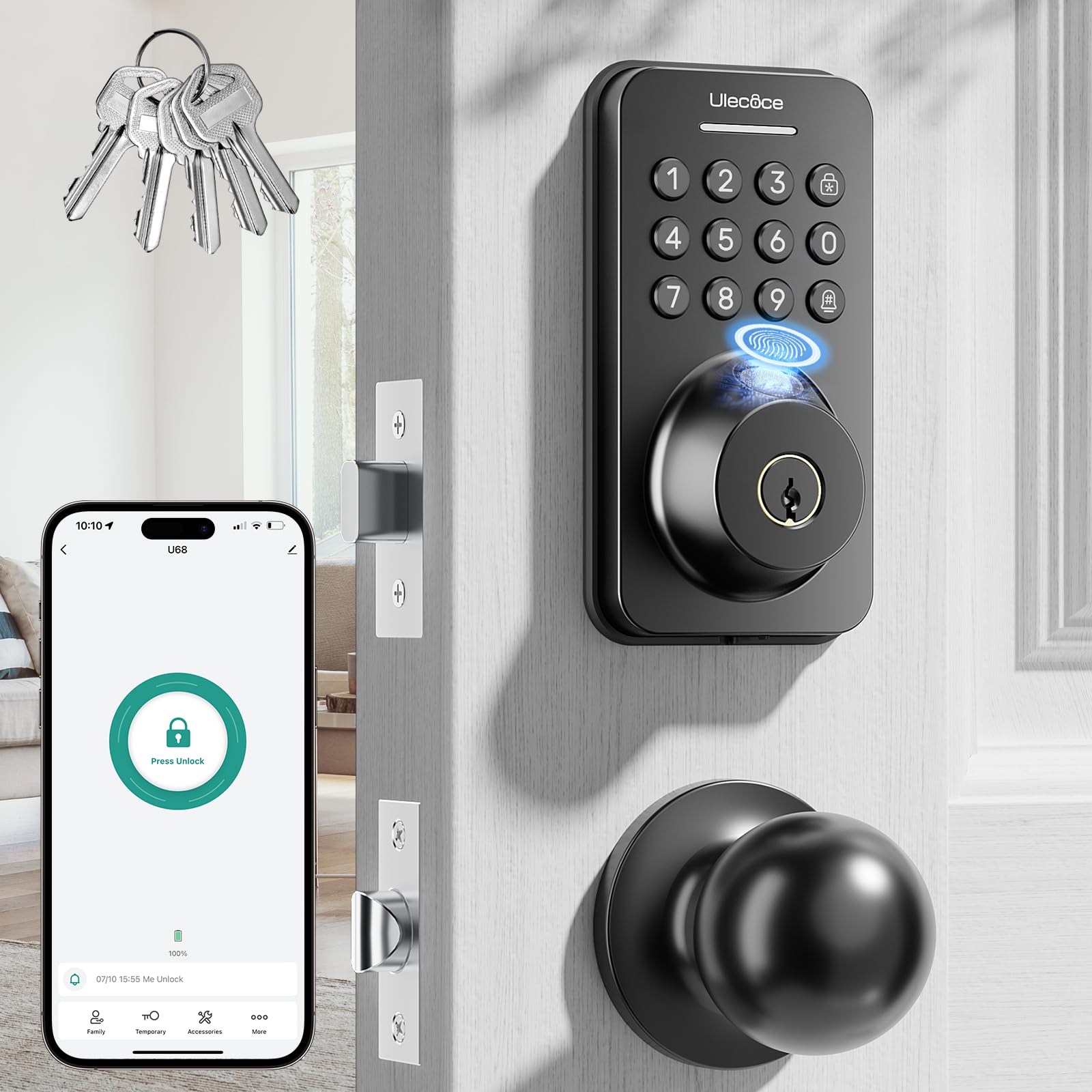
Unlock Methods: Fingerprint, keypad, app, key
Codes: Anti-peep
Locking: Auto-lock and one-touch lock
Keys Included: 5
Hardware: Deadbolt with knob set
Finish: Matte black
Five physical keys in the box is unusual at this end of the market, and it matters for a flat where not everyone wants an app. The U68 pairs a fingerprint reader and keypad with a knob set, so the whole door furniture gets updated in one go. Anti-peep codes let a resident add random digits around the real code while someone watches, and one-touch locking means the door can be secured on the way out without waiting for the auto-lock.
It is the simplest and cheapest way into fingerprint entry, and a sensible first smart lock for a renter testing the water. The budget price shows in the app and in the lack of built-in WiFi on some configurations, so remote access may depend on the model chosen. Buyers wanting voice control should confirm compatibility before ordering.
Trade-off: The budget build and plainer app mean fewer integrations, and remote features may need extra setup compared with the WiFi picks above.
Before You Buy
- Door measurements: Measure the door thickness and the backset before ordering — a handle-and-deadbolt set needs more clearance than a deadbolt alone.
- Communal door vs flat door: These locks fit the flat’s own door; the building’s shared entrance stays on the landlord’s or factor’s system.
- Rental permission: Check the tenancy agreement before drilling; a deadbolt-only swap is easier to reverse than a full handle set.
- Connectivity: Built-in WiFi gives remote access without a hub; Bluetooth-only locks need to be within range for app control.
- Battery type and access: Confirm which batteries the lock takes and keep a spare set, especially for WiFi models that drain faster.
- Unlock methods: Decide whether the household needs fingerprints, fobs, codes or all three — the cheapest locks rarely offer every option.
- Finish and weather: A sheltered communal landing still sees damp, so a weather-rated lock is worth the small premium.
Frequently Asked Questions
-
Can a smart lock replace a communal front door lock?
Usually not. The shared entrance belongs to the building, so these locks are fitted to the flat’s own door, with the communal door opened by its existing key or fob. -
Which smart lock is best for a rented flat?
A deadbolt-only model such as the Schlage Encode is the easiest to fit and reverse, because the existing handle stays in place and fewer holes are drilled. -
Do these locks need WiFi to work?
No. Codes, fingerprints and fobs work offline; built-in WiFi is what enables remote control and voice assistants when away from the door. -
What happens when the batteries run out?
Most models warn with a low battery alarm, and a key or external power option provides a backup. Keeping spare batteries on hand avoids a lockout. -
Can guests get temporary access?
Yes. Flexible codes and app-based user management let the household add and remove access for guests, carers or cleaners without handing over a key. -
Is a fingerprint lock more secure than a keypad?
Both are secure when set up properly. Fingerprints cannot be shared or guessed, while anti-peep codes protect a keypad from onlookers — the right choice depends on who needs entry.
Bottom Line
For most flats, the Philips WiFi Keypad Deadbolt with Handle is the best smart lock for a flat with a communal front door: it replaces the deadbolt and handle together, works over built-in WiFi without a hub, and covers voice, fingerprint and code entry for the whole household. Buyers who want a recognised brand and hosting features should look at the Schlage Encode, while a tight budget is best served by the U68 or the fob-friendly Veise. Whichever suits, check the door measurements first and confirm the price through the link above.
