Why there are Amazon links here: Brave Review is paid a commission for qualifying Amazon purchases made through the links below. Your price does not change, and using our links is entirely optional. How this works
Best Smart Lock for a Household with a Cleaner and a Carer
A home that runs on help from outside needs a front door that hands out access without handing over keys. The best smart lock for a household with a cleaner and a carer gives each person their own code or fingerprint, locks itself behind them, and lets the homeowner open the door from anywhere. This guide covers five deadbolts and lock sets that fit that job, from a budget-friendly code lock to a premium model with a built-in camera. The overview table below lines up all five so a reader can pick one and move on.
Overview of the Picks
| Product | Key Spec | Best Use | Price Tier |
|---|---|---|---|
| Philips WiFi Keypad Deadbolt with Handle | Fingerprint, voice and code unlock; built-in WiFi | Households wanting one full lock-and-handle set | Budget |
| ULTRALOQ Bolt SE Wifi Smart Deadbolt | Matter support, Apple Home, Alexa, Google | Apple Home and Matter households | Mid-range |
| Philips Wi-Fi Front Lock Set with 2 Handles | Code, fingerprint, app and voice; two handles included | Doors that need a matched handle pair | Mid-range |
| eufy Security Video Smart Lock FamiLock S3 Max | 2K HD doorbell camera, palm vein recognition, Grade 1 | Households wanting to see who arrives | Premium |
| Schlage Encode Smart WiFi Deadbolt | Touchscreen keypad, app control, Airbnb compatible | Rentals and busy multi-person homes | Mid-range |
1. Philips WiFi Keypad Deadbolt with Handle

Unlock Methods: Fingerprint, code, voice, app
Connectivity: Built-in WiFi
Keypad: Backlit
Auto-Lock: Included
Included Hardware: Deadbolt and door lever
Power Source: Battery
This Philips set pairs a keypad deadbolt with a matching door lever, so a single purchase replaces both pieces of front-door hardware. The backlit keypad stays readable after dark, and the fingerprint reader gives a carer or cleaner a way in without memorizing a number. Flexible codes let the homeowner issue a separate entry code per person, which is exactly what a household with rotating help needs. Auto-lock closes the door behind them, and built-in WiFi means no separate hub is required.
The set suits the homeowner who wants one clean install and a full hardware refresh rather than a deadbolt alone. Fingerprint entry is the headline here, since a carer with gloved or busy hands can open the door without punching keys. The main caution is the handling of issued codes: anyone who has been given a code keeps it until it is manually removed, so a departing helper needs their access revoked on the same day.
Trade-off: The combined lock-and-handle bundle costs more than a bare deadbolt, and the homeowner pays for a lever they may not need if the door already has matching hardware.
2. ULTRALOQ Bolt SE Wifi Smart Deadbolt
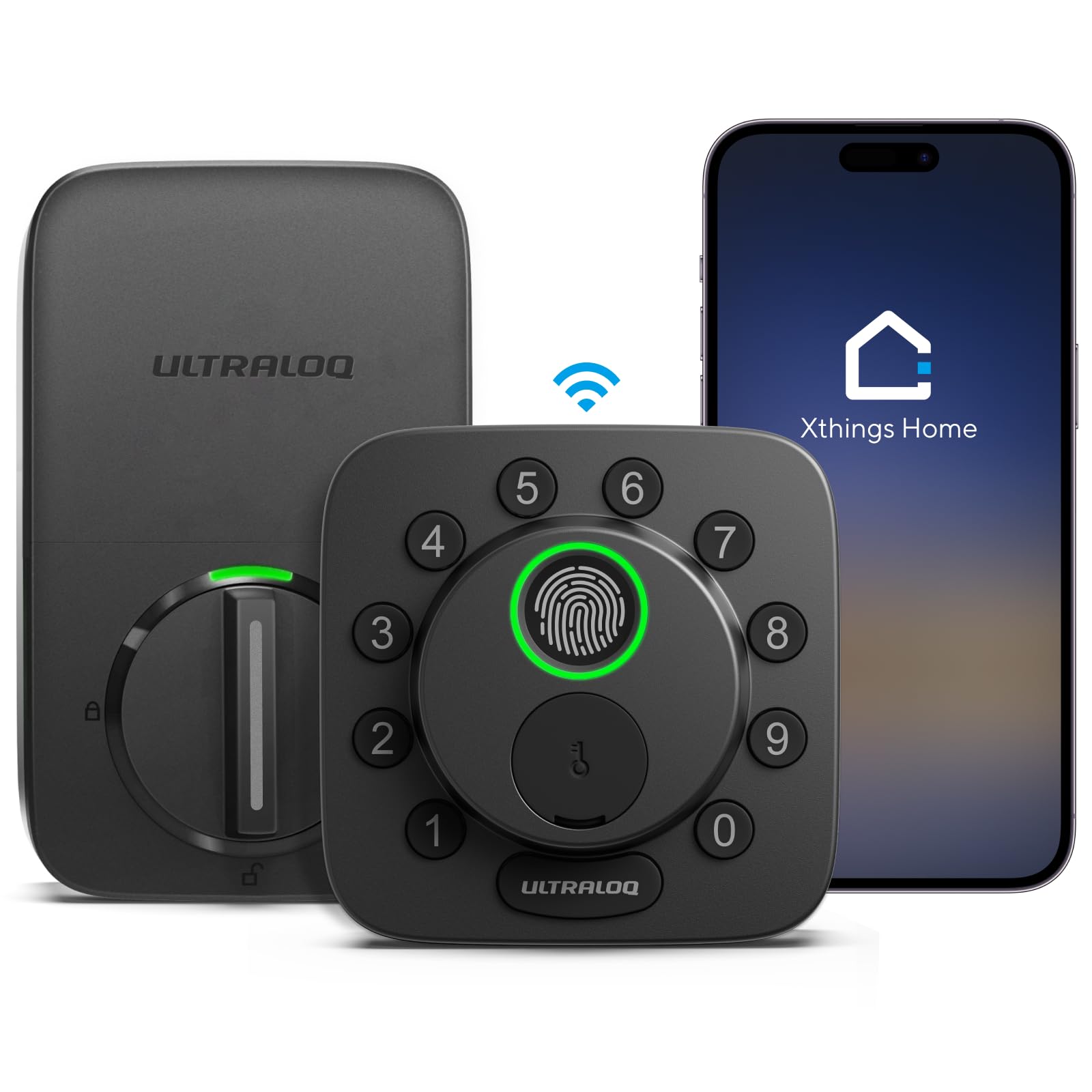
Unlock Methods: Fingerprint, code, app
Connectivity: Built-in WiFi
Smart Home: Apple Home, Alexa, Google, Matter
Material: Solid zinc alloy
Auto-Lock: Included
Form Factor: Deadbolt
The Bolt SE is the pick for a household already built around Apple Home or Matter, since it slots into those ecosystems without a bridge. A solid zinc alloy body gives it a sturdier feel than the all-plastic housings common at the entry level. Fingerprint, code and app entry cover the three ways a cleaner or carer is likely to arrive, and auto-lock handles the door behind them. Remote control through the app means the homeowner can let someone in from the office when a code is forgotten.
This lock earns its place on compatibility: a household that runs its lights and thermostat through Apple Home will want the front door in the same app. The zinc alloy build is the other draw, since a front door takes daily abuse from bags, keys and weather. The caution is ecosystem lock-in: the deepest features live inside Apple Home and Matter, so an Android-only household gets less out of the purchase than it pays for.
Trade-off: Buyers outside the Apple Home or Matter ecosystem pay for integration they cannot fully use, which makes a simpler code lock a better value for them.
3. Philips Wi-Fi Front Lock Set with 2 Handles
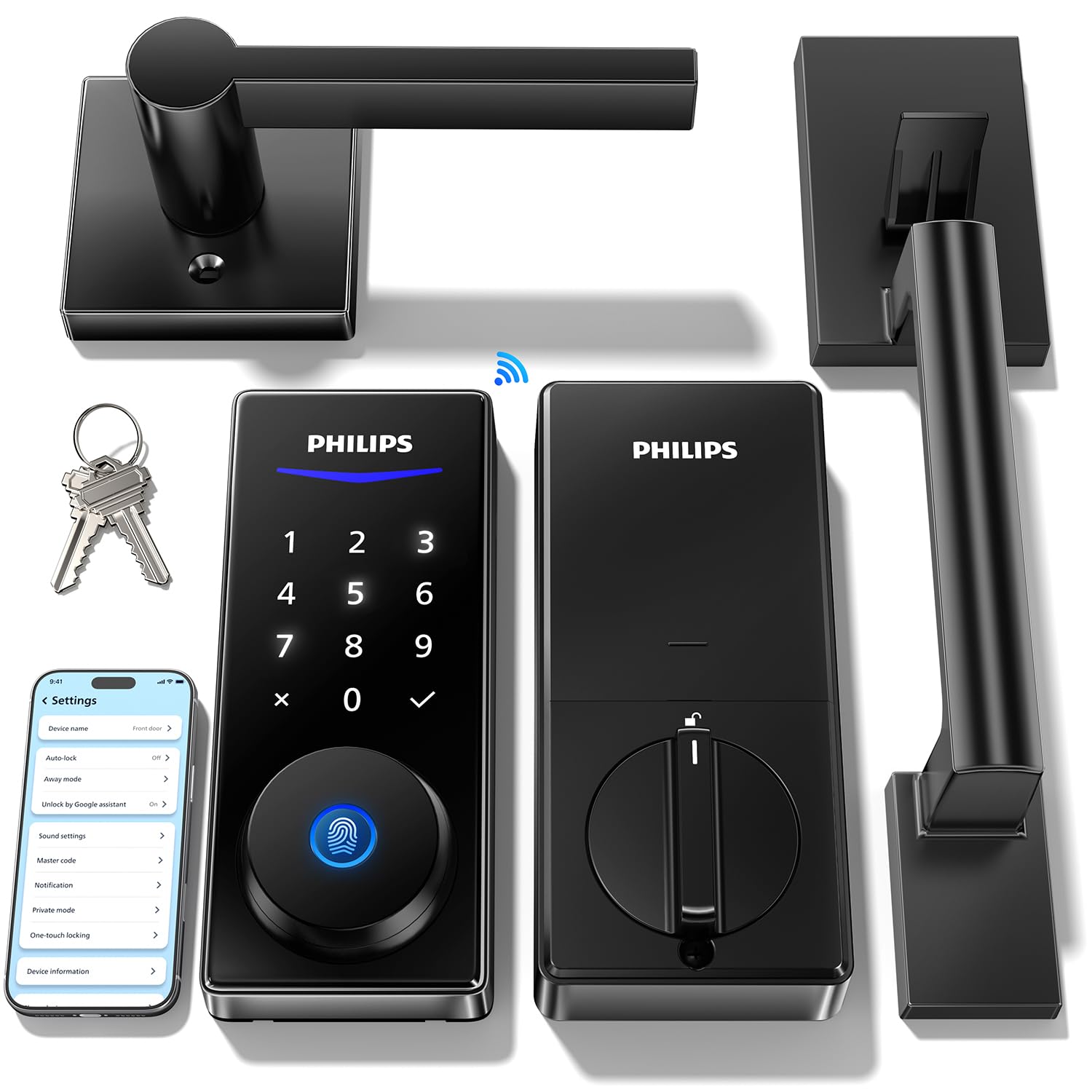
Unlock Methods: Code, fingerprint, app, voice
Connectivity: Built-in WiFi
Keypad: Backlit touchscreen
Auto-Lock: Included
Included Hardware: Deadbolt and two handles
Voice Assistants: Alexa, Google
This Philips set ships with two handles, which makes it the practical choice for a door where both the interior and exterior levers are being replaced at once. The backlit touchscreen is a sleeker surface than a physical keypad and wipes clean easily. Code, fingerprint, app and voice unlock cover every arrival style, and remote access lets the homeowner open the door for a carer who is running late. Auto-lock and built-in WiFi round out the package without extra hardware.
The pick suits a homeowner doing a full front-door refresh who wants the handles to match the lock. Voice unlock through Alexa or Google is a genuine convenience for a carer carrying groceries or equipment. The caution is the touchscreen itself: a glass surface shows fingerprints and smudges, and it needs a wipe now and then to stay presentable on a front door.
Trade-off: The two-handle bundle pushes the price above a standalone deadbolt, and a household that only needs the lock pays for hardware it will not install.
4. eufy Security Video Smart Lock FamiLock S3 Max
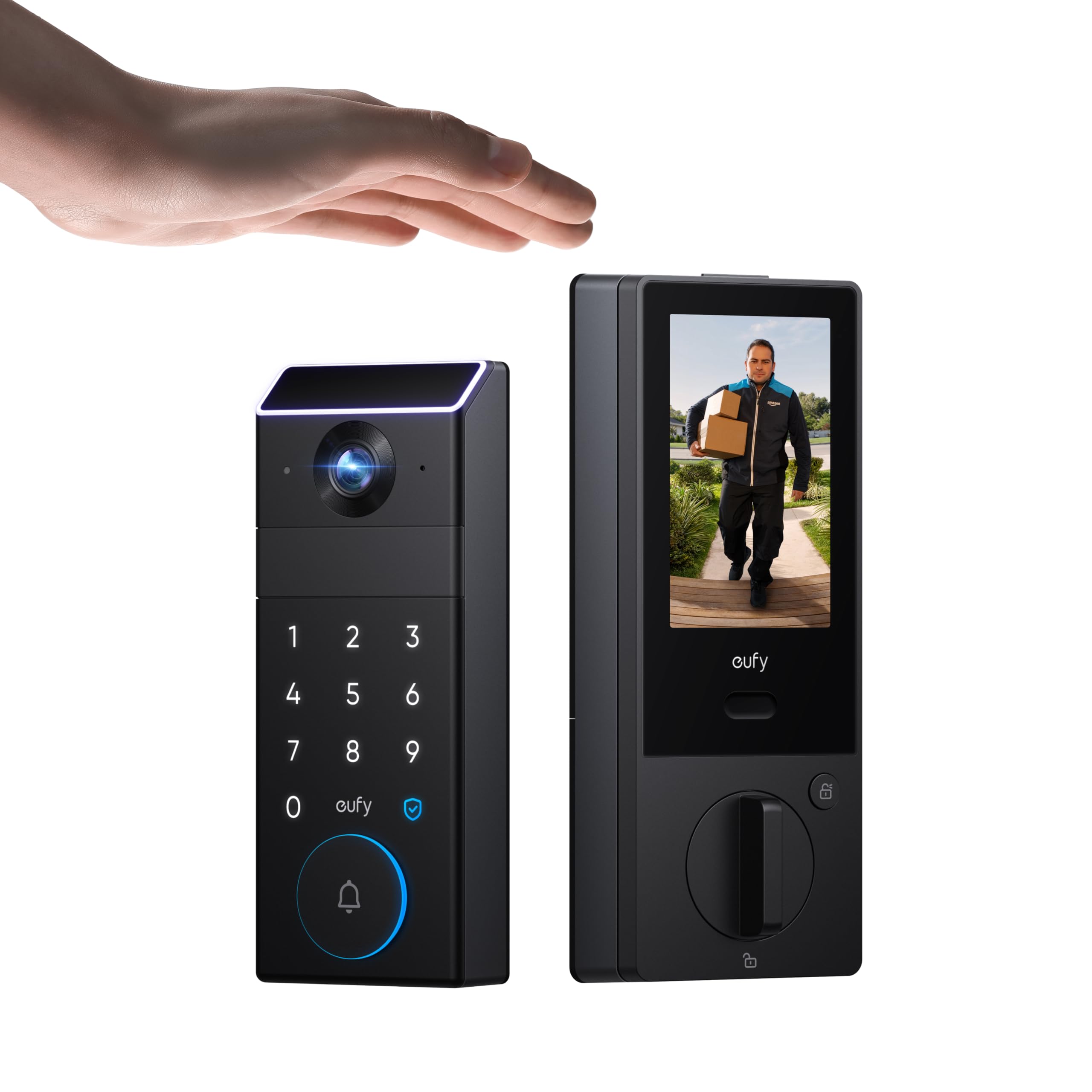
Unlock Methods: Palm vein recognition, keyless entry
Camera: 2K HD doorbell camera
Display: Internal video screen
Storage: 16GB built-in
Rating: BHMA Grade 1
Connectivity: WiFi
The FamiLock S3 Max is the premium pick and the only one here that doubles as a doorbell camera. A 2K HD camera sits above the deadbolt, and an internal video screen shows who is at the door without reaching for a phone. Palm vein recognition is the standout entry method: a carer or cleaner opens the door with a wave of the hand, no code to share and no fingerprint to register. BHMA Grade 1 hardware and 16GB of built-in storage make it a serious piece of security equipment rather than a convenience gadget.
This lock suits a household that wants to see arrivals as well as control them, especially when a carer visits on a schedule the homeowner cannot always supervise. Palm vein entry is the cleanest solution for rotating help, since access can be granted and withdrawn without anyone memorizing anything. The caution is the price and complexity: this is the most expensive pick by a wide margin, and the camera and screen add setup steps a simple keypad lock never asks for.
Trade-off: The camera, screen and premium hardware put this well above the other picks on price, and a household that only needs keyless entry pays for features it will rarely touch.
5. Schlage Encode Smart WiFi Deadbolt

Unlock Methods: Touchscreen keypad, app
Connectivity: Built-in WiFi
Smart Home: Alexa, Google Home, Ring
Compatibility: Airbnb
Finish: Matte black
Trim: Century
The Schlage Encode is the most recognizable name on this list and the easiest to recommend to a busy household. The touchscreen keypad takes codes for the cleaner and the carer, app control handles remote entry, and built-in WiFi skips the hub. Ring and Airbnb compatibility make it a natural fit for a home that also rents a room or hosts short stays. The matte black Century trim gives it a modern look that suits most front doors.
This pick suits a household that wants a proven brand and a lock that plays well with rental platforms as well as family members. It is the busiest seller in this group, which speaks to how widely it is installed and understood. The caution is the touchscreen: it is the only entry method besides the app, so a carer who prefers a fingerprint or palm scan will not find one here, and codes must be managed carefully when help changes.
Trade-off: There is no fingerprint or palm reader, so every visitor depends on a code or the app, which puts more weight on disciplined code management.
Before You Buy
- Entry methods: A household with rotating help benefits from fingerprints or palm vein recognition over shared codes, since access can be revoked per person without changing anyone else’s number.
- Connectivity: Built-in WiFi avoids a hub, but confirm whether the lock needs a bridge for the smart-home platform the household actually uses.
- Compatibility: Apple Home, Matter, Alexa, Google and Ring support vary by model, and the deepest features usually live in the ecosystem named on the box.
- Hardware included: Some sets ship with a deadbolt only, others with one or two handles, so check what the door actually needs before ordering.
- Power: All five run on batteries, and a lock that reports low battery through its app is easier to maintain than one that simply dies.
- Code management: Every issued code stays active until it is removed, so plan how and when a departing cleaner or carer loses access.
- Camera and storage: Only the eufy pick includes a camera and built-in storage, and that added capability is the main reason it costs more.
Frequently Asked Questions
-
What is the best smart lock for a household with a cleaner and a carer?
The Philips WiFi Keypad Deadbolt with Handle is the strongest all-round value, while the eufy FamiLock S3 Max is the best choice when the homeowner also wants to see who arrives. -
Can each helper get their own entry code?
Yes. The Philips, ULTRALOQ and Schlage models all support multiple codes, so the cleaner and the carer can each be given a separate number that is removed when their service ends. -
Is a fingerprint or palm scan better than a code for carers?
A scan is harder to share accidentally and easier to revoke per person, which suits rotating help. A code is simpler to issue remotely when someone arrives without warning. -
Do these locks need a hub or bridge?
All five have built-in WiFi, so basic app control works without a hub. Some smart-home integrations may still need a bridge depending on the platform. -
Will the door lock itself after the cleaner leaves?
Yes. Auto-lock is listed on the Philips, ULTRALOQ and Schlage models, and it closes the door behind a visitor without anyone remembering to do it. -
Which pick is best for a home that also rents on Airbnb?
The Schlage Encode is the natural fit, since it lists Airbnb and Ring compatibility alongside its touchscreen keypad and app control.
Bottom Line
For most households juggling a cleaner and a carer, the Philips WiFi Keypad Deadbolt with Handle is the pick to beat: fingerprint entry for each helper, flexible codes, auto-lock and a matching lever in one purchase. A household that wants to see arrivals should step up to the eufy FamiLock S3 Max, and an Apple Home or Matter setup points to the ULTRALOQ Bolt SE. Check current prices before ordering, since these snapshots move quickly.
