Why there are Amazon links here: Brave Review is paid a commission for qualifying Amazon purchases made through the links below. Your price does not change, and using our links is entirely optional. How this works
Best Smart Lock With a Keypad for an Elderly Relative
A keypad smart lock removes the fumbling for keys that becomes harder with age, and it lets family members check in without handing out spare keys. This roundup covers five models that suit three kinds of buyers: households adding remote access for a parent, caregivers who want a simple shared code, and families who already run a smart-home hub. The overview table below puts every pick side by side; each review then explains who it fits and where it falls short.
The Picks at a Glance
| Product | Key Spec | Best Use | Price Tier |
|---|---|---|---|
| Smart Locks for Front Door (Philips WiFi Keypad Deadbolt with Handle) | Fingerprint, voice, WiFi, backlit keypad | Full-featured pick for a parent’s front door | Mid |
| Kwikset HomeConnect 620 | Z-Wave Long Range, hub required | Homes already on Ring Alarm or a Z-Wave hub | Mid |
| Philips WiFi Smart Keypad Deadbolt | WiFi, no hub needed, auto-lock | Budget-friendly keyless entry with app control | Budget |
| Philips WiFi Keypad Door Lock with Handle | 100 user PIN codes, anti-peep keypad | Large families and caregivers sharing access | Mid |
| Yamiry Fingerprint Knob | Keypad, app, passage mode | Simple keypad handle on a tight budget | Budget |
1. Smart Locks for Front Door, Voice & Fingerprint Unlock

Type: Keypad deadbolt with door lever
Unlock methods: Fingerprint, voice, flexible codes, key
Connectivity: Built-in WiFi, app remote control
Keypad: Backlit
Auto-lock: Yes
Power source: Not stated in name — battery-powered deadbolt
Smart Locks for Front Door, Voice & Fingerprint Unlock is the most complete package in this group. It pairs a deadbolt with a matching door lever, so a relative who struggles with a round knob gets a handle that is easier to push down. The built-in WiFi means no separate hub, and the fingerprint reader gives an option for someone who finds codes hard to remember.
Voice unlock and a backlit keypad round out the entry options, which matters for an older user who may arrive home after dark. The auto-lock feature closes the door behind them without a second thought. This pick earns its place for households that want every entry method covered in one box.
Trade-off: The full feature set — fingerprint, voice, WiFi, and a lever — adds setup steps and battery draw that a simpler keypad lock avoids.
Best for: Families who want a single lock that covers keys, codes, fingerprints, and remote access for an elderly parent.
2. Kwikset HomeConnect 620 Z-Wave Keypad Smart Lock

Type: Keypad deadbolt, traditional style
Connectivity: Z-Wave Long Range
Hub: Required, sold separately
Compatibility: Ring Alarm
Entry: Keyless keypad with customizable user codes
Finish: Polished brass
Power source: Not stated in name — battery-powered deadbolt
Kwikset HomeConnect 620 Z-Wave Keypad Smart Lock is the pick for a home that already runs a smart-home hub. Z-Wave Long Range extends the signal farther than standard Z-Wave, which helps when the lock sits on a distant front door. Customizable user codes let a caregiver set a temporary number and retire it later.
The polished brass finish and traditional shape suit older homes where a modern slab lock would look out of place. Ring Alarm compatibility means the lock can join an existing security setup rather than demanding a new app. It is a strong choice when the household is already invested in that ecosystem.
Trade-off: The lock needs a separate hub to reach its full features, so it is a poor fit for a relative with no smart-home system in place.
Best for: Households already using Ring Alarm or a Z-Wave hub who want keyless entry without adding another app.
3. Philips WiFi Smart Keypad Deadbolt Lock
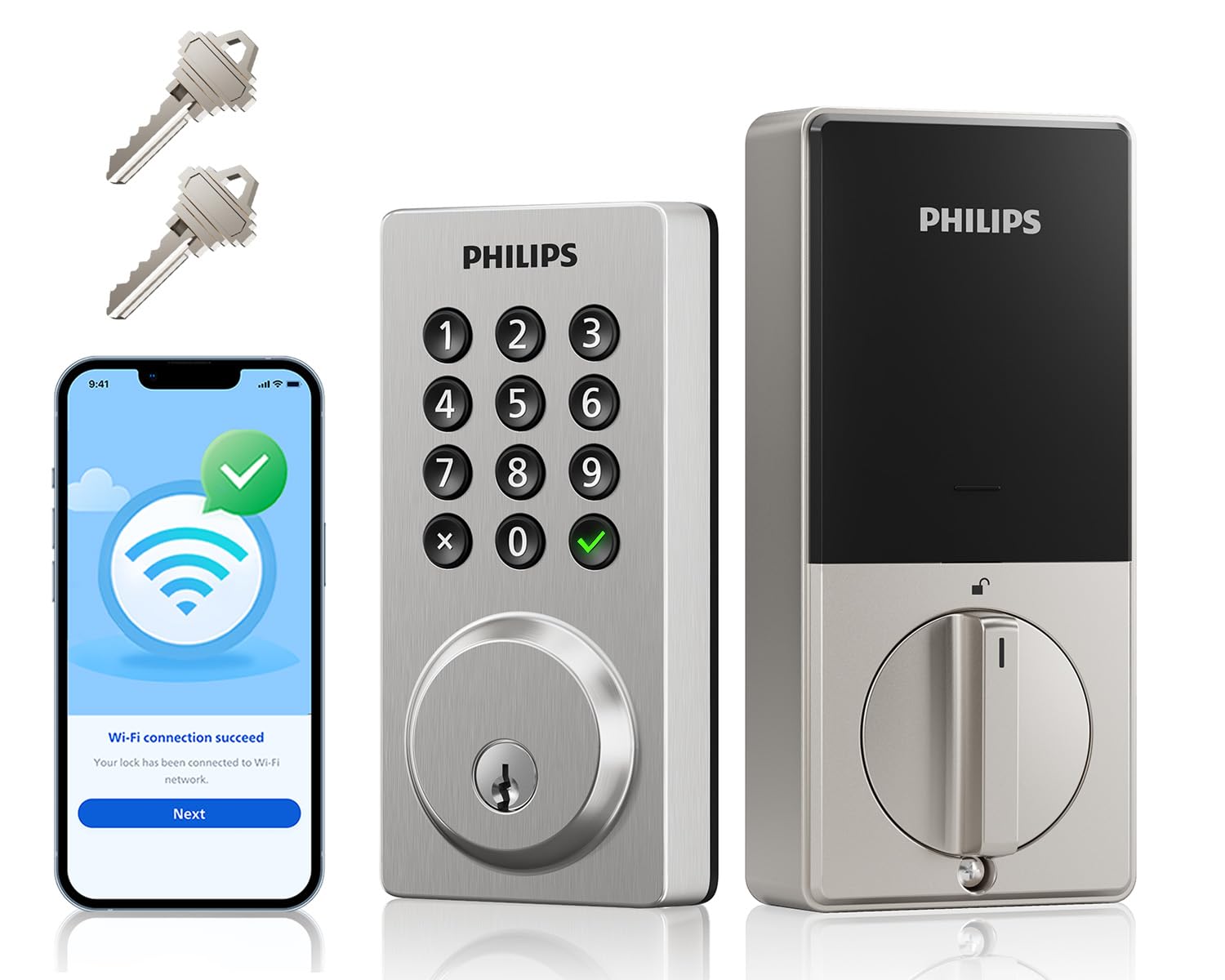
Type: Keypad deadbolt
Connectivity: Built-in WiFi, no hub needed
Entry: Flexible codes, two keys, voice control
Features: Activities log, auto-lock, one-touch lock
Keypad: Backlit
App: Remote control
Philips WiFi Smart Keypad Deadbolt Lock is the value pick for anyone who wants app control without a hub. The activities log is the standout feature for caregivers: it shows when the door was opened, which offers peace of mind without a phone call. One-touch lock and auto-lock both make it easy to secure the door on the way out.
Two physical keys ship in the box, so a relative who prefers a familiar key still has that option. The backlit keypad keeps codes readable at night, and flexible codes let the family set a simple number. It covers the essentials at the lowest price in this roundup.
Trade-off: At the budget end, the build and finish are more utilitarian than the premium picks, and the log depends on a steady WiFi connection.
Best for: Budget-conscious families who want remote app access and an activity log without buying a hub.
4. Philips WiFi Keypad Door Lock with Handle
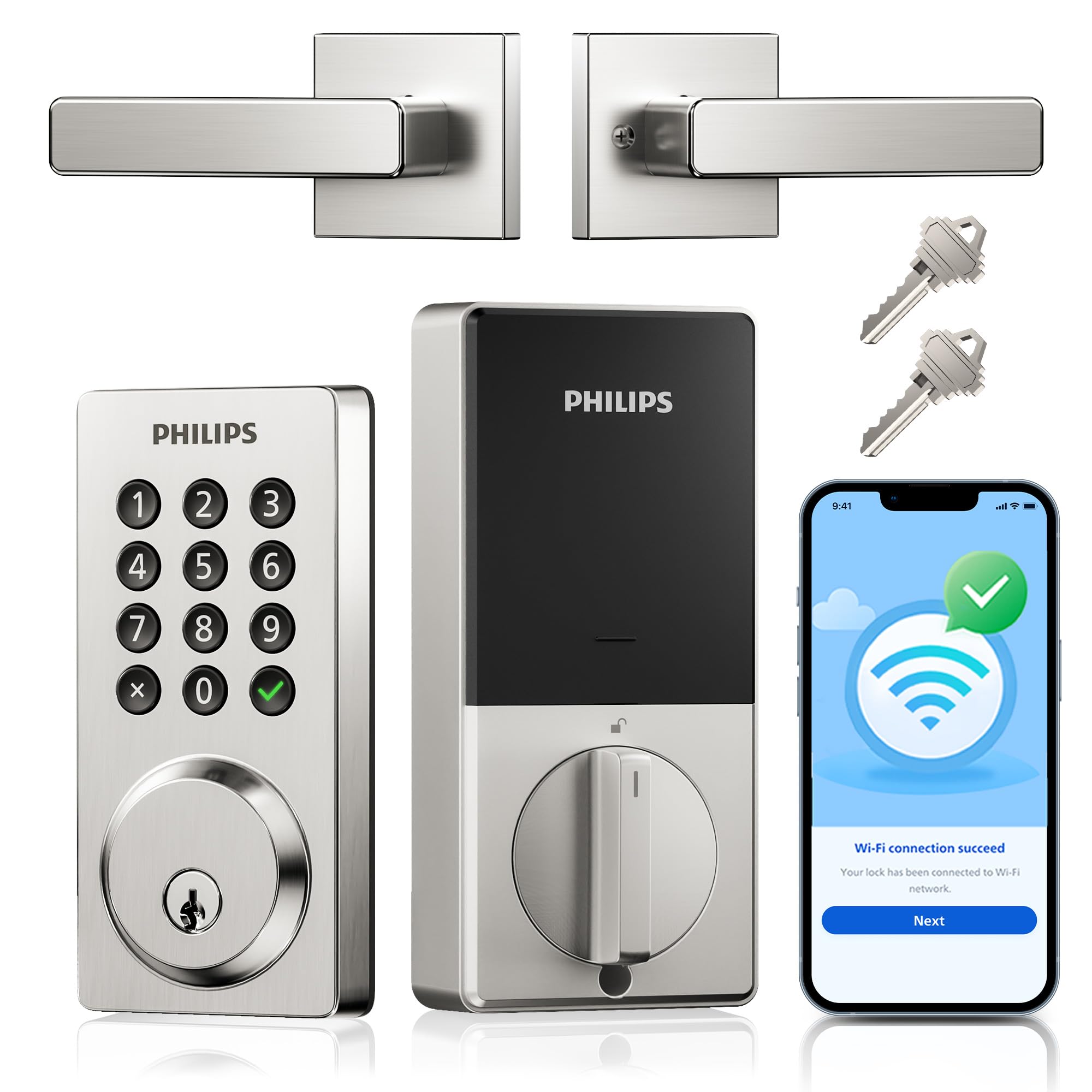
Type: Keypad deadbolt with handle
Entry: 100 user PIN codes
Voice: Alexa and Google support
Keypad: Anti-peep
Weather: Waterproof
Features: Auto-lock, app control
Connectivity: WiFi
Philips WiFi Keypad Door Lock with Handle is built for households where many people need access. A hundred user PIN codes cover a large family, visiting nurses, and neighbors without anyone sharing a single code. The anti-peep keypad lets a user add random digits around the real code, which protects it from onlookers.
The waterproof rating suits an exposed front door, and the included handle makes opening easier for hands with less grip strength. Alexa and Google voice support add hands-free options. This is the pick when access management matters more than any single unlock method.
Trade-off: Managing a hundred possible codes takes discipline — unused codes should be deleted, or the list becomes a security liability.
Best for: Large families and caregiver teams who need many separate codes and voice control.
5. Yamiry Fingerprint Knob Smart Door Handle Lock

Type: Keypad door handle lock
Entry: Keypad, fingerprint, app-generated passcodes
Features: Passage mode, auto-lock
Installation: DIY
App: Remote passcode generation
Connectivity: App-based
Yamiry Fingerprint Knob Smart Door Handle Lock is the simplest and least expensive way to add a keypad to a door. It replaces the handle rather than a separate deadbolt, and DIY installation keeps the job quick. Passage mode is useful for a relative who wants the door to stay unlocked during a set window, such as when a caregiver visits.
Remote passcode generation lets family create a temporary code from the app, so a visiting aide can get in without a physical key. The fingerprint knob adds a fast option for anyone who finds codes tedious. It is a practical starter lock for a secondary door or a tight budget.
Trade-off: A handle-style lock offers less physical security than a dedicated deadbolt, so it suits a secondary entrance better than a main front door.
Best for: Budget buyers adding keypad entry to a back or side door, or a first smart lock for a relative.
Before You Buy
- Security type: A deadbolt offers more physical security than a handle-only lock; match the type to the door’s role.
- Connectivity: Built-in WiFi needs no hub; Z-Wave models like the Kwikset require a separate hub to unlock their features.
- Entry methods: Fingerprint and voice help a relative who struggles with codes; physical keys remain a reliable backup.
- Ease of use: A lever or handle is easier to operate than a round knob for hands with reduced grip.
- Access management: Count how many people need codes — a hundred-code model only helps if someone maintains the list.
- Power and upkeep: All keypad locks run on batteries; plan a check-in routine so a dead battery never locks anyone out.
- Weather exposure: An exposed front door calls for a waterproof rating like the one on the Philips handle lock.
Frequently Asked Questions
-
Is a keypad lock easier for an elderly relative than a key?
Yes — a backlit keypad removes the need to find and turn a key, and codes can be kept short and simple. A lever handle makes the final push easier too. -
Does a smart lock need WiFi to work?
Not always. The Kwikset uses Z-Wave and needs a hub, while the Philips models connect directly over WiFi. A lock still opens with a code or key even when the network is down. -
Can family members unlock the door remotely?
The WiFi models support app remote control, and the Yamiry generates passcodes remotely. That lets a caregiver open the door or issue a temporary code from anywhere. -
What happens if the battery dies?
Keypad locks typically give a low-battery warning, and physical keys remain a backup. Setting a regular battery-check reminder avoids a lockout. -
Which pick is best for a large caregiver team?
The Philips WiFi Keypad Door Lock with Handle, which supports a hundred user codes and voice control. It is built for many people sharing one door.
Bottom Line
For most families, the Smart Locks for Front Door, Voice & Fingerprint Unlock is the best smart lock with a keypad for an elderly relative: it covers keys, codes, fingerprints, voice, and remote access in one unit, with a lever that is easier on the hands. Budget buyers can drop to the Philips WiFi Smart Keypad Deadbolt without losing app control or the activity log.
