Why there are Amazon links here: Brave Review is paid a commission for qualifying Amazon purchases made through the links below. Your price does not change, and using our links is entirely optional. How this works
Best Camera with a Privacy Shutter for Worry-Free Video Calls
A camera with a privacy shutter gives a physical block between the lens and the room, which is the simplest way to guarantee that a video call never catches an unintended moment. This roundup covers five options: a budget Logitech for everyday meetings, a renewed USB-C model for laptop users, a 4K Philips for desk setups, a streamer-focused AVerMedia, and a low-cost cover for an existing webcam. Each pick suits a different buyer, and the overview below shows the quickest path to the right one.
The Picks at a Glance
| Product | Key Spec | Best Use | Price Tier |
|---|---|---|---|
| Logitech Brio 101 | Full HD 1080p, USB-A, built-in mic | Everyday meetings on a budget | Budget |
| Logitech Brio 300 (Renewed) | 1920x1080p, USB-C, auto light correction | USB-C laptops and clean desk setups | Budget |
| Philips 4K Webcam | 4K resolution, privacy cover, built-in microphone | High-resolution conferencing and streaming | Mid-range |
| AVerMedia Live Streamer Cam 313 | Full HD 1080p, dual microphone, 360-degree swivel | Streaming and video conferencing | Mid-range |
| CloudValley Webcam Cover | Adhesive cover for Logitech C920-family cameras | Adding privacy to an existing webcam | Budget accessory |
Logitech Brio 101 Full HD 1080p Webcam

Resolution: Full HD 1080p
Connection: USB-A
Microphone: Built-in
Privacy: Integrated shutter
Light handling: Auto-light correction
Compatibility: Teams, Google Meet, Zoom and more
The Brio 101 is the straightforward entry point into the category: a compact black webcam with a built-in privacy shutter that slides across the lens when the camera is not in use. Auto-light correction handles uneven room lighting without any setup, and the built-in microphone means no separate headset is needed for casual calls. The USB-A plug suits desktops, older laptops and docking stations, and the stated compatibility with Teams, Google Meet and Zoom covers most workplace software. It is a plug-and-play device aimed at buyers who want reliable video without paying for resolution they will never stream.
This pick earns its place as the value option for students, remote workers and anyone replacing a laptop’s grainy built-in camera. The plastic body keeps the weight down, which matters on a monitor that gets adjusted often. Trade-off: The USB-A connector limits it on newer laptops that only offer USB-C ports, so a USB-C-only buyer should look at the Brio 300 instead.
Check the current price on Amazon
Logitech Brio 300 1920x1080p USB-C Webcam (Renewed)

Resolution: 1920x1080p
Connection: USB-C
Privacy: Integrated shutter
Light handling: Auto light correction
Color: Graphite
Condition: Renewed
The Brio 300 brings the same privacy-shutter idea to a USB-C body, which is the right connector for modern laptops and many docking stations. Auto light correction keeps faces visible in dim home offices, and the graphite finish reads as slightly more polished than plain black. The renewed condition is the headline detail: it is a refurbished unit, so the price sits closer to budget territory while the hardware remains the same design. For a buyer with a USB-C port and no interest in paying full retail, that trade is reasonable.
This is the pick for laptop users who want a tidy single-cable connection and a shutter they can see at a glance. It suits hybrid workers who move between a home desk and an office dock. Trade-off: Renewed stock varies in availability and may arrive in plain packaging, so buyers who want a sealed retail box and a predictable unboxing should choose a new unit.
Check the current price on Amazon
Philips 4K Webcam for PC with Microphone
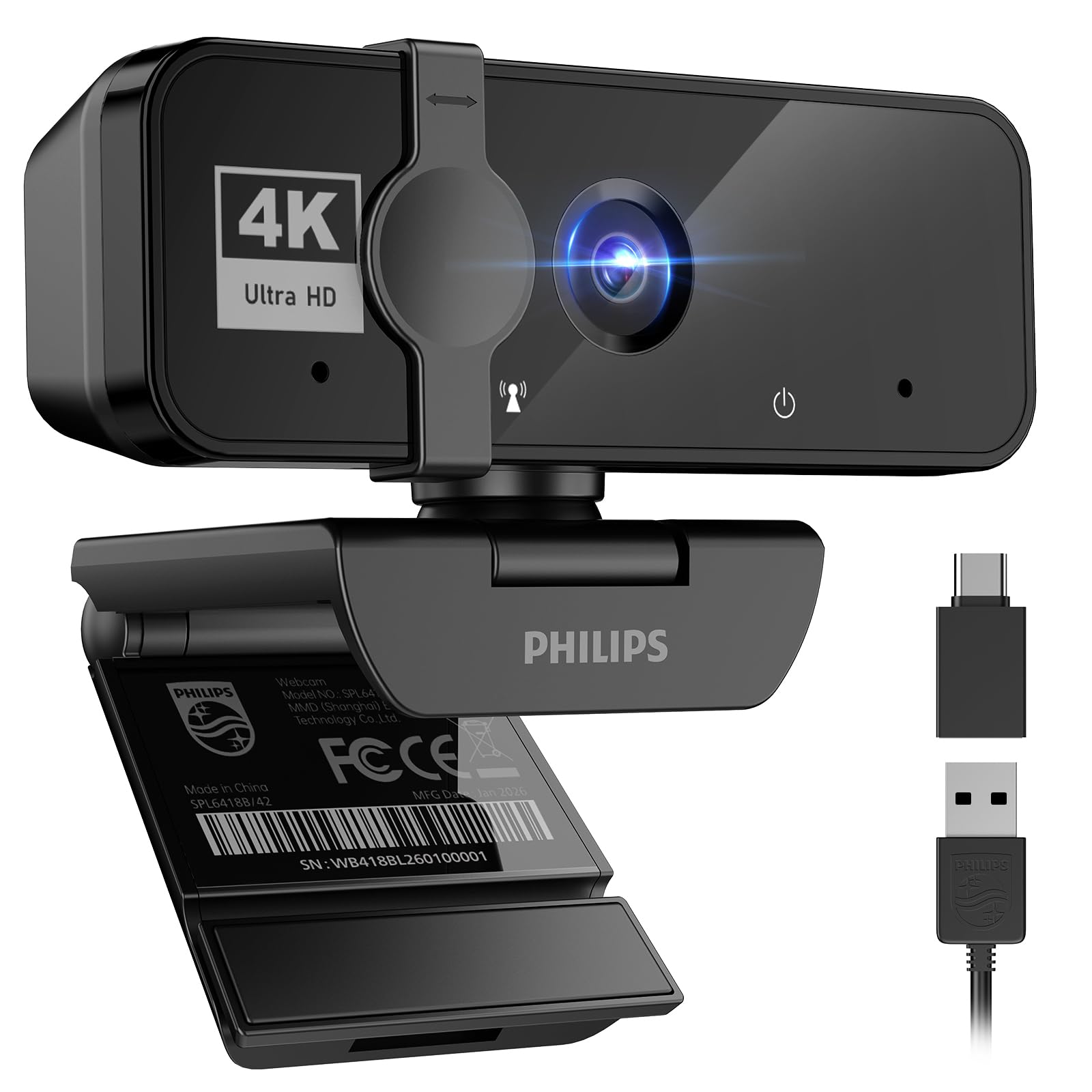
Resolution: 4K
Connection: USB plug and play
Microphone: Built-in
Privacy: Privacy cover
Intended use: Laptop, desktop, Zoom, Teams, Skype, video conferencing, streaming
Color: Black
The Philips model steps up to 4K resolution, which is the main reason to consider it over the 1080p options here. A privacy cover protects the lens when the camera is idle, and the built-in microphone handles meeting audio without extra gear. Plug-and-play USB means no driver hunt, and the listed software support covers Zoom, Teams and Skype along with general streaming use. The black housing is designed to sit on a monitor or desktop without drawing attention.
This pick suits buyers who present on camera, record content, or simply want the sharpest image for large displays and screen sharing. It is the middle of the range here: more resolution than the budget Logitech models, less outlay than a dedicated streaming camera. Trade-off: 4K video demands more bandwidth and processing power, and some meeting platforms cap outgoing quality well below 4K, so the extra resolution may go unused on a slow connection.
Check the current price on Amazon
AVerMedia Live Streamer Cam 313 (PW313)

Resolution: Full HD 1080p
Microphones: Dual
Privacy: Integrated shutter
Mount: 360-degree swivel
Compliance: NDAA compliant
Intended use: Video conferencing and streaming
The Live Streamer Cam 313 is built for people who appear on camera regularly, with a 360-degree swivel mount that makes it easy to angle toward a face, a whiteboard or a product on the desk. Dual microphones are the standout feature at this level, capturing audio from more than one direction without an external mic. The integrated privacy shutter closes the lens between sessions, and the NDAA compliance claim matters to buyers in regulated workplaces and government-adjacent roles. Full HD 1080p keeps the file sizes and bandwidth manageable for long streams.
This pick earns its spot for streamers, tutors and anyone whose camera doubles as a work and hobby tool. The swivel mount is genuinely useful for desk setups that change angle often. Trade-off: The design is bulkier than the slim Logitech cameras, so it takes up more room on a narrow monitor bezel and looks out of place on a laptop lid.
Check the current price on Amazon
CloudValley Webcam Cover for Logitech C920x / C920 / C922x / C922 / C930e

Type: Adhesive webcam cover
Compatible models: Logitech C920x, C920, C922x, C922, C930e
Function: Covers lens and protects visual privacy
Color: Black
Mounting: Attaches over the existing camera**
Not every buyer needs a new camera. The CloudValley cover is a low-cost accessory that adds a physical shutter to a Logitech C920-family webcam that is already on the desk. It attaches over the lens area and slides or flips to block the view, protecting visual privacy without any software setting. The black finish matches the camera body, and the fit is tailored to the listed models rather than a universal one-size design.
This pick suits buyers who already own one of the compatible Logitech cameras and want the shutter feature without replacing working hardware. It is the cheapest route into the category by a wide margin. Trade-off: The cover is model-specific and adhesive, so it will not fit other webcam brands, and removal may leave residue on the camera housing.
Check the current price on Amazon
Before You Buy
- Connection: USB-A suits desktops and older laptops, while USB-C is the better match for modern ultrabooks and docks. Check the port before choosing between the Brio 101 and Brio 300.
- Resolution: 1080p is enough for meetings and everyday calls. 4K pays off only with a fast connection and a platform that actually sends that quality.
- Privacy mechanism: An integrated shutter is the most durable option. An add-on cover works but is limited to the models it was designed for.
- Microphone: A built-in mic removes clutter, but a dual-mic design handles more than one speaker or a room with echo better than a single capsule.
- Mounting: A swivel mount helps when the camera needs to point at a desk, a whiteboard or a person who moves around.
- Compliance: Buyers in regulated or government-adjacent workplaces should confirm NDAA compliance before purchase.
- Condition: Renewed units cost less but may ship in plain packaging with variable stock.
Frequently Asked Questions
-
What is a camera with a privacy shutter?
It is a webcam with a physical cover that slides or flips over the lens, blocking the view when the camera is not in use. -
Is a privacy shutter better than a software setting?
A physical shutter cannot be overridden by software or a remote session, so it gives a more certain guarantee than a toggle in an app. -
Does a privacy shutter affect video quality?
No. The shutter sits outside the lens path when open, so image quality is unchanged during calls. -
Can a webcam cover be added to any camera?
Only if the cover is designed for that model. The CloudValley option here fits specific Logitech C920-family cameras, not universal webcams. -
Is 4K worth it for video meetings?
Usually not. Most meeting platforms compress outgoing video, so 1080p is sufficient unless the buyer records or streams at high resolution. -
Should buyers choose renewed or new?
Renewed saves money and keeps the same design, but new stock offers sealed packaging and more predictable availability.
Bottom Line
The Logitech Brio 101 is the top pick for most buyers: full HD video, a built-in mic, auto-light correction and an integrated privacy shutter at the lowest price of any full camera here. Buyers with USB-C laptops should look at the renewed Brio 300, while the Philips 4K and AVerMedia 313 serve higher-resolution and streaming needs. Anyone who already owns a compatible Logitech C920-family camera can add the CloudValley cover for a fraction of the cost.