Why there are Amazon links here: Brave Review is paid a commission for qualifying Amazon purchases made through the links below. Your price does not change, and using our links is entirely optional. How this works
eufy Security Smart Lock C220 vs Philips Wi-Fi Smart Deadbolt Lock: One Needs a Hub, One Doesn’t
This comparison settles a single question: does the front door need a lock that runs its own Wi-Fi connection, or is a cheaper deadbolt with a separate hub good enough? The eufy Security Smart Lock C220 is the value pick for anyone who wants fingerprint entry without paying for cloud extras. The Philips Wi-Fi Smart Deadbolt is the pick for a household that wants remote access and voice control out of the box. The side-by-side table below carries the differences, and the verdict follows.
eufy Security Smart Lock C220
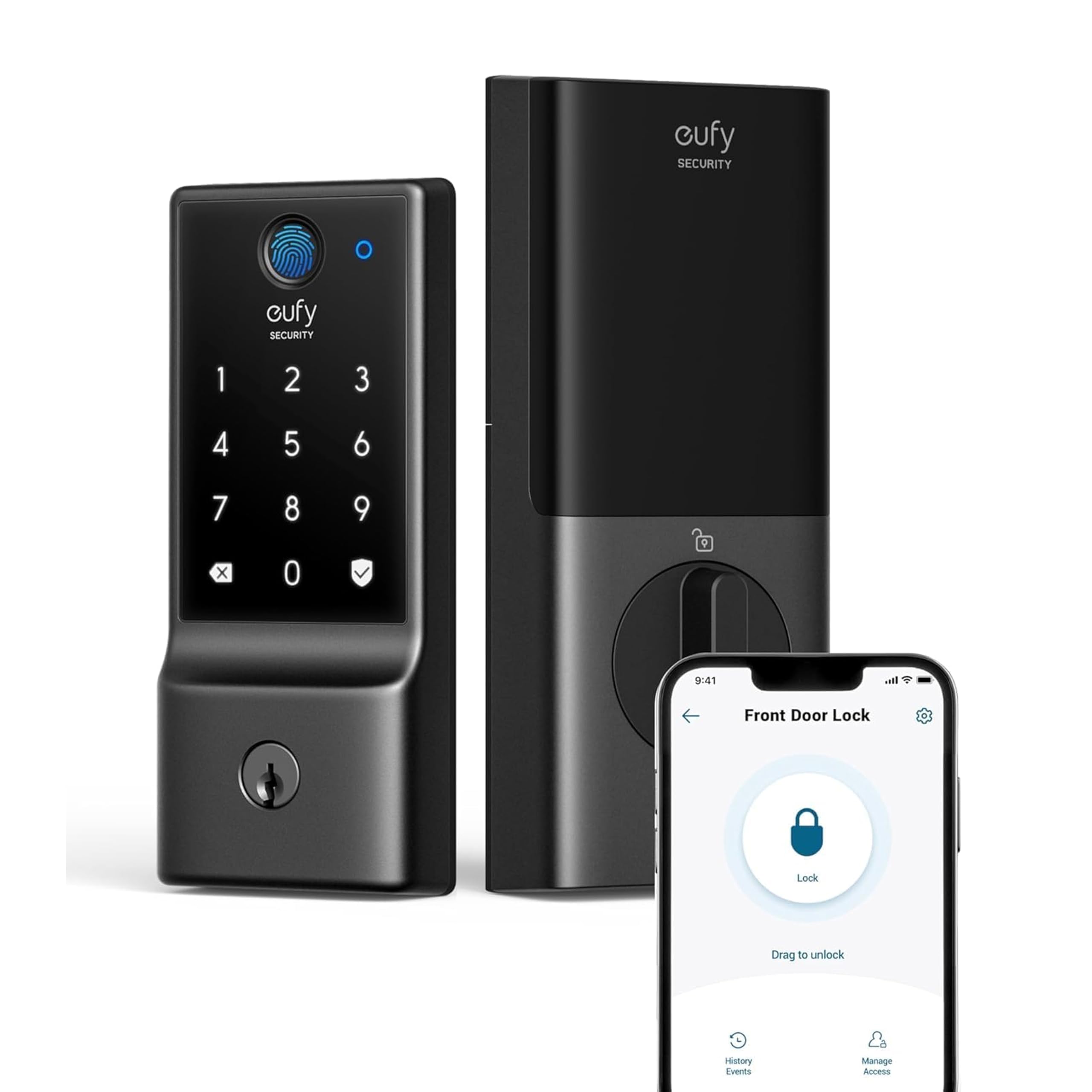
Type: Smart deadbolt, front door
Connectivity: Built-in Wi-Fi, app remote control
Entry Methods: Fingerprint, keyless entry
Power Source: Battery, up to 8-month rating
Weather Rating: IP53 waterproof
Security Grade: BHMA Grade 3
The C220 is a full deadbolt replacement that puts the fingerprint reader at the center of the experience. The built-in Wi-Fi means the lock talks to the app directly, with no bridge or hub sitting in between. The IP53 rating covers rain and dust on an exposed front door, and the BHMA Grade 3 designation is the entry-level tier of the standard residential hardware scale.
Battery life is the headline number here: up to eight months between changes under the rated conditions. The fingerprint-first design suits a household where people come and go with full hands, and the keyless path means no fumbling for a key in the dark. The app handles remote control and the usual scheduling, so the lock is manageable without a separate accessory.
Trade-off: The Grade 3 rating and IP53 protection are the modest end of the scale, so a buyer in a harsh climate or a high-security setting should not expect commercial-grade hardware here.
Check the current price on Amazon
Philips Wi-Fi Smart Deadbolt Lock

Type: Smart deadbolt, front door
Connectivity: Built-in Wi-Fi
Entry Methods: Code, fingerprint, app unlock
Voice Control: Alexa and Google voice unlock
Extras: Auto lock, backlit touchscreen
Power Source: Battery
The Philips lock spreads entry across three methods — keypad code, fingerprint and app — and adds a backlit touchscreen so the keypad stays usable after dark. Built-in Wi-Fi carries the remote access and the Alexa and Google voice unlock, which means no separate hub is needed for either feature.
Auto lock is the practical differentiator: the deadbolt can re-secure itself after a set interval, which closes the gap left by a door that gets pulled shut but never locked. The touchscreen and voice integration push this unit toward convenience-first buyers rather than minimalists.
Trade-off: The feature set — touchscreen, voice assistants, auto lock — is exactly what drains a battery faster, so this lock will likely ask for fresh cells more often than a plainer unit.
Check the current price on Amazon
eufy C220 vs Philips Wi-Fi Smart Deadbolt: Side-by-Side
| Feature | eufy Security Smart Lock C220 | Philips Wi-Fi Smart Deadbolt |
|---|---|---|
| Entry methods | Fingerprint, keyless entry | Code, fingerprint, app unlock |
| Wi-Fi | Built-in | Built-in |
| Hub required | No | No |
| Voice control | Not part of the listed feature set | Alexa and Google voice unlock |
| Keypad | Not part of the listed feature set | Backlit touchscreen |
| Auto lock | Not part of the listed feature set | Yes |
| Battery rating | Up to 8 months | Not rated in the product name |
| Weather rating | IP53 waterproof | Not rated in the product name |
| Security grade | BHMA Grade 3 | Not rated in the product name |
| Price tier | Budget | Budget to mid |
How the Two Locks Differ
The first dimension is entry method, and it is the one that decides most buyers. The eufy leans on the fingerprint reader as its primary path, with the app as backup. The Philips offers a code, a fingerprint and the app, so a guest or a delivery person can be let in with a temporary code without handing over a fingerprint or a phone.
The second dimension is what the lock does on its own. Auto lock is the standout feature on the Philips unit: the deadbolt can re-secure itself, which matters in a household where doors get pulled shut and forgotten. The eufy relies on the user to lock up, with the app as the remote check.
The third dimension is voice control. Alexa and Google voice unlock are built into the Philips lock, and that integration is a real convenience for a household already living inside a smart speaker ecosystem. The eufy’s listed feature set does not include voice assistants, so buyers who want to say "lock the front door" should weight this accordingly.
The fourth dimension is durability documentation. The eufy name states an IP53 weather rating and a BHMA Grade 3 security grade, which gives a buyer something concrete to compare against. The Philips name states neither, so the buyer is trusting the brand rather than a printed rating. That is not a knock on the hardware — it is simply a difference in what the packaging promises.
The fifth dimension is battery confidence. The eufy name commits to up to eight months, a figure a buyer can plan around. The Philips name makes no such claim, and its touchscreen and voice features are the kind of extras that tend to shorten battery life. A buyer who hates changing batteries should factor that in.
Which Should You Buy?
Choose the eufy Security Smart Lock C220 if: the front door needs a straightforward fingerprint deadbolt with a stated weather rating and security grade, the household does not care about voice assistants, and a long battery interval matters more than a touchscreen.
Choose the Philips Wi-Fi Smart Deadbolt if: the household wants code entry for guests, a backlit keypad for night arrivals, auto lock for peace of mind, and Alexa or Google voice unlock without adding a hub.
FAQ
-
Does either lock need a hub for Wi-Fi? No. Both product names state built-in Wi-Fi, so each lock connects to the home network on its own.
-
Which lock has more ways to get in? The Philips unit lists code, fingerprint and app unlock. The eufy lists fingerprint and keyless entry, with app control.
-
Is the eufy C220 weatherproof? The product name states an IP53 waterproof rating, which covers rain and dust exposure on a front door.
-
What does BHMA Grade 3 mean? It is the entry tier of the residential hardware grading scale, a reasonable baseline for a home deadbolt rather than a commercial-grade lock.
-
Which one locks itself? The Philips lock lists auto lock. The eufy’s listed features do not include it, so locking up is a manual or app-driven step.
-
Which is better for a rental or a guest-heavy home? The Philips lock, because temporary codes can be issued without sharing a fingerprint or a phone.
-
How often will the batteries need changing? The eufy name rates up to eight months. The Philips name makes no battery claim, and its touchscreen and voice features likely shorten the interval.
-
Which lock suits a smart-home setup? The Philips unit, since Alexa and Google voice unlock are part of its feature set.
Bottom Line
The eufy Security Smart Lock C220 wins on documented durability and battery life, and it is the simpler lock for a household that just wants fingerprint entry. The Philips Wi-Fi Smart Deadbolt wins on flexibility — codes, a backlit keypad, auto lock and voice control — and that makes it the better fit for a busy front door with guests and smart speakers. Buyers who want the most lock for the least complexity should start with the eufy Security Smart Lock C220; buyers who want every convenience feature on the list should go with the Philips Wi-Fi Smart Deadbolt.