Why there are Amazon links here: Brave Review is paid a commission for qualifying Amazon purchases made through the links below. Your price does not change, and using our links is entirely optional. How this works
Kwikset SmartCode 260 vs Kwikset SmartCode 270: Keypad vs Touchpad
The Kwikset SmartCode 260 and the Kwikset SmartCode 270 are the same lock in almost every way that matters — same brand, same satin nickel finish, same traditional shape, same auto-lock and custom user codes. The one real difference is the interface on the outside of the door: the 260 uses physical keypad buttons, the 270 uses a touchpad.
That single difference decides the purchase. Readers who want something they can operate by feel, in the dark, with gloves on should lean toward the 260. Readers who prefer a flat, smudge-prone-but-sleek surface and don’t mind looking before they press should lean toward the 270. The sections below break down every other dimension so the choice takes a minute, not an afternoon.
Kwikset SmartCode 260 vs Kwikset SmartCode 270 at a Glance
| Product | Key Spec | Best Use | Price Tier |
|---|---|---|---|
| Kwikset SmartCode 260 | Electronic keypad deadbolt, satin nickel, auto-lock | Front doors where tactile buttons matter | Budget |
| Kwikset SmartCode 270 | Electronic touchpad deadbolt, satin nickel, auto-lock | Modern entryways that favor a flat surface | Mid-range |
Kwikset SmartCode 260 Keyless Entry Electronic Keypad Deadbolt
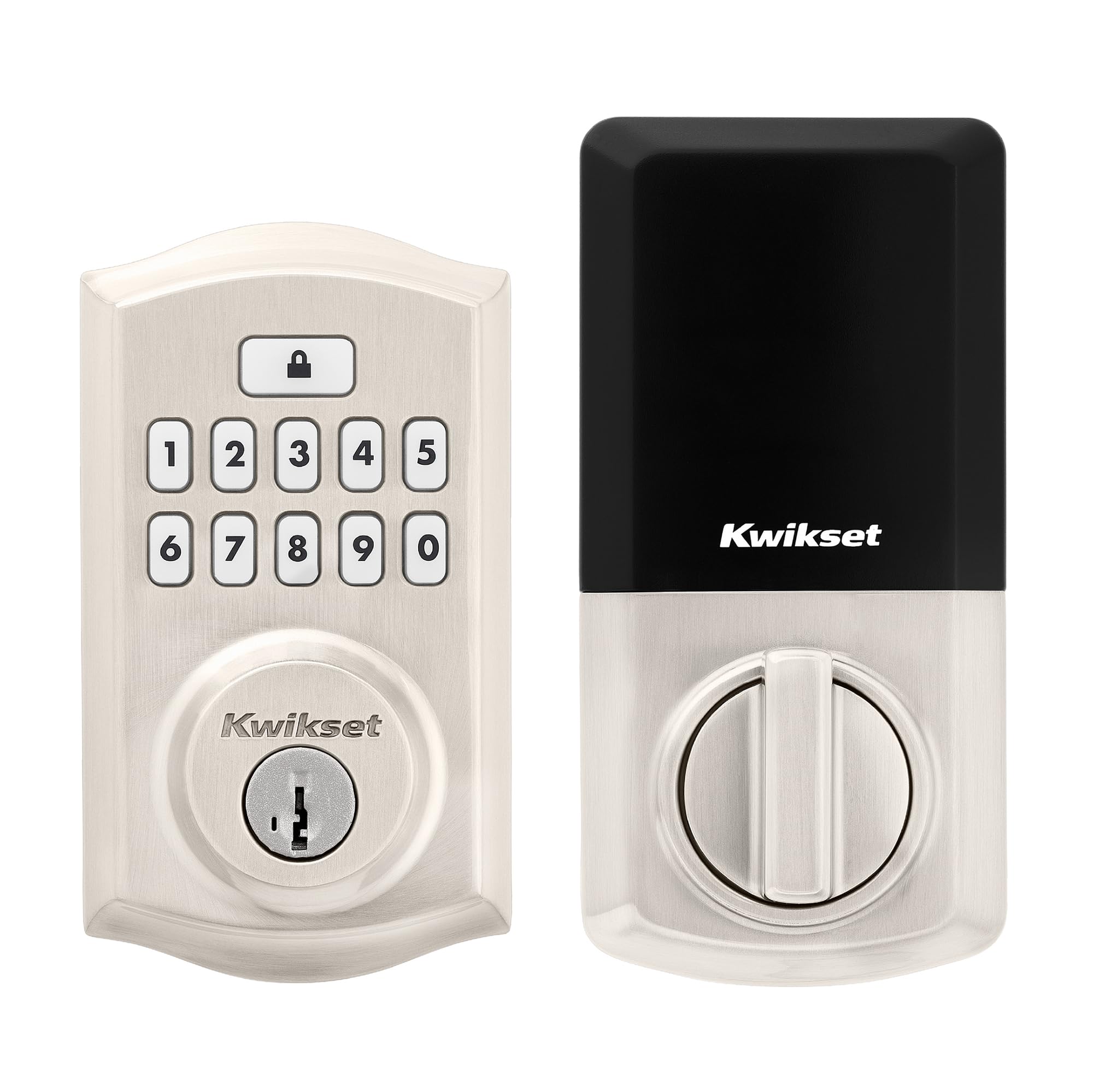
Type: Electronic keypad deadbolt
Finish: Satin nickel
Locking: Auto-lock
Access: Custom user codes
Security: Advanced Security
Style: Traditional
The 260 is the button-based version of Kwikset’s keyless deadbolt formula. The exterior is a traditional satin nickel escutcheon with a raised numeric keypad, and the interior is a matching thumb-turn assembly. Auto-lock handles the "did I remember to lock it?" problem by re-securing the door after it closes, and custom user codes let the household set its own entry numbers instead of living with a factory default.
This is the model for anyone who wants to open a door without looking at it. Physical buttons give a positive click under a finger, which matters on a dark porch, in rain, or with an arm full of groceries. The trade-off is cosmetic: raised buttons collect dust and grit in the seams, and the face reads as slightly more old-fashioned than a flat panel.
Trade-off: The keypad’s raised buttons and exposed seams are the part most likely to need wiping down, and the traditional styling will not suit a very modern door.
Check the current price on Amazon
Kwikset SmartCode 270 Keyless Entry Electronic Touchpad Deadbolt

Type: Electronic touchpad deadbolt
Finish: Satin nickel
Locking: Auto-lock
Access: Custom user codes
Security: Advanced Security
Style: Traditional
The 270 keeps the same traditional satin nickel body and the same auto-lock and custom-code behavior, but swaps the mechanical keypad for a capacitive-style touchpad. The exterior face is flat, the numbers light up or sit flush, and there are no moving parts to press. The result is a cleaner look on the door and one less place for dirt to lodge.
The catch with touchpads is universal: fingers leave marks. A repeated code can leave a faint pattern on the surface that a careful observer might read, and the panel needs a periodic wipe to stay discreet. The flat surface also demands a glance rather than a grope — a hand reaching blindly for the right digit will often find the wrong one.
Trade-off: The flat touchpad shows fingerprints and smudges, and it is harder to operate by feel than a raised keypad, which matters on a dark entryway.
Check the current price on Amazon
Side-by-Side Comparison
| Feature | SmartCode 260 | SmartCode 270 |
|---|---|---|
| Interface | Physical keypad buttons | Flat electronic touchpad |
| Finish | Satin nickel | Satin nickel |
| Style | Traditional | Traditional |
| Auto-lock | Yes | Yes |
| Custom user codes | Yes | Yes |
| Advanced Security | Yes | Yes |
| Blind operation | Easy — buttons are tactile | Harder — requires a glance |
| Surface maintenance | Seams collect grit | Surface collects smudges |
| Price tier | Budget | Mid-range |
Keypad vs Touchpad: The Difference That Decides It
The 260’s keypad is a mechanical interface. Each digit is a distinct raised button with travel and a click, and the finger learns the layout quickly. On a dark porch, that tactile feedback is the whole point: a household member can punch in a code without looking, and the lock responds. The downside is that every button is a small recess where dust, pollen and grit accumulate, and the raised profile is visually busier than a flat panel.
The 270’s touchpad is a flat surface. There is nothing to press, nothing to clean out of seams, and the door face looks more contemporary as a result. The cost is feedback: without a physical click, the user has to watch the panel to confirm a digit registered, and fingers leave prints that build into a visible pattern over time. A quick wipe now and then keeps it discreet.
The rest of the hardware is effectively the same story. Both locks use a satin nickel finish, both carry the traditional escutcheon shape, both offer auto-lock so the door re-secures itself after closing, both support custom user codes so the household sets its own numbers, and both carry Kwikset’s Advanced Security designation. Neither is a smart lock in the Wi-Fi or app sense — these are standalone electronic deadbolts, and that is a feature for anyone who wants keyless entry without another hub, app or battery-draining radio.
Auto-Lock, Codes, and Daily Use
Auto-lock is the quiet workhorse of both models. Instead of relying on a household member to remember the thumb-turn, the deadbolt re-engages on its own after the door closes. In practice that turns the lock into a set-and-forget device, and it removes the most common failure mode of a manual deadbolt: the door that was pulled shut but never locked.
Custom user codes matter for a different reason. A household can assign distinct numbers to family members, a dog walker or a cleaner, and change them without rekeying anything. That flexibility is the main argument for an electronic deadbolt over a plain keyed one, and both the 260 and 270 deliver it identically.
Where daily use separates them is in the small friction points. The 260 asks for a finger that knows where the buttons are; the 270 asks for a glance and a wipe. Neither is a burden, but the habit each one builds is different, and the right pick depends on which habit fits the household.
Power and Maintenance
Both locks are battery-powered standalone units, which means no wiring at the door and no hub in the house. Battery changes are the main maintenance event, and the interval depends on how often the lock cycles and how much the interface draws — a touchpad that lights up will generally work the electronics a little harder than a passive button matrix.
Beyond batteries, the maintenance split follows the interface. The 260 needs occasional cleaning around the button seams to keep grit out of the mechanism. The 270 needs a wipe across the touchpad to keep finger patterns from accumulating. Both benefit from the same basic care: a dry cloth, no abrasive cleaners, and a check that the bolt throws cleanly as the seasons change.
Which Should You Buy?
Choose the Kwikset SmartCode 260 if the door is a main entry that gets used in the dark, by people carrying things, or by anyone who wants to punch a code without looking. The tactile keypad is the deciding feature, and the budget positioning makes it the lower-commitment of the two.
Choose the Kwikset SmartCode 270 if the door faces a street or a modern facade where a flat panel looks better, and the household does not mind glancing at the pad to confirm entry. The touchpad is the cleaner design, and the price step up buys that appearance rather than extra capability.
Readers who want app control, remote access or integration with a smart home system should look elsewhere — neither of these is that product. They are standalone keyless deadbolts, and they compete on interface, not connectivity.
FAQ
-
What is the main difference between the SmartCode 260 and 270?
The interface. The 260 uses physical keypad buttons; the 270 uses a flat electronic touchpad. Finish, style, auto-lock, custom user codes and Advanced Security are shared. -
Do both locks have auto-lock?
Yes. Both the 260 and the 270 list auto-lock, so the deadbolt re-secures the door after it closes without a manual thumb-turn. -
Can both models store custom user codes?
Yes. Both are listed with custom user codes, which lets the household set its own entry numbers rather than relying on a factory default. -
Is the 270 a smart lock with Wi-Fi or an app?
No. The 270 is a standalone electronic touchpad deadbolt. It offers keyless entry, auto-lock and codes, but it is not a connected smart lock. -
Which one is easier to use in the dark?
The 260. Raised buttons can be located by feel, while the 270’s flat touchpad generally requires a glance to confirm the right digits. -
Which finish do both locks use?
Both are listed in satin nickel with a traditional style, so the visual difference comes down to the keypad versus the touchpad. -
Do touchpads show fingerprints?
They can. A flat surface collects finger marks, and a frequently used code can leave a visible pattern until the panel is wiped. -
Are these locks a good fit for a rental?
They can be, since codes can be changed without rekeying. A renter should confirm the property owner permits replacing the deadbolt before purchase.
Bottom Line
The Kwikset SmartCode 260 is the pick for most households: the tactile keypad is easier to use blind, it sits at the budget end of the pair, and it delivers the same auto-lock and custom-code convenience as its sibling. The Kwikset SmartCode 270 is the better-looking choice for a modern door, and the touchpad is a legitimate preference — but it asks for a glance and a wipe that the 260 does not. Buyers who want the simplest keyless deadbolt should start with the Kwikset SmartCode 260.
