Why there are Amazon links here: Brave Review is paid a commission for qualifying Amazon purchases made through the links below. Your price does not change, and using our links is entirely optional. How this works
LOCKSTAR Smart Door Lock: Keyless Entry Without the Cloud
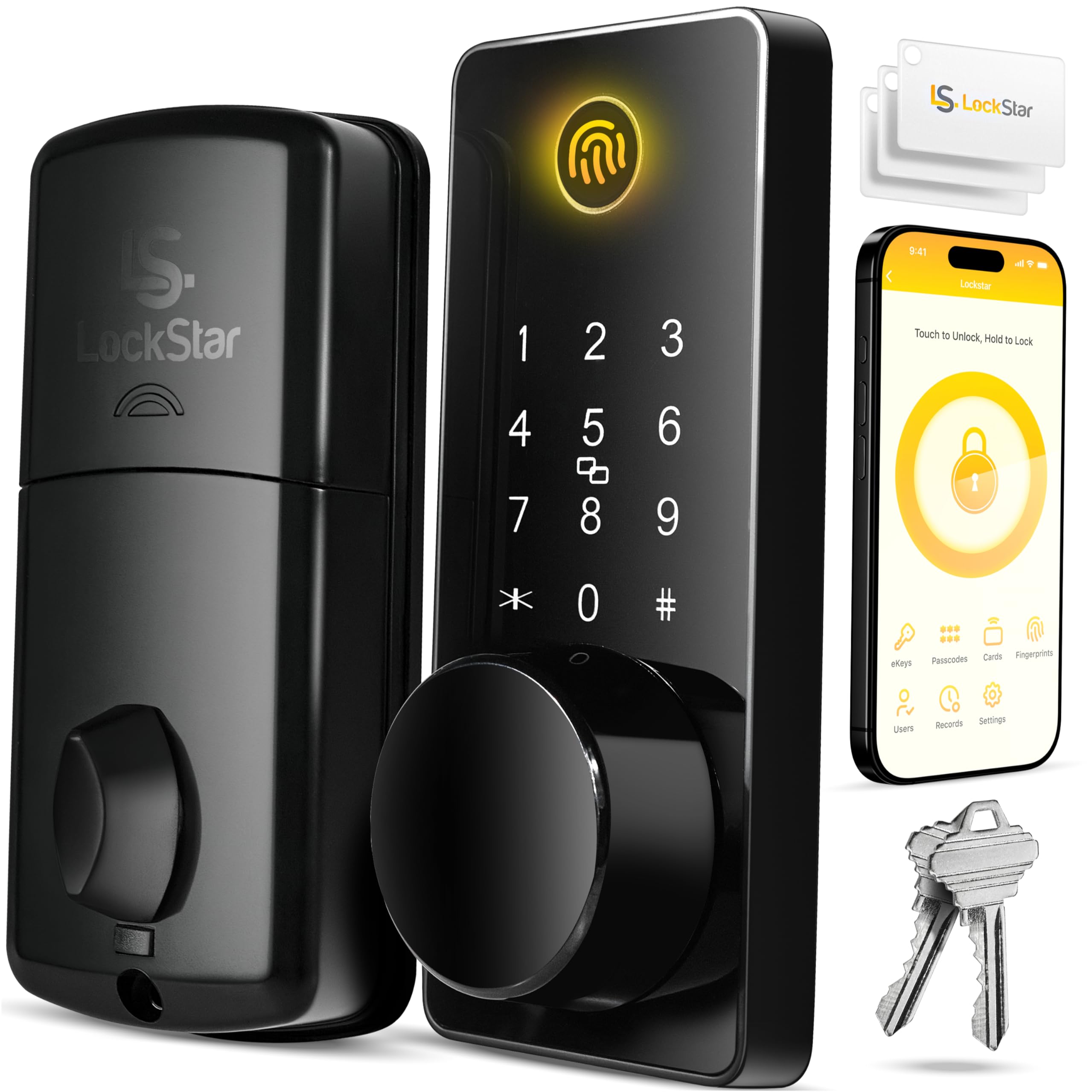
The LOCKSTAR smart door lock is a keyless entry deadbolt built around one idea: nobody in the household should ever be locked out or stuck fumbling for a key. It packs five entry methods — app, fingerprint, keypad code, card FOB and a traditional key — into a single deadbolt body that also talks to smart home devices. This review covers what the hardware is, how the entry methods differ in daily use, and where the lock’s design makes compromises. It is written for the homeowner or renter replacing a standard deadbolt who wants convenience without handing the front door to a subscription service.
Features and Specifications
Type: Keyless entry deadbolt door lock
Entry Methods: App, fingerprint Touch ID, keypad code, card FOB, traditional key
Connectivity: Smart home device integration
Mounting: Deadbolt, replaces a standard deadbolt
Power Source: Battery-powered (no hardwiring implied by the design)
Best Suited To: Front doors, side entries and rental units with high foot traffic
Price Tier: Mid-range
The headline feature is redundancy. Five entry methods means the lock keeps working when one of them fails — a dead fingerprint sensor still leaves the keypad, and a forgotten code still leaves the app or the physical key. That layered approach is the real selling point, not any single method on its own.
The other thing worth noting is what is absent from the name: no mention of Wi-Fi, no mention of a hub, no subscription tier. Buyers who want a lock that works locally, without routing every unlock through a cloud account, will find that restraint appealing. The smart home integration is there for those who want it, but the lock does not appear to depend on it.
Build and Hardware
A deadbolt replacement lives or dies on the cylinder and the bolt, because that is what a forced entry actually attacks. The LOCKSTAR follows the standard retrofit formula: the exterior keypad and fingerprint reader sit in a weather-exposed housing, and the interior half holds the motor, the battery compartment and the manual thumb turn.
That interior thumb turn matters more than shoppers expect. On any motorized deadbolt, the ability to open the door by hand from inside is the fallback when batteries run down or the motor jams. A lock without it turns a dead battery into a locksmith call.
The fingerprint reader sits on the exterior face, which is the correct place for it — a reader on the inside would be useless for entry. The trade-off of an exposed reader is that it takes weather and fingerprints both, and optical or capacitive sensors on exterior hardware generally want a wipe down now and then to stay reliable.
Trade-off: A single-unit deadbolt with this many entry methods concentrates a lot of electronics into one housing, so buyers should expect the exterior keypad and reader to be the parts most exposed to wear and weather over the lock’s life.
Entry Methods and Daily Use
The five methods serve genuinely different people, and that is the strongest argument for this lock over a cheaper keypad-only model.
The fingerprint reader is the fastest path for residents — a thumb on the sensor and the door opens, no code to remember and nothing to carry. It is the method most households will use for the daily in-and-out. The keypad code covers everyone the fingerprint does not: a guest, a dog walker, a cleaner, a contractor. Codes can be changed when those relationships end, which is exactly the point of a keypad.
The card FOB is the odd one out and the most underrated. It suits kids who cannot reliably remember a code, older relatives who find small keypads fiddly, or anyone who wants a physical token that lives on a keyring without being a cut key. The app covers remote and scheduled access — letting someone in from elsewhere, or checking that the door is locked.
The traditional key is the backstop. It is the method nobody uses until the day they have to, and its presence is why this lock is a safer bet than a fully keyless design.
Trade-off: Five entry methods means five things to set up, manage and occasionally troubleshoot, so buyers who want a lock they configure once and forget may find a simpler two-method deadbolt less demanding.
Power and Smart Home Integration
The lock is battery-powered, which is standard for retrofit deadbolts — running low-voltage wire to a front door is a renovation, not an install. Battery life depends on motor cycles, how often the fingerprint reader and keypad are used, and temperature, so a busy front door in a cold climate will drain cells faster than a side entry in a mild one.
The practical advice for any battery deadbolt applies here: keep spare batteries on hand, and pay attention to the low-battery warning rather than dismissing it. The physical key and the interior thumb turn exist precisely so a dead battery is an inconvenience, not a lockout.
Smart home integration is listed as a capability, and it is the feature most likely to be misunderstood at purchase. Buyers should confirm what their own hub or platform supports before assuming voice control or automation will work out of the box — integration between lock brands and smart home ecosystems varies widely, and the product name alone does not promise a specific protocol.
Trade-off: Smart home features on a battery-powered lock usually cost battery life, so buyers who wire the lock into automations and voice assistants should expect to change batteries more often than those who use it as a standalone keypad.
Who It Suits and Who It Does Not
This lock fits households with mixed needs: a couple who want fingerprint entry, a teenager with a FOB, a cleaner with a temporary code, and a spare key in a drawer for emergencies. It also suits short-term rental hosts who need to issue and revoke access without rekeying, and anyone replacing a deadbolt in a home where running new wiring is not an option.
It is a poor fit for buyers who want a fully keyless lock with no physical key at all — that is a different product category with different trade-offs. It is also a weaker choice for anyone who expects deep, guaranteed integration with a specific smart home platform without checking compatibility first, and for renters whose lease forbids changing the locks.
Buyers comparing this against a basic keypad deadbolt should weigh whether fingerprint and FOB entry are worth the step up in price. For a household where everyone carries a phone and remembers a code, the extra methods are convenience. For a household with kids, guests and contractors cycling through, they are the reason to buy.
FAQ
-
Is the LOCKSTAR smart door lock keyless?
It is keyless-capable rather than keyless-only. The lock offers app, fingerprint, keypad code and card FOB entry, and it also retains a traditional key as a backup — so the door can be opened without a key, but a key still works if needed. -
Does the LOCKSTAR smart door lock need Wi-Fi?
The lock’s core entry methods — fingerprint, keypad, FOB and key — work locally without a network. App access and smart home features are the parts that depend on connectivity, and buyers should confirm what their setup supports before relying on remote access. -
How many entry methods does the LOCKSTAR smart door lock have?
Five: app, fingerprint Touch ID, keypad code, card FOB and traditional key. That redundancy is the lock’s main design argument, since no single failure locks the household out. -
Can the LOCKSTAR smart door lock be used by children or older adults?
Yes. The card FOB and keypad code are the most practical methods for anyone who finds a fingerprint sensor unreliable or cannot carry a phone, and the traditional key remains available as a fallback. -
Does the LOCKSTAR smart door lock replace an existing deadbolt?
It is designed as a deadbolt replacement, so it fits the same door prep as a standard deadbolt rather than requiring a new bore. Buyers should check their door thickness and backset against the installation guide before ordering. -
What happens when the batteries die on the LOCKSTAR smart door lock?
The traditional key and the interior thumb turn provide manual access, so a dead battery does not mean being shut out. Watching for the low-battery warning and keeping spare cells on hand avoids the situation entirely. -
Is the LOCKSTAR smart door lock good for rental properties?
It suits short-term rentals well because codes and app access can be issued and revoked between guests without rekeying. Landlords should confirm the lease and local rules allow a lock change before installing. -
Can the LOCKSTAR smart door lock be controlled by a smart home system?
Smart home device integration is listed as a feature, but the specific platforms and protocols are not stated in the product name. Buyers should verify compatibility with their hub or assistant before purchase rather than assuming it. -
Is a fingerprint lock more secure than a keypad lock?
Neither is inherently more secure — both rely on the same deadbolt hardware underneath. The fingerprint reader adds convenience and avoids code sharing, while the keypad makes temporary access easier to manage. This lock offers both plus a key. -
Who should not buy the LOCKSTAR smart door lock?
Buyers who want a completely keyless lock, renters barred from changing locks, and anyone who needs guaranteed integration with a specific smart home platform without checking compatibility first.
Bottom Line
The LOCKSTAR Smart Door Lock earns its place as a mid-range pick by refusing to bet on a single entry method. Fingerprint for residents, keypad for guests, FOB for the people a code does not suit, app for remote access, and a physical key for the day everything else fails — that redundancy is what a front door actually needs. Households with a mix of ages, schedules and visitors will get the most from it; buyers who want a bare-bones keypad or a fully keyless design should look elsewhere.