Why there are Amazon links here: Brave Review is paid a commission for qualifying Amazon purchases made through the links below. Your price does not change, and using our links is entirely optional. How this works
Nyboer Smart Keypad Door Lock with Handle: Keyless Entry Without the Smart-Home Headache
The Nyboer smart keypad door lock with handle is a full lockset replacement for a front door — handle included — that swaps a traditional deadbolt-and-knob setup for a keypad, fingerprint reader, remote access and voice control. It is aimed at homeowners who want keyless entry without hiring a locksmith or building a whole smart-home ecosystem around one door. This review covers how the lock is built, what its seven entry methods actually mean in daily use, and where the design asks for a compromise.
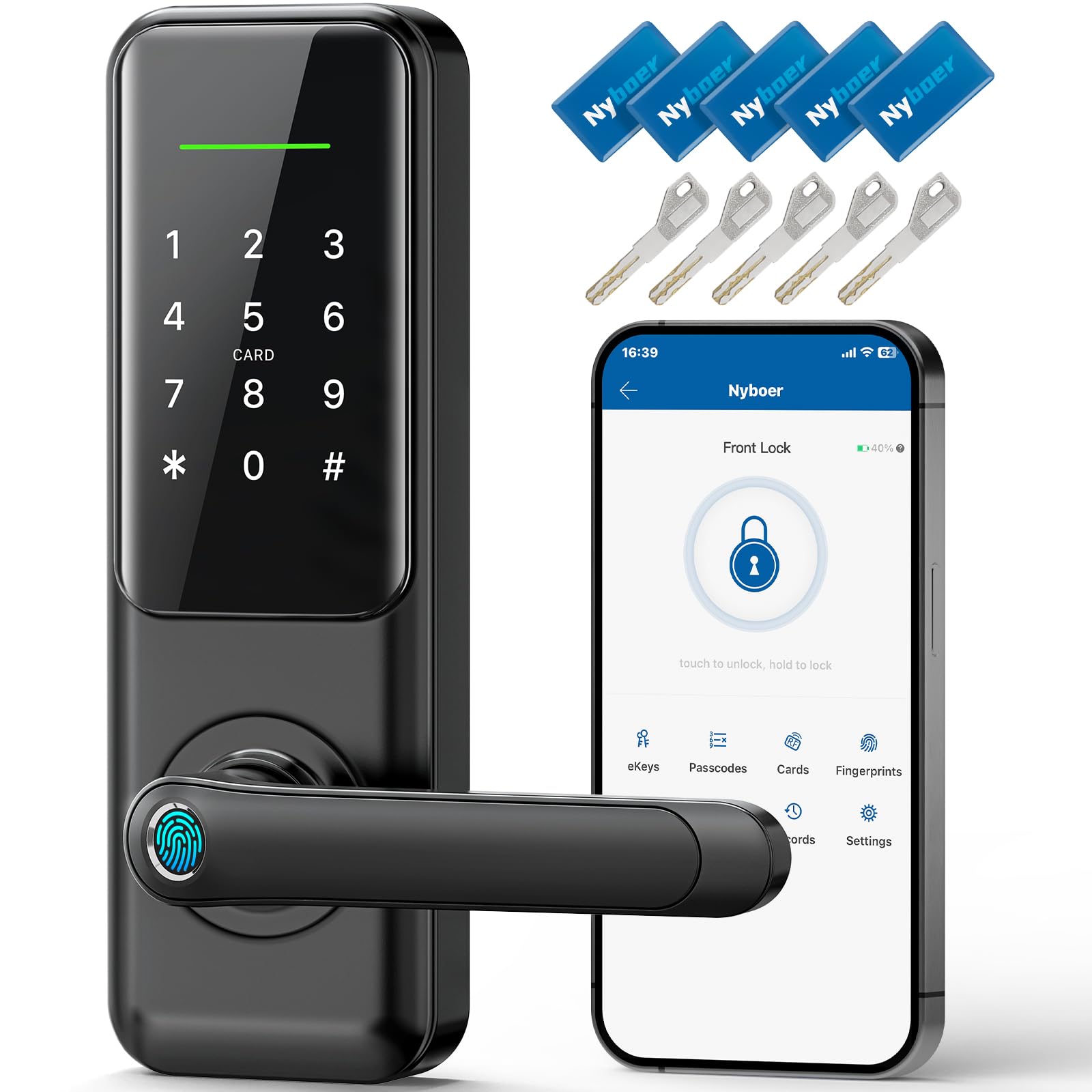
Features and Specifications
Product Type: Smart keypad door lock with integrated handle (lockset replacement)
Entry Methods: Seven-in-one — keypad, fingerprint, and additional keyless entry options
Installation: DIY, designed to replace an existing lockset
Control: Remote and voice control
Security Feature: Auto-lock
Intended Use: Front door
Price Tier: Mid-range ($134.99 at the time of this snapshot)
The headline here is the "7 in 1" claim. In practice, a lock marketed that way bundles several ways to get through the door: a numeric keypad for a PIN, a fingerprint reader for biometric entry, app-based remote unlocking, voice commands through a smart assistant, and — on most locksets of this type — a traditional key as a fallback. The exact split varies by brand, but the intent is clear: no single point of failure and no need to carry a key if the homeowner would rather not.
The fingerprint reader is the feature that separates this from a plain keypad deadbolt. Biometric entry is the fastest option for family members whose prints are enrolled, and it removes the problem of sharing and rotating PINs. The keypad still matters for guests, cleaners and anyone whose fingerprint will not register reliably.
Trade-off: Seven entry methods sound generous, but each one adds setup steps and a battery-dependent component — a buyer who only ever wants a PIN and a key is paying for features that mostly sit unused.
Check the current price on Amazon
Build and Installation
The "lockset replacement" wording is the most useful part of the product name. This is not an add-on deadbolt that clamps over an existing lock — it is a complete handle-and-lock assembly meant to take the place of the hardware already on the door. That is a bigger job than screwing a retrofit keypad onto the inside of a deadbolt, but it also means the finished door looks intentional rather than improvised.
The DIY claim should be read as "no locksmith required for a standard door," not "no tools required." Replacing a lockset means removing the old handle and cylinder, checking that the bore holes and backset line up, and mounting the new assembly so the latch engages cleanly. Homeowners with a standard prep and a screwdriver set can usually manage it; older doors, metal doors or anything with an unusual bore spacing are where the job gets longer.
The handle is worth calling out because it is the part hands touch every day. A keypad lock that reuses a flimsy lever feels cheap no matter how good the electronics are, so the integrated handle is doing real work for the product’s perceived quality.
Trade-off: A full lockset replacement fits standard door prep well but leaves little room for adjustment on unusual doors — a buyer with an older or non-standard door should measure the existing hardware before ordering.
Power, Connectivity and Auto-Lock
Remote and voice control mean the lock talks to something — a phone app and, typically, a smart assistant — which in turn means it depends on a wireless connection and on batteries. That is the honest trade of any connected lock: convenience in exchange for two things that can fail. A homeowner should expect to change batteries on a schedule and to keep a physical key somewhere outside the house as a backup.
Auto-lock is the quietly valuable feature. It re-latches the door after it closes, which solves the most common real-world lock failure — the door that gets pulled shut and never locked. For a front door, particularly one used by kids or by people carrying groceries, auto-lock does more for day-to-day security than any app feature.
Voice control is best treated as a convenience, not a security layer. Asking a smart speaker to unlock a door is handy when hands are full, but it also means the lock’s security is tied to the security of the assistant account. Buyers who are uncomfortable with that should simply not enable the voice skill; the keypad and fingerprint reader work without it.
Trade-off: Remote and voice features depend on a stable wireless connection and fresh batteries, so the lock is only as reliable as the network and the power source behind it.
Fingerprint and Keypad in Daily Use
Fingerprint entry is the feature most likely to change a household’s habits. Once prints are enrolled, entry is a single touch — faster than digging for a key and faster than typing a PIN in the dark. The catch is enrollment quality: dry, cracked or very worn fingertips register less consistently, and anyone whose print will not take will fall back to the keypad every time.
The keypad carries the load for everyone else. Temporary codes for a dog walker, a contractor or a visiting relative are the reason keypads beat keys for households with people coming and going. A keypad also removes the hide-a-key-under-the-mat problem, which is a genuine security improvement for a front door.
Where this class of lock asks for patience is in programming. Adding users, setting codes and adjusting auto-lock behavior usually means working through an app or a sequence of button presses, and the first setup session is rarely the fun part. Buyers who want a lock that works out of the box with zero configuration should expect to spend an evening with the manual.
Trade-off: Biometric entry is fast for most people but inconsistent for dry or worn fingertips, so the keypad remains essential rather than optional.
Check the current price on Amazon
Who It Suits and Who It Does Not
This lock fits a homeowner replacing the hardware on a standard front door who wants keyless entry, a fingerprint option and the convenience of auto-lock, and who is comfortable with a DIY install and a phone app. It also suits a household with several people coming and going — family, renters, regular visitors — where managing keys is a chore.
It does not suit someone renting who cannot change the door hardware, someone with an older or non-standard door who is not prepared for extra fitting work, or a buyer who wants a lock that never needs batteries or a network. Anyone who wants a simple mechanical deadbolt with no app should look elsewhere; the electronics here are the point, not an add-on.
Trade-off: The feature set is broad, but it assumes a standard door, a smartphone and a willingness to maintain batteries — three assumptions that will not fit every household.
View the Nyboer lock on Amazon
FAQ
-
Is the Nyboer smart keypad door lock with handle easy to install?
It is designed as a DIY lockset replacement, meaning it takes the place of the existing handle and lock rather than adding a separate device. A standard door prep and basic tools are usually enough; unusual bore spacing or an older door makes the job longer. -
Does it work without a smartphone?
The keypad and fingerprint reader are the core entry methods and work without an app. Remote and voice control require a phone and a wireless connection, so those features are optional extras rather than requirements. -
What happens when the batteries die?
Connected locks of this type typically provide a low-battery warning and a physical key override. Keeping a key outside the house and changing batteries on a schedule is the practical safeguard. -
Can several people have their own entry?
Yes — that is the main reason to choose a keypad and fingerprint lock over a keyed deadbolt. Multiple fingerprints and multiple PINs can be enrolled, and temporary codes can be issued for guests or contractors. -
Does auto-lock work every time the door closes?
Auto-lock re-latches the door after it closes, which is its main security benefit. The exact timing and whether it can be toggled off are set during configuration, so buyers should check the manual for the options. -
Will it fit an existing front door?
It is built for standard lockset replacement, which covers most residential front doors. Doors with non-standard bore holes or unusual thickness should be measured against the product’s install requirements before ordering. -
Is voice control secure?
Voice unlocking ties the door’s security to the smart assistant account, so a strong password and two-factor authentication on that account matter. Buyers who are uncomfortable with that can leave the voice skill disabled. -
Does it replace the deadbolt too?
The product is a lockset replacement with an integrated handle, so it takes over the door’s main locking hardware. Buyers who want to keep a separate deadbolt should confirm the configuration before purchase. -
What is the price tier?
At $134.99 at the time of this snapshot, it sits in the mid-range for a smart lock with a handle and fingerprint reader — above basic keypad deadbolts, below premium video-integrated models. -
Who should skip it?
Renters who cannot change hardware, buyers with non-standard doors, and anyone who wants a purely mechanical lock with no app or battery maintenance.
Bottom Line
The Nyboer smart keypad door lock with handle earns its place as a mid-range front-door upgrade for homeowners who want keyless entry, fingerprint access and auto-lock in one lockset — provided the door is standard and the household is comfortable with a DIY install and a phone app. The seven entry methods are more than most people will use, but the fingerprint reader and auto-lock are the two that genuinely change daily life. Buyers who want a simple mechanical lock, or who rent, should pass; everyone else can check the current price on Amazon and confirm the fit against their door before ordering.
