Why there are Amazon links here: Brave Review is paid a commission for qualifying Amazon purchases made through the links below. Your price does not change, and using our links is entirely optional. How this works
Reolink OMVI 3i Review: Triple-Lens Coverage Without a Subscription
The Reolink OMVI 3i is a single outdoor camera built to watch a wide sweep of a yard, driveway or storefront and still follow movement across it. This review breaks down how the triple-lens design works, what the panoramic and pan-tilt combination actually buys a buyer, and where the camera’s limits sit. It is aimed at homeowners and small-property owners who want one camera to cover a corner instead of three separate units, and who would rather not pay a monthly cloud bill. Readers ready to buy can jump straight to the current Amazon listing.
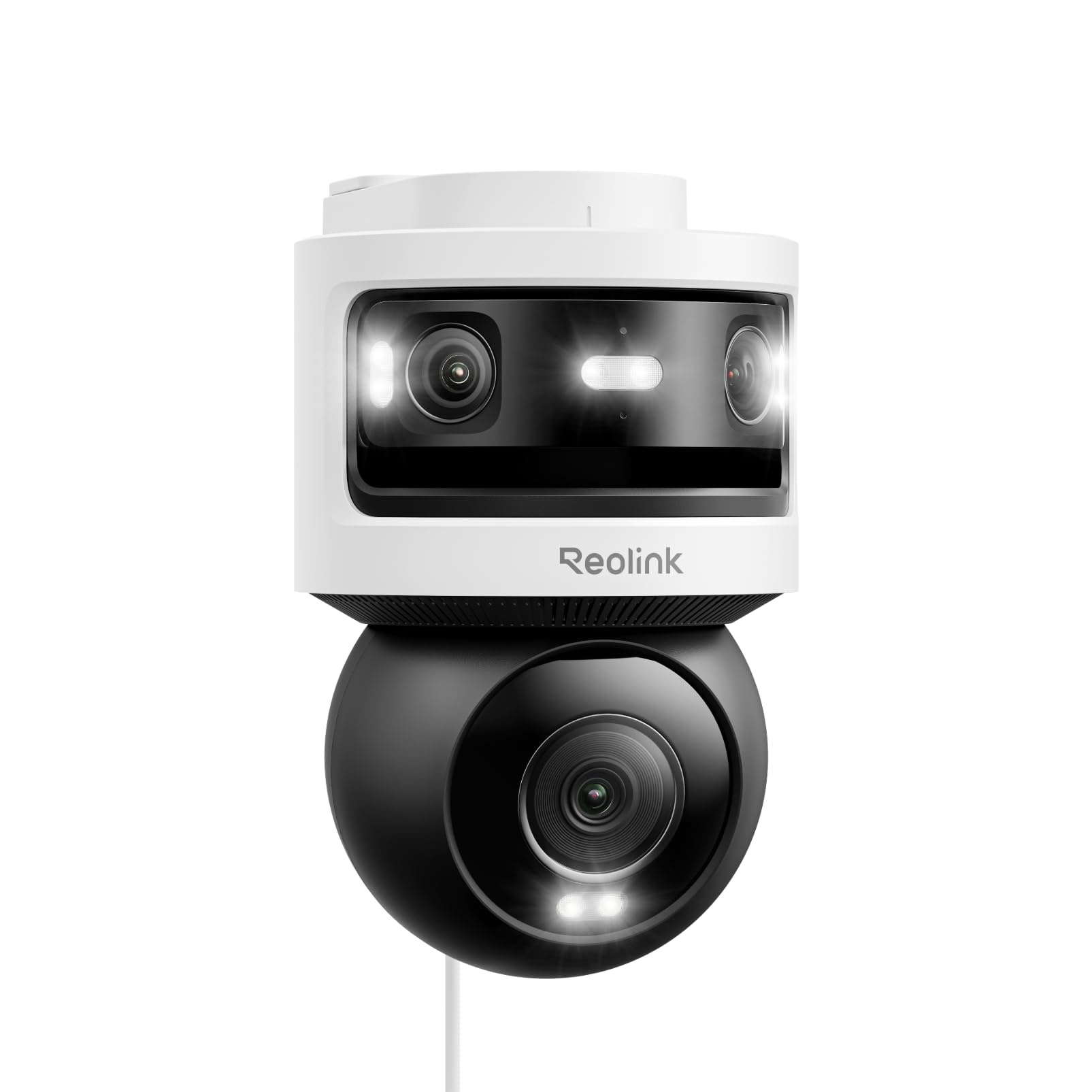
Features and Specifications
Type: Outdoor WiFi security camera, triple-lens panoramic plus pan-tilt
Resolution: 10MP main plus 8MP, 4K-class output
Field of View: 180° panoramic with motorized pan and tilt
Tracking: SyncTrack and auto tracking
Connectivity: WiFi 6
Detection: Smart detection with local AI video search
Storage Fees: No monthly fees, local storage
Wiring: Not PoE — WiFi power and data
Those eight lines are the whole pitch, and they hang together better than most spec sheets. The camera pairs a fixed wide panoramic head with a moving body, so it can hold a broad view while something crosses the frame and then swing to follow it. The 4K-class resolution and WiFi 6 radio are there to keep that dual job from turning into a blurry, stuttering feed.
The no-fee storage promise is the other half of the value. Local storage means recordings live on a card or a recorder on the property rather than in a paid cloud plan, which changes the long-run cost picture considerably. Buyers comparing this camera to subscription-dependent rivals should weigh that first.
Build and Design: Three Lenses in One Housing
A triple-lens camera is a mechanical compromise before it is anything else. One lens sits behind a wide panoramic element that covers a fixed half-circle, while the pan-tilt assembly carries the remaining sensors on a motorized base. The housing has to be weather-sealed around a joint that moves, which is the hardest part of any outdoor camera to build well.
Reolink’s approach keeps the panoramic view always-on and uses the movable section for detail and tracking. That is a sensible split: the wide lens never misses the start of an event, and the moving lens supplies the close-up. Buyers mounting this on a soffit or wall should plan for a bracket position with a clear half-circle in front of it, because the panoramic lens is only as good as what it can see.
The practical caution is physical. A camera with a motorized base is larger and heavier than a fixed bullet or dome, and the moving joint is the component most likely to wear over years of outdoor service. Mounting it under an eave, out of direct rain and away from sprinklers, is worth the extra ladder work.
Trade-off: The panoramic-plus-pan-tilt housing is bulky and depends on a moving joint outdoors, so it needs a sheltered mount and more careful placement than a simple fixed camera.
Coverage and Resolution: What 10MP Plus 8MP Delivers
Two resolution figures on one camera can confuse buyers, so it helps to think of them as two jobs. The higher-resolution sensor anchors the primary view, while the second sensor supports the wider or tracking view. Together they produce a 4K-class picture, which is the level where license plates at the curb and faces at the door start to become readable rather than suggestive.
Resolution only helps if the lens is pointed at the right thing, and that is where the 180° panoramic element earns its place. A single wide camera covering a corner of a property can replace two narrower cameras and the cabling that goes with them. For a driveway that wraps around a house, or a side yard with a gate at one end, that geometry is the main reason to buy this model.
Buyers should temper expectations about digital zoom. Cropping into a 4K frame to read a distant detail costs sharpness fast, especially at night. The camera is at its best when the subject is within the middle distance of the property, not at the far edge of the frame.
Trade-off: The 4K-class output reads detail well at moderate range, but heavy digital zoom and distant nighttime subjects will still soften, so placement matters more than the megapixel count.
Power and Connectivity: WiFi 6 Without PoE
The "Not PoE" note in the product name is a deliberate signal. Power over Ethernet cameras get a rock-solid wired connection and never compete for WiFi bandwidth, and this model does not. It runs over WiFi 6 instead, which brings higher throughput and better handling of many devices on one network than older WiFi standards.
For most homes that is a fine trade. WiFi 6 handles a 4K-class stream comfortably, and the camera does not need a network cable run to the mounting point. The catch is that the wireless link is only as good as the signal at that corner of the property. A camera mounted where the phone already drops to one bar will deliver stuttering video and missed events, no matter how good the radio is.
Buyers should check signal strength at the intended mount before committing, and consider a mesh node or access point near the camera if the location is marginal. The absence of PoE also means the camera needs a power source at the mount, so an outdoor outlet or a properly rated cable run is part of the plan.
Trade-off: Dropping PoE for WiFi 6 simplifies installation but makes video reliability dependent on wireless signal at the mount, which is the most common cause of disappointing outdoor camera performance.
Tracking and Detection: SyncTrack, Auto Tracking and Local AI Search
Tracking is the feature that separates this camera from a static panoramic unit. SyncTrack coordinates the wide and moving views so the camera can hand off a subject between them, and auto tracking lets the pan-tilt base follow movement across the property without a user steering it. In practice, that means a person walking from the street to the front door stays in frame rather than exiting the edge of a fixed view.
Smart detection filters events by type, which matters more than it sounds. A camera that alerts on every passing car trains its owner to ignore alerts entirely. Detection that distinguishes people and vehicles from wind-blown branches keeps the notification stream useful, and it is the difference between a camera that gets checked and one that gets muted.
Local AI video search is the sleeper feature. Searching recorded footage on the device for a person or a vehicle, rather than scrubbing timelines by hand, turns a fifteen-minute review into a short one. It also keeps that search capability on the property rather than in a cloud service, which fits the no-monthly-fee positioning.
Trade-off: Auto tracking and continuous panoramic processing draw more power and generate more footage than a static camera, so storage capacity and the power arrangement deserve attention before purchase.
Storage, Fees and Maintenance
The no-monthly-fee claim is only as good as the local storage plan behind it. Buyers need a microSD card or a compatible Reolink recorder, and the card should be rated for continuous write cycles — surveillance footage is brutal on ordinary cards. A card that fails silently is worse than no card at all, because the camera keeps running while recording nothing.
Maintenance is modest but real. The panoramic lens and the moving lens both collect dust, pollen and spider webs, and a smeared panoramic element degrades the whole wide view. A periodic wipe with a soft cloth, plus a check that the pan-tilt base still moves freely, covers most of it. Firmware updates are worth applying, particularly for detection and tracking behavior.
The bigger caution is redundancy. Local storage means the footage is physically in the buyer’s home, which is good for privacy and cost, but a thief who takes the recorder or the camera takes the evidence with it. Buyers who care about that should consider a recorder tucked out of sight or a secondary backup arrangement.
Trade-off: Local-only storage keeps costs down and footage private, but it puts the recordings at the same physical risk as the property, so a hidden or backed-up recorder is worth planning for.
Who It Suits and Who Should Skip It
This camera suits a buyer with one awkward corner to cover — a wraparound driveway, a side yard, a small commercial frontage — who wants a single unit to handle both the wide view and the follow-up detail. It also suits anyone who has priced out a cloud subscription and decided against it, since the local AI search and no-fee storage keep the long-run cost flat.
It is a poor fit for someone who already has Ethernet at the mounting point and values a wired connection, because a PoE camera will be more reliable for the same money. It is also a poor fit for a property where the camera’s corner has weak WiFi and no easy way to improve it.
Buyers who want the simplest possible install, a small fixed camera and nothing more, will pay for tracking and panoramic coverage they never use. The feature set here rewards someone with a genuine coverage problem to solve.
FAQ
-
Does the Reolink OMVI 3i need a subscription?
No. It is built around local storage and local AI video search, so there is no mandatory monthly cloud fee. Buyers supply their own microSD card or compatible recorder. -
Is the Reolink OMVI 3i a PoE camera?
No. The product name explicitly states it is not PoE. It connects over WiFi 6 and needs a power source at the mounting location. -
What does the triple-lens design actually do?
It pairs a fixed 180° panoramic view with a motorized pan-tilt section, so the camera can hold a wide scene and still follow movement across it with a closer view. -
What are SyncTrack and auto tracking?
SyncTrack coordinates the panoramic and moving views so a subject stays in frame, and auto tracking lets the pan-tilt base follow movement without manual control. -
Is 10MP plus 8MP the same as 4K?
The camera is described as 4K-class, and the two sensors split the wide and detail jobs. The practical result is a detailed picture at moderate range rather than unlimited zoom. -
Where should the camera be mounted?
Under an eave or another sheltered spot with a clear half-circle in front of it. The panoramic lens needs an unobstructed view, and the moving joint benefits from protection from direct rain. -
Does it work with WiFi 6 routers only?
WiFi 6 brings the best throughput and congestion handling, and the camera is designed around it. A weaker signal at the mount is the main risk to video quality regardless of router generation. -
What maintenance does it need?
Periodic cleaning of both lens elements and a check that the pan-tilt base moves freely. Firmware updates are worth applying for detection and tracking improvements. -
Can it replace two or three separate cameras?
For a corner or wraparound view, often yes. The 180° panoramic head covers ground that would otherwise need multiple fixed cameras, though no single unit covers a full 360°. -
Who should not buy it?
Buyers with Ethernet already at the mount, weak WiFi at the camera corner, or a simple fixed-view need will get better value from a cheaper PoE or fixed camera.
Bottom Line
The Reolink OMVI 3i is the right answer for a buyer with one hard-to-cover corner and no appetite for a subscription. The panoramic head plus pan-tilt tracking solves a real coverage problem, WiFi 6 keeps the 4K-class stream practical, and local AI search makes the footage actually usable. The caveats are honest ones: no PoE, a bulky moving housing, and a hard dependence on WiFi signal at the mount. Buyers who can shelter the camera and give it a strong signal will get a lot of coverage from a single unit — check the current price on Amazon before deciding.
