Why there are Amazon links here: Brave Review is paid a commission for qualifying Amazon purchases made through the links below. Your price does not change, and using our links is entirely optional. How this works
TP-Link Archer BE220: The Budget Wi-Fi 7 Router That Covers the Basics
The TP-Link Archer BE220 is a dual-band Wi-Fi 7 router aimed at buyers who want the new wireless standard without paying flagship prices. It combines full Gigabit Ethernet ports, a USB 3.0 connection, four external antennas, and built-in VPN support in a single affordable box. This review breaks down what the Archer BE220 actually delivers, where it fits in a home network, and which households should look elsewhere before buying.
Features and Specifications
Product Type: BE3600 dual-band Wi-Fi 7 router
Ports: Full Gigabit Ethernet ports
USB: USB 3.0
Antennas: 4× external
VPN: VPN clients and server support
Mesh: EasyMesh compatible
Security: HomeShield, Private IoT Network
The Archer BE220 sits in the entry-level tier of TP-Link’s Wi-Fi 7 lineup. The BE3600 rating describes the combined throughput of its dual-band radios, and the four external antennas are there to shape coverage across a typical apartment or single-floor home. Full Gigabit ports mean wired devices get the full speed a standard home broadband connection can deliver, and the USB 3.0 port opens the door to shared storage or a printer on the network.
The feature set reads like a checklist of what most households actually use. VPN client and server support is included rather than reserved for higher tiers, HomeShield covers the parental controls and network security basics, and the Private IoT Network gives smart-home devices their own segregated slice of the network. EasyMesh compatibility means the router can later be paired with other EasyMesh units to extend coverage instead of being replaced outright.
Build and Design
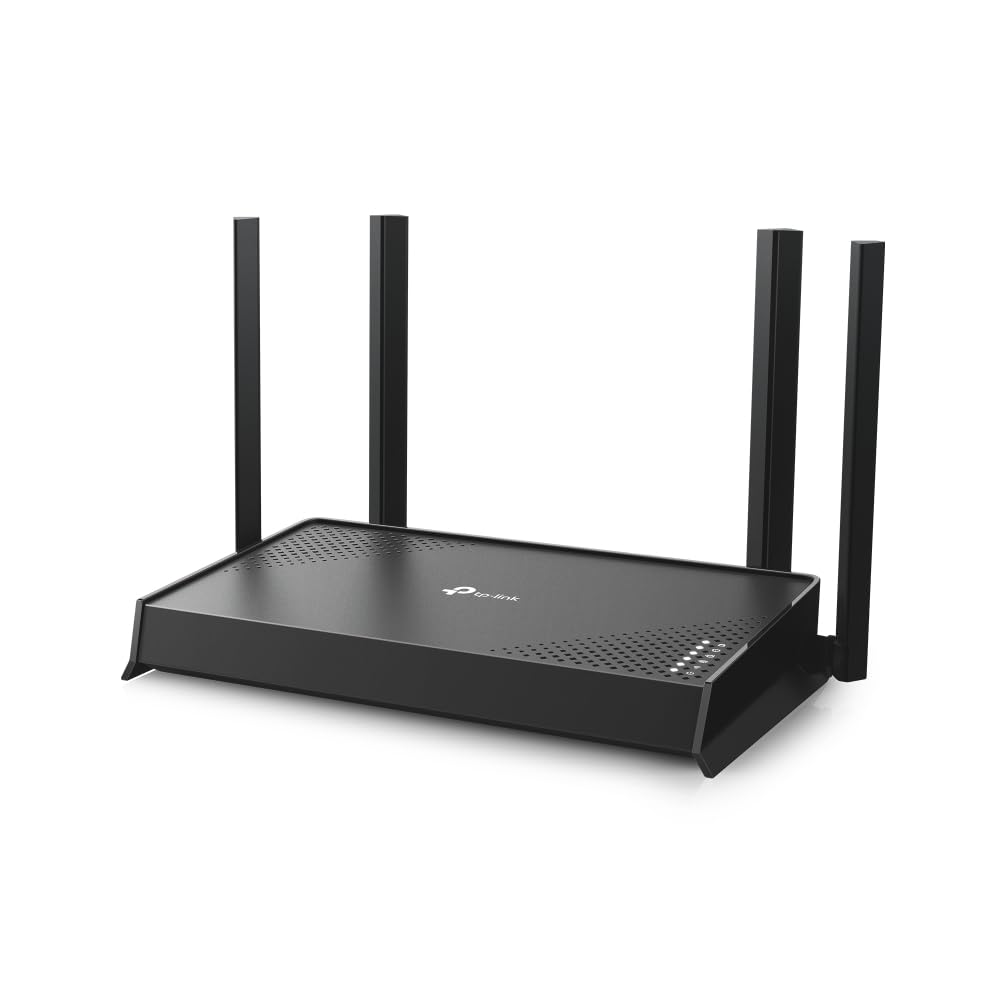
The Archer BE220 follows the familiar router formula: a desktop chassis with four external antennas that can be angled for coverage. TP-Link builds this class of router in matte plastic with ventilation across the body, and the external antenna design is a deliberate choice at this price point. It is easier to position for coverage than an internal-antenna design, even if it takes up more visual space on a shelf.
Buyers should expect a unit that wants a bit of breathing room. Routers in this tier run warm under load, and stacking one inside a closed cabinet or behind a TV works against the antennas. A central, elevated spot in the home gets the most out of the four-antenna layout.
Trade-off: The external antennas and desktop footprint make the Archer BE220 harder to tuck out of sight than a compact mesh node, so buyers who want a router that disappears into the decor should plan around that.
Capacity and Coverage
The BE3600 dual-band design is the core of what this router offers. Wi-Fi 7 brings improvements in how the router handles multiple devices at once, and that matters more than raw peak speed for most homes. A household running phones, laptops, a streaming TV, and a handful of smart-home gadgets puts sustained pressure on a router, and the newer standard is built to schedule that traffic more efficiently than older generations.
Coverage expectations should stay realistic. This is a single router with four external antennas, not a multi-node mesh system, so a large multi-story house will likely have weak corners. The EasyMesh support is the escape hatch: buyers can add compatible nodes later rather than starting over. For an apartment, a townhouse, or a single-floor home, one well-placed Archer BE220 covers the typical layout comfortably.
The full Gigabit ports deserve a mention here because they set the wired ceiling. Buyers with multi-Gig internet plans will find the wired side of this router caps out at Gigabit speeds, which is a limitation worth knowing before purchase rather than after.
Trade-off: The Gigabit port ceiling means the Archer BE220 is not the right match for households already paying for multi-Gig broadband, since the wired connection becomes the bottleneck.
Security and Network Features
HomeShield is TP-Link’s umbrella for the router’s security and parental-control features. In practice, that means the Archer BE220 can filter content, manage device access, and run basic network protection without a separate subscription appliance. The exact feature depth depends on the HomeShield tier in use, but the baseline protections are part of the router rather than an add-on box.
The Private IoT Network is arguably the most useful feature for modern homes. Smart plugs, cameras, and appliances are the least secure devices on most networks, and giving them a separate network segment keeps them away from laptops and phones. Buyers who have accumulated a drawer full of smart-home gadgets will appreciate that this is built in at this price.
VPN support rounds out the feature list. The router can act as a VPN client, routing traffic through a third-party VPN service, or as a VPN server, allowing remote access back into the home network. Both are conveniences usually found further up the price ladder.
Trade-off: HomeShield’s more advanced protections typically sit behind a paid subscription tier, so buyers who want the full security suite should budget for that on top of the router price.
Maintenance and Setup
Setup on TP-Link routers runs through the Tether app or a browser-based interface, and the Archer BE220 follows that pattern. The app walks through initial configuration, and most buyers get a working network without touching advanced settings. Firmware updates arrive through the same app, which keeps the security patches current without manual downloads.
Maintenance is minimal by design. The router has no moving parts, and the main ongoing tasks are keeping firmware updated and occasionally rebooting after long uptime. The USB 3.0 port adds a maintenance consideration: buyers using it for shared storage should check that the connected drive is powered and formatted correctly, since network storage reliability depends heavily on the drive itself.
Physical upkeep is limited to dusting the vents and keeping the antennas clear. Buyers in dusty environments or homes with pets should check the ventilation slots periodically, since a clogged router runs hotter and less stably over time.
Who Should Buy the TP-Link Archer BE220
The Archer BE220 suits buyers who want to move to Wi-Fi 7 without rebuilding their whole network budget. A renter in an apartment, a small family in a single-floor home, or anyone replacing an aging router that no longer keeps up with the device count will find the feature set covers the essentials. The VPN support and Private IoT Network add value for buyers who care about privacy and smart-home separation.
It is not for buyers with multi-Gig internet service, since the Gigabit ports cap wired throughput below what those plans deliver. It is also not the right pick for large multi-story homes that need full coverage from a single unit, or for buyers who want a router with no visible antennas. Those shoppers should look at mesh systems or higher-tier models instead.
Trade-off: The Archer BE220 is a strong value for its tier, but buyers who need multi-Gig wired speeds or whole-home coverage from one device will outgrow it quickly.
Check the current price of the TP-Link Archer BE220 on Amazon
FAQ
-
What is the TP-Link Archer BE220?
It is a dual-band Wi-Fi 7 router with full Gigabit ports, USB 3.0, four external antennas, VPN client and server support, EasyMesh compatibility, HomeShield security, and a Private IoT Network. -
Is the Archer BE220 a good router for apartments?
Yes. A single unit with four external antennas covers a typical apartment or single-floor home well, and EasyMesh support allows adding nodes later if coverage needs grow. -
Does the Archer BE220 support Wi-Fi 7?
Yes. It is a BE3600 dual-band Wi-Fi 7 router, so it works with Wi-Fi 7 devices and remains backward compatible with older Wi-Fi standards. -
Can the Archer BE220 be used with a VPN?
Yes. It supports both VPN client and VPN server modes, allowing traffic to route through a third-party VPN or remote access back into the home network. -
What is the Private IoT Network on the Archer BE220?
It is a separate network segment for smart-home devices, keeping IoT gadgets isolated from computers and phones on the main network. -
Does the Archer BE220 work with mesh systems?
Yes. It is EasyMesh compatible, so it can be paired with other EasyMesh units to extend coverage. -
How many Ethernet ports does the Archer BE220 have?
It has full Gigabit Ethernet ports for wired devices, though the exact port count is worth confirming on the product listing before purchase. -
Is the Archer BE220 good for gaming?
It handles the device-heavy traffic of a gaming household well, but competitive gamers with multi-Gig connections should note the Gigabit port ceiling on the wired side. -
What is HomeShield on the Archer BE220?
HomeShield is TP-Link’s security and parental-control platform, covering content filtering, device management, and network protection. -
Who should skip the Archer BE220?
Buyers with multi-Gig internet plans, large multi-story homes needing full single-unit coverage, or anyone who wants a router without visible external antennas should consider other options.
Bottom Line
The TP-Link Archer BE220 is a sensible entry point into Wi-Fi 7 for buyers who want modern features without a flagship price. Its full Gigabit ports, USB 3.0, VPN support, HomeShield, and Private IoT Network cover the needs of most apartments and single-floor homes, and EasyMesh compatibility leaves room to expand later. Buyers with multi-Gig broadband or large multi-story layouts should look at higher-tier models, but for everyone else, the Archer BE220 delivers the essentials at a budget-friendly tier.
