Why there are Amazon links here: Brave Review is paid a commission for qualifying Amazon purchases made through the links below. Your price does not change, and using our links is entirely optional. How this works
ULTRALOQ U-Bolt Pro WiFi Smart Lock: A Deadbolt That Knows You
The ULTRALOQ U-Bolt Pro WiFi smart lock is a front-door deadbolt built for people who want to stop carrying keys and start managing entry from a phone. It combines a fingerprint reader, Wi-Fi connectivity, app control and an auto-unlock feature in one ANSI Grade 1 unit. This review covers what the lock does, how it is likely to hold up, who it fits and where it falls short, so a buyer can decide quickly.
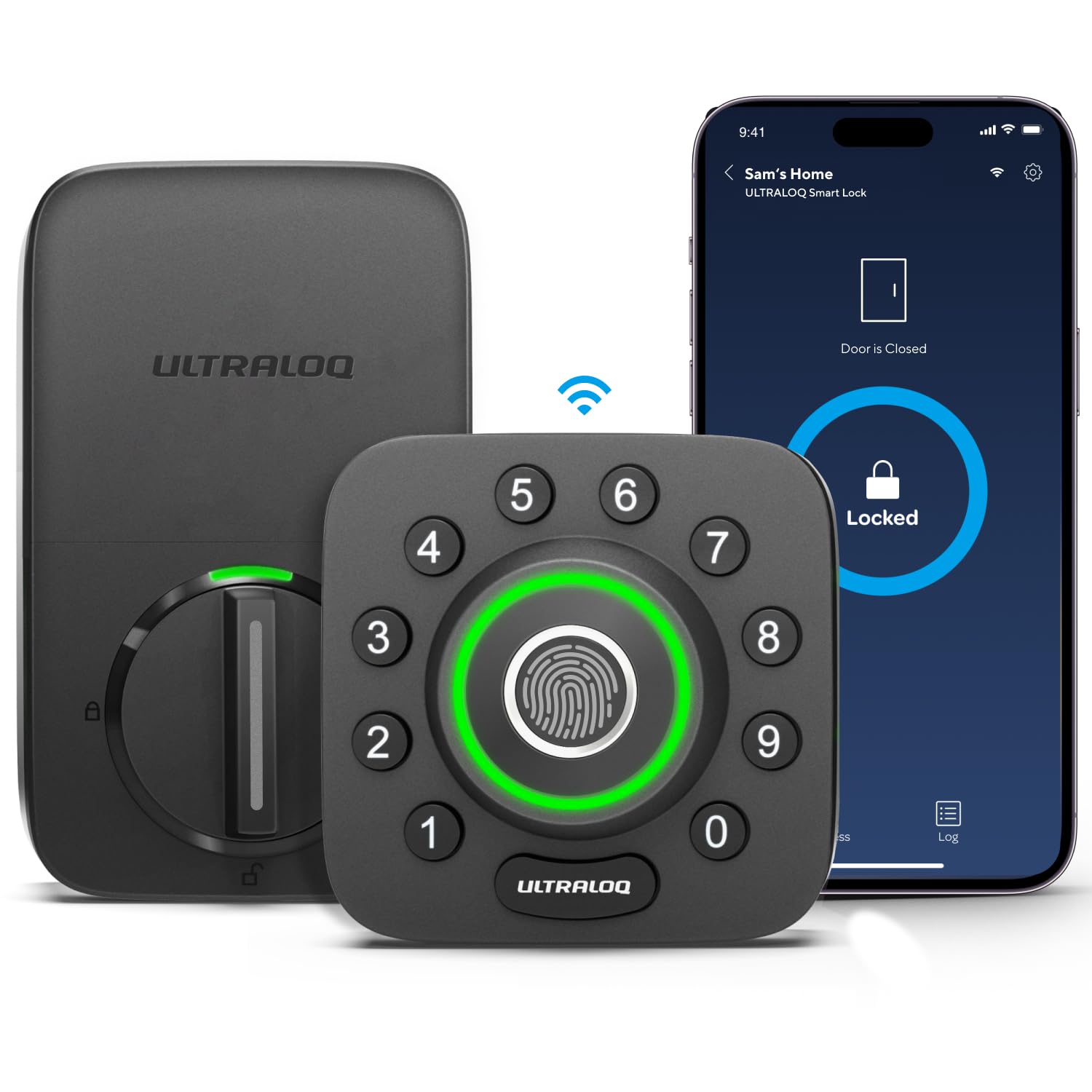
Features and Specifications
The product name carries the important facts, and they are worth reading line by line before anything else.
Type: Deadbolt smart lock for front doors
Connectivity: Built-in Wi-Fi
Entry Methods: Fingerprint ID, app, keypad and key
Key Features: Auto Unlock, Auto-lock, Share Access
Rating: ANSI Grade 1
Extras: Door sensor, app remote control
The headline here is the built-in Wi-Fi. Many smart locks in this class need a separate bridge or hub to reach the internet, and the U-Bolt Pro skips that step. That single decision changes the whole ownership experience: remote control, lock status checks and shared access all work without a second box plugged into the router.
The fingerprint reader is the other draw. A deadbolt that opens on a registered print means no phone, no code and no key for the people who live there. Guests and service workers get their own access through Share Access instead, so the household never has to hand out the physical key.
Build and Design
ANSI Grade 1 is the top residential security grade for deadbolt hardware, and it is the most reassuring line in the spec sheet. Grade 1 hardware is built for the kind of repeated use a main entry door sees, not a back gate that opens twice a week. For a front door that takes family, guests and deliveries all day, that rating is the baseline a buyer should insist on.
The U-Bolt Pro is a full deadbolt replacement, not a cover that fits over existing hardware. Installation means removing the old deadbolt and fitting the new one, which is a job most handy homeowners can handle with a screwdriver. Renters and anyone who cannot modify a door should think carefully before buying.
The door sensor is a quiet but useful addition. It lets the lock know whether the door is actually closed, which matters for the auto-lock behavior described below. A deadbolt that tries to lock an open door is a deadbolt that jams, so the sensor is doing real work rather than padding the feature list.
Power and Connectivity
Wi-Fi built into the lock is convenient, but it is also the feature that drains batteries fastest. A lock that maintains a network connection draws power continuously, and that shortens the gap between battery changes compared with a Bluetooth-only deadbolt. Buyers should expect to swap batteries more often than they would on a simpler lock, and should keep a spare set on hand.
The upside is remote control without extra hardware. The app can check lock status, lock or unlock the door and manage access from anywhere, which is the feature most people picture when they shop for a smart lock. That capability normally requires a hub, so the U-Bolt Pro is effectively bundling two purchases into one.
Auto Unlock is the feature that divides opinion. It opens the door as the authorized phone approaches, which is genuinely convenient with arms full of groceries. It also depends on the phone’s location services being accurate, and a phone that misjudges position can leave a buyer standing at the door waiting. The feature is best treated as a bonus rather than the primary way in.
Access and Sharing
Share Access is where a smart lock earns its keep for households with guests, cleaners, dog walkers or family members who come and go. Instead of copying a key, the owner issues access through the app and can revoke it later. That is a real security improvement over a hidden key under a mat, which is the system most homes actually run on.
The fingerprint reader covers the people who live there. Once a print is registered, entry is a single touch, and there is no code to forget or phone to dig out. The keypad covers everyone else who needs a code, and the physical key remains as a fallback for the day the electronics misbehave.
That fallback matters. Any electronic lock can run out of power or lose its connection, and a deadbolt with a key cylinder gives the owner a way in that does not depend on batteries or Wi-Fi. Buyers should confirm the key works smoothly before relying on the smart features day to day.
Auto-Lock and Daily Use
Auto-lock is the feature that quietly changes behavior. The lock secures itself after the door closes, which removes the "did I lock it?" moment from the day. Paired with the door sensor, it can avoid locking against an open door, which is the failure mode that would otherwise make the feature annoying.
For a family with children coming home before parents, auto-lock plus Share Access is a strong combination. The door is never left open, and each person gets their own way in. For a single occupant who is home most of the day, the feature is more of a convenience than a necessity.
The app becomes the control center: checking status, managing access and locking remotely. A buyer who dislikes managing home hardware through a phone app should weigh that against the convenience, because the app is not optional here — it is the interface for most of what the lock does.
Trade-off: Built-in Wi-Fi and a fingerprint reader make this a feature-dense lock, and that density means more battery drain and more setup steps than a simple keypad deadbolt — buyers who want zero maintenance should look at a lower-tech option.
Check the current price on Amazon
Who It Suits and Who It Does Not
The U-Bolt Pro fits homeowners who want keyless entry on a main door and are willing to install a full deadbolt. It suits households with regular guests, renters-by-the-night arrangements or family members who need their own access. It also suits anyone who has priced a smart lock plus a Wi-Fi bridge and would rather buy one device.
It does not suit renters who cannot change the door hardware, or buyers who want a lock they never have to think about. The Wi-Fi radio and fingerprint sensor are features that need feeding, and a buyer who resents battery changes will be happier with a simpler keypad lock.
FAQ
-
Does the ULTRALOQ U-Bolt Pro need a hub or bridge for Wi-Fi?
No. The Wi-Fi is built into the lock, so it connects to the home network directly. That is the main difference between this model and locks that need a separate bridge to reach the internet. -
Can the ULTRALOQ U-Bolt Pro be opened without a phone?
Yes. The fingerprint reader, the keypad and the physical key all work without a phone. The app is for remote control and access management, not a requirement for everyday entry. -
What does ANSI Grade 1 mean on a smart lock?
It is the top residential security grade for deadbolt hardware. Grade 1 hardware is built for the heavy use of a main entry door, which is why it matters on a front door rather than a back gate. -
How often do the batteries need changing?
The product name does not state a battery life figure, and real-world results depend on Wi-Fi signal strength and how often the lock is used. Built-in Wi-Fi draws power continuously, so buyers should expect more frequent changes than with a Bluetooth-only lock and keep spares on hand. -
Does Auto Unlock work with any phone?
Auto Unlock depends on the phone’s location services reporting position accurately. It is a convenience feature, and buyers should treat the fingerprint reader, keypad and key as the primary ways in. -
Can access be shared with guests and then removed?
Yes. Share Access lets the owner issue access through the app and revoke it later, which is the main advantage over handing out a physical key. -
Is the ULTRALOQ U-Bolt Pro hard to install?
It is a full deadbolt replacement, so the old hardware comes off and the new lock goes on. Most homeowners can manage it with basic tools, but renters and anyone uncomfortable modifying a door should plan for professional installation. -
What is the door sensor for?
The door sensor lets the lock know whether the door is closed. That supports auto-lock by preventing the deadbolt from extending into an open door, which would otherwise cause jams. -
Does the lock still work if the Wi-Fi goes down?
The fingerprint reader, keypad and key work locally, so entry is not dependent on Wi-Fi. Remote control through the app is the part that needs a network connection. -
Who should not buy the ULTRALOQ U-Bolt Pro?
Renters who cannot change door hardware, and buyers who want a lock with no app, no battery management and no setup, are better served by a simpler keypad deadbolt.
Bottom Line
The ULTRALOQ U-Bolt Pro WiFi smart lock is the right buy for a homeowner who wants a keyless front door without adding a hub: fingerprint entry, app control, auto-lock and shareable access all live in one ANSI Grade 1 deadbolt. The cost is battery attention and a fuller setup, which is the price of packing this much into a single device. Buyers who want the features and will accept the upkeep should check the current price on Amazon.
