Why there are Amazon links here: Brave Review is paid a commission for qualifying Amazon purchases made through the links below. Your price does not change, and using our links is entirely optional. How this works
ULTRALOQ U-Bolt Pro WiFi: A Smart Lock That Knows the Door Is Shut
The ULTRALOQ U-Bolt Pro WiFi is a deadbolt replacement aimed at people who want to stop digging for keys without handing their front door over to a cloud service. It combines a fingerprint reader, a keypad, a physical keyway and a Wi-Fi bridge in one unit, with no separate hub to buy or plug in. This review covers the hardware, how the access methods compare, where the door sensor earns its keep, and which households should look elsewhere.
Features and Specifications
Type: Built-in Wi-Fi deadbolt smart lock for front doors
Access Methods: Fingerprint ID, keypad code, app remote control, physical key
Connectivity: Wi-Fi, built in — no separate hub required
Security Rating: ANSI Grade 1
Automation: Auto Unlock, Auto-lock, Share Access
Extras: Integrated door sensor
Finish: U-Bolt Pro WiFi, matte black
The headline here is the Wi-Fi radio living inside the lock itself. Most smart deadbolts at this level need a bridge plugged into a nearby outlet to reach the network, and that bridge is a second purchase and a second thing to fail. ULTRALOQ folds it into the lock body, which means remote control and app notifications work out of the box once the lock joins the home network.
The fingerprint reader is the second differentiator. It sits on the exterior keypad and is designed to unlock with a touch, which matters most for the everyday case: arriving with groceries, a bag or a child, and not wanting to type six digits in the rain. Up to a set of prints can be enrolled per lock, and the same app that manages prints also manages the codes.
ANSI Grade 1 is the top residential security grade, and it is the claim worth pausing on. It speaks to the physical build — the strike plate, the bolt and the cylinder — rather than to the smart features, and it means the lock is rated for the kind of forced entry a front door actually faces. Buyers upgrading from a builder-grade deadbolt are getting a genuine step up in hardware, not just a keypad bolted onto the old mechanism.
Build and Hardware
The U-Bolt Pro WiFi replaces the existing deadbolt rather than sitting over it, so the exterior and interior halves sandwich the door the way a conventional lock does. The interior side holds the batteries and the thumb turn, and the exterior side carries the keypad, fingerprint sensor and keyway. Installation follows the standard deadbolt pattern: remove the old lock, check the bore holes, and bolt the new assembly through the door.
The matte black finish reads as deliberate hardware rather than gadget, which is the right call for a front door that guests actually see. The keypad is a touch surface, and the fingerprint sensor is recessed slightly so a thumb lands in the right place without looking. Neither is a statement piece, and that is a compliment — the lock should not compete with the door.
The honest caveat about the physical build is that a smart deadbolt is a heavier, bulkier object than the lock it replaces, and on a door with a tight fit or a thin panel the interior housing can feel crowded against the frame. Buyers replacing a lock on an older or unusually thin door should measure before ordering rather than assume a drop-in fit.
Access Methods and Daily Use
Four ways in, and they serve four different people. The fingerprint reader handles the homeowner who comes and goes several times a day. The keypad covers the dog walker, the cleaner and the visiting relative, each with a code that can be revoked from the app rather than re-keyed. The app handles the case where someone is already inside and wants to let a delivery in remotely. The physical key is the fallback for a dead battery or a dead phone.
Auto Unlock is the feature that changes behavior rather than just adding a convenience. With the phone in a pocket and the app running in the background, the lock is designed to release as the owner approaches, which turns the front door into a push rather than a production. It is also the feature most likely to need tuning, because a lock that unlocks too eagerly or too late is worse than one that waits for a thumb.
Auto-lock is the quieter win. A door that relocks itself after closing removes the single most common home security failure, which is a door left unlocked overnight because the last person in was carrying something. The delay can be set in the app, and once it is dialed in the lock simply stops being something anyone has to think about.
Share Access is where the app earns its place for households with help. Temporary codes with start and end times mean a contractor’s access expires on its own, and a code can be deleted the moment a relationship ends. That is a meaningful improvement over hiding a key, and it is the feature that justifies the Wi-Fi connection more than remote unlocking does.
Power, Connectivity and Maintenance
The lock runs on batteries in the interior housing, and battery life is the specification that matters most in daily ownership. A Wi-Fi radio is the hungriest component in any smart lock, so the U-Bolt Pro WiFi will ask for fresh cells more often than a Bluetooth-only lock would. ULTRALOQ addresses this with low-battery warnings through the app, and the physical keyway exists precisely so a dead battery is an inconvenience rather than a lockout.
Wi-Fi setup is the one step that can test patience. The lock has to join the home network at the front door, which is often the weakest point of the house’s coverage, and a marginal signal there will show up as slow app responses and missed notifications. Buyers whose router sits at the back of the house should check signal strength at the door before committing, or plan on a mesh node near the entry.
Maintenance beyond batteries is minimal. The touch surfaces want an occasional wipe, the keyway wants graphite rather than oil, and the fingerprint sensor benefits from a clean thumb. There is no filter to change and no hub to reboot, which is the practical payoff of the built-in radio.
The Door Sensor
The integrated door sensor is the feature that separates this lock from a keypad deadbolt with an app. It reports whether the door is open or closed, not merely whether the bolt is thrown, and that distinction is the whole point. A lock that only knows its own state can tell the owner the door is locked; a lock with a door sensor can tell the owner the door is locked and shut.
That matters for the auto-lock logic, because a lock that bolts itself while the door is ajar is a lock that has failed at its job while reporting success. With the sensor in the loop, the lock can wait for the door to actually close before throwing the bolt. For households with children or pets who come and go, that is a small piece of logic with outsized peace of mind attached.
The sensor also feeds the app’s status view, which is what most people actually check when they are away from home. Instead of a vague "locked" indicator, the app can report the door as closed and locked, or flag that it is open. It is not a substitute for a full alarm system, and it should not be sold as one, but it closes the most common gap in a smart lock’s awareness.
Trade-off
Trade-off: The built-in Wi-Fi that removes the hub also drains batteries faster and demands a strong signal at the front door, so buyers with weak entryway coverage may find a hub-based lock less frustrating despite the extra hardware.
Who It Suits and Who It Does Not
This lock suits the homeowner who wants keyless entry for a household of several people, who values a top residential security grade, and who is willing to spend a few minutes tuning auto-unlock and auto-lock to their routine. It suits anyone who has been putting off a smart lock because of the hub, and anyone who wants temporary access for help without a key under a mat.
It does not suit renters who cannot modify the door, since the deadbolt is replaced rather than attached. It does not suit buyers on the tightest budget, because a Wi-Fi lock with a fingerprint reader and a door sensor sits above the entry-level keypad models. And it does not suit anyone who wants a lock that works entirely offline with no app and no account — the smart features here are the product, and ignoring them leaves an expensive deadbolt.
FAQ
-
Does the ULTRALOQ U-Bolt Pro WiFi need a hub?
No. The Wi-Fi radio is built into the lock, so it connects to the home network directly and needs no separate bridge or hub. -
Can it be used without Wi-Fi?
Yes, for the basics. The fingerprint reader, keypad and physical key work locally, but remote app control, notifications and Share Access depend on the connection. -
What happens when the batteries die?
The app warns before the cells are exhausted, and the physical key provides entry if they run flat. There is no lockout scenario that requires a locksmith. -
How many fingerprints can it store?
ULTRALOQ designs the U-Bolt Pro WiFi to enroll multiple prints, which is enough for a household of several people plus a regular visitor. Prints are managed and deleted in the app. -
Is ANSI Grade 1 actually meaningful?
It is the top residential security grade and covers the physical lock hardware rather than the smart features. It is the rating to check when comparing deadbolts on build quality. -
Does the door sensor need separate installation?
The sensor is integrated into the lock assembly, so it is part of the same install rather than a second device to mount and pair. -
Can codes be time-limited?
Yes. Share Access supports temporary codes with defined windows, which is the feature to use for contractors, cleaners and short-term guests. -
Will it fit an existing deadbolt hole?
It is designed as a standard deadbolt replacement, but older or unusually thin doors can crowd the interior housing. Measuring before ordering is the safe move. -
Does it work with a smart home system?
The lock is managed through the ULTRALOQ app, and compatibility with third-party platforms should be confirmed against the current product listing before purchase. -
Is it good for a rental property?
For a landlord who controls the door, yes — temporary codes and remote access are genuinely useful. For a tenant who cannot replace the deadbolt, no.
Bottom Line
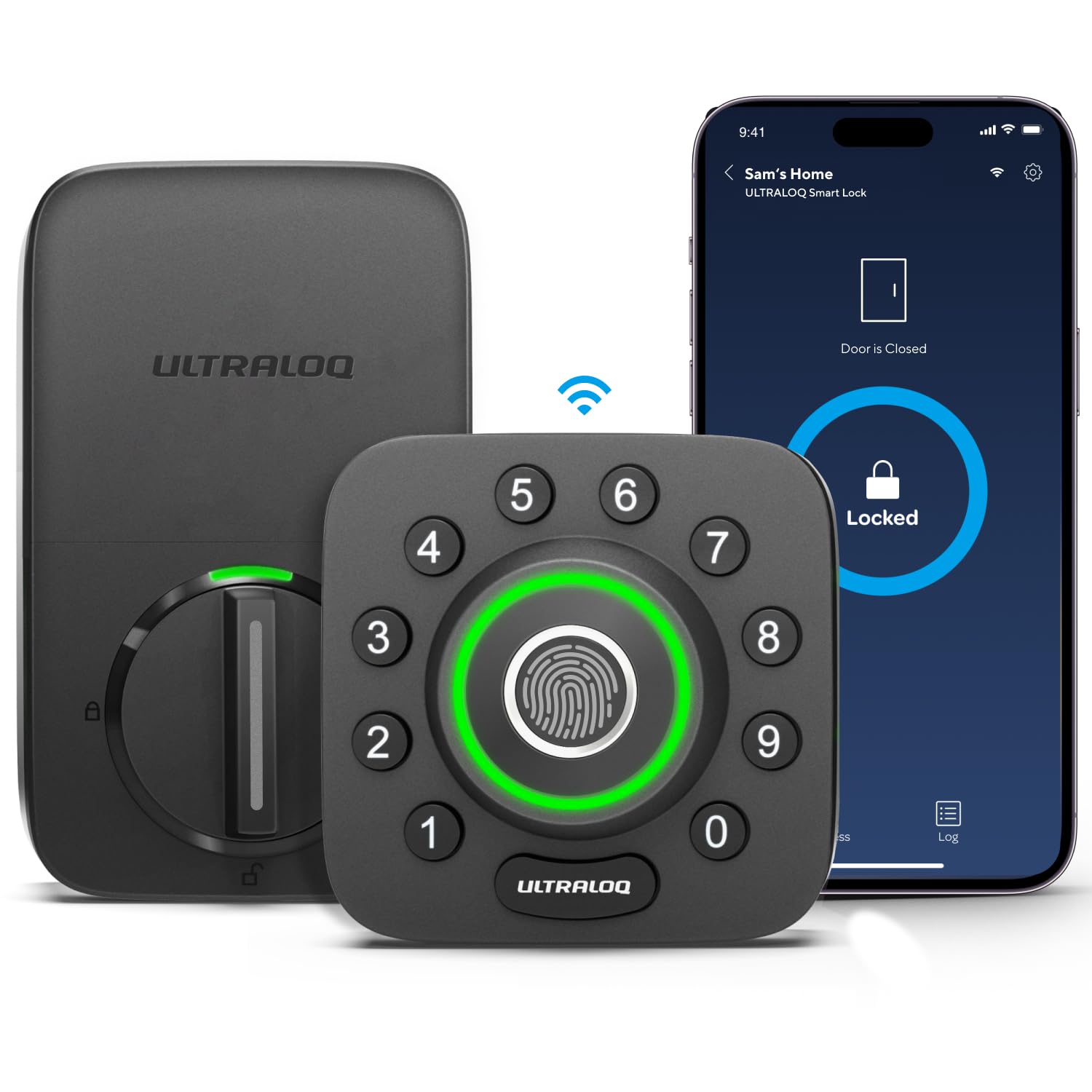
The ULTRALOQ U-Bolt Pro WiFi is the smart lock to pick when the goal is a front door that opens for the right people without a key and reports honestly on whether it is shut. The built-in Wi-Fi removes the hub, the fingerprint reader handles the daily case, and the door sensor closes the gap that most smart locks leave open. Buyers with a strong signal at the entry and a household of more than one person will get the most out of it.
