Why there are Amazon links here: Brave Review is paid a commission for qualifying Amazon purchases made through the links below. Your price does not change, and using our links is entirely optional. How this works
Best Voice Control for Limited Mobility for Everyday Independence
Voice control for limited mobility covers a wide range of needs: some people need to answer a phone without lifting a handset, others need to run lights and music from a chair, and some need a simple way to speak a message out loud. The five picks below span those jobs, from a dedicated voice-dial home telephone to an open-source smart assistant. The overview table shows each product’s key spec and best use so a reader can shortlist in under a minute, then the reviews explain the trade-offs.
Overview of the Picks
| Product | Key Spec | Best Use | Price Tier |
|---|---|---|---|
| Uses your home phone line – Great for those with Vision Difficulties or Hand Issues | Home phone line, full voice dial | Answering and dialing a landline hands-free | Premium |
| Hable Easy Smartphone Remote for Visually Impaired Seniors | Bluetooth, large button interface | Controlling a smartphone or tablet without touch | Premium |
| AbleNet TalkingBrix 2 Multi-Message Speech Generating Device | Multi-message speech output | Speaking short recorded messages on demand | Premium |
| Electric Recliner Voice Controller 29V | 29V, plug and play | Voice control of a lift chair or recliner | Budget |
| Third Reality Voice/Music Assistant Dev Edition | Dual digital mics, 2.4G WiFi only | Voice control of smart home devices and music | Mid-range |
Uses your home phone line – Great for those with Vision Difficulties or Hand Issues Answer, Dial & Hang-Up with Only Your Voice – Home Telephone
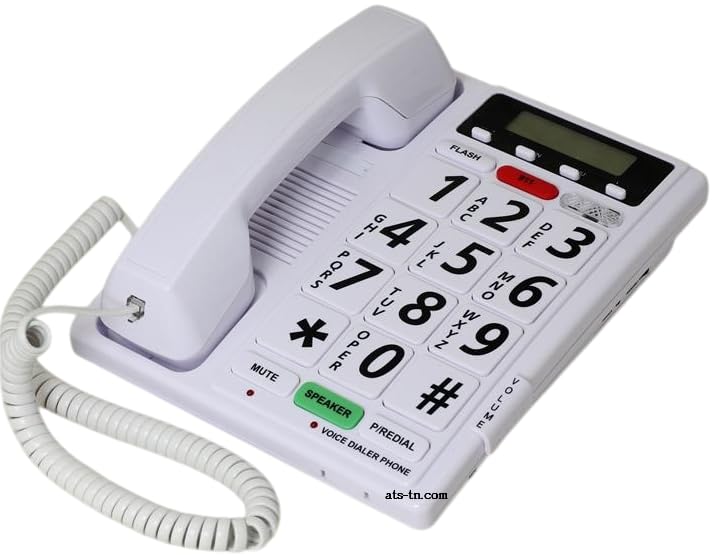
Type: Voice-controlled home telephone
Connection: Standard home phone line
Core function: Answer, dial and hang up by voice
Intended user: People with vision difficulties or limited hand use
Installation: Works with an existing landline
This is a full telephone built around spoken commands rather than a keypad. It connects to a standard home phone line, so no smartphone or internet service is required, and the core tasks — answering an incoming call, dialing a number, and hanging up — are handled by voice alone. That makes it a strong fit for a household that still keeps a landline and wants the phone to work for someone who cannot easily grip or see a handset.
The pick earns its place because it solves one job completely rather than partially. A person who struggles with small buttons or a dim screen can keep using the family phone number without asking for help. The caution is that it depends on an active home phone line: a household that has moved entirely to mobile service would get nothing from it, and the premium price is high for a single-purpose device.
Trade-off: It only pays off if a landline is already in the home, and the cost is steep for one function.
Hable Easy Smartphone Remote for Visually Impaired Seniors: Large Button Interface, Bluetooth, Compatible with All Phones & Tablets, Supports VoiceOver & TalkBack
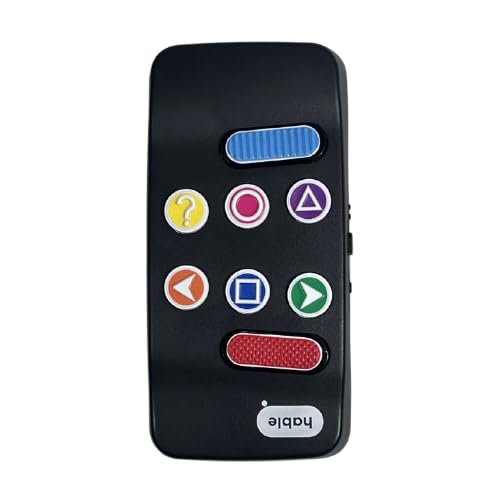
Type: Bluetooth smartphone remote
Interface: Large button
Compatibility: All phones and tablets
Accessibility support: VoiceOver and TalkBack
Connection: Bluetooth
This is a physical remote that pairs with a phone or tablet over Bluetooth and gives the user a large-button control surface instead of a touchscreen. It works alongside the built-in screen readers on modern phones, so spoken feedback and spoken commands stay part of the experience. The design targets seniors and visually impaired users who find glass screens hard to operate reliably.
It suits a household where the phone is the main communication tool and the user wants to keep it but needs a simpler way in. The pick is here because it adds accessibility to a device the user already owns rather than replacing it. The caution is compatibility in practice: screen reader behavior varies between phone models and operating system versions, so setup should be tested before relying on it daily.
Trade-off: Setup depends on the phone’s own screen reader, so results can vary by device and OS version.
AbleNet TalkingBrix 2 Multi-Message Speech Generating Device – Multi-Message Communicator – Product #10000032

Type: Multi-message speech generating device
Function: Plays recorded spoken messages
Messages: Multiple messages per device
Intended user: People who need help speaking for themselves
Use case: Short, repeatable spoken communication
The TalkingBrix 2 is a speech generating device that stores several recorded messages and plays them on demand. It is built for short, practical communication — calling for help, answering a routine question, or making a need known — rather than for conversation. The multi-message format means one device can cover several common phrases without the user having to type or write anything.
It belongs on this list because voice output is itself a form of voice control for people whose speech is limited. It suits a user with a caregiver who can record and update the messages, and it works well in a fixed spot such as a bedside table or wheelchair tray. The caution is that it is a closed, single-purpose device at a premium price, and its usefulness depends entirely on someone else setting it up and keeping the messages current.
Trade-off: It needs a caregiver to record messages, and the price is high for a device that only speaks short phrases.
Electric Recliner Voice Controller 29V | Replacement Switch with USB Charging Port | Voice Activated Lift Chair Remote for Home/Office/Elderly | ABS Material, Plug and Play

Type: Voice-activated recliner and lift chair controller
Voltage: 29V
Material: ABS
Extras: USB charging port
Installation: Plug and play replacement switch
This is a replacement switch for a power recliner or lift chair that adds voice activation to the chair’s existing controls. It is a plug-and-play unit, so the job is swapping the switch rather than rebuilding the chair, and the ABS housing keeps the part light and durable. The built-in USB charging port is a small but useful extra for a chair that already sits in a living room or bedroom.
It is the budget pick here and the most targeted one: a person who already owns a power lift chair gets hands-free control of the exact motion that matters most for standing up and sitting down. The caution is fit — it is a 29V replacement part, so the chair’s existing system has to match, and a buyer should confirm the connector and voltage before ordering.
Trade-off: It only works on chairs with a compatible 29V system, so it is not a universal add-on.
Third Reality Voice/Music Assistant Dev Edition – Preloaded with Home Assistant Voice Assistant and Music Assistant, Dual Digital Mics, 3W Speaker, 2.4G WiFi only, Open Source
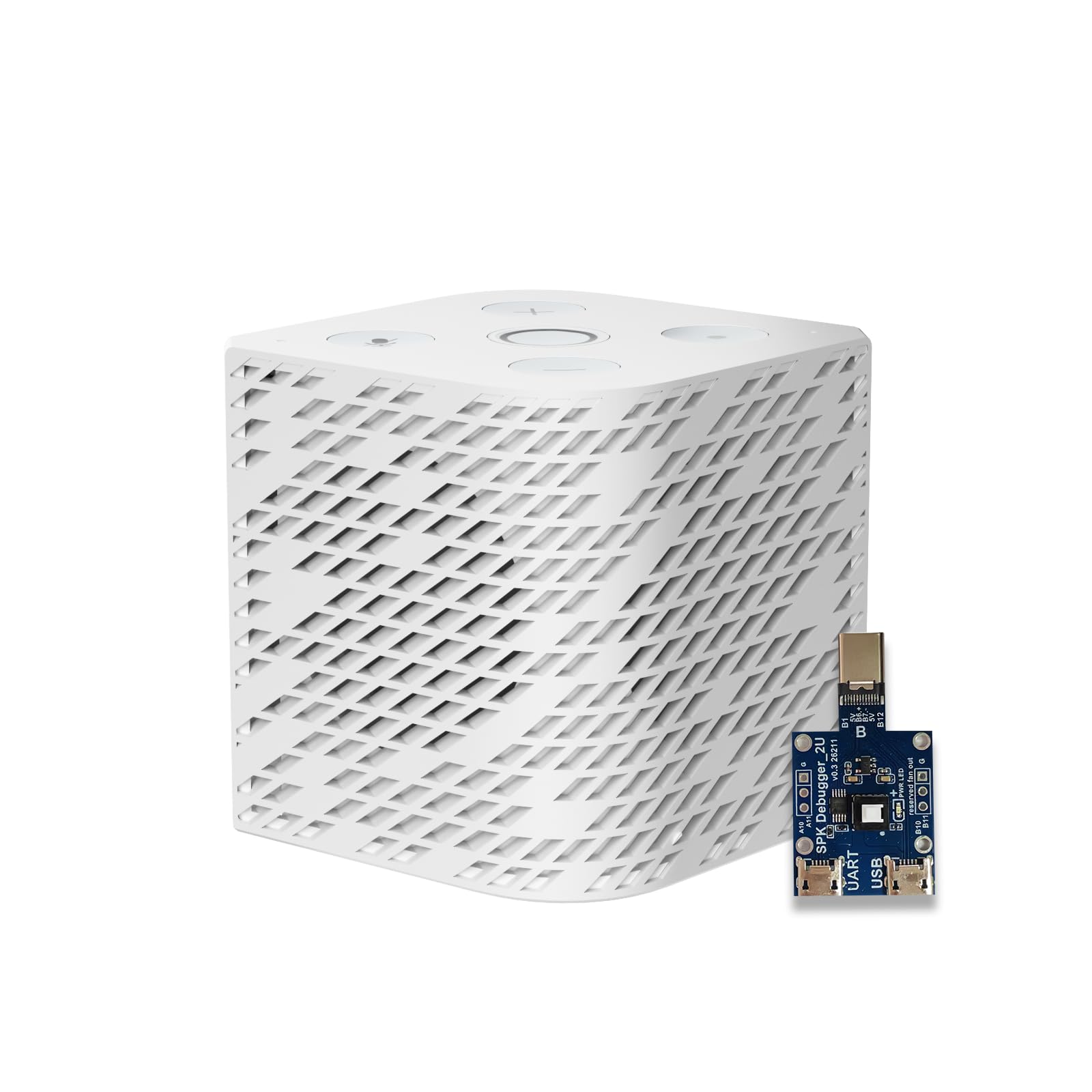
Type: Voice and music assistant device
Microphones: Dual digital mics
Speaker: 3W
Connectivity: 2.4G WiFi only
Software: Preloaded Home Assistant Voice Assistant and Music Assistant, open source
This is a small voice assistant built on open-source software and shipped preloaded with Home Assistant’s voice and music tools. Dual digital microphones handle far-field pickup, and the 3W speaker covers spoken replies and light music playback in a room. It is the mid-range pick here and the one aimed at a household that wants voice control over lights, plugs and media without depending on a big commercial ecosystem.
It suits a buyer who is comfortable with a Home Assistant setup, or who has someone nearby who is, and it can put voice control of a whole room within reach of a chair-bound user. The caution is the setup curve: open-source assistants reward patience but rarely work out of the box like a mainstream smart speaker, and the 2.4G-only WiFi is a limitation in homes with crowded or modern-only networks.
Trade-off: It expects a Home Assistant household and some technical patience, and it connects on 2.4G WiFi only.
Before You Buy
- Line or device dependency: A voice phone needs an active home phone line, a recliner controller needs a matching 29V chair, and a smart assistant needs WiFi — confirm the existing setup first.
- Compatibility: For the smartphone remote, check that the phone’s screen reader works with it; for the recliner switch, confirm the connector and voltage.
- Who sets it up: The speech device and the open-source assistant both need someone to configure them, so plan for a helper.
- Single purpose vs. whole room: Decide whether the need is one task (a phone call, a chair, a message) or general control of lights and media.
- Placement: Fixed devices such as the speech communicator and the recliner controller work best where the user spends most of the day; the assistant needs a sensible spot for its microphones.
- Power and charging: The recliner controller adds a USB port, while the phone remote and assistant need their own power arrangements.
- Budget spread: The picks range from a low-cost replacement part to premium dedicated devices, so match spending to how central the task is.
Frequently Asked Questions
-
What is the best voice control for limited mobility overall?
It depends on the task. For phone calls, the voice-dial home telephone is the most complete solution; for smart home control, the Third Reality assistant covers the most ground. -
Can voice control replace a phone keypad entirely?
The home telephone model is designed to answer, dial and hang up by voice, so it can replace the keypad for basic calling. A smartphone still needs its screen reader and a remote like the Hable Easy for full hands-free use. -
Does the recliner voice controller work on any lift chair?
No. It is a 29V replacement switch, so the chair’s existing system has to match before it will work. -
Is the speech generating device the same as voice control?
It is the output side of the same idea: the user triggers spoken messages instead of speaking. It helps with communication rather than with operating other devices. -
Does the Third Reality assistant need a subscription?
It runs open-source Home Assistant software, so the model is local and self-hosted rather than subscription-based, but it does require a Home Assistant setup to be useful. -
Which pick is best for a tight budget?
The Electric Recliner Voice Controller is the lowest-cost entry and delivers hands-free chair control for buyers who already own a compatible lift chair.
Bottom Line
For most households, the strongest single answer is the voice-dial home telephone: it turns a familiar landline into a fully hands-free tool for the person who needs it most. Buyers who already own a power lift chair should start with the budget recliner controller instead, and anyone building a broader smart home should look at the open-source assistant.
