Why there are Amazon links here: Brave Review is paid a commission for qualifying Amazon purchases made through the links below. Your price does not change, and using our links is entirely optional. How this works
Best Wall Display for Camera Feeds: 5 Picks for Home and Small Business
A wall display for camera feeds turns a phone screen into something the whole room can see. This guide covers five picks: two low-cost floating shelves that hold a camera or small monitor, two dedicated security monitors, and one commercial-grade touchscreen. It suits renters who cannot drill, homeowners building a simple CCTV corner, and small businesses that want a feed visible at the counter. The overview table below lets most readers choose in under a minute.
Overview of the Picks
| Product | Key Spec | Best Use | Price Tier |
|---|---|---|---|
| Ouliget Wall Mount Bracket (2-Pack) | Acrylic, no-drill, clear, 2-pack | Renting, light camera or speaker | Budget |
| Wall Mount Floating Shelves (2 Pcs) | Clear mini shelf, 2-pack | Baby monitor or mini speaker | Budget |
| ZOSHING 17inch Security Monitor | 17-inch, AV/HDMI/VGA, wall-mountable | Small CCTV setup | Mid-range |
| Eyoyo 22-inch Security Monitor | 22-inch, 1080P FHD, HDMI/VGA/AV/BNC | Multi-camera NVR/DVR desk or wall | Mid-range |
| 21.5 inch Wall Mount Digital Signage | 21.5-inch, multi-touch, WiFi, CMS | Commercial or advanced home display | Premium |
1. Ouliget Wall Mount Bracket for Security Camera (2-Pack)
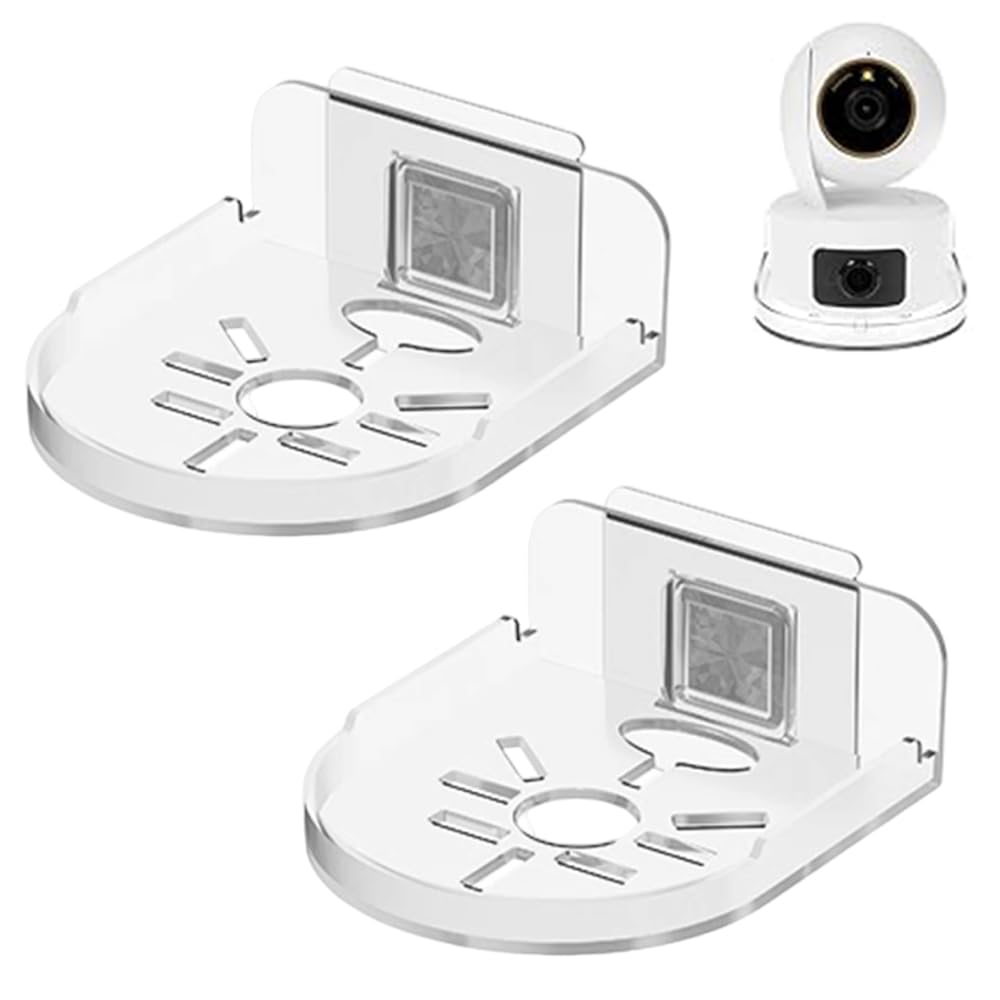
Type: No-drill floating wall shelf
Material: Acrylic
Color: Clear
Pack Size: 2-pack
Intended Use: Security camera, small device, wall space
The Ouliget bracket is a clear acrylic shelf that mounts without drilling, which makes it the practical choice for renters and for anyone who does not want holes in a finished wall. The transparent build keeps the hardware visually quiet, so a small camera or speaker sits on the wall without a bulky frame drawing attention. Two shelves come in the pack, so one order can cover a front-door camera and a second spot.
This is the pick for a lightweight camera or a small device that needs a stable perch at eye level. It is not the right choice for a heavy monitor or a large camera body, since an acrylic no-drill shelf is built for light loads. Buyers who need to hold a full-size screen should look at the monitors further down this list.
Trade-off: A no-drill acrylic shelf trades holding capacity for easy, damage-free mounting, so it suits small devices rather than heavier equipment.
2. Wall Mount Floating Shelves for Camera, Mini Speaker, Baby Monitor (2 Pcs)

Type: Mini floating wall shelf
Material: Clear acrylic-style build
Pack Size: 2 pcs
Intended Use: Camera, mini speaker, baby monitor
Placement: Bedroom, bathroom, kitchen, living room
This second clear mini shelf targets the same job as the Ouliget but leans toward indoor placement, with the name calling out bedrooms, bathrooms, kitchens, and living rooms. The clear finish blends into painted walls, and the small footprint keeps a baby monitor or mini speaker off a dresser or counter. Two shelves per pack give a buyer flexibility across rooms.
It earned its place as the budget alternative for indoor monitoring, especially for a baby monitor or a small speaker that needs to stay within view. It is not for outdoor use or for anything heavy, and a buyer mounting a camera near a shower should think about moisture before committing.
Trade-off: The clear mini format keeps a room tidy but offers little load support and no weather protection, so outdoor or heavy-duty use is out of scope.
3. ZOSHING 17inch Security Monitor

Type: Wall-mounted security monitor
Screen Size: 17-inch
Inputs: AV, HDMI, VGA
Outputs: Headphone
Extras: Built-in speaker, remote control, USB playback
Mounting: Wall-mounted design
The ZOSHING is the entry point into a dedicated display rather than a shelf. A 17-inch panel is large enough to show a camera feed clearly without dominating a wall, and the HDMI, AV, and VGA inputs cover most consumer DVRs and older cameras. USB playback and a remote add convenience for reviewing recorded clips without a separate device.
This suits a homeowner or small shop that wants one feed visible at a glance, and the wall-mounted design keeps a counter clear. It is not for a buyer who needs a large multi-camera grid or a touch interface — the panel is modest and the feature set is playback-focused. Those needs point to the larger Eyoyo or the commercial display below.
Trade-off: A 17-inch panel keeps the footprint small, which means a multi-camera layout will feel cramped on screen.
4. Eyoyo Security Camera Monitor, 22-inch

Type: Security camera monitor
Screen Size: 22-inch
Resolution: 1080P FHD
Refresh Rate: 75Hz
Inputs: HDMI, VGA, AV, BNC, USB
Mounting: 100x100mm VESA compatible
Extras: Built-in speakers
The Eyoyo is the strongest all-round pick for a multi-camera setup. BNC input is the detail that matters most — it connects directly to traditional CCTV DVRs, while HDMI, VGA, AV, and USB cover newer NVRs and PCs. A 22-inch 1080P panel gives enough room for a multi-view grid, and the 100x100mm VESA pattern means a standard wall bracket can hold it.
Buyers with an existing NVR or DVR and several cameras will get the most from this unit, and the built-in speakers help with audio-equipped feeds. It is not the pick for someone who wants touch control or signage scheduling, and a buyer on a tight budget may find the ZOSHING sufficient.
Trade-off: The larger panel and BNC input add capability, but the unit is a plain monitor with no smart features, so scheduling and touch work are left to other devices.
5. 21.5 inch Wall Mount Digital Signage Touchscreen Monitor

Type: Wall-mount digital signage monitor
Screen Size: 21.5-inch
Touch: Multi-touch
Inputs: HD-MI, USB
Connectivity: WiFi
Software: CMS management, time switch
Platform: Windows compatible
The premium pick is a commercial signage display that doubles as an advanced camera wall. Multi-touch, WiFi, CMS management, and a time switch mean it can run a scheduled feed during business hours and switch to signage or a dashboard afterward. The industrial build is aimed at continuous operation rather than occasional viewing.
This is for a small business, office lobby, or serious home setup that wants a managed display rather than a passive monitor. It is not for a buyer who simply wants to see one camera feed — the price and CMS layer are overkill for that. A basic NVR monitor covers the simple case for far less.
Trade-off: The signage features and touch layer justify the premium only for buyers who will actually use scheduling and CMS tools; simple feed viewing does not need them.
Before You Buy
- Mounting method: No-drill shelves suit renters and light devices; VESA-compatible monitors need a separate bracket rated for the screen’s weight.
- Screen size: A 17-inch panel handles one feed comfortably, while a 22-inch or larger screen is needed for a multi-camera grid.
- Input compatibility: Match the monitor to the recorder — BNC for traditional DVRs, HDMI for NVRs and PCs, AV and VGA for older equipment.
- Load rating: Acrylic mini shelves hold small cameras and speakers, not full monitors.
- Placement: Indoor clear shelves are not built for outdoor weather, so exterior cameras need a different mount.
- Software needs: Touch, WiFi, and CMS scheduling are only worth paying for if the setup will use them.
- Power and cabling: A wall-mounted monitor needs a nearby outlet and a cable route to the recorder.
Frequently Asked Questions
-
What is the best wall display for camera feeds overall?
The Eyoyo 22-inch is the best all-round choice for most buyers, thanks to its BNC input, 1080P panel, and VESA mounting. -
Can a no-drill shelf hold a security camera?
Yes, for small, lightweight cameras. Acrylic mini shelves are not built for heavy camera bodies or full monitors. -
Do I need a special monitor for CCTV?
Not strictly, but a monitor with BNC or AV input connects directly to a traditional DVR without adapters. -
What size screen works for multiple cameras?
A 22-inch panel is a practical minimum for a multi-view grid; a 17-inch screen is better for a single feed. -
Is a digital signage display worth it for home use?
Only for advanced setups that want scheduling, touch, or CMS management. A standard security monitor is simpler and cheaper. -
Can these displays mount on drywall?
VESA-compatible monitors need a wall bracket anchored to studs or proper drywall anchors; no-drill shelves use adhesive mounting.
Bottom Line
For most buyers, the Eyoyo 22-inch Security Camera Monitor is the best wall display for camera feeds — it covers BNC, HDMI, and VGA sources, fits a multi-camera grid, and mounts on a standard VESA bracket. Renters and light setups can start with the Ouliget no-drill shelves, while businesses that need scheduling and touch should step up to the 21.5-inch signage display.
